
Oblique Projection
Jiro's pick this week is obliqueview by John Barber.
As some of you may know from my previous posts, one of my MATLAB interests is in graphics. While you can very easily create plots using built in functions, Handle Graphics opens up a whole new world of visualization. You can customize pretty much anything about a MATLAB plot using Handle Graphics. So when I received a question about creating a plot with an oblique projection, it piqued my interest. It turns out that this is tricky to do, because MATLAB projection types are either orthographic or perspective.
When I saw John's obliqueview, I was eager to see how he did it. Let's say that you create a plot that looks like this (from the HELP for his function):
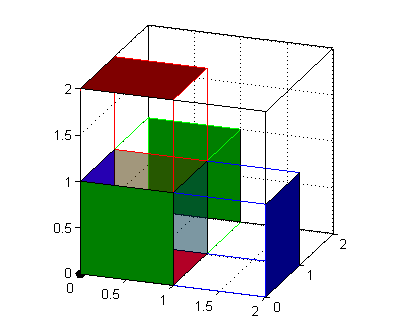
By running his function, you can make it look like this:
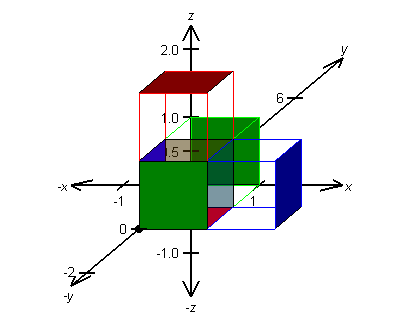
His clever method involves applying a shear transformation to the plot objects, which creates an oblique projection when view in 2D. His function is very well written, with lots of comments and detailed help. To get the full effect, use this in conjunction with his other entry, oaxes.
Comments
Give this a try and let us know what you think here or leave a comment for John.
- Category:
- Picks





Comments
To leave a comment, please click here to sign in to your MathWorks Account or create a new one.