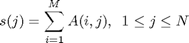
Most MATLAB functions are overloaded. That means that there are several ways to call them and that MATLAB will “Do The Right Thing” based on the number and types of inputs. As a simple example you can call SUM
sum(M) %this will sum along the columns
sum(M,2) %this will sum along the rows
This video shows how you can implement the same behavior based on using
VARARGIN: VARiable ARGuments INNARGIN: Number ARGuments IN
I think that the recent introduction of the inputParser object has made things evolve a bit with respect to the nargin approach.
Have you ever thought about creating a video with a demo of inputParser?
Can your output ever be a text and not a number?
Hi!
I sometimes use “exist” in order to realize variable inputs:
function bla(A,B,D)
if ~exist(’D', ‘var’)
D = 10; % default value
end
…
Here, I did not hard-code the order and number of input arguments. If I ever want to introduce an additional input C before D, like
function bla(A,B,C,D)
I do not have to change anything (except the function calls of course). I think both alternatives have their pros and cons.
Regards
Markus
Justin,
You can use num2str to make a number into text. You can have a function output be string if that is what you want.
Doug
Hello Doug, great work as always!
I think that the recent introduction of the inputParser object has made things evolve a bit with respect to the nargin approach.
Have you ever thought about creating a video with a demo of inputParser?
i followed your code exactly and i get the following error:
>> main(1)
??? Undefined function or method ‘mtimes’ for input arguments of type ‘cell’.
Error in ==> main at 19
out=alpha * beta;
dylan,
Make sure you are using (curly) braces and not parentheses:
alpha = varargin{1}
“varargin” is a cell array, so you need to use braces to get the contents of each element. Parentheses will only give you back the element as a cell.