
Model-Based Systems Engineering and Agentic AI

Today I am happy to welcome Sarah Dagen from MathWorks Consulting Services to talk about her experience with coding agents for Model-Based Systems Engineering.
.
Like many of you, I’ve been exploring agentic AI and coding agents. I’ve also been thinking about Systems Engineering, so I decided to try building up a model-based systems engineering (MBSE) methodology-based workflow with an AI assistant.
If you’re skeptical about all of this, don’t worry: you are not alone. I’ve included some of my thoughts on the “why” at the end of this article.
Here is a video summarizing my experience; I step through details after:
First, a few words about Systems Engineering and System Composer, which hasn’t appeared on this blog before.
Systems Engineering
Systems Engineering can seem mysterious and, at times, redundant to design engineers using Simulink. But as your system gets more complex, it becomes harder to reason about overall architecture, integration risks, and unintended interactions by looking only at individual Simulink models. System Composer lets Simulink users step back, capture system structure and interfaces, and keep that architecture directly connected to their executable models, helping them manage complexity without breaking their existing workflow.
MBSE is a powerful approach to systems engineering that uses models to replace or augment textual requirements and other document-centered workflows. There are lots of ways to do this, so practitioners have developed methodologies to provide structure and process.
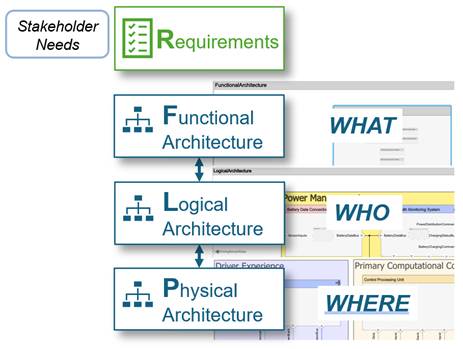
For my example, I followed the RFLP (Requirements – Functional – Logical – Physical) methodology:
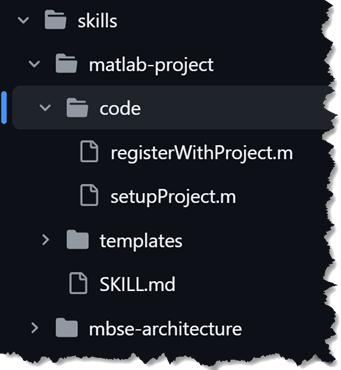
I started with the MATLAB MCP Core Server, and then moved to the Simulink MCP Server from the Simulink Agentic Toolkit along with Claude Code to build up skills both for the MBSE APIs and to encode the RFLP workflow.
Skills
- matlab-project: MATLAB project structure, project APIs, and project integrity checks
- mbse-workflow: Guided end-to-end RFLP workflow
- mbse-architecture: F/L/P models, interface dictionaries, stereotype profiles, views, F→L and L→P allocation sets, roll-up analysis
- simulink-requirements: Requirements Toolbox API reference
- system-composer: System Composer API reference
I like to factor out larger pieces of code into reusable functions that can be called directly or used as templates; many of the skills include these.
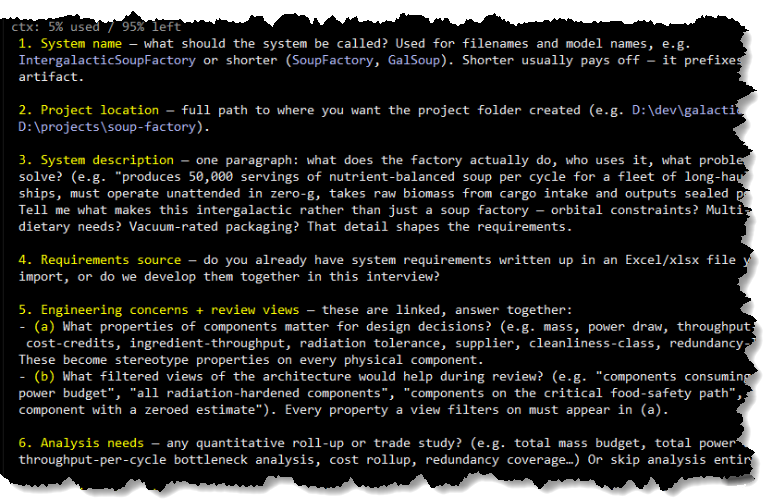
The interaction mode with the workflow is conversational; you tell your coding agent that you want to create a new MBSE project, and it will ask you questions in order to set it up in MATLAB. You can start either by providing requirements (in an Excel file, for example), or providing a description and the agent will propose requirements that you can iterate on.
For each subsequent phase, the workflow is:
- Propose: AI drafts the content in plain language
- Approve: user reviews and requests changes
- Generate: AI writes the script to create the model or artifact
- Run: AI executes the script via MATLAB MCP
- Confirm: show output and ask user to confirm before continuing
You can jump in at any point of the overall MBSE workflow; you don’t have to do it all at once, and you can bring in your own artifacts at any stage.
My Example
To try out the workflow, I used it to do some initial system design for an intergalactic vegan soup factory. The factory produces several different kinds of soup in various gravitational environments and ships the soup out via rocket ships. There are only 5 beings working in the factory, so it relies heavily on automation.
This is an article about GenAI, so it has to have an AI-generated image:

For my experiment, I am not very interested in whether AI figured out how to build a realistic system; I am focused on the workflow and coding. Also, for this post, I'm only showing architectures, but it is possible to include behavioral models too.
Requirements
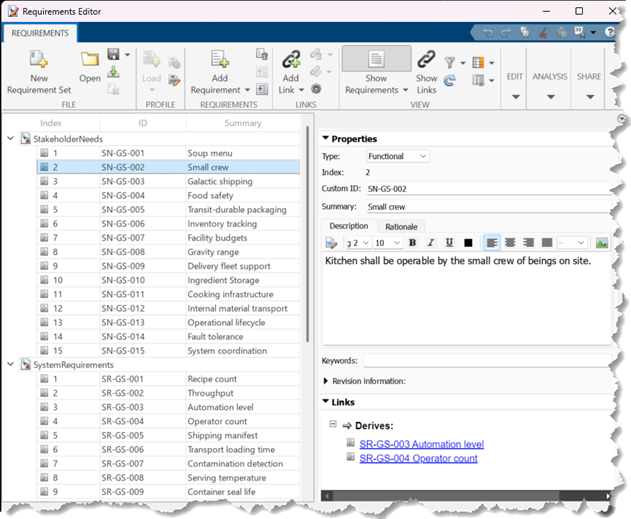
I provided a set of Stakeholder Needs and System Requirements that my engineering team had developed.

The workflow imported these into MATLAB via the Requirements Toolbox and implemented the traceability links between the Stakeholder Needs and System Requirements.
Architectures and Allocations
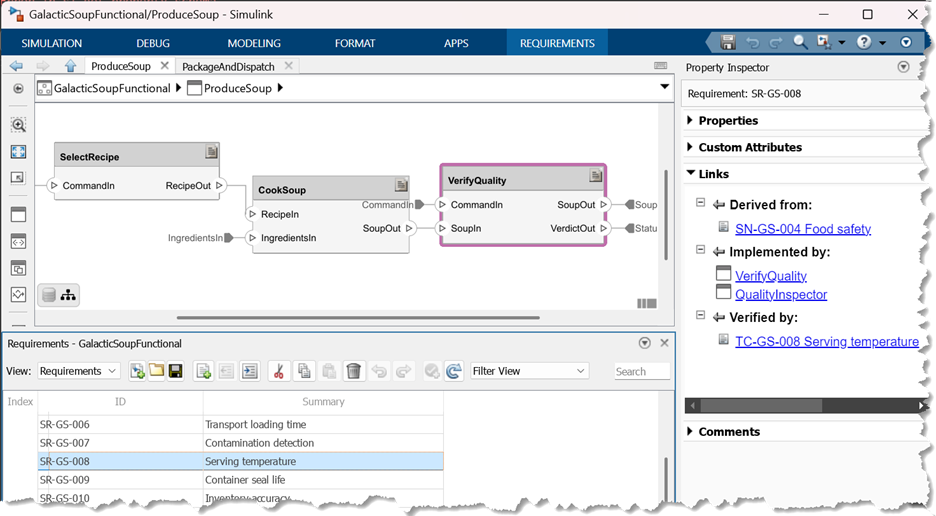
Next, we created a functional, logical, and then physical architecture. For each architecture, Claude proposed the composition and interfaces, and once I approved, it built the corresponding artifact. I'll go through most of those next.
- a System Composer architecture model,
- a Data Dictionary with interface definitions,
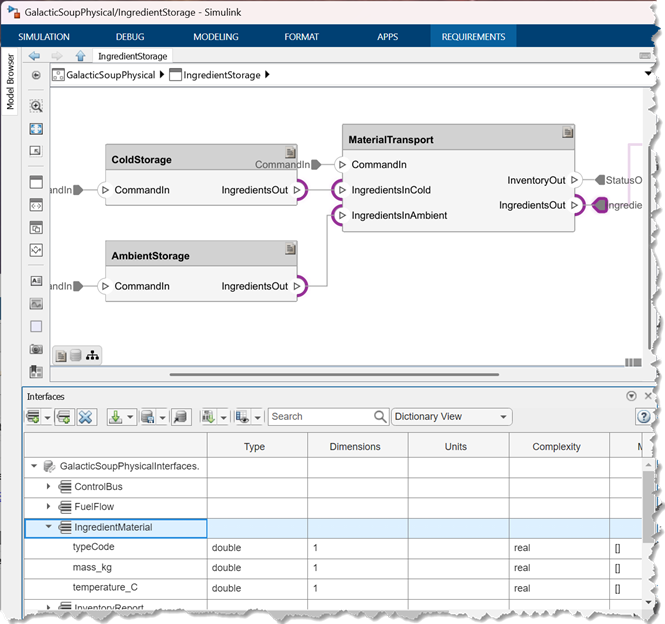
I didn’t tell Claude anything about what the components or interfaces should be. Based on my high-level initial requirements, it decided that there should be separate cold storage and ambient storage units, and an interface that captures the ingredient type, mass, and temperature, as one example. Claude made me a plan for review, I reviewed and provided feedback, and then it implemented it.
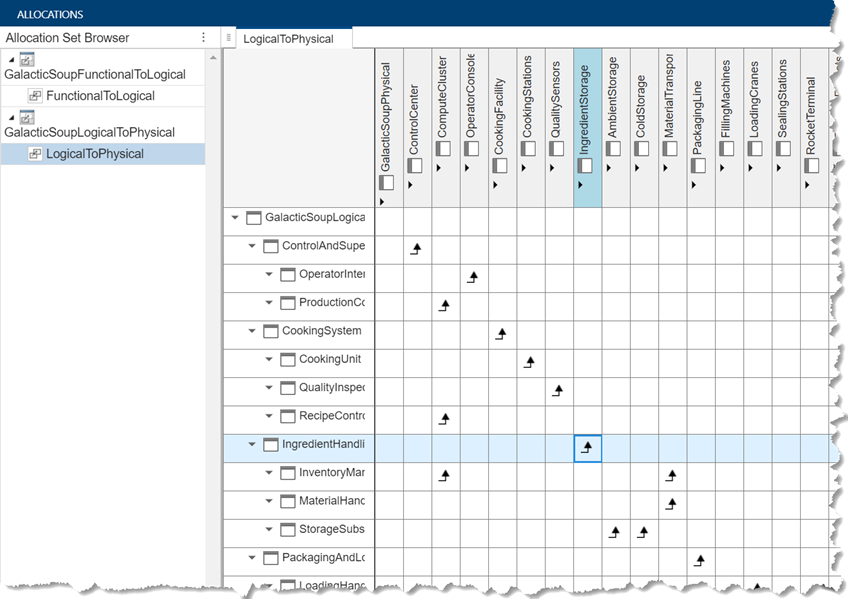
- allocations between the functional / logical and logical / physical architectures
Additionally, for the physical architecture:
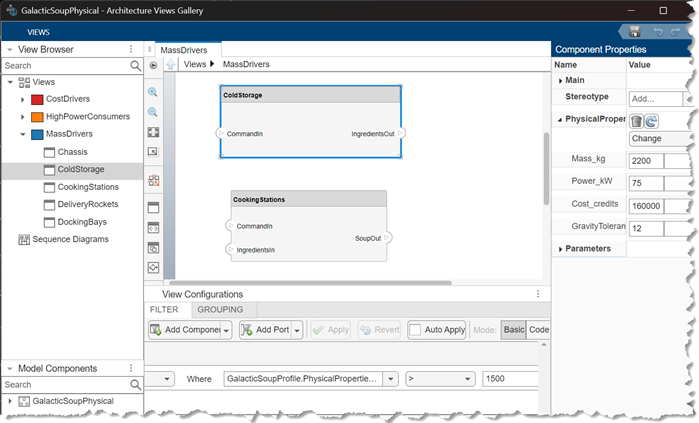
- Stereotype and profile for capturing key design parameters
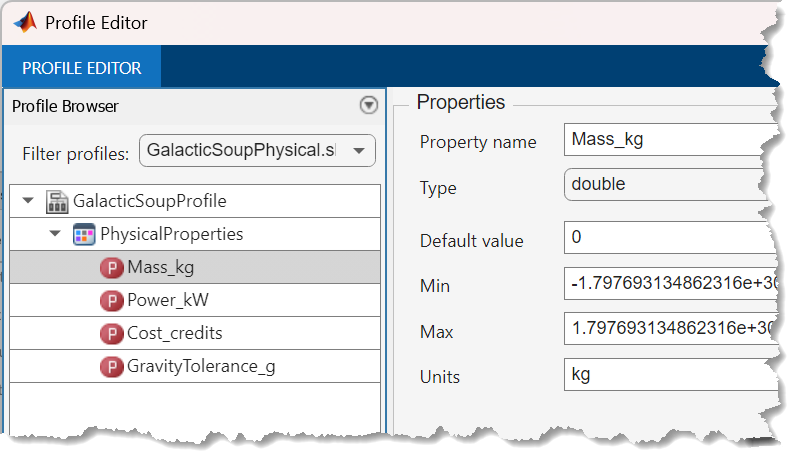
Based on the requirements and type of analysis I told Claude I was interested in, it proposed these properties to be in the stereotype.
- Architectural views, such as cost drivers and largest mass contributors
Analysis and Verification
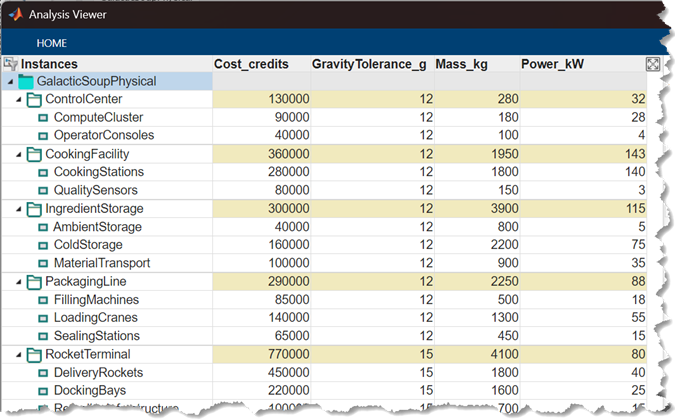
For this first cut, I limited the workflow to creating a roll-up analysis on the physical architecture, and writing verification requirements traced to the system requirements and physical architecture. I’ll build this out more in the future.
- Analysis instance model and roll-up analysis function that calculated things like cost and mass roll-ups.
I got what I wanted out of this; I have a good starting architecture, and I am ready to implement those systems in Simulink!
So what’s the point?
Nobody is going to sit down and design an entire system with agentic AI in one session via chat. So while it makes for a cute demo, what is the point of this? Is it actually useful?
One real benefit is to get initial artifacts built out quickly, allowing you to spend your time on more interesting problem-solving on the broader design. AI is useful for analyzing requirements and making plans that you can iterate on quickly. The agent can save you from a lot of tedious initial construction at the start of a project.
You can also leverage the skills as contextualized API references for maintaining existing models and artifacts. Telling an agent, “Add a requirement and link it through to this existing component, and then regenerate the allocation matrix” is efficient.
Finally, this workflow helps ensure compliance with a methodology (RFLP, in this case). You can augment or tailor this with your own organization’s standards and build something that helps keep work standardized. Most humans are not big fans of complying with standards, so I don’t think many of us would mind letting the robots do that part.
Try it out yourself!
You can get all the skills I built here and try this yourself. To use these skills, start by installing the Simulink Agentic Toolkit (or you can use the MATLAB MCP Core Server). Grab the skills and point your favorite coding agent to the folder containing them. If you are using Claude Code, there is already a claude.md in the repo, so that will be ready to use. For other coding agents, initialize the agent in the folder with the skills. Then tell your agent you want to create a new MBSE project and go!
Want to see more?
This is just some very basic starting points. Would you be interested to read more about MBSE and Agentic AI? Let us know in the comments what you would like to see next!





コメント
コメントを残すには、ここ をクリックして MathWorks アカウントにサインインするか新しい MathWorks アカウントを作成します。