Skip to Main Content Skip to Search
File Exchange
MATLAB Newsgroup
Link Exchange
  Blogs  
 Contest 
MathWorks.com

Loren on the Art of MATLAB

February 8th, 2007

String Annotations for Plots

Did you know that you can customize the direction of text in MATLAB plots? There are times when such annotations work better than if they were purely horizontal or vertical.
Contents

Sunspot Data

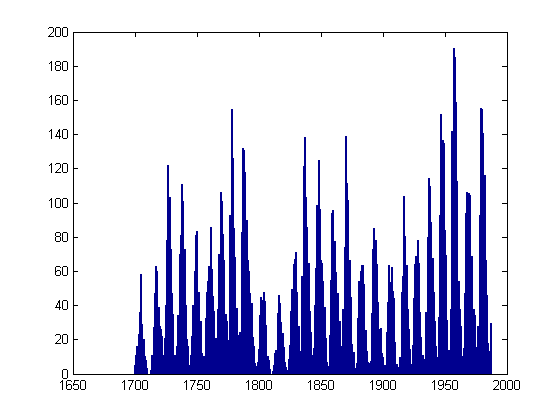
Let's look at some sunspot data. First I'll load it into MATLAB.

s = load('sunspot.dat');

Separate the year from the actual number of sunspots.

year = s(:,1);
spots = s(:,2);

Show the data in a bar plot.

bar(year,spots)

Annotate the Year with the Maximum Number of Sunspots

[smax, indmax] = max(spots);

The historical record shows the year

yearmax = year(indmax)
yearmax =
        1957

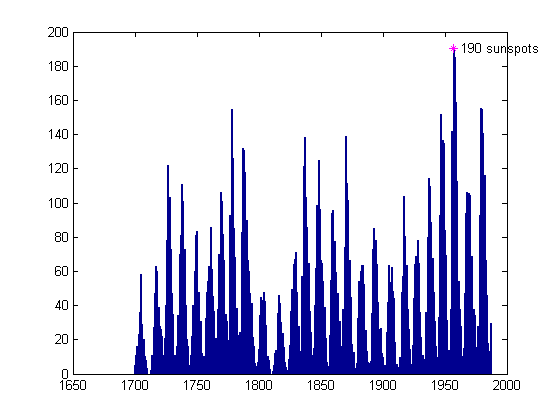
with the maximum number of sunspots, 190.

hold on
plot(yearmax, smax, 'm*')
hold off
ht = text(yearmax, smax,['  ',int2str(round(smax)), ' sunspots  ']);

Use Handle Graphics to Alter the Annotation Orientation

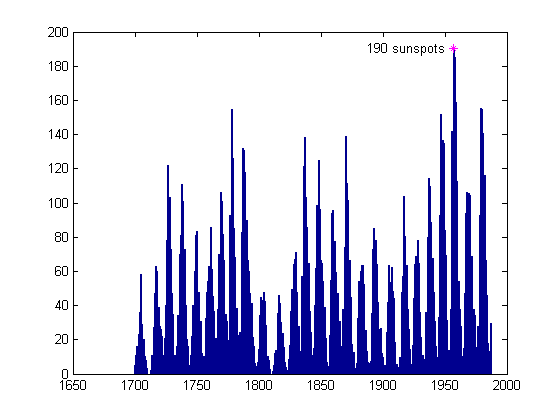
Let's try labeling the maximum so the label is right-justified now.

set(ht,'HorizontalAlignment','right')

Now change the label so it is at an angle, something I might want if I were planning to label several more points on the graph.
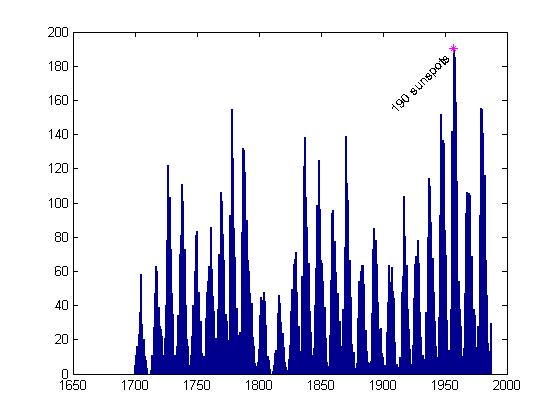
set(ht,'Rotation',45)

Note Other Maxima

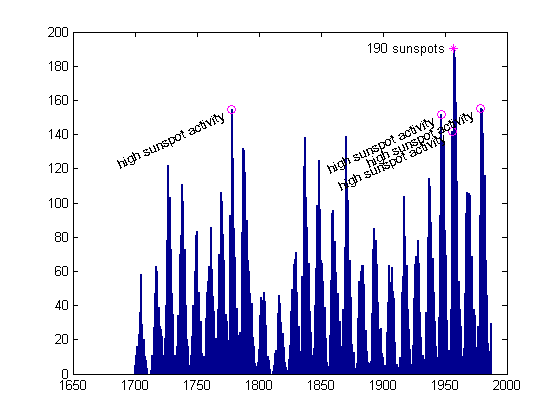
The sunspot cycle has a periodicity of about 11 years. Let's see which other years have a high number of sunspots.

[maxssa, indssa] = sort(spots,'descend');
year(indssa(1:10))
ans =
        1957
        1958
        1959
        1979
        1980
        1778
        1947
        1956
        1981
        1870

We see some years near the maximum year, 1957, then another cluster near 1979, and the next at 1778. Let me grab the first five "distinct" clusters.

idxdistinct = [1 4 6 7 8];
year(indssa(idxdistinct))
ans =
        1957
        1979
        1778
        1947
        1956

Label Extra Peaks

Let's label these few other peaks in a similar manner to the first one.

nearMaxYears = year(indssa(idxdistinct(2:end)))
ssaMax = spots(indssa(idxdistinct(2:end)))
hold on
plot(nearMaxYears, ssaMax, 'mo')
hold off
hn = text(nearMaxYears, ssaMax,['  high sunspot activity  '],...
    'HorizontalAlignment','Right','Rotation',25);
set(ht,'Rotation',0)
nearMaxYears =
        1979
        1778
        1947
        1956
ssaMax =
  155.4000
  154.4000
  151.6000
  141.7000

Write Around a Circle

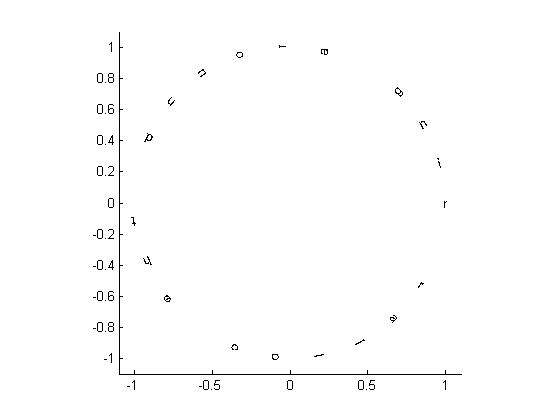
Just for fun now, let's write a phrase around a circle of radius 1.

clf, box on
phrase = 'ring around the collar ';
num = length(phrase)
angles = 0:(360/num):359;
x = cos(angles*pi/180);
y = sin(angles*pi/180);
for ind = 1:length(phrase)
    text(x(ind),y(ind),phrase(ind),'Rotation',angles(ind),...
        'HorizontalAlignment','center')
end
axis equal, axis([-1.1 1.1 -1.1 1.1])
num =
    23

References

There is a whole lot more you can do with text annotation in MATLAB. Here are some references for the language aspects of working with text.

Though I don't want to turn this blog into one chiefly about graphics, I think I can cover some aspects here and still talk about it in terms of the language. Any suggestions? Please post them here.


Get the MATLAB code

Published with MATLAB® 7.4

14 Responses to “String Annotations for Plots”

  1. Tom Richardson replied on :

    So how do we rotate ticklabels?

  2. Loren replied on :

    Tom-

    Ticklabels are not regular text elements in a MATLAB plot currently and can’t be rotated like a regular text annotation. That request is in our enhancement database.

    –Loren

  3. Dan K replied on :

    Not that I expect you to do anything about it, but why does ML do such a terrible job of rendering rotated text? I would think that a system with a TeX interpreter built in would be able to do *much* better.
    Dan K

  4. Loren replied on :

    Dan-

    First, the TeX interpreter and text rendering are decoupled in MATLAB. That aside, you are right that rotated text currently doesn’t look so great. It’s in the longer term plans to update the underlying graphics infrastructure so better rendering technology can be substituted in the future.

    –Loren

  5. Dan K replied on :

    Loren, I’m glad to hear about the planned improvement.

    Tom, as a side item, I have faked the rotated tick labels by using text in the past. It is kludge-y in the extreme, but it did work. The meat of the command I use is:
    for iTick
    th=text(iTick,yoff,p.n1{iTick},’rotation’,-45,’HorizontalAlignment’,'Right’);
    where p.n1 contains the labels, iTick steps through the tick marks themselves, and yoff offsets the text so it is outside of the axes. (BTW. this was for labels across the top of the plot). I don’t know if it helps or not, but it dealt with my need, however poorly.
    -Dan

  6. David W replied on :

    Loren, while understandably you are reticent to discuss graphics in your own blog, going by the numbers of graphical related queries in the newsgroup, perhaps a graphics dedicated blog would be of interest to many.

  7. Steve replied on :

    I find it odd that ML can do so much with text objects, but can not handle the following simple request:

    x=linspace(-pi,pi);y=sin(x);
    plot(x,y)
    set(gca,’XTick’,(-pi:pi/2:pi))
    set(gca,’XTickLabel’,{’-\pi’,'-\pi/2′,’0′,’\pi/2′,’\pi’})

    This means that I can not use ML alone to produce publication-quality figures with symbolic tick labels. Surely this has been on the ‘to-do’ list for a long time? Why is it not yet possible?

  8. Loren replied on :

    Steve-

    This request is on the enhancement list. I don’t get into discussions here about timing typically.

    The workaround for now is to replace the ticklabels with text. text can use the TeX interpreter and get the symbols such as pi into the label.

    –Loren

  9. Steve Dodge replied on :

    Loren,

    the workaround you suggest requires that I know where to put the text; is there a simple way to obtain this information about existing labels? Or have I misunderstood your suggestion?

    -Steve

  10. Loren replied on :

    Steve-

    You know where the text is roughly in one dimension for each axis (e.g., you know the centered horizontal locations from the Xtick values). But there is not a simple way to inquire about the exact position. There is no doubt that this is currently awkward to achieve.

    –loren

  11. lehalle replied on :

    Hi Loren,
    I just wanted to point out a problem I have for years with MATLAB about the datetick.
    It seems that once you decided to use datetick to plot dates on your axe, once you have zoomed between two ticks, you loose the ticks…
    I developped a small function to be able to zoom and keep ticks: I rewrite the date labels using the text function…

    %% Example
    figure
    plot(today-100:today,cumsum(randn(101,1)))
    datetick
    ax=axis;axis([today-10 today ax(3:4)])
    title(’Where have my other ticks gone?’)

  12. Rodney replied on :

    The ability to rotate xlabel text by an arbitrary angle would be fantastic. +1 vote by me.

    I have performed something similar to the kludge mentioned by Dan K before, but as mentioned by lehalle, you get very strange behaviour when zooming.

    Imagine the case when you have set your own XTickLabels, the the silly user zooms on a region.. what happens? The same labels are reused!! A complete disaster.

    Now what WOULD be useful (and may exist but I cannot for the life of me find it) would be a OnZoom callback. I can imagine lots of cool things that can be performed with this, particularly in a GUI aspect. And then the horrible lable kludge can be hidden in a nice compact reuseable piece of code and will actually work over all zoom ranges.

    (by the way - to get around the problem previously I have created a Timer of interval 0.1 second that continuously polls the axis and axis tic locations, and if they have changed, update the plots… nowhere near as nice)

    (sorry for the long post)

    - Rod

  13. Ram replied on :

    another vote for supporting vertical axis labels in matlab. what a pain. :(

  14. Scott Hirsch replied on :

    Rodney -

    MATLAB does have the equivalent of the OnZoom callback. It’s a zoom property called ActionPostCallback. Check out the help for ZOOM for explanations and examples.

    Regardless, we are aware of the issues with datetick and rotated tick labels, and are very interested in addressing these in a future release.
    - scott

Leave a Reply


Loren Shure works on design of the MATLAB language at The MathWorks. She writes here about once a week on MATLAB programming and related topics.

  • Loren: Hannah- If you are looking to see if a value of a field is set, use one of the string comparison functions,...
  • Hannah: Hi, Is there any way to check for the existence of structure elements? For example… >> c c =...
  • John DErrico: Hi Pam, Interpolation in a higher number of dimensions is interesting for a few reasons. In fact, I...
  • Loren: Michel- I am not sure you can extend it. What you can do is run it twice, first with 3 points, and then, if...
  • Michel Charette: My head’s still spinning trying to figure out how the solution got from ultra-fragile floating...
  • Loren: Thanks Yi. Also, for what it’s worth, I have put in an enhancement request to have the deletion syntax...
  • Yi Cao: Loren, It is an interesting experiment. I wish to point out that even in the situation where a set of...
  • Pam: Dear John, The mini lecture is great! I am interested in knowing how to linearly interpolate for higher...
  • Loren: Jebb- Good question! In today’s MATLAB you don’t need to do more than A(1) = B(1) but I was trying...
  • jebb: I was interested to see this method of forcing a non-lazy copy: A = B; A(1) = A(1) + sin(0); Presumably the...

These postings are the author's and don't necessarily represent the opinions of The MathWorks.

Related Topics