Doug’s MATLAB Video Tutorials

June 16th, 2008

Puzzler: Difficult algorithm development challenge

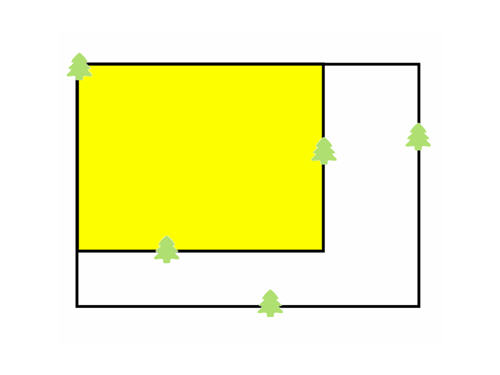
This week’s puzzler is significantly harder than others we have done in the past, I would be surprised (and delighted) to see an answer before I go home tonight… The challenge is shown below. Given a group of trees, find the rectangular bounding box in the x-y direction that holds all the trees. Once you have that bounding box, look for the largest rectangle (by area) that can be made inside the bounding box. Of course, this rectangle can have no trees in the interior. bigfield.jpg Since this is a more difficult problem, you may want to look at the first video to see the outline for an algorithm to solve this:
If you do not want to attempt this challenge on your own, then feel free to watch the code review of my solution in the video below:
This video walks through the described algorithm line by line. If you come up with a solution, please post it in the comments below. I have already posted the code from the video as the first comment. Here is the code that you can use to test and visualize your solution with. Simply make main.m in this form:

function [bigArea, boundBox] = main(trees)
% bigArea and boundBox are structures that describe a rectangle and
% contain the fields:
% bigArea.x      X of lower left corner
% bigArea.y      Y of lower left corner
% bigArea.width Width of rectangle
% bigArea.height Height of rectangle

% bigArea is the largest open area
% boundBox is the bounding box of the entire set of trees
Here is the code to get you started:

clc
n = 5;

trees.x = rand(1,n);
trees.y = rand(1,n);
[bigArea, boundBox] = main(trees);

clf
rectangle('position', [ bigArea.x  bigArea.y  bigArea.width  bigArea.height], ...
         'facecolor', [1 1 0])

rectangle('position', [boundBox.x boundBox.y boundBox.width boundBox.height])
axis([0 1 0 1])

line(trees.x,trees.y, ...
          'color',[0 1 0], ...
         'marker','^'    , ...
      'linestyle','none' , ...
     'markersize',5      , ...
      'linewidth',5)
Remember to use the <pre><code> and </code></pre> tags around your code in the comments.

10 Responses to “Puzzler: Difficult algorithm development challenge”

  1. Doug replied on :
    
    function [bigArea, boundBox] = main(trees)
    
    boundBox      = findBoundBox(trees.x, trees.y);
    includedTrees = findIncludedTrees(boundBox, trees);
    areaList      = findArea(boundBox, includedTrees);
    
    % find biggest area
    [v,i] = max([areaList(:).width] .* [areaList(:).height]);
    numel(areaList)
    bigArea = areaList(i);
    
    function boundBox = findBoundBox(x,y)
    
    left   = min(x);
    right  = max(x);
    bottom = min(y);
    top    = max(y);
    
    boundBox.x = left;
    boundBox.y = bottom;
    boundBox.width  = right - left;
    boundBox.height =   top - bottom;
    
    function includedTrees = findIncludedTrees(boundBox, trees)
    
    goodX = (trees.x > boundBox.x                  ) & ...
            (trees.x < boundBox.x + boundBox.width );
    
    goodY = (trees.y > boundBox.y                  ) & …
            (trees.y < boundBox.y + boundBox.height);
    
    goodIndex = goodX & goodY;
    
    includedTrees.x = trees.x(goodIndex);
    includedTrees.y = trees.y(goodIndex);
    
    function areaList = findArea(boundBox, includedTrees)
    
    areaList = [];
    
    if isempty(includedTrees.x) %No obstructions
        areaList = boundBox; %send back the boundingbox
        return
    end
    
    % Must be an obscuring tree
    for i = 1 : numel(includedTrees.x) %for each tree, break into four parts
    
        subAreas = findSubAreas(boundBox, includedTrees.x(i), includedTrees.y(i));
    
        for j = 1 : 4 %loop through each of the four areas as a smaller problem
            subAreaIncludedTrees = findIncludedTrees(subAreas(j), includedTrees);
            newAreaListItems     = findArea(subAreas(j), subAreaIncludedTrees);
            areaList             = [areaList newAreaListItems];
        end
    end
    
    function subAreas = findSubAreas(boundBox, treeX, treeY)
    
        subAreas(1)        = boundBox; %left
        subAreas(1).width  = treeX - boundBox.x;
        %no change.x
    
        subAreas(2)        = boundBox; %right
        subAreas(2).width  = boundBox.x + boundBox.width - treeX;
        subAreas(2).x      = treeX;
    
        subAreas(3)        = boundBox; %top
        subAreas(3).height = boundBox.y + boundBox.height - treeY;
        subAreas(3).y      = treeY;
    
        %no change.y
        subAreas(4)        = boundBox; %bottom
        subAreas(4).height = treeY - boundBox.y;
    
  2. ArthurG replied on :

    Here’s the formatted code.

    
    function [bigArea, boundBox] = main(trees)
    % find largest field; short but uses O(n^4) memory
    %% find bigArea
    [bigArea, boundBox] = deal(struct('x',[],'y',[],'width',[],'height',[]));
    boundBox.x = min(trees.x);
    boundBox.y = min(trees.y);
    boundBox.width = max(trees.x) - boundBox.x;
    boundBox.height = max(trees.y) - boundBox.y;
    %% find area of every possible field
    % Consider every possible combination of X and Y coordinates
    n = numel(trees.x);
    % Construct an [n x n] array of all possible field widths
    delX = bsxfun(@minus, trees.x, shiftdim(trees.x, -1));
    % Construct an [n x n] array of all possible field heights
    delY = bsxfun(@minus, trees.y, shiftdim(trees.y, -1));
    % Construct an [n x n x n x n] array of all possible field areas
    area = bsxfun(@times, delX, shiftdim(delY, -2));
    % Sort the areas, largest to smallest
    [areaSort, iSort] = sort(area(:), 'descend');
    % Look for the largest area that contains no trees
    for i=iSort'
        % Convert the sorted index to subscripts
        % (subscripts correspond to indices in tree.x and tree.y)
        [x1,x2,y1,y2] = ind2sub([n,n,n,n], i);
        if ~any(trees.x > min(trees.x([x1 x2])) & ...
                trees.x < max(trees.x([x1 x2])) & ...
                trees.y > min(trees.y([y1 y2])) & …
                trees.y < max(trees.y([y1 y2])) )
            break % this area has no trees
        end
    end
    %% Record results
    bigArea.x = min(trees.x([x1 x2]));
    bigArea.y = min(trees.y([y1 y2]));
    bigArea.width = abs(diff(trees.x([x1 x2])));
    bigArea.height = abs(diff(trees.y([y1 y2])));
    end % function main
    
    
  3. Daniel Armyr replied on :

    Hi.
    Unfortunately, this problem is a bit on the lengthy side for me to give a go at during office hours, but I realized somthing when I was thinking through how I would solve it and while watching the solution.

    The proposed algorithm will find the largest area twice using the scenario from the video. Had there been three trees inside the bounding box that enclosed the largesty area I believe it would be found 3 times. This sounds somewhat inefficient. Could one device a check inside the algoritm that stops once the largest area is found the first time?

    A little white-board scetching tells me that once you start subdividing around the second tree, if an area contains the first tree than you can immediately stop because if there is an interesting area there, then it has allready been found. This should trivially extend to N trees.

    Anyone have a comment on my reasoning here?

    –DA

  4. Doug replied on :

    Daniel,

    Yes, I had an inkling of the same conclusion, but did not pursue it. My original outline on paper proposed something like that, but I wanted to keep it simple. I often find that I will compromise: taking simplicity over efficiency and then continue to optimize from there. Since this algorithm works, I stopped. If the inefficiency started to matter, that would be the lowest hanging fruit to go after.

    What I like about MATLAB is that it is pretty easy to prototype ideas. I can afford to throw this together, see how it works and then iterate on my code because it is fast to program.

    -Thanks,
    Doug

  5. Joel replied on :
    
    % Create Trees
    num_trees = 10;
    width = 40;
    height = 30;
    tree.x = rand(num_trees,1)*width;
    tree.y = rand(num_trees,1)*height;
    
    % Big bounding box
    bounding = [min(tree.x),...
                min(tree.y),...
                max(tree.x)-min(tree.x),...
                max(tree.y)-min(tree.y)];
    
    % Brute force combination search
    pairs = combnk(1:num_trees,2);
    combinations = combnk(1:size(pairs,1),2);
    
    % All combinations
    box_left = min(tree.x(pairs(combinations(:,1),1)),tree.x(pairs(combinations(:,1),2)));
    box_right = max(tree.x(pairs(combinations(:,1),1)),tree.x(pairs(combinations(:,1),2)));
    box_bottom = min(tree.y(pairs(combinations(:,2),1)),tree.y(pairs(combinations(:,2),2)));
    box_top = max(tree.y(pairs(combinations(:,2),1)),tree.y(pairs(combinations(:,2),2)));
    box_widths = box_right-box_left;
    box_heights = box_top-box_bottom;
    box_areas = box_widths.*box_heights;
    
    % Sort the results
    [box_areas box_i] = sort(box_areas,'descend');
    
    % Eliminate boxes which contain points
    for i = 1:length(box_i)
    	points_outside = (tree.x=box_right(box_i(i)) |...
                         tree.y=box_top(box_i(i)));
        if all(points_outside)
            break % Found a good one
        end
    end
    biggest_box = [box_left(box_i(i)),...
                   box_bottom(box_i(i)),...
                   box_widths(box_i(i)),...
                   box_heights(box_i(i))];
    
    % Display the results
    figure
    scatter(tree.x,tree.y,'o')
    rectangle('Position',bounding)
    rectangle('Position',biggest_box,'EdgeColor','red')
    
  6. Doug replied on :

    Joel,

    I tried the above code. It does not work for me. I looks to me like the logic test:

    
    % Eliminate boxes which contain points
    for i = 1:length(box_i)
    	points_outside = (tree.x=box_right(box_i(i)) |...
                         tree.y=box_top(box_i(i)));
        if all(points_outside)
            break % Found a good one
        end
    end
    

    Is implemented incorrectly. You are only checking for top and right, but not bottom and left. Also, the single equals sign is an assignment, I think you wanted a greater than. Once I added the other checks, I found that this finds a valid rectangle, but never the best one. I think the reason for that is the “indexing into something that indexes into something else” is done incorrectly.

    I think these changes can be fixed, but a simpler scheme might make it easier to avoid such errors.

    -Doug

  7. Timur replied on :
    
    function [bigArea, boundBox] = main(trees)
    
    boundBox      = findBoundBox(trees.x, trees.y);
    includedTrees = findIncludedTrees(boundBox, trees);
    areaList      = findArea(boundBox, boundBox, includedTrees, trees, trees);
    
    % find biggest area
    [v,i] = max([areaList(:).width] .* [areaList(:).height]);
    numel(areaList);
    bigArea = areaList(i);
    
    function boundBox = findBoundBox(x,y)
    
    boundBox.trees = [];
    
    [left index] = min(x);
    boundBox.trees = [boundBox.trees index];
    [right index] = max(x);
    boundBox.trees = [boundBox.trees index];
    [bottom index] = min(y);
    boundBox.trees = [boundBox.trees index];
    [top index] = max(y);
    boundBox.trees = [boundBox.trees index];
    
    boundBox.x = left;
    boundBox.y = bottom;
    boundBox.width  = right - left;
    boundBox.height = top - bottom;
    boundBox.trees = unique(boundBox.trees);
    
    function includedTrees = findIncludedTrees(boundBox, trees)
    goodX = (trees.x > boundBox.x                  ) & ...
            (trees.x < boundBox.x + boundBox.width );
    
    goodY = (trees.y > boundBox.y                  ) & …
            (trees.y < boundBox.y + boundBox.height);
    
    goodIndex = goodX & goodY;
    
    includedTrees.x = trees.x(goodIndex);
    includedTrees.y = trees.y(goodIndex);
    
    function areaList = findArea(boundBox, newBoundBox, includedTrees, trees, newTrees)
    
    areaList = [];
    
    if isempty(includedTrees.x) %No obstructions
        areaList = newBoundBox; %send back the boundingbox
        return
    end
    
    if numel(newTrees.x) > 2
        for i = newBoundBox.trees
            newerTrees            = newTrees;
            newerTrees.x(i)       = [];
            newerTrees.y(i)       = [];
    
            newBoundBox             = findBoundBox(newerTrees.x, newerTrees.y);
            newIncludedTrees        = findIncludedTrees(newBoundBox, trees);
            newAreaListItems        = findArea(boundBox, newBoundBox, newIncludedTrees, trees, newerTrees);
            areaList                = [areaList newAreaListItems];
    
            if boundBox.x ~= newBoundBox.x
                newBoundBoxXP           = newBoundBox;
                newBoundBoxXP.x         = boundBox.x;
                newBoundBoxXP.width     = newBoundBox.width + (newBoundBox.x - boundBox.x);
    
                newIncludedTrees        = findIncludedTrees(newBoundBoxXP, trees);
                newAreaListItems        = findArea(boundBox, newBoundBoxXP, newIncludedTrees, trees, newerTrees);
                areaList                = [areaList newAreaListItems];
            end
    
            if boundBox.x ~= newBoundBox.x && boundBox.width + boundBox.x ~= newBoundBox.width + newBoundBox.x
                newBoundBoxXP           = newBoundBox;
                newBoundBoxXP.x         = boundBox.x;
                newBoundBoxXP.width     = boundBox.width;
    
                newIncludedTrees        = findIncludedTrees(newBoundBoxXP, trees);
                newAreaListItems        = findArea(boundBox, newBoundBoxXP, newIncludedTrees, trees, newerTrees);
                areaList                = [areaList newAreaListItems];
            end
    
            if boundBox.y ~= newBoundBox.y
                newBoundBoxXP           = newBoundBox;
                newBoundBoxXP.y         = boundBox.y;
                newBoundBoxXP.height    = newBoundBox.height + (newBoundBox.y - boundBox.y);
                newIncludedTrees        = findIncludedTrees(newBoundBoxXP, trees);
                newAreaListItems        = findArea(boundBox, newBoundBoxXP, newIncludedTrees, trees, newerTrees);
                areaList                = [areaList newAreaListItems];
            end
    
            if boundBox.y ~= newBoundBox.y && boundBox.height + boundBox.y ~= newBoundBox.height + newBoundBox.y
                newBoundBoxXP           = newBoundBox;
                newBoundBoxXP.y         = boundBox.y;
                newBoundBoxXP.height     = boundBox.height;
    
                newIncludedTrees        = findIncludedTrees(newBoundBoxXP, trees);
                newAreaListItems        = findArea(boundBox, newBoundBoxXP, newIncludedTrees, trees, newerTrees);
                areaList                = [areaList newAreaListItems];
            end
    
            if boundBox.x + boundBox.width  ~= newBoundBox.x + newBoundBox.width
                newBoundBoxXP           = newBoundBox;
                newBoundBoxXP.width     = (boundBox.width + boundBox.x) - newBoundBox.x;
                newIncludedTrees        = findIncludedTrees(newBoundBoxXP, trees);
                newAreaListItems        = findArea(boundBox, newBoundBoxXP, newIncludedTrees, trees, newerTrees);
                areaList                = [areaList newAreaListItems];
            end
    
            if boundBox.y + boundBox.height  ~= newBoundBox.y + newBoundBox.height
                newBoundBoxXP           = newBoundBox;
                newBoundBoxXP.height    = (boundBox.height + boundBox.y) - newBoundBox.y;
                newIncludedTrees        = findIncludedTrees(newBoundBoxXP, trees);
                newAreaListItems        = findArea(boundBox, newBoundBoxXP, newIncludedTrees, trees, newerTrees);
                areaList                = [areaList newAreaListItems];
            end
    
        end
    end
    

  8. Pepelio replied on :

    Doug, thanks for this interesting problem. However, the proposed solution is wrong. I can think of at least one tree configuration (not a boundary condition) that will make the algorithm fail. In the sense that it will not find the largest rectangle.

    Do you want me to tell you or do you like me to keep this as an added problem to solve?

    I think that if you try to prove in a rigorous way that your algorithm always finds the largest rectangle you will probably realize that it doesn’t.

  9. D replied on :

    Hi all,
    I am a biologist working on a project where the location of the trees are already known on a plot.
    I have to set some boxes of 25 by 4 randomly on this plot.
    Then find which trees have fallen in the box.
    Seems I can easily do it using Matlab but am new and Alien to theis malab wrold.
    Grateful if someone can help or guide me please
    Thx
    Dav

  10. dhull replied on :

    Dav,

    I am sorry, I do not understand your question. Please show more details of code you have tried and where it is not working.

    thanks,
    Doug

Leave a Reply

Wrap code fragments inside <pre> tags, like this:

<pre class="code">
a = magic(3);
sum(a)
</pre>

If you have a "<" character in your code, either follow it with a space or replace it with "&lt;" (including the semicolon).


Doug Hull is a proud MathWorker who is on a mission to help you with MATLAB.

Doug's picture

These postings are the author's and don't necessarily represent the opinions of The MathWorks.