
Refactoring a Simulink Model using the MATLAB MCP Server

Once you start using those AI agents, it's hard to stop!
In today's post, I used Amp, an AI coding agent made by Sourcegraph and similar to Claude Code, to do one of the tasks I help Simulink users with the most: Improve the componentization of a model by using a referenced model in accelerator mode.
The Challenge
A best practice I always recommend to Simulink users and that we describe in the article Improving Simulation Performance in Simulink is to leverage referenced models in accelerator mode. Because they can be precompiled, they initialize instantaneously and simulate faster when they are not modified between simulations.
To highlight the workflow, I started with this example: Helicopter Modeling and Simulation - MATLAB & Simulink
If you want to open this example in your MATLAB, you can execute this command:
openExample('simulink_aerospace/HelicopterModelingAndSimulationExample')
As it is the case in most user models I see, a good candidate to be converted to a referenced model is typically the control logic, in this case the subsystem Attitude and Altitude Control:
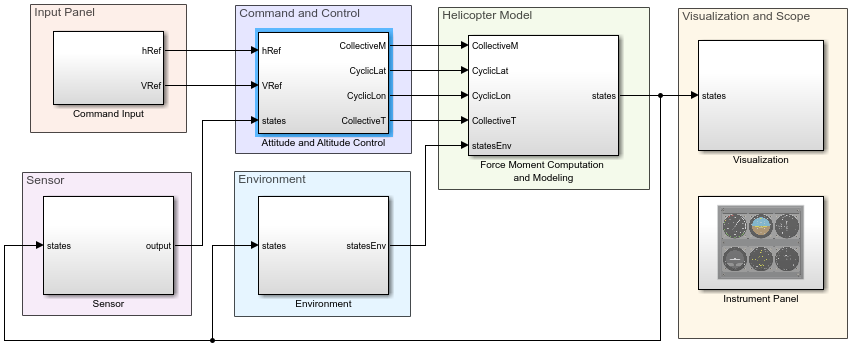
While Simulink includes a Model Reference Conversion Advisor that can do most of the work, it's common that something does not work as expected after doing the conversion.
I knew that this example had some of those, so I thought it would be a good candidate to test an AI agent.
The Final Result
Let's first look at a video of how Amp succeeded at the task by iterating through the MATLAB MCP server.
What I described is:
- What to do: Convert the Attitude and Altitude Control subsystem into a referenced model
- My motivation: Improve performance by simulating the referenced model in accelerator mode
- Requirement: I need to be able to change variants in the controller without triggering a rebuild of the accelerator target
I suggested that it should start by creating a baseline test to validate that the final results match the original model and let it iterate.
The Details
Let's now dissect what the AI agent did during this video.
Skills
As you might have noticed, Amp loaded 3 skills I created. Those are very basic skills and not intended to help with model reference conversion. Here is a quick overview and hyperlink if you want to download them:
- simulink-interaction: To help the AI Agent be aware of what is happening in Simulink. For example: "this block" means gcb, "this model" means bdroot, "this subsystem" means gcs, etc. I find this helps me "talk" to it more naturally.
- simulink-simulation: To guide the agent toward using the Simulink.SimulationInput object syntax instead of the older combination set_param and sim('modelname'). This is not necessary, but I prefer how the code looks.
- simulink-baseline-test: Also not necessary, the AI agent can figure out how to write such a test on its own. I use it for minor things like having the proper setup and teardown I personally like.
While additional skills could have made the work of the AI agent easier, requiring less tokens and converging faster, what I wanted to observe in today's experiment is how well it would do without additional skills.
Baseline Test
Whether you're an AI agent or a human, a baseline test capturing the system's behavior is always a good thing to have before starting to modify it. In this case, the agent was able to inspect the model and identify that the variable state was controlling variant conditions. Here is one example block using state:
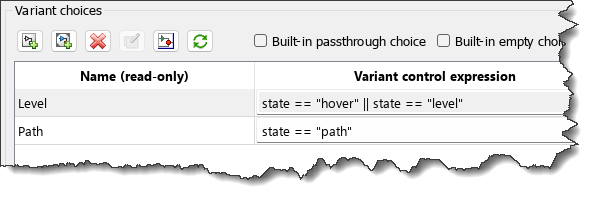
In the test, it made it a test parameter to capture one baseline per variant configuration.
classdef HelicopterBaselineTest < sltest.TestCase
properties (Constant)
ModelName = 'HelicopterModelingSimulation'
RefModelName = 'AttitudeAltitudeControl'
RelTol = 1e-6
AbsTol = 1e-8
end
properties (TestParameter)
variant = {'hover', 'level', 'path'}
end
methods (Test)
function testVariantMatchesBaseline(testCase, variant)
baselineFile = fullfile(fileparts(mfilename('fullpath')), ...
sprintf('baseline_%s.mat', variant));
testCase.assertTrue(isfile(baselineFile), ...
sprintf('Baseline not found: %s', baselineFile));
in = Simulink.SimulationInput(testCase.ModelName);
in = in.setVariable('state', FlightMode.(variant));
out = sim(in);
S = load(baselineFile, 'baselineLogsout');
testCase.verifySignalsMatch(out.logsout, S.baselineLogsout, ...
'RelTol', testCase.RelTol, ...
'AbsTol', testCase.AbsTol);
end
Model Reference Conversion
This can be accomplished in one line of code:
blk = 'HelicopterModelingSimulation/Attitude and Altitude Control';
mdlName = 'AttitudeAltitudeControl';
Simulink.SubSystem.convertToModelReference(blk,mdlName,...
"AutoFix",true,...
"ReplaceSubsystem",true,...
"SimulationModes","Accelerator",...
"BuildTarget","Sim");
One problem: Logged signals at the boundary of the original subsystem got lost during the conversion. The agent was able to quickly fix that and re-enable logging for the correct signals.
Changing Active Variants Without Rebuild
In the original model, the variant subsystems were configured for: Variant Activation Time = Update Diagram.
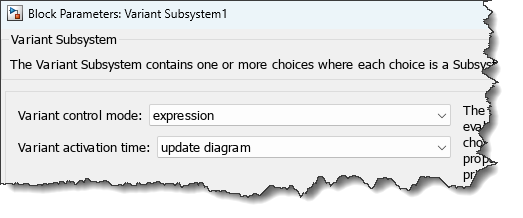
With this setup, the referenced model would need to rebuild every time the active variant changes. We don't want that because rebuilding takes time. To avoid that, it's possible to change for Variant Activation Time = Startup.
Startup activation time comes with limitations; there is a full documentation page on that: Considerations and Limitations for startup Variant Activation Time - MATLAB & Simulink.
The agent ran into the following problems:
- When using Startup, each variant choice must be atomic
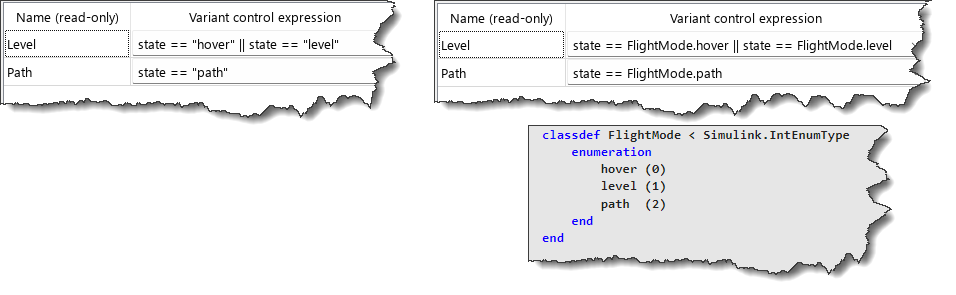
- In Startup, strings are not allowed in variant control expressions
Making the variant choices atomic was easy. To work around the second limitation, the agent decided to create an enumerated type to replace the string. This is exactly what I would have recommended to any user. Here is the original on the left and the fix on the right:
No Rebuild Requirement
I have to admit, Simulink does not provide a straightforward way to programmatically determine if a referenced model is being rebuilt or not. The agent tried a few techniques:
- Record a diary of the MATLAB base workspace and parse the build summary
- Compare the output of Simulink.BlockDiagram.getChecksum
- Compare the datenum field returned by dir on the referenced model mex-file
It landed on this last option, and I am ok with that, that seems reliable enough.
function testNoRebuildOnVariantChange(testCase)
variants = {FlightMode.hover, FlightMode.level, FlightMode.path};
% First simulation — cold build may occur
in = Simulink.SimulationInput(testCase.ModelName);
in = in.setVariable('state', variants{1});
in = in.setModelParameter('StopTime', '0');
sim(in);
% Record the MEX file timestamp after first build
mexFile = which([testCase.RefModelName '_msf']);
testCase.assertNotEmpty(mexFile, ...
'Accelerator MEX target not found after first simulation.');
d = dir(mexFile);
timestampAfterBuild = d.datenum;
% Simulate with remaining variants and verify no rebuild
for v = 2:numel(variants)
in = Simulink.SimulationInput(testCase.ModelName);
in = in.setVariable('state', variants{v});
in = in.setModelParameter('StopTime', '0');
sim(in);
d = dir(mexFile);
testCase.verifyEqual(d.datenum, timestampAfterBuild, ...
sprintf('Accelerator target was rebuilt when switching to variant %d.', v));
end
end
If you watch the video carefully, I asked one minor modification to make the test complete faster by simulating for a stop time of zero instead of running the entire simulation. The agent applied it instantly.
Conclusion
Overall, I am pretty happy with the process. The agent probably took longer and used more tokens than it could have with clearly defined skills, but it succeeded... and it did it faster than it would have taken myself doing the same manually.
Now it's your turn
I am sharing my experiments with AI coding agents and Simulink because I know many readers of this blog are early technology adopters and cannot wait to see how Simulink can fit in this new world. If you're interested and motivated, what I highlighted in this post, and the previous one, is possible today with a bit of "do-it-yourself" setup.
If you prefer to wait, many colleagues are actively working on agentic tools and features that will be fully integrated in the Simulink ecosystem and should be available soon.


コメント
コメントを残すには、ここ をクリックして MathWorks アカウントにサインインするか新しい MathWorks アカウントを作成します。