Loren on the Art of MATLAB

July 8th, 2008

HELP - I Got the Wrong Answer for My Optimization!

How often I have heard this!?! It turns out there are a bunch of reasons why you might not get the answer you expect when performing an optimization task. These possibilities include the answer not being unique, the optimization method used isn't global and therefore returns a local optimal solution, and the problem, as stated, isn't the problem you really want to solve. Let me tell you more about a recent case.

Contents

What We Heard

We heard from a user that fmincon, from Optimization Toolbox, gets the wrong answer for the problem posed in myOptFun. In fact, the optimization gets stuck at the initial point.

The Function

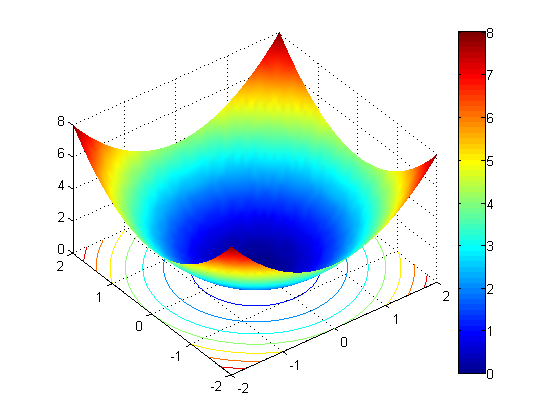
Let's take a quick look at the function. The user told us that it was a simple paraboloid of revolution. I'll calculate z values on a grid and display as a surface.

[xx,yy] = meshgrid(-2:.1:2);
zz = xx.^2+yy.^2;
surfc(xx,yy,zz)
shading interp
colorbar
view(-37.5,50)
Run the Example

First I do some housekeeping.

opt = optimset('display', 'final');
warning off optim:fmincon:SwitchingToMediumScale

Next, I'll run the example using the user's objective function.

lb = [-5;-5];
ub = [5;5];
x0 = [1;1];
[x fval exitflag output lamb grad hess] = ...
           fmincon(@myOptFun,x0,[],[],[],[],lb,ub,[],opt);
Optimization terminated: first-order optimality measure less
 than options.TolFun and maximum constraint violation is less
 than options.TolCon.
No active inequalities.

According the user, the optimal answer is 0 and can be found at (0,0). Instead, look what we find.

x
x =
     1
     1
fval
fval =
     2

Why Did the Optimization Not Find Zero?

The source of the confusion is in myOptFun. Now let me show you the code.

type myOptFun
function f = myOptFun(X)
formule = 'x.*x+y.*y';
formule = strrep(formule,'x',num2str(X(1)));
formule = strrep(formule,'y',num2str(X(2)));
f = eval(formule);

It's the use of num2str specifically. As the documentation says, the default format for num2str is '%11.4g' which means I am calculating results to 4 significant figures. Calling num2str(1), the result is 1 and the same is true for num2str(1+1e-5). In other words the accuracy of the customer's objective function cannot be expected to be better than 1e-4. However, the default tolerances for TolFun and TolX are 1e-6. More importantly DiffMinChange ("minimum change in variables for finite difference derivatives") is 1e-8. When the first finite difference calculations are done, the approximate first-order derivatives of the customer's objective function are zero and fmincon stops.

How to Fix the Optimization

I have several options for obtaining a "better" result. I can

  • increase the accuracy of the objective function
  • adjust the relevant tolerances to be larger to accomodate the resolution of the objective function
  • provide exact first-order derivatives (TolFun and TolX still need to be less than 1e-4).

Change the Objective Function

Let's try the same optimization with a modified objective function.

[xFixed fvalFixed exitflag output lamb grad hess] = ...
           fmincon(@myOptFunFixed,x0,[],[],[],[],lb,ub,[],opt);
Optimization terminated: first-order optimality measure less
 than options.TolFun and maximum constraint violation is less
 than options.TolCon.
No active inequalities.
xFixed
xFixed =
  1.0e-015 *
    0.4441
   -0.2220
fvalFixed
fvalFixed =
  2.4652e-031

Have You Hit a Similar Snag?

If you have hit a similar snag, it would be great if you could share it here.


Get the MATLAB code

Published with MATLAB® 7.6

8 Responses to “HELP - I Got the Wrong Answer for My Optimization!”

  1. Arthur replied on :

    Can you post the code for myOptFunFixed, so we can see how you decided to rewrite the function?

    I’ve had similar problems: I was trying to minimize a complex function that was just a little noisy. My function was noisy because it required solving a nonlinear equation and approximating an integral. Solving them to many decimal places was very time-consuming, but relaxing the solvers was causing problems with the optimization.

    That’s when I discovered DiffMinChange, which let me ensure that the finite differencing was larger than the magnitude of the noise.

  2. Loren replied on :

    Sure, Arthur, sorry for the oversight! Here it is:

    function f = myOptFunFixed(X)
    f = X(1,:).^2+X(2,:).^2;
    

    –Loren

  3. Dan K replied on :

    Loren,
    Thank you once again for a post on a topic of great interest. Two thoughts: First, why on earth would somebody want to use the code you described as the original. Won’t using the string replacements and eval vastly increase processing time? Second, in answer to your question,the problem which I had a great deal of difficulty with was a case where I had a huge number of local minima. I was trying to fit a noisy sinusoid, with unknown frequency, amplitudes, phase, and offset. Of course for any test frequency you get a local minima when you adjust the phase. I finally ended up having to drop the direct approach, and set up a genetic optimizer with a godawful mutation function (which occasionally would calculate the frequency change to effect exactly 2 pi equivalent phase jump).
    Dan

  4. Brian replied on :

    I am in awe of the original code. I can’t understand how someone ends up thinking that’s the way to go. It’s totally missing a basic idea of Matlab (and programming in general): you can assign numbers to variables.

  5. Loren replied on :

    Brian-

    I wonder if the user had the numbers in strings from reading in a text file in some way. In any case, their “solution” certainly led to difficulties on multiple levels.

    –Loren

  6. Stuart Kozola replied on :

    Loren is probably right that the user was reading in a text file. I’ve run into a similar problem when reading in input/output files from an external program. The rounding and truncation that occurs in the file i/o operations can cause the same problem as the strrep function did in this example. In my case, I used DiffMinChange (fmincon) to keep the solver getting stuck.

    -Stu

  7. Ben replied on :

    It’s worth pointing out that fmincon (R2007b) can get stuck at the initial point even for “nice” functions, like

    >>fmincon(@cos,0,[],[],[],[],-1,1)

    which returns 0 the local maximum. Not that we’d do that in practice though :)

  8. Loren replied on :

    Ben-

    What you mention is not about the quality of the objective function itself. In fact, when I run the problem in R2008b, I get a warning before I get my answer:

    Warning: Trust-region-reflective method does not currently solve this type of problem,
     using active-set (line search) instead.
    > In fmincon at 437
    Optimization terminated: first-order optimality measure less
     than options.TolFun and maximum constraint violation is less
     than options.TolCon.
    

    which hints at the answer (and the problem as posed, perhaps) needing scrutiny.

    –loren

Leave a Reply

Wrap code fragments inside <pre> tags, like this:

<pre class="code">
a = magic(3);
sum(a)
</pre>

If you have a "<" character in your code, either follow it with a space or replace it with "&lt;" (including the semicolon).


Loren Shure works on design of the MATLAB language at The MathWorks. She writes here about once a week on MATLAB programming and related topics.

  • Jun: I totally can not believe it, Loren. You are really helpful. Thank you so much, MATLAB master!
  • Loren: Wow folks- Always lots of interest when there’s a quickie to try out! I will only make 2 general...
  • Loren: Jun- ismember is your friend here: >> [aa,ind] = ismember(Array2,Arra y1) aa = 1 1 1 1 1 1 1 ind = 1 2 1 4 4 3...
  • Dan: I like the first way better than the second way. Combining the arrays into one and running any is nice, although...
  • James Myatt: How about I = (a == 0 | b == 0); a(I) = []; b(I) = [];
  • Tunc: Hello Loren, love your blog because of such inspiring and challenging comments to such ’small’...
  • Pekka Kumpulainen: Here is my tradeoff. I usually want to keep the original variables as they are most probably...
  • Iain: Followup: Of course, to allow NaNs (counting them as non-zero): mask = (a~=0) & (b~=0); The mask says “a...
  • Matt Fig: I would usually go with something like this: y = a&b; x = a(y); y = b(y); But I was surprised to find...
  • kk: c=all([a;b]) a(c) a(b)

These postings are the author's and don't necessarily represent the opinions of The MathWorks.