
My Personal Simulink AI Assistant

In my previous post, I introduced MATLAB Copilot and the Simulink Copilot Beta. Today, I continue my exploration into the world of AI assistants and how they can help in a Simulink context.
What should a Simulink AI Coding Assistant do? And How?
Since I started using AI coding assistants, I keep thinking: What do I want an AI assistant to do for me in a Simulink context?
For me, one of the first things that comes to my mind is using natural language to do repetitive editing tasks: the kind of things that I know how to do but will require more clicks or more lines of code than I would like.
The next question that comes to my mind is: How should an AI assistant for Simulink do those tasks?
Most AI coding assistants are based on Large Language Models (LLMs), but Simulink is a block diagram programming language. So, it's not "text in -> text out" like other text-based programming languages.
This is where my colleague Mike Croucher comes into play with his blog post The MATLAB Blog: Giving LLMs new capabilities: Ollama tool calling in MATLAB. As you can imagine, my first thought after reading this post was: Can I use that to talk to Simulink in natural language?
In this post, I will share what I came up after just a few hours of experimentation with LLMs tools calling.
Disclaimer: I am no AI expert; this is just me having fun.
The Challenge
I decided to start small and focus on setting block parameters. For example, I want to write queries like the following and have the tool to do it automatically:
- Find all blocks of type Model Reference and change their simulation mode to Accelerator
- Set the value of this Gain block to 42
- Change the color of all Inport blocks to green
The Plan
To make that happen, I made myself a road map where I would split my tool in 4 functions:
- Find the blocks to be modified
- Determine which block parameter to set
- Determine the value of the parameter to be applied
- Call set_param with the 3 items above
Setup
To get started, you will need two things:
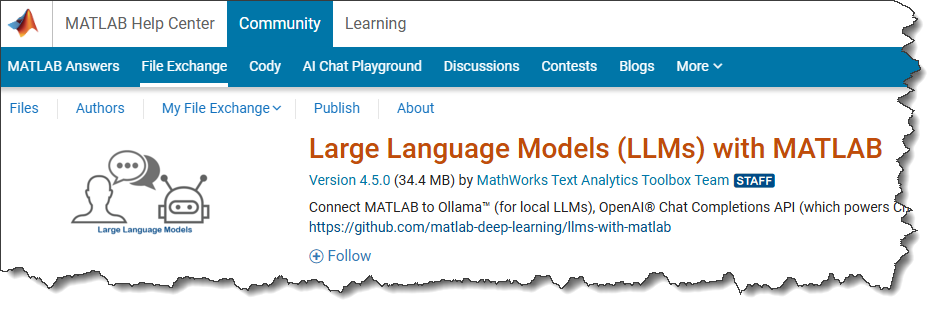
- Install Large Language Models (LLMs) with MATLAB from MATLAB File Exchange or from GitHub.
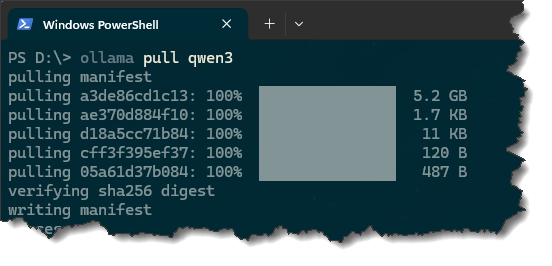
- Install Ollama and pull one of the models that support tools. In my case, after installing Ollama, I launched the Windows Powershell and executed "ollama pull qwen3". There is no special reason why I chose qwen3, it just seemed to work well.
Note: I am using Ollama because it's free, so everyone reading this can immediately try. The Large Language Models (LLMs) with MATLAB project also supports OpenAI® Chat Completions API (which powers ChatGPT™), and Azure® OpenAI Services, which gives you access to more powerful models and more computational power.
With that done, you should be good to go.
Text Processing versus Tools
Obviously, Large Language Models are good at processing text. This means that I could probably have saved the Simulink model as MDL format, and feed that to the LLM to be processed. However, I see two potential problems with that approach:
- The MDL file can become very large, and a simulation can be made of multiple Simulink files. If there is a simple API in MATLAB to get the info I need, it's probably more efficient to use that instead of parsing the MDL text file.
- The MDL file contains only static information. My use cases above require something more dynamic. When I will type "This block", I want the tool to know which block is currently selected in the Simulink editor.
Based on that, I decided to go with a tools calling approach. Let's see what I came up with.
Finding the blocks to modify
As described in Mike's post, I created two tool functions that the LLM can call if it decides it needs block paths.
For the first one, I find the selected blocks in the current system. I expect the tool to decide to call this function if the query mentions things like "This block" or "The selected blocks".
function blks = findSelectedBlocks(data) %#ok<INUSD>
opts = Simulink.FindOptions;
opts.SearchDepth = 1;
blks = Simulink.findBlocks(gcs,'Selected','on',opts);
end
The second function is a bit more complex. Beforehand, I created a comma-separated list of all block types in Simulink and stored that in a MAT-file. I then ask the LLM to find the most likely match based on the natural language block type specified by the query:
function blks = findBlocksOfType(data)
% Function to be called by the LLM if it determines that it
% needs blocks of a certain type
type = string(data.blockType);
% I did find_system on simulink.slx and stored the types of all blocks found
d = load('allBlockTypes.mat');
if any(strcmp(d.bTypes,type))
% Type passed by the LLM is already in the list
blockType = type;
else
disp("Determining block type based on: ''" + type + "''");
systemPrompt = "You will receive a sentence and comma-separated list " + ...
"of parameters for a Simulink block. " +...
"Find the parameter that corresponds the most likely to the sentence. " +...
"Returns only the parameter name.";
modelName = "qwen3:latest";
mdl = ollamaChat(modelName, systemPrompt);
[blockType, message] = generate(mdl, "The sentence: " + type + "The listof parameters: " + d.blkTypesStr); %#ok<ASGLU>
end
opts = Simulink.FindOptions;% Could be modified to include referenced models
blks = Simulink.findBlocksOfType(bdroot,blockType,opts);
end
With those two functions available, I can register them in my query to the LLM:
function obj = findBlks(obj)
tool1 = openAIFunction("slModifier.findSelectedBlocks",...
"Returns the list of currently selected blocks in a Simulink model");
tool2 = openAIFunction("slModifier.findBlocksOfType",...
"Returns the list of blocks of a specific blockType in a Simulink model");
tool2 = addParameter(tool2,"blockType",type="string");
systemPrompt = "You are an automated tool designed to modify Simulink models, " +...
"a block diagram programming language. " + ...
"The user will make a request, you need to find which " + ...
"modeling elements the user is trying to modify";
agent = ollamaChat(obj.modelName,systemPrompt,tools=[tool1,tool2]);
[response, message] = generate(agent, "The sentence: " + obj.request);
obj.blks = slModifier.callTool(response, message);
end
Determine which parameter to set
In a second pass, I do something similar to what I did earlier with block types, but this time for block parameters. I query the list of parameters for the blocks found in the previous step using get_param and ask the LLM to find the most likely match based on the original query:
function obj = findParam(obj)
d = get_param(obj.blks(1),'ObjectParameters');
f = fieldnames(d);
commaSeparatedString = string(strjoin(f, ', '));
systemPrompt = "You will receive a sentence and comma-separated list of parameters for a Simulink block. " + ...
"Find the parameter that corresponds the most likely to the sentence. " + ...
"Returns only the parameter name.";
agent = ollamaChat(obj.modelName,systemPrompt);
[obj.param, message] = generate(agent, "The sentence: " + obj.request + "The list of parameters: " + commaSeparatedString); %#ok<ASGLU>
disp("Found parameter to set: ''" + string(obj.param) + "''");
disp(newline);
end
Determine the value of the parameter to be applied
One more similar round, but this time I am looking for the value to be applied.
function obj = findParamValue(obj)
systemPrompt = "You are an automated tool designed to modify Simulink models. " + ...
"The user will make a request, your task is to identify the value " + ...
"of the parameter that needs to be applied. " + ...
"Return only a single word. " + ...
"Example: Set the color of this block to red, the answer should be red. " + ...
"Example: Set the value of a Gain block to 3, the answer is 3.";
agent = ollamaChat(obj.modelName,systemPrompt);
[obj.value, message] = generate(agent, "The sentence: " + obj.request); %#ok<ASGLU>
end
Call set_param
function doTheModif(obj)
for i = 1:length(obj.blks)
set_param(obj.blks(i),obj.param,obj.value);
end
end
The Final MATLAB Class
Assembling that together in a single MATLAB class for convenience, this give (with the functions described above collapsed):
classdef slModifier < handle
properties
modelName
request
findOptions = Simulink.FindOptions;
blks
param
value
end
methods
function obj = slModifier()
obj.modelName = "qwen3:latest";
end
function run(obj)
obj.findBlks();
obj.findParam();
obj.findParamValue();
obj.doTheModif();
end
function obj = findBlks(obj)
end
function obj = findParam(obj)
end
function obj = findParamValue(obj)
end
function doTheModif(obj)
end
end
% Tools passed to the LLM
methods (Static=true)
function out = callTool(response,message)
end
function blks = findSelectedBlocks(data) %#ok<INUSD>
end
function blks = findBlocksOfType(data)
end
end
end
Testing the results
Test 1: Modify multiple blocks of the same type
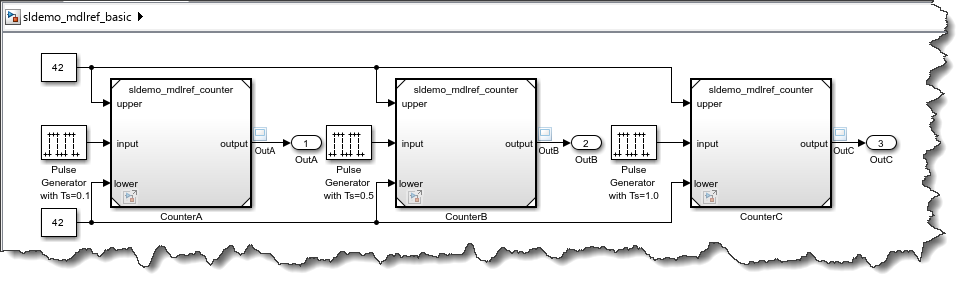
Let's use this simple model:
open_system('sldemo_mdlref_basic');
and run this code:
h = slModifier;
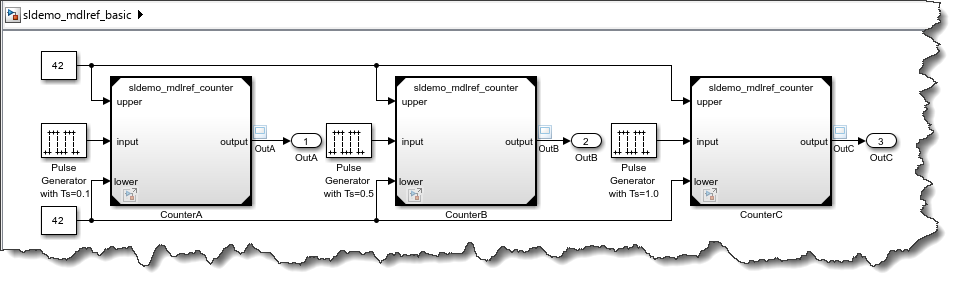
h.request = "Find all blocks of type Model Reference and change their simulation mode to Accelerator";
h.run;
The dark corners on the Model blocks confirm that this worked:
Test 2: Modify selected blocks
I manually select this Gain block:
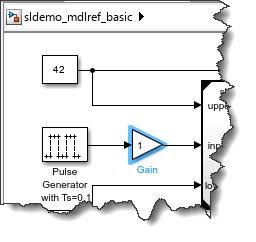
h = slModifier;
h.request = "Set the value of this Gain block to 42";
h.run;
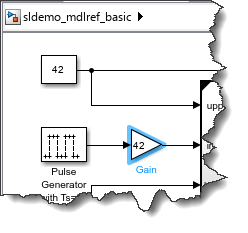
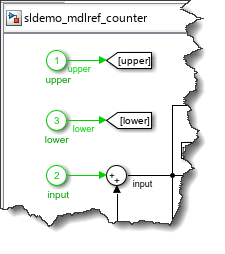
Test 3: Change the color of all Inport blocks to green
open_system('sldemo_mdlref_counter');
h = slModifier;
h.request = "Change the color of all Inport blocks to green";
h.run;
Now it's your turn
Have you been experimenting with Large Language Models? Incorporating tools for specialized tasks?





评论
要发表评论,请点击 此处 登录到您的 MathWorks 帐户或创建一个新帐户。