
MATLAB AI Coding Standards for Simulating Simulink Models

In my previous post, I went through the basics of using GitHub Copilot and the MATLAB MCP Server to generate MATLAB code that can simulate a Simulink. While the AI-generated code simulated the model to completion, it had multiple issues, including:
- Unnecessary logic for my application
- Old syntax going against recommended modern best practices
- Unexpected simulation results
- Simply not the style I like
In this post, I will define coding instructions to guide the copilot such that it will generate the code I want at the first iteration.
MATLAB AI Coding Rules
Are you aware of this repository?
It contains a set of coding rules optimized for use with AI coding assistants like Cursor, Windsurf, Claude Code, and GitHub Copilot.
Unfortunately, as of today, none of those rules apply specifically to Simulink models. It's time to change that!
Here is my first attempt at defining AI coding rules for MATLAB code simulating Simulink models.
Disclaimer: The rules defined in this post do not try to be general rules that all users should follow when simulating a Simulink model. Some are general best practices I encourage everybody to follow, for example using the Simulink.SimulationInput syntax. Others are specific to the code I like to see on this blog when simulating a model.
Coding Rules to Simulate Simulink Models
For this first attempt, I will focus on rules to generate MATLAB code I like to see on this blog to simulate Simulink models and plot results.
To begin, let's write down a few high-level requirements for the code I like to see:
- Use the Simulink.SimulationInput object syntax.
- Input signals to be passed through root-level Inport blocks should be stored as timeseries.
- Signals are logged in a Simulink.SimulationData.Dataset object and the individual signals stored as timeseries.
- The code plotting simulation results should be as short and simple as possible.
Using the Coding Rules
As instructed in the MATLAB AI Coding rules readme.md, I stored those rules in a markdown file named .github/copilot-instructions.md

By the way, did you know that the MATLAB Editor is now able to display markdown files?
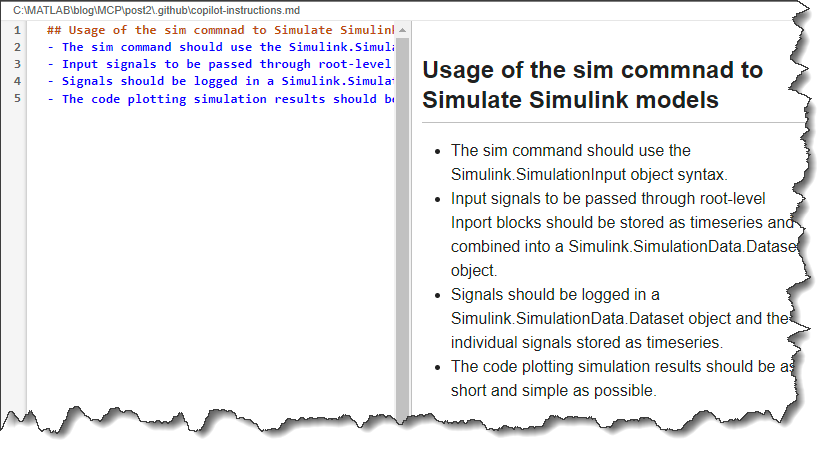
I typed my request in the GitHub Copilot chat, and it immediately created a first version of the script stepSim.m.
Create a MATLAB script named stepSim.m that simulates the Simulink model BasicModelingSimpleSystem.slx with a step input signal and plots the logged signal 'x'.
The generated code is not exactly what I want, but it's closer than the first attempt in my previous post.
% Model name
modelName = 'BasicModelingSimpleSystem';
% Load the model
load_system(modelName);
% Get the stop time from model
stopTime = str2double(get_param(modelName, 'StopTime'));
% Create time vector for step input signal
t = linspace(0, stopTime, 1000);
F_data = ones(size(t));
% Create step input as timeseries
F = timeseries(F_data, t);
% Create input dataset
simInput = Simulink.SimulationInput(modelName);
simInput = simInput.setExternalInput(F);
% Simulate the model
simOut = sim(simInput);
% Extract logged signals and plot 'x'
x_signal = simOut.logsout.getElement('x');
figure('Name', 'Step Response', 'NumberTitle', 'off');
plot(x_signal.Values.Time, x_signal.Values.Data, 'LineWidth', 2);
xlabel('Time (s)');
ylabel('x');
title('Step Response of BasicModelingSimpleSystem');
grid on;
While this works, here are a few things I would like to tweak:
- There is no need to use load_system before simulating a model. The sim command will load the model if needed.
- I prefer to use in instead of simInput for the Simulink.SimulationInput object.
- I prefer to use out instead of simOut for the Simulink.SimulationOutput object.
- When plotting simulation results, I prefer to use the plot method of MATLAB timeseries, instead of extracting the time and data vectors.
Based on this result, I went through a series of iterations, adding more and more specific rules.
In the end, I came up with this set of rules: copilot-instructions.md
## Usage of the sim command to Simulate Simulink models
### General syntax
- Simulink models should always be simulated using the sim command
- The sim command should be used with the syntax "out = sim(in)", where "in" is a Simulink.SimulationInput object and out is a Simulink.SimulationOutput object.
- Use the variable name "in" for the Simulink.SimulationInput object.
- Use the variable name "out" for the Simulink.SimulationOutput object.
- Avoid using set_param for simulation. All parameters should be set through Simulink.SimulationInput methods.
- Avoid using load_system or open_system for simulation. Models will be loaded automatically by the sim command.
- Model parameters should be specified using the Simulink.SimulationInput method setModelParameter.
- Block parameters should be specified using the Simulink.SimulationInput method setBlockParameter.
- New values for MATLAB variables used by the Simulink models should be specified using the Simulink.SimulationInput method setVariable.
### Input signals
- Input signals should be passed to the model using Inport blocks.
- The values for the individual input signals should be stored in MATLAB timeseries.
- The timeseries should be combined into a Simulink.SimulationData.Dataset. For example: "ds=Simulink.SimulationData.Dataset;ds{1} = myTimeseries;"
- The Simulink.SimulationData.Dataset should be specified using the Simulink.SimulationInput method setExternalInput. For example: "in = in.setExternalInput(ds);"
### Data logging
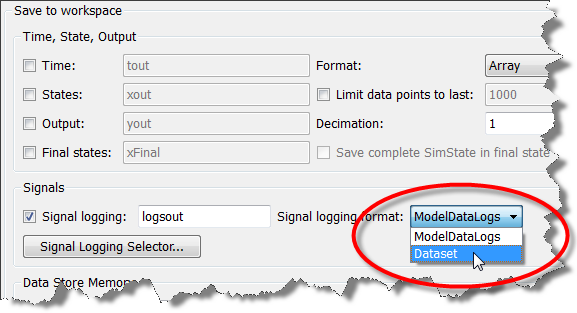
- Data is logged in dataset format.
- Logged data can be accessed through the logsout field of the Simulink.SimulationOutput object, for example "out.logsout".
- Logged signals can be accessed by name using the get method, for example: "out.logsout.get('signalName')"
- Logged signals should be plotted using the timeseries plot command, for example: "plot(out.logsout.get('signalName').Values)"
- Avoid creating unnecessary variables when accessing logged data. Access logged data directly from the Simulink.SimulationOutput object. For example, use "out.logsout.get('signalName').Values" instead of creating a separate variable for the logged signal.
- Avoid unnecessary validation of the Simulink.SimulationOutput object. Assume the sim command returns a valid object. No try-catch or validation code is needed.
- A Simulink.SimulationOutput does not have a isfield method. Do not use isfield to check for logged data.
I repeated my original query. This time, the generated code is exactly what I was hoping for:
% Simulation end time (seconds)
tEnd = 10;
% Create a step timeseries: 0 for t < 1, 1 for t >= 1
t = linspace(0, tEnd, 1001)';
u = double(t >= 1);
stepTS = timeseries(u, t);
% Package into a dataset for external input
ds = Simulink.SimulationData.Dataset;
ds{1} = stepTS;
% Create SimulationInput using the model name (Simulink will load the model automatically)
in = Simulink.SimulationInput('BasicModelingSimpleSystem');
in = in.setModelParameter('StopTime', num2str(tEnd));
in = in.setExternalInput(ds);
% Run simulation
out = sim(in);
% Plot the logged signal 'x'
plot(out.logsout.get('x').Values);
title('Logged signal: x');
xlabel('Time (s)');
grid on;

Now that I have that working, let's keep exploring.
MATLAB Test Class
For my next experiment, I tried creating a MATLAB-Based Simulink Test:
Simulate the Simulink model BasicModelingSimpleSystem.slx for a step input, capture the signal "x" and store it in a MAT-file to be used for baseline validation.
Create a MATLAB Test class that simulates the Simulink model BasicModelingSimpleSystem.slx do baseline validation using the saved MAT-file.
I was pretty happy with the results. It created 3 files:
- A script to generate and save the baseline
- A MAT-file containing the baseline results
- The requested MATLAB Test class
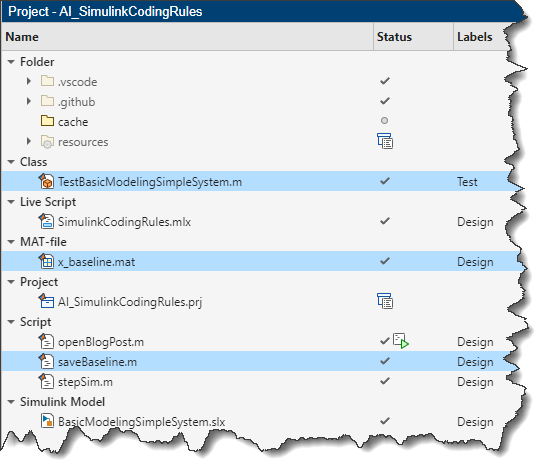
Here is what the MATLAB Test class looks like. It's simple and follows my coding rules.
classdef TestBasicModelingSimpleSystem < matlab.unittest.TestCase
% Test class for baseline validation of BasicModelingSimpleSystem.slx
methods (Test)
function testBaselineX(testCase)
% Simulation end time
tEnd = 10;
t = linspace(0, tEnd, 1001)';
u = double(t >= 1);
stepTS = timeseries(u, t);
ds = Simulink.SimulationData.Dataset;
ds{1} = stepTS;
in = Simulink.SimulationInput('BasicModelingSimpleSystem');
in = in.setModelParameter('StopTime', num2str(tEnd));
in = in.setExternalInput(ds);
out = sim(in);
x_actual = out.logsout.get('x').Values;
% Load baseline
baseline = load('x_baseline.mat', 'x_baseline');
x_baseline = baseline.x_baseline;
% Compare signals (allowing for small numerical differences)
testCase.verifyEqual(x_actual.Data, x_baseline.Data, 'AbsTol', 1e-8);
testCase.verifyEqual(x_actual.Time, x_baseline.Time, 'AbsTol', 1e-8);
end
end
end
I could add more rules to refine this test class, but I think this will be enough for today.
Now it's your turn
What kind of Simulink AI Coding Rules would you like to see? Which AI coding assistant is your favorite? Let us know in the comments below.
- Category:
- AI Coding Assistant,
- What's new?






Comments
To leave a comment, please click here to sign in to your MathWorks Account or create a new one.