
My Repository of AI Skills for Simulink

Update: The Simulink Agentic Toolkit is now available. I recommend installing the toolkit when interacting twith Simulink through an AI agent. Skills in this repository are complementary and should not interfere with the toolkit. I am planning to include in this repository skills that are early prototypes or more advanced and specialized skills that we do not plan to add to the toolkit.
--------
This toolkit packages tools and skills ready to use in your favorite agentic coding tool (Claude Code, GitHub® Copilot, Cursor, OpenAI® Codex, Sourcegraph Amp, Gemini™ CLI). It provides guidance for the AI coding agent to do things like build apps, create tests, create live scripts, through the MATLAB MCP server.
While we are waiting for an Agentic Toolkit focused on Simulink, I thought I should share a set of skills I developed in the last few weeks in this GitHub Repository:
You can use those skills today with the MATLAB MCP server, see my previous posts for how to set that up.
For now, the repository contains 6 skills:
- simulink-interactions
- simulink-simulation
- simulink-baseline-test
- simulink-profiler-analyzer
- simulink-solver-profiler-analyzer
- simulink-profile-initialization
Let see what each of them do.
simulink-interactions
The idea with this simple skill is to make it straightforward for the AI agent to know which Simulink component I want to interact with. It starts with this table:
User says | Resolution |
"this model" | bdroot(gcs) |
"this system" / "this subsystem" | gcs |
"this block" | gcb |
"selected blocks" (plural) | see snippet below |
"all [Type] blocks in this subsystem" | see snippet below |
"all [Type] blocks in the model" | see snippet below |
Where the "snippets below" are a few lines of code like this one, to find all selected blocks:
opts = Simulink.FindOptions;
opts.SearchDepth = 1;
blks = getfullname(Simulink.findBlocks(gcs, 'Selected', 'on', opts));
I find that this saves me some typing when time comes to tell the agent which model component to interrogate or modify. I use it when I need to do things that would otherwise require many clicks, or to write 10-20 lines of code to do. A few examples:
- Set all models blocks to accelerator mode
- Set the interpolation method of all selected lookup table blocks to Akima Spline
- Enable interpolation in all Inports block at the root-level of the model
This skill also contains basic editing instructions, like how to use add_block and Simulink.connectBlocks.
simulink-simulation
I find this skill very important. Because AI agents have been trained on whatever is available on the internet, they tend to use old syntax instead of the latest and greatest recommended best practices. While the code it generates is valid, it is often not ideal.
The skill includes best practices like:
- Always simulate using Simulink.SimulationInput and Simulink.SimulationOutput
- Everything that needs to be passed to the sim command must be through the Simulink.SimulationInput object
- How to specify input signals through MATLAB timeseries stored in a Simulink.SimulationData.Dataset.
- How to run multiple simulations using an array of Simulink.SimulationInput objects
For example, I asked Claude: "Write a MATLAB live script to simulate model HelicopterModelingSimulation for the 3 possible values of variable "state"". Without the skill, the code simulating the model looks like this:
model = "HelicopterModelingSimulation";
states = ["hover", "level", "path"];
load_system(model);
results = struct();
for i = 1:numel(states)
state = states(i);
simout = sim(model);
results.(states(i)) = simout;
end
With my skill, the code I get is:
modelName = "HelicopterModelingSimulation";
states = ["hover", "level", "path"];
in(1:numStates) = Simulink.SimulationInput(modelName);
for k = 1:numel(states)
in(k) = in(k).setVariable('state', states(k));
end
out = sim(in);
Both codes are valid, but the second version is better for many reasons. The first code would have problems when used in context like parsim, rapid accelerator and Simulink Compiler. The first code would also fail when run from an app or a function because variable state would be written to the local workspace and not the MATLAB base workspace.
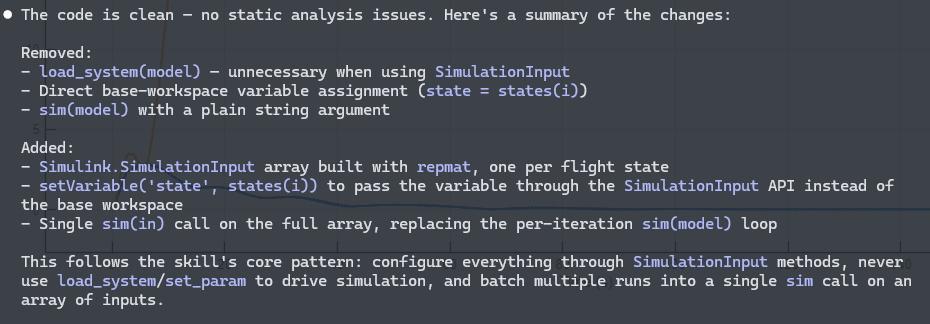
If you have existing code simulating Simulink models, try asking something like: "Use skill simulink-simulation to improve the code simulating a Simulink model in myFile.m". The coding agent should respond with something like this:
simulink-baseline-test
This skill creates a simple baseline test class for a Simulink model. It's useful when you ask the coding agent to refactor an existing model and validate that the results don't change, as I did in my previous post.
Without this skill, if I ask the AI to generate a baseline test, I find that it has a tendency to do more than what I need. It also has a tendency to add a teardown that closes the model after runnig the test. This is inconvenient when I have the model opened and want to look at it once the AI is done with its modifications.
Here is what a typical test class looks like:
classdef MyModelBaselineTest < sltest.TestCase
properties (Constant)
ModelName = 'MyModel'
BaselineFile = fullfile(fileparts(mfilename('fullpath')), 'baselineData.mat')
RelTol = 1e-6
AbsTol = 1e-8
end
methods (TestClassSetup)
function loadModelAndBaseline(testCase)
wasLoaded = bdIsLoaded(testCase.ModelName);
load_system(testCase.ModelName);
if ~wasLoaded
testCase.addTeardown(@()close_system(testCase.ModelName, 0));
end
testCase.assertTrue(isfile(testCase.BaselineFile), ...
sprintf('Baseline not found: %s\nRun %s.generateBaseline() first.', ...
testCase.BaselineFile, mfilename('class')));
end
end
methods (Test)
function testAllSignalsMatchBaseline(testCase)
in = Simulink.SimulationInput(testCase.ModelName);
out = sim(in);
S = load(testCase.BaselineFile, 'baselineLogsout');
testCase.verifySignalsMatch(out.logsout, S.baselineLogsout, ...
'RelTol', testCase.RelTol, ...
'AbsTol', testCase.AbsTol);
end
end
methods (Static)
function generateBaseline()
modelName = MyModelBaselineTest.ModelName;
load_system(modelName);
in = Simulink.SimulationInput(modelName);
out = sim(in);
baselineLogsout = out.logsout;
save(MyModelBaselineTest.BaselineFile, 'baselineLogsout');
fprintf('Baseline saved to: %s\n', MyModelBaselineTest.BaselineFile);
close_system(modelName, 0);
end
end
end
Profiling Skills
In my everyday work, I spend a lot of time helping Simulink users make their simulations run faster. For that, I often need to interpret results from the different profilers available in MATLAB and Simulink. I created 3 skills for my most common profiling workflows:
- simulink-profiler-analyzer: Interprets results from the Simulink Profiler
- simulink-solver-profiler-analyzer: Interprets results from the Simulink Solver Profiler
- simulink-profile-initialization: Combines results from the MATLAB Profiler and sldiagnostics with the goal of helping you speedup model initialization
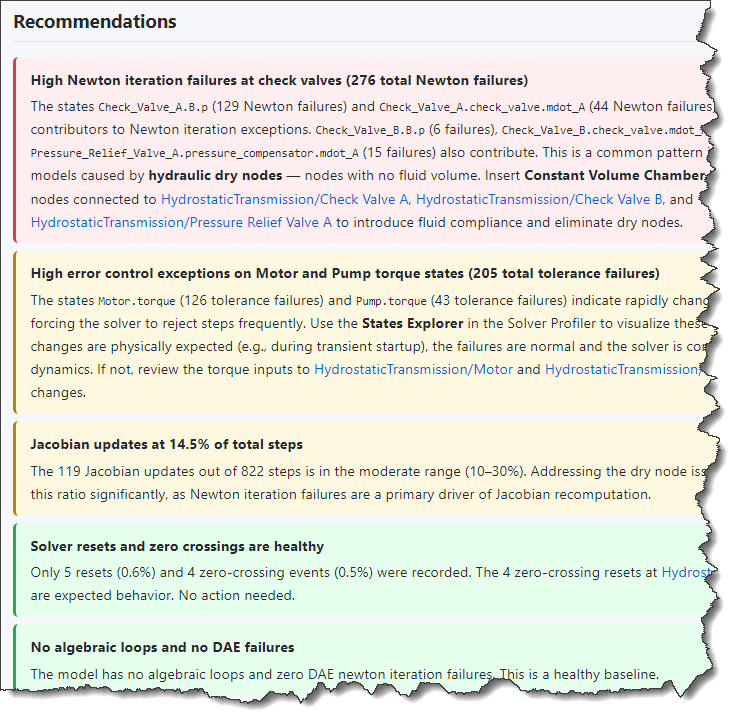
Those 3 skills have a similar pattern where you can ask the AI agent to run the desired profiler, or just to interpret saved results, if you already ran the profiler manually. In the end, it generates an HTML report that lists the most expensive operations and provides advice on what could be potentially improved.
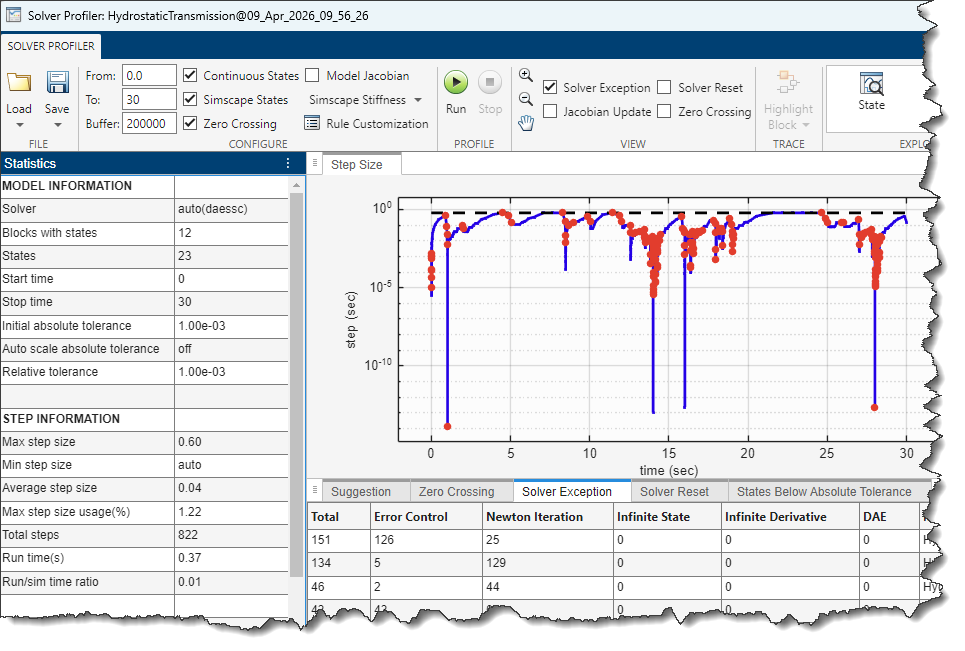
To give you an idea, I tried running the Solver Profiler on this example: Hydrostatic Transmission - MATLAB & Simulink
Here is what the results look like in the Solver Profiler:
Here is what the recommendations from my skill look like:
Disclaimer: Those skills are experimental and can be wrong. They have a tendency to flag more things as "High" than I would typically do. I am improving these every time I use them and will push updates as they evolve.
Now it's your turn
Have you created your own skills to guide AI Coding Agents with Simulink? If not, I encourage you to download mine and tweak them to your preferences. I would be very interested to hear what you come up with.





댓글
댓글을 남기려면 링크 를 클릭하여 MathWorks 계정에 로그인하거나 계정을 새로 만드십시오.