
My Scuba Diving Simulator

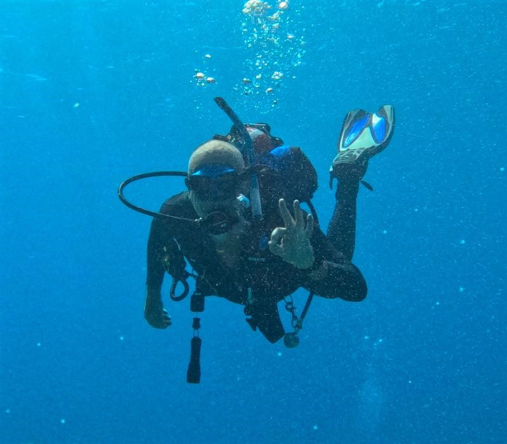
I recently took a week of vacation to go scuba diving in the Caribbean. In the middle of a dive, at about 80 feet down, this idea came to my mind: I need to make a scuba diving simulator!
I have thought about creating this simulation before, but I always ended up struggling with one thing or another. Typically, I would get stuck when trying to add the effect of depth on the diver's lungs and the buoyancy control device (BCD).
Today, with an AI agent and the Simulink Agentic Toolkit, I thought it was time to give this another try.
The Plan
Everyone who has worked with AI agents will tell you: The planning part is very important!
I thought for some time about what I wanted this simulator to include and how I wanted it to be implemented. Once the picture was clear in my mind, I wrote my requirements:
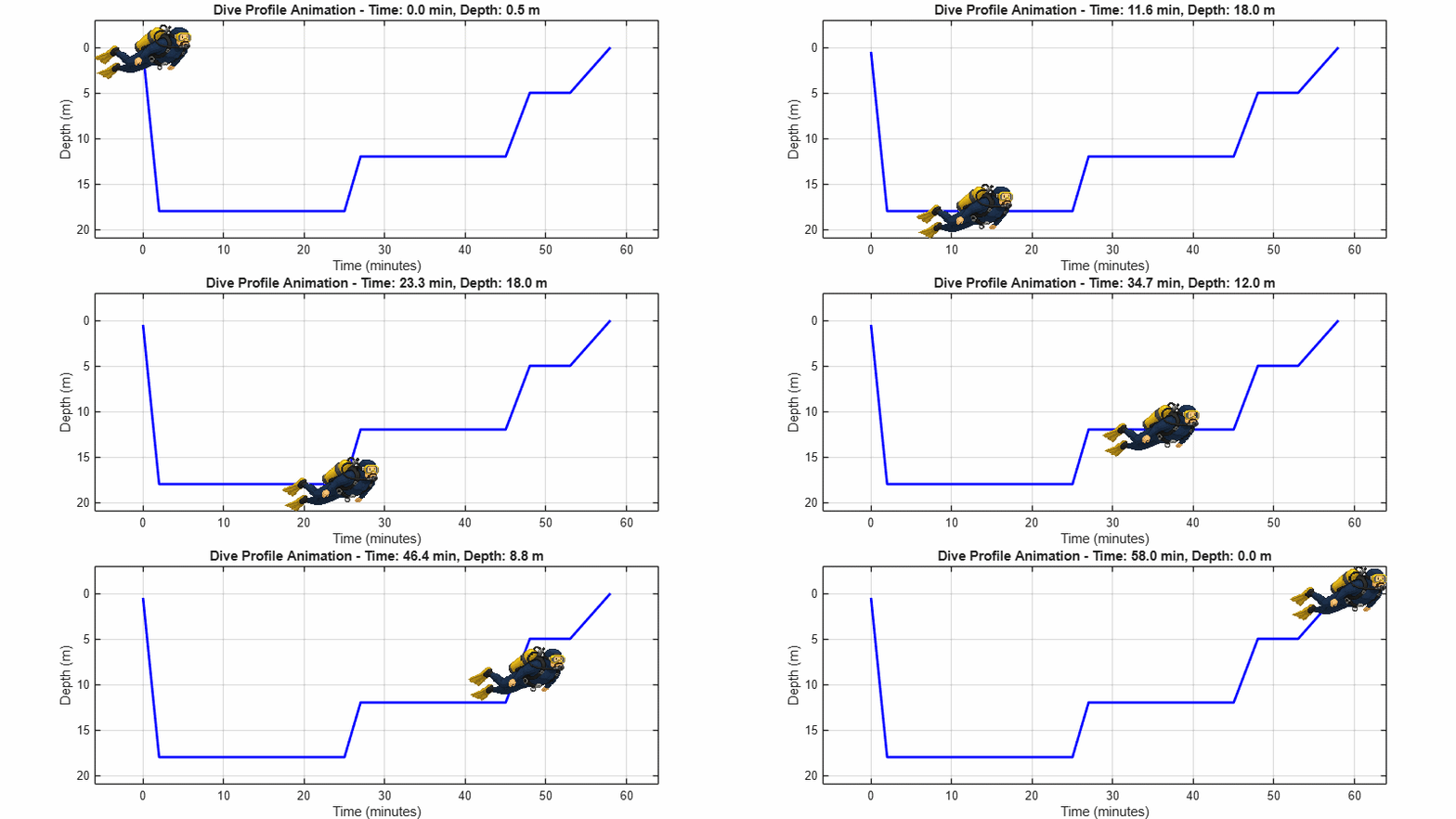
- I want to simulate a typical hour-long scuba dive profile
- It should model air consumption during the dive
- It needs to model the diver's buoyancy throughout the dive
- The diver's buoyancy should be controlled by the diver's breathing and the buoyancy control device (BCD)
- The mechanical part of the simulation should use the Simscape 1D position-based translational domain
- The gas part should be implemented using a simple custom gas domain with constant temperature approximation
- The depth information computed in the mechanical domain will be passed to the custom gas components that need it through a translational mechanical connection port
- The depth control logic should be implemented in Simulink and Stateflow
- Three control signals should be sent to the plant model: BCD inflate valve, BCD release valve and diver breathing effort
- The plant model should include the following individual Simscape components: Gas tank, first-stage regulator, BCD with intake and release valves, second stage regulator with intake and release valves.
Based on those requirements, the Simulink Agentic Toolkit invoked multiple sub agents to fetch relevant information from many reliable sources. Here are some examples:


In the end, it created 4 plan files
- scuba-diver-system.md: A high-level description of the system, with executive summary, objectives, and success criteria.
- scuba-diver-architecture.md: We are going into more details, listing the individual components, their interface, and their equations.
- scuba-diver-implementation-plan.md: This went into implementation of the full simulation, including controllers for dive profile scenarios, breathing waveform and BCD controller
- scuba-diver-test-plan.md: How all this will be tested.
The Simscape Scuba Library
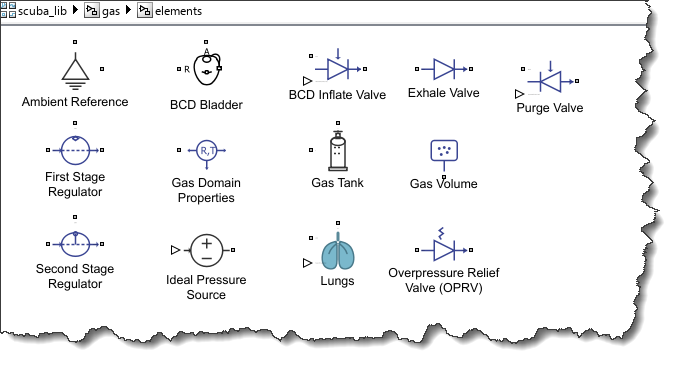
The first implementation step I went through is the Simscape library development. The agent was pretty good at generating the components I wanted. Here is what the components look like in my library:
The underwater gas domain definition code is:
domain underwaterGas
% Custom gas domain for scuba simulation.
% Across variable: pressure (Pa)
% Through variable: molar flow rate (mol/s)
parameters
R_gas = {8.314, 'J/(mol*K)'}; % Universal gas constant
T = {293.15, 'K'}; % Gas temperature (isothermal)
end
variables(Balancing = true)
n_dot = {0, 'mol/s'}; % Molar flow rate (through)
end
variables
p = {101325, 'Pa'}; % Pressure (across)
end
end
For a component like the diver lungs, the ideal gas law is used to compute the lungs volume at the current depth, and the Archimedes principle to compute the buoyancy force:
intermediates
R_gas = A.R_gas;
T = A.T;
depth = R.x;
P_amb = P_atm + rho_water * R.gravity * depth;
F_buoy = rho_water * R.gravity * V_lungs;
end
equations
V_lungs == V_lungs_in;
A.p == P_lung;
der(n_lungs) == n_dot;
% Ideal gas law
P_lung * V_lungs == n_lungs * R_gas * T;
f == -F_buoy;
end
Generating the Simscape library using an AI agent
Here are a few items I had to iterate with the agent to get the way I wanted:
Simscape language syntax
As of today, the Simulink Agentic Toolkit does not include guidance for the Simscape language. Because of that, the agent initially ended up using old-style syntax like the setup function and let-in-end pattern that are either obsolete or will be soon. Once I realized that, I simply prompted the agent with the following and it succeeded in seconds:
"Update all Let-in-end pattern in Simscape language with the more modern intermediate syntax. Search the MathWorks documentation for examples"
Block Icons
By default, Simscape blocks have no icon. To make my new library of blocks look better, I asked the agent to generate images. The request was something like:
"Generate SVG image files for all components in the scuba library. Images should be representative of the block functionality. Update the "annotation" section of the .ssc files to reference the icon image"
For complex components like the lung, gas tank and BCD bladder, I went through a few iterations to refine the image.
Lung model
In my initial request, I specified that the lung input should be the "diver breathing effort". Testing showed that I was wrong with that.
While inspecting the test results, I realized that when going deeper, the diver was not consuming more air as expected. Instead, the lungs were getting smaller! After a bit of research, I realized that the lung input should be volume. The agent was able to fix that easily.
At the end of the day, I did not write a single line of Simscape code myself and got the fully functional Simscape components I needed.
Assembling the Scuba Diver
Next step: Assemble the plant model. Unfortunately, I have to admit that the current layout algorithm in the Simulink Agentic Toolkit struggles with Simscape and physical connections. I asked the agent to give it a first shot. It added all the blocks with the correct parameterization, and I manually moved the blocks and lines around until I got a layout I was happy with.
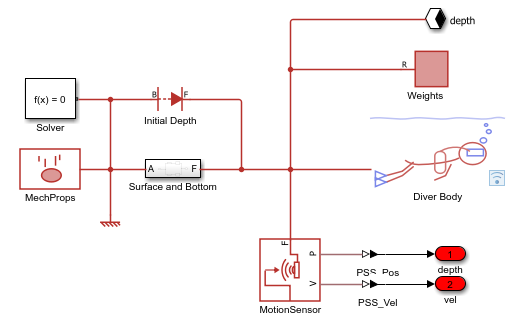
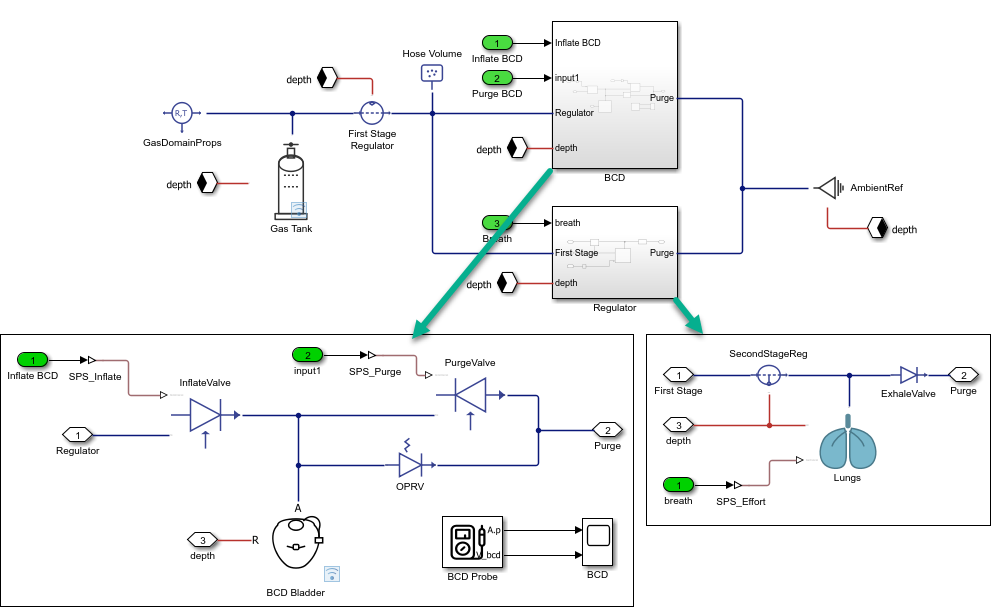
I grouped the components in two subsystems: mechanical and gas.
The mechanical part is mostly the diver body and weights.
For the gas network, I used the Simscape Connection Label block to share the depth information with all components.
Testing
Once I had my diver assembled, I put together tests for a few simple maneuvers.
Simple Ascent-Descent
As a first test, I put together this model.
mdl = 'descent_test';
open_system(mdl)
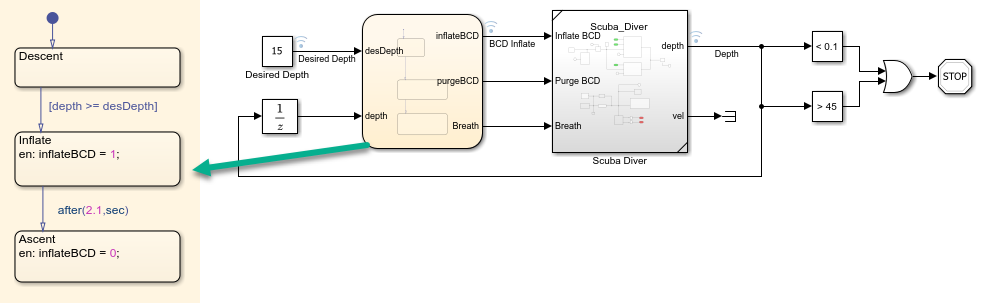
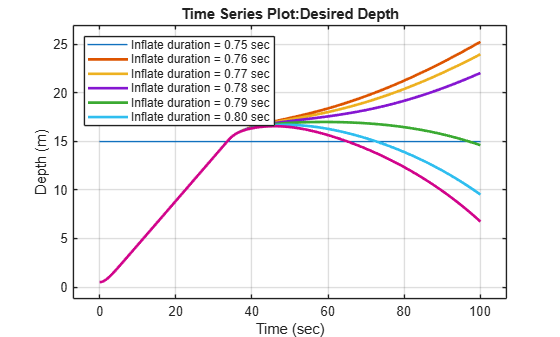
At the beginning of the simulation, the BCD is empty and the diver descends. When reaching 15 meters, the BCD is inflated for some amount of time. We can see that a small fraction of a second makes the difference between sinking to the bottom and ascending back up.
mdl = 'descent_test';
inflateVector = 0.75:0.01:0.8;
N = length(inflateVector);
in = repmat(Simulink.SimulationInput(mdl),N,1);
in = arrayfun(@(i) in(i).setVariable('InflateDT',inflateVector(i)),1:N);
out = sim(in,'ShowProgress','off','UseFastRestart','on');
figure
plot(out(1).logsout.get('Desired Depth').Values)
hold on
for i = 1:N
plot(out(i).logsout.get('Depth').Values);
end
hold off
labels = compose("Inflate duration = %.2f sec", inflateVector); % string array
legend(labels,'Location','northwest');
xlabel('Time (sec)')
ylabel('Depth (m)')
Air Consumption
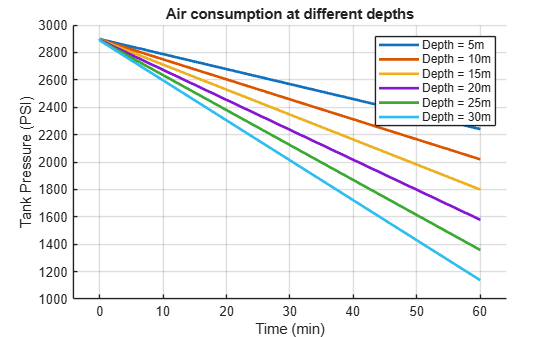
When diving, the deeper you go, the more air you use. To validate that this is modeled properly, I used this simple harness where I "pinned" the diver at certain depths and let it breathe normally for an hour.
mdl = 'breath_test';
open_system(mdl);
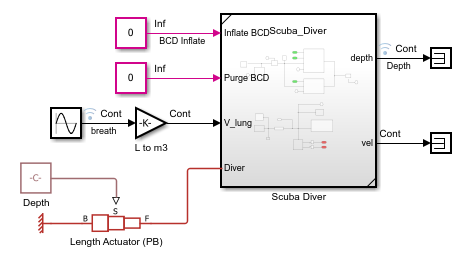
I can run the simulation for various depths.
breathTestDepthV = 5:5:30;
N = length(breathTestDepthV);
in = repmat(Simulink.SimulationInput(mdl),N,1);
in = arrayfun(@(i) in(i).setVariable('breathTestDepth',breathTestDepthV(i)),1:N);
out = sim(in,'ShowProgress','off','UseFastRestart','on');
The results match quite well what I experience myself while diving.
figure
hold on
for i = 1:N
ts = out(i).logsout.get('Tank Pressure').Values; % timeseries
plot(ts.Time/60, ts.Data) % plot minutes vs data
end
hold off
labels = compose("Depth = %dm", breathTestDepthV); % string array
legend(labels)
xlabel('Time (min)')
ylabel('Tank Pressure (PSI)')
title('Air consumption at different depths');
Full Control
I am still working on controlling the diver's depth for a full dive profile. It turns out that combining the BCD and breathing to control depth is more complicated than it looks like. Now that Claude Fable is available, maybe I'll give it a try and see if it can figure it out.
If anyone is interested, grab my scuba-simulator project on GitHub and send me a pull request if you can come up with a good control logic.
Now it's your turn
What new modeling capabilities have AI agents and the Simulink Agentic Toolkit enabled for you? Let us know in the comments below.




评论
要发表评论,请点击 此处 登录到您的 MathWorks 帐户或创建一个新帐户。