Seth on Simulink

January 2nd, 2009

Passion for Simulink

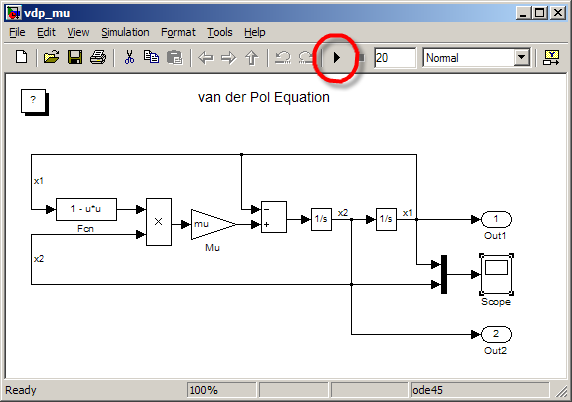
Happy New Year!  On New Year’s Eve, it snowed for most of the day in Massachusetts.  On New Year’s Day, I went out to clear some snow from my driveway.  When I stopped for a rest this beautiful white canvas faced me, and it reminded me of the Simulink canvas.  I grabbed a stick and sketched out a familiar model.

Block diagram in my front yard, drawn in the snow.

(Snow drawings have horrible contrast, so I modified this image using IMADJUST)

Later in the day, I went sledding with my kids at a nearby hill above some sports fields.  Again, I saw a beautiful, pristine canvas.  I couldn’t resist the opportunity to express system dynamics on such a large scale, so, again I paced out a Simulink model.

Simulink model in the snow, from January 1, 2009.

This image doesn’t do justice to the block diagram represented by my foot prints.  I made a montage from a couple of my pictures and did some contrast correction with IMADJUST.  Here is the result:
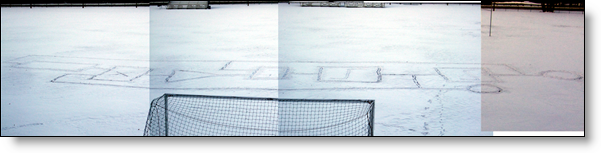
Simulink model in the snow, montage of images.

I also used IMTRANSFORM to project the image so it would look like an aerial photograph.

Simulink model in the snow, transformed iwth IMTRANSFORM

Zooming using IMCROP and resizing with IMRESIZE produces this final version of the snowfield block diagram.
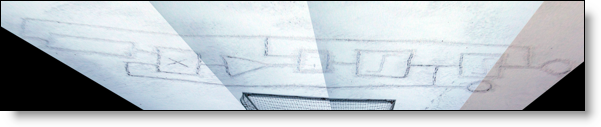
Simulink model in the snow, tranformed and cropped.

As you can tell, even when I’m out playing in the snow with my kids, I might also be thinking about Simulink.  Most engineers I know have a passion for their work.  People who love the tools they use to do their work express their passion in interesting ways.  For example, have you ever seen a car with the license plate “MATLAB”?
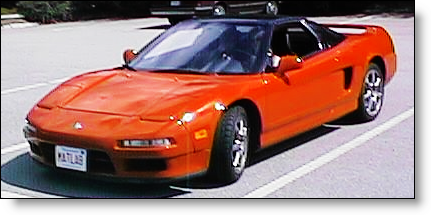
MATLAB License plate.

(I leave it to the reader to transform and crop this image down to just the license plate.)

Here is another example; an engineering student at Olin College made a Simulink inspired pumpkin carving in celebration of Halloween.   I found out about this thanks to Colin Zwiebel’s post on the Olin student blog. What a great place to find a P-I Control system!
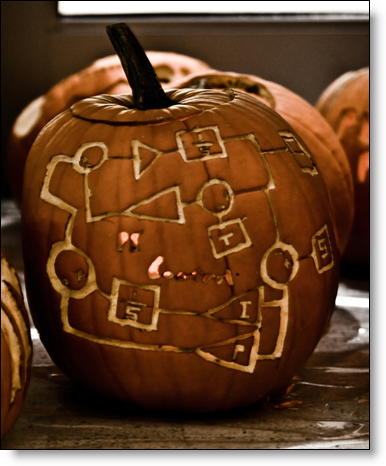
Simulink pumpkin carving by Olin College Student

Picture credit: Jacob Getto, Olin College

Do you have a geeky engineering passion like me?  How do you display your love of Simulink?  Leave me a comment here and send me pictures that show your passion for Simulink.   I will ship the first five of you a MathWorks T-shirt.

10 Responses to “Passion for Simulink”

  1. Amin replied on :

    Happy new year Seth!
    Although, NowRooz (Persian new year) is in the spring, but i wish you will have a good year!

  2. Seth replied on :

    Thank you Amin!

  3. Jeff Koechling replied on :

    Nice pictures, and superb use of pristine snow!

    I recall seeing the Massachusetts license plate “MATLAB” on a different car. Any idea of the age of that photo?

  4. Seth replied on :

    That picture actually ships as part of an Optimization Toolbox demo since R11 (1999!). So, the age is at least 10 years old. If you want to see the demo, try:
    >> optdeblur

  5. Kevin L. replied on :

    Happy new year Seth!
    I have a geeky engineering passion on simulink just like you.
    So I have a lot of horrible problems on simulink.
    Can you help me on it?
    E.g., the questions on “The Answer for Large Scale Modeling: Model Reference”.
    Can you tell me your email address. So I can email you directly.
    Will you ship a MathWorks T-shirt to me? Ha-ha.
    Thanks a lot.

    Kevin

  6. Kenneth Eaton replied on :

    I could swear I saw a “MATLAB” license plate some time a while back around here (Cincinnati), but I was driving and didn’t get a good look…

    I don’t have a geeky Simulink passion, but I do have a geeky MATLAB passion. As my FEX submissions show, I spend a lot of my free time writing video games using MATLAB. I use it for pretty much everything else I do, so why not my hobby too!

    Ken

  7. Chiew replied on :

    Happy New Year, Mr Seth.

    My name is Chiew, Nice to meet you.

    Being doing a lot of work using simulink lately, finding it more and more interesting.

    I’ve a problem on multithreading on Simulink, can it be done?

    Regards

    Chiew

  8. Seth replied on :

    @Kevin L. - Thanks for your regular comments and contribution to the blog. I’ll send you a shirt!

    @Kenneth Eaton - I checked out your author profile, good work. I’ll send you a shirt…. might you develop a Simulink based game?

    @Chiew - Are you asking about generating code for a multi-core processor, or utilizing multiple CPUs during your Simulink simulation?

    RTW uses a single threaded rate monotonic scheduler. Out of the box it wouldn’t be able to utilize multiple cores, although it would be possible to customize your scheduler and use mutli-tasking code to get something working.

    In the case of utilizing more than one core on your desktop or laptop for simulation, this can only be accomplished using the Parallel Computing Toolbox (PCT). Simulink is single threaded and will not use more than one core during a Simulation. If you run in Rapid-Accel mode your simulation will run on it’s own core while MATLAB and Simulink run on a separate core, but that doesn’t result in the kind of processor utilization I think you are looking for. If you craft a PARFOR command to run a series of simulations across workers, note that you can not call SIM directly. You will need to wrap your sim command in a function call and look out for current directory conflicts across your labs. I hope that answers your question.

  9. Dongyun Lu replied on :

    Happy New Year, Mr. Seth.
    I started doing some work on Simulink and found it is an awesome tool. Right now, I have a problem that I can’t found any answer to it,please help me.
    I am using the switched reluctance motor model which belongs to the SimPowerSystems libray, the simulink version is V2007b. I tried 6/4 motor, 10/8 motor by using the example from the simulink, they worked very well, but for the 8/6 motor, the output is not good. The fluxes of the four phases should follow the same pattern, but for the 8/6, the flux of the fourth phase is weird, I don’t know why. Also I want to know how to use the special model of the 8/6 motor, I can’t get any information from the internet on how to define the parameter. Please have a look at it. Thanks a lot.

  10. Seth replied on :

    @Dongyun Lu - I am not an expert on the SimPowerSystems blocks, so I don’t have any suggestions for you. I saw that you have posted on the newsgroup, and that is a good place to ask this question. Another option is always technical support. Sorry I couldn’t be more help. Good luck!

Leave a Reply

Wrap code fragments inside <pre> tags, like this:

<pre class="code">
a = magic(3);
sum(a)
</pre>

If you have a "<" character in your code, either follow it with a space or replace it with "&lt;" (including the semicolon).


Seth Popinchalk is an Application Engineer for The MathWorks. He writes here about Simulink and other MathWorks tools used in Model-Based Design.
  • wei: @Ashish, I agree with your observation on compiler optimization but fail to see why Han’s code would be...
  • Ashish Sadanandan: Han, Sorry for butting in with a reply, but the modification to the for-loop you’ve...
  • arun kumar: dear seth i have been involved in developing and simulating asynchronous systems for my VLSI lab. in...
  • Han Geerligs: Hi Aarti, thanks for providing the example! I was just wondering why the lines model_YDim = model_XDim;...
  • Seth: @Han - Aarti’s response is in a post titled Generated Code for Variable Size Signals.
  • garla: what is advantage of exporting the bus object with the format as “cell” and “object” ....
  • J.r: @ Guy - Example sent to your account. Thank you.
  • Guy: @ J.r - The ability for atomic subsystems and Model Reference to remove the “fake algebraic loop”...
  • J.r: Sorry to hit an old thread, but this seems like the best place to solicit help on this topic. Is there supposed...
  • Bindu: please tell me how can i get the sampling time used in simulation

These postings are the author's and don't necessarily represent the opinions of The MathWorks.