Doug’s MATLAB Video Tutorials

December 4th, 2007

Advanced MATLAB: Data acquisition in MATLAB

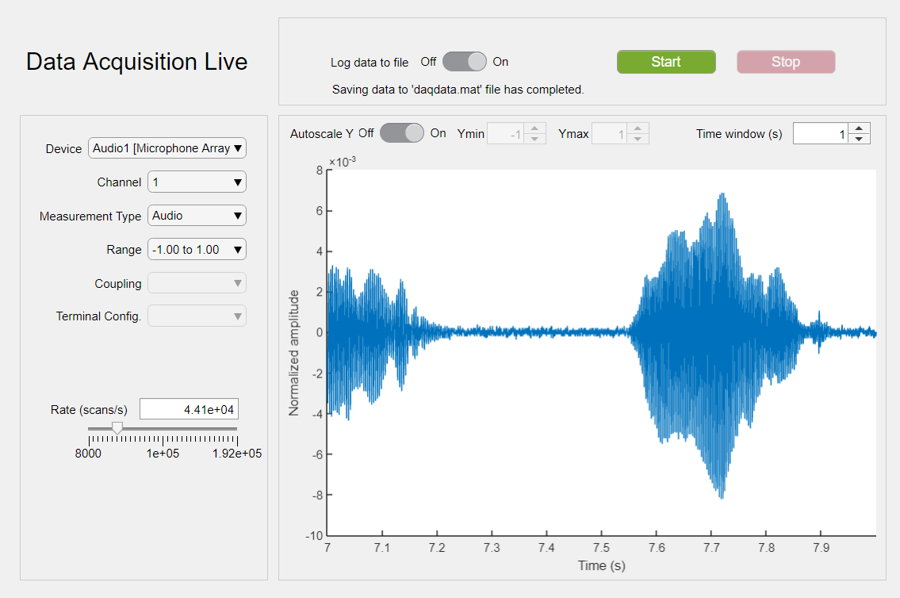
MATLAB is often used for post-test data analysis. You can get more value from your data acquisition session if you do the MATLAB analysis on the data as it is being collected. This can be done by having MATLAB be the software for collecting your data. This video shows a very simple way of getting data into MATLAB from a DAQ board, in this case the windows soundcard. This demo uses the Data Acquisition Toolbox.
Find the files here. PodCast here Other videos have been gathered here: http://blogs.mathworks.com/pick/category/video/ Other Advanced MATLAB posts have been gathered here: http://blogs.mathworks.com/pick/category/advanced-matlab/

20 Responses to “Advanced MATLAB: Data acquisition in MATLAB”

  1. Juan Manuel Merlo replied on :

    Hi Doug, I saw your demonstrations of http://blogs.mathworks.com/pick/2007/12/04/advanced-matlab-data-acquisition-in-matlab/, but I can’t see the winsound input, matlab said me the following:
    ??? Error using ==> analoginput.analoginput
    Error using ==> analoginput.analoginput>localCreateAnalogInputObject
    Failure to find requested data acquisition device: adaptor.
    Can you help me please?
    Thanks
    Juan Manuel “El Mer” Merlo

  2. Doug replied on :

    Juan,

    This is a question best answered by my colleagues in Technical support. They can be reached here:

    http://www.mathworks.com/support

    Doug

  3. Di-An Hong replied on :

    My questions are
    How to use Matlab to record computer mouse movement
    Do I need the Data Acquistion Toolbox to do so

    Thanks,
    Di-An

  4. Doug replied on :

    Di-An

    I just put up this video:

    http://blogs.mathworks.com/pick/2008/05/27/advanced-matlab-capture-mouse-movement/

    This should help you.

    Doug

  5. Dayal Strub replied on :

    Hi Doug, I have a question regarding DAT and usb mice, which doesn’t fit under either of your two previous posts.

    I am trying to devise a cheap pendula experiment for university and highschool students,
    the idea is to use a usb mouse (as has been done before, but differently and not using Matlab) as the sensor. I would like to use Matlab to acquire data from the usb mouse (specificaly the coordinates which would now be angles), but it should not be identified as a mouse, and should not interfere with the computers primary one.
    I thought it might be possible to use DAT by creating an adaptor for the usb port, and then considering considering it as a digital input and not as a mouse.

    As I have never used DAT before I am not sure this is possible, and if it is, exactly how to go about it.
    Any help would therefore be very much apreciated!

    Thanks!

  6. Doug replied on :

    Dayal,

    USB is not a protocol but if you have a dll driver for the mouse and know the API you can write a DAT adaptor.

    Having said that, writing a DAT adaptor is not an easy task and we usually recommend it only for the hardware vendors themselves. This doc

    http://www.mathworks.com/access/helpdesk/help/pdf_doc/daq/adaptorkit.pdf

    has all the information necessary for writing an adaptor.

    There are some inexpensive USB devices available that we do support (some from Measurement Computing, some from National Instruments) but you would then need to find a sensor.

    DAT does not appear to be the correct solution for this problem.

    Doug

  7. Bob replied on :

    Dayal, here’s another thought that could use the Data Acquisition Toolbox. Use a rotary potentiometer (variable resistor) as a sensor. The basic idea here is voltage divider. Place a reference voltage (say 5V) across the ends and connect the wiper pin to the analog input channel. The digitized voltage would be proportional to the rotation angle of the pot. Many cars now use exactly this for the gas pedal sensor, In fact, maybe you can take the foot pedal off a video game, or from a sewing machine, etc.

    Cheers
    Bob

  8. Gert replied on :

    Hi Doug,
    Is there a way to analyze the rpm of an engine from the sound with Matlab? I downloaded an example “Real time octave analysis” http://www.mathworks.com/matlabcentral/fileexchange/loadFile.do?objectId=3076 and I tried to put in a band-pass filter but the program crashes every time when I try to run it.
    If there is a way to do that, can you give me an idea how? For an 12 cylinder 4stroke engine and rpm between 800 – 9000 (16.67-150 Hz) it gives a maximum of 900 pulses a second. So I think I will need than a Fs > 1800 Hz. But is there a way to filter real time data ?

    Thanks,
    Gert

  9. Doug replied on :

    Gert,

    I can not speak to the stability of any of the File Exchange, you will need to speak to the original author about that. However, to filter “Real Time Data”, you need to be more specific. Are you tying to get the results of your analysis while the test is running, or is this post test analysis. If you want the results while the test is running, how “Real Time” do you need to be. You might end up using Real Time Workshop. Explain more what you are looking for, and I will try to help.

    Doug

  10. Bryan replied on :

    Hi Doug -

    I’m trying to use an accelerometer to measure the tilt angle and record that data in MATLAB. I have it hooked up to a power supply and to a Measurement Computer USB-1208FS DAQ. Then I have code in MATLAB to acquire the data. It works for a second or two, but then it stops. Is there a template code for doing something like this? Any clue on the problem?

    - Bryan

  11. pierre replied on :

    Hi all,
    I have the Data Acquisition Toolbox, and I’m trying for 2 weeks to send a step voltage, and just after another one of a different voltage WITHOUT going back to “zero” between the two..
    I tried to do it little by little and I saw that the “start” function between the two steps reinitialize the voltage at a value of zero volts. And I wouldn’t like it because the piezo I want to control has a really fast response time..

    Furthermore I think I am compelled to use a “start” function between the two steps because I have to compute de Amplitude of the second step in real time so I don’t have to prepare the two steps before and put both of them in the engine using one “putdata”.

    Is there a way to avoid it ?
    Thank you a lot, This problem is really annoying me.

    Pierre

  12. Sherryl replied on :

    Hello Pierre,

    Please look at the OutOfDataMode property.
    http://www.mathworks.com/access/helpdesk/help/toolbox/daq/outofdatamode.html
    You can use it to set a value that will be held when the queued data has been output.

    start will not set the output voltage to zero until that value is in your output signal.

    Regards,
    Sherryl

  13. Sherryl replied on :

    In Response to Post #10 by Bryan -
    Hi Bryan,
    By default the analog input object will acquire one second worth of data.
    There are many ways to acquire more than that.
    1. Set TriggerRepeat to greater than 0
    2. Set SamplesPerTrigger to a larger number than the default, which matches the default SampleRate
    3. Use either a TimerFcn or SamplesAcquiredFcn callback to restart the acquisition

    All of these things are well documented here:
    http://www.mathworks.com/access/helpdesk/help/toolbox/daq/daq.html
    They can also be seen in the demos . Bring up MATLAB and type:
    demo(’toolbox’,'data acquisition’)
    at the command line (requires that Data Acquisition Toolbox already is installed).

    Regards,
    Sherryl

  14. pierre replied on :

    Hi sherryl and thank you for answering me,

    Actually, I already tried before to use this property because I saw that it was what I wanted, nevertheless I got this error:

    EDU>> AO = analogoutput(’ueidaq’,'pwrdaq://dev0′);
    EDU>> addchannel (AO, 0);
    EDU>> AO.OutOfDataMode = ‘DefaultValue’;
    ??? Error using ==> daqdevice.subsasgn at 108
    Error using ==> daqdevice.set at 261
    Invalid property: ‘OutOfDataMode’.

    Then I tried to skip it just by doing :
    EDU>> AO.Channel.DefaultChannelValue = 5;

    And then I had no error but also no effect : I still got a value of “zero” instead of 5 volts between the two steps ..

    I don’t know why this property is not recongnized, do you ?
    I am using the R2007a student version of matlab.

    Thanks,
    pierre

  15. Gamal replied on :

    Dear Sir,
    I am working in a project that i use an Analogue to digital converter HW to transfer analogue electrical data to digital. I want to read this digital these data via Matlab using USB port in order to get its FFT. I would be very glad if you tell me how to do that. thanks alot for your help.
    Gamal

  16. Doug replied on :

    Gamal,

    That is something that can be done. Do you have the Data Acquisition toolbox? What have you tried, can you connect to the board? What board is it?

    Doug

  17. Gamal replied on :

    Thank u Doug for ur fast reply. yes I have an NI-DAQ USB 6008. and I have an Analogue voltage sinusoidal signal that have a maximum frequency of 500KHz which means i want a minimum sampling of 1 Mhz. I want to analyze this signal using matlab( getting FFT) real time. can this be done by using the ADC in NI-DAQ or i have to get another ADC. if so how can i interface it with matlab. thanks alot Doug and I am waiting for your reply.
    Gamal

  18. Javier replied on :

    i’d like to know how can i import data for a transducer of human pulses into matlab without help of other hardware. the sensor has a USB terminal?

  19. Pirat replied on :

    hi doug. i want to ask you about using data acquisition card to record data from an oscilloscope realtime and process it with Matlab. i’m able to use getdata, but it’s blocking since i want real time recording and processing, then i will write a GUI to calculate the period, amplitude and some other things.Thank you

  20. dhull replied on :

    @pirat,

    You are best talking to htt://www.mathworks.com/support for this.

    Thanks,
    Doug

Leave a Reply

Wrap code fragments inside <pre> tags, like this:

<pre class="code">
a = magic(3);
sum(a)
</pre>

If you have a "<" character in your code, either follow it with a space or replace it with "&lt;" (including the semicolon).


Doug Hull is a proud MathWorker who is on a mission to help you with MATLAB.

Doug's picture

These postings are the author's and don't necessarily represent the opinions of The MathWorks.