Seth on Simulink

March 11th, 2008

Springtime and R2008a

I am eager for winter to release its icy grip on New England. Fortunately, change is in the air and spring is around the corner. At work, the big change is the new release of MATLAB. After installation I immediately notice the slight differences in the UI.

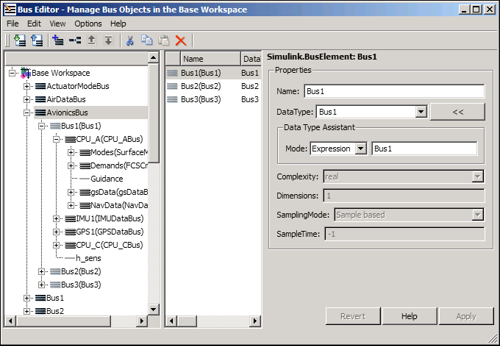
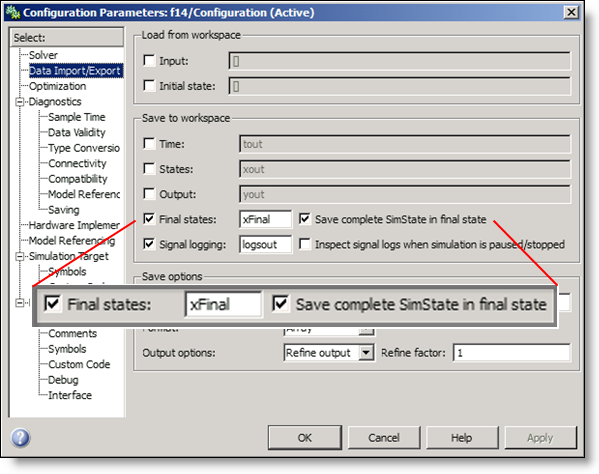
The new release of MATLAB and Simulink products went live for download at the beginning of this month. You can read about some of the changes to R2008a in the release notes. Here are some of my favorites:

Over the next few months, as the spring flowers bloom (for those of us in the northern latitudes), I will highlight many of these new features.

These are some of my favorite enhancements to Simulink products. Have you activated your new copy of R2008a? What do you see in the release notes that you want to try out?

6 Responses to “Springtime and R2008a”

  1. Joe replied on :

    Hey Seth!

    Looking forward to your upcoming posts. Are you going to highlight the new zero crossing algorithm? I think a discussion about Simulink solvers and/or zero crossing would be GREAT for all users, new and old.

  2. Seth replied on :

    @Joe - I will most definitely be talking about zero crossing detection in general and look at the capabilities of the new adaptive settings. If you have 8a and don’t want to wait, open the Simulink demos:

    >> demo simulink

    Then, open the second demo called “Double Bouncing Ball: Use of Adaptive Zero Crossing Location”.

  3. Yaw replied on :

    Seth,
    Thanks for starting a Blog on Simulink. Much needed! I have a question on signal buffering and processing in Simulink without a DSP toolbox or Blockset.

    Lets say you have a sinusoid for example, of varying amplitudes in every period. Lets look at the first 4 periods of this signal. The positive side max amplitudes are 5, 4, 6, and 3 respectively and the negative sides are
    -4,-5,-3 and -5 respectively.

    What I want to learn is to buffer the 4 periods as they arrive in based off hit crossings. These crossing thresholds are 10% of the amplitudes in the period of interest. For example the first cycle has 5(max) and (-4)min. So we want to generate the rising edge of a square wave when we cross 0.5(towards the +ve direction or upward)and generate the falling edge when we cross -0.4(towards the +ve direction or upward).

    This square wave is then buffered, post processed and the buffer reset for the second period. The process continues until all 4 cycles are processed.

    Thanks for your time.
    Yaw.

  4. Vijay Swaminathan replied on :

    @Yaw,

    Two comments before I point you in the rigt direction:

    1. Your logic seems to be anti-causal. i.e. How would you know at the stating of a period what the amplitude of the sinusoid is going to be? This will decide your threshold for that time period. If you are collecting this information offline in some other fashion then you’re all set.

    2. Just a caution from a signal processing perspective. You said you have a sinusoid with varying amplitudes in each period. This can happen if the gain of your amplifier is drifting. But just as a word of caution, if this indeed happens, you no longer have *one* sinusoid. You can confirm this by taking the fourier transform of you signal. But since you are procesing only one period at a time, you are approximating a sinusoid and therefore okay in short time spans. Just be careful about doing any spectral processing of this signal (you will notice some high frequency components that you do not expect).

    Now to you question about buferring. Given that you “know” what the threshold for this period is , you can use for example the “Compare to constant” block in the “Logic and Bit operations” library (under Simulink) to enable/trigger either an “Enabled Subsytem” or a “Trigerred Subsystem” to do you buffering. These blocks may be found under the “Ports and Subsystems” library (under Simulink). You may either use a “Memory” block (Simulink) or the “Buffer” block (Signal Processing blockset)to do the actual bufferring. Check the documentation for more information on “Enabled Subsystems” and “Trigerred Subsystems”. Pay special attention to the options that allow you to keep/reset the outputs and states when these subsytems are not active.These options can greatly affect how your subsystems will behave.

    hth,

    Vijay

  5. Seth replied on :

    @Vijay - thank you for answering Yaw. It’s good to see other MathWorkers on MATLAB Central.

    @Yaw - I think Vijay gave some good suggestions. The Buffer block can be tricky to use when combined with a conditional subsystem. I don’t think the memory block is going to meet your needs because it will only capture one sample and hold it for a single step.

  6. karthik replied on :

    Hi,
    In my application i need to send output to CANOE from simulink model on need basis only.
    ie
    i send the output to the external application when i have data. Otherwise i should not send anything.

    I have implemented the logic using stateflow inside a simulink subsystem and using CANOE MATLAB interface simulink library blocks.

    Issue:
    The issue is that when i dont want to send data the output transmitted out is “Zero”. Which seems correct by all sense.
    But as per my specific requirement, i should not transmit anything , not even “Zero”.
    If i transmitt “Zero” the CAN bus will wake up to transmitt “Zero”. This is undesiable as we cannot simulate “Sleep mode” since it is always awake.
    I would like to know we can do something in the MATLAB end to stop sending “Zero” i.e transmitt nothing when no data is present.

    This seems to happen without the interface blocks. ie by default MATLAB sends “zero” when no data is transmitted. This i could see in the scope.
    But i dont want “Zero” also to be transmitted out. Is there a way to disable output from the simulink output ports forcibly and then re enabling them back when needed using a .m script?

    Please let me know if any clarification is required regarding the issue.
    Kindly let me know at the earliest.
    Regards
    Karthik

Leave a Reply

Wrap code fragments inside <pre> tags, like this:

<pre class="code">
a = magic(3);
sum(a)
</pre>

If you have a "<" character in your code, either follow it with a space or replace it with "&lt;" (including the semicolon).


Seth Popinchalk is an Application Engineer for The MathWorks. He writes here about Simulink and other MathWorks tools used in Model-Based Design.
  • Mohamamd: Hi Suth, I try to simulate a load tap-changing transformer in simulink but its control part has to be...
  • Han Geerligs: Hello Guy, thanks for the clarificaton and link. However in the documentation I am missing the...
  • Guy: @Han, you probably already know, but I think it is good to share with everyone. To zoom in use the key...
  • Han Geerligs: Hi Seth, Once again I’d like to point out that my biggest accelerator is using mouse and keyboard...
  • XaL: Hi, thanks for the tips. As someone wrote in http://blogs.mathwor ks.com/seth/2009/03/ 13/new-%C2%A0rele...
  • Uba osy: Hi, in the introductory example for fuzzy logic toolbox it was noted that using non fuzzy means, you could...
  • Prashant: How can I have same example but instead AC(1 to 10V 50 or 60Hz) and DC(0.5 to 10 V) then adding AC+DC but...
  • adrian chavarro: Great tool, for educational and sicentific, simulation. I would like to know where can i place a...
  • Ashish Sadanandan: @wei, I was talking about the case where the compiler would perform the ‘model_Xdim...
  • wei: @Ashish, I agree with your observation on compiler optimization but fail to see why Han’s code would be...

These postings are the author's and don't necessarily represent the opinions of The MathWorks.