
Mask Initialization and Self-Modifying Blocks
In previous posts, I introduced advanced masking concepts and discussed how to build a masked library block with a dynamic mask dialog. In this post, I will show how the example Saturation block adds/deletes ports and rewires itself depending on its configuration.
The Saturation Block Example
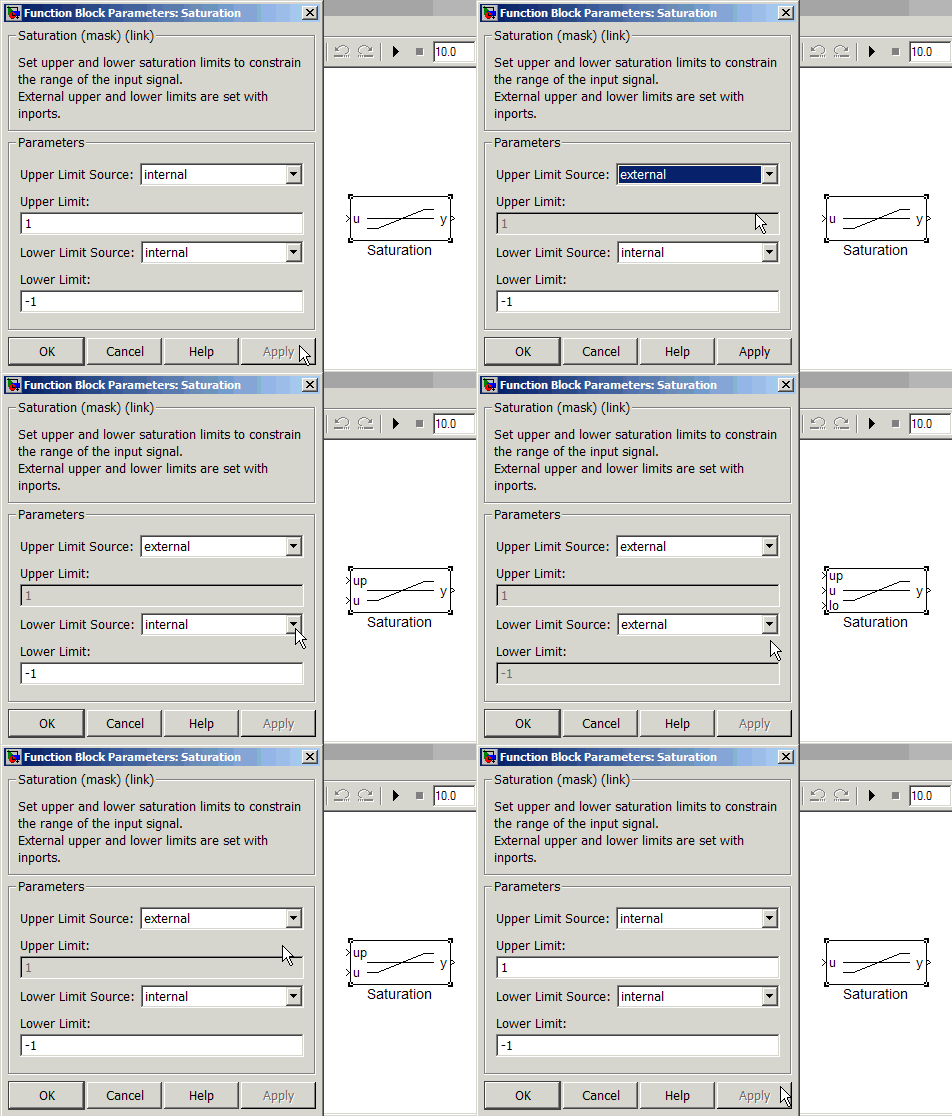
After configuring the block dialog, clicking Apply or OK executes the mask initialization callback. The mask initialization callback is where most of the work for a mask happens. Mask initialization commands should take the parameter values set in the mask dialog and configure the block so it is ready to run. In the Saturation block example, the block is switching between two basic configurations, the Dynamic Saturation and the Fixed Saturation.
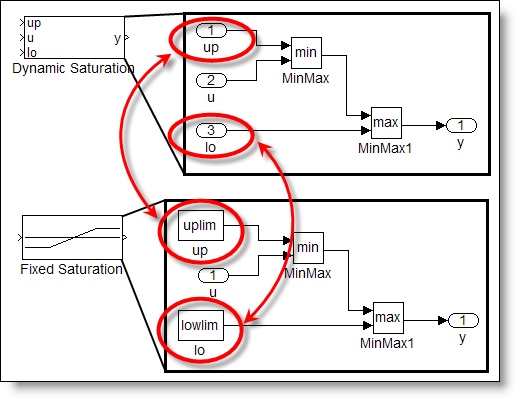
The difference between the configurations is the type of block used for up and lo. They are ports to provide dynamic limits, and constants to provide fixed limits.
Key point: do the least amount of work that you can in the mask initialization.
Mask initialization code should do the minimum amount of work that it can because mask initialization runs many times in the life of a model. In addition to running when you click OK or Apply, mask initialization runs at the start of every simulation and update diagram, when you call set_param to modify the block, and when you are building the model as you drop the block into the system.
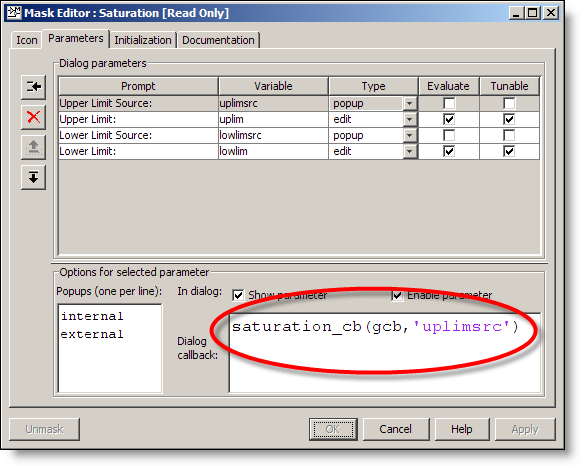
The mask parameters are the variable names set on the parameters page of the mask editor. (See below)
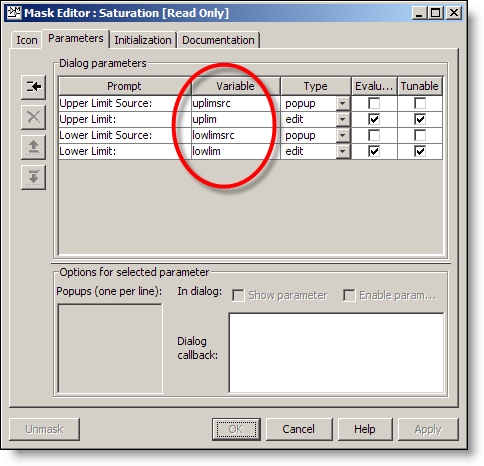
Blocks in the system under the mask can access these variables in the mask workspace. Initialization commands also run in the mask workspace, so these variables are part of the mask initialization callback. (see below) If a block will rewire itself, or add ports, you must check Allow library block to modify its contents.
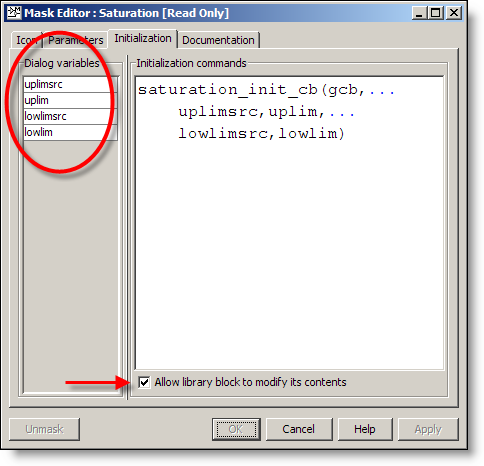
For the saturation block, I chose to call an M-function to do the work of the initialization command. I find it is more convenient to debug and the MATLAB editor is a more comfortable development for mask initialization commands that are more than a few lines.
Use the state of the mask GUI to control the code
My function is saturation_init_cb. I pass into the function all the variables it needs from the mask workspace. This is more efficient than calling get_param on the block. I always pass in the result of gcb (get pathname of current block). I will use this path when I need to reference the blocks inside the saturation block subsystem.
In order to do the least amount of work, my mask initialization checks the system to see if changes are needed. The check for the upper limit source runs through the switch statement to handle the two possible values, internal or external. The code then checks for the BlockType of the saturation/up block. If it is not the right type, we call the local replace function to replace the block. If we have added a constant, we set the Value of that constant to use the uplim variable from the mask. A similar action is repeated for the lower limit.
% saturation_init_cb Mask Initialization


function saturation_init_cb(blk,uplimsrc,uplim,...


                                lowlimsrc,lowlim)


% Check for upper limit source


switch uplimsrc


    case 'external'


        % Check for constant


     if strcmp(get_param([blk '/up'],'BlockType'),...


                                         'Constant')


            replace([blk '/up'],'built-in/Inport');


        end


    case 'internal'


        % Check for inport


     if strcmp(get_param([blk '/up'],'BlockType'),...


                                           'Inport')


            replace([blk '/up'],'built-in/Constant')


            set_param([blk '/up'],'Value','uplim')


        end


end


% Check for lower limit source


switch lowlimsrc


    case 'external'


        % Check for constant


     if strcmp(get_param([blk '/lo'],'BlockType'),...


                                         'Constant')


            replace([blk '/lo'],'built-in/Inport')


        end


    case 'internal'


        % Check for inport


     if strcmp(get_param([blk '/lo'],'BlockType'),...


                                           'Inport')


            replace([blk,'/lo'],'built-in/Constant')


            set_param([blk '/lo'],'Value','lowlim')


        end


end
The replace function gets the position and orientation from the old block, deletes it and then adds the new block in its place.
% Local replace function


function replace(oldblock,newblock)


pos = get_param(oldblock,'Position');


orient = get_param(oldblock,'Orientation');


delete_block(oldblock);


add_block(newblock,oldblock,'Position',pos,...


    'Orientation',orient);
Note, the replace_block function in Simulink could not be used here because it is meant for model wide changes. While it is possible to limit the affect of replace_block to a specific system, replace block doesn’t work on library blocks. Self-modifiable masked blocks are library blocks, so this is a common helper function used for this kind of mask.
Renumbering ports to control the order
The port number affects the order that the ports show up on the outside of the block. Wires cross the boundary of the block and remain connected through the inport that they are originally connected to. A port can be inserted before or after existing ports on the block by changing the numbering of all ports. The following code sets the port numbers by checking the values of uplimsrc and lowlimsrc. When the upper limit source is external, that will be the first port. If not, the first port is the u input. I can keep track of the order and number of the ports by incrementing the numbering variable each time I set a port number.
% Renumber ports


% when using external upper limit,
% set blk/up port to 1


n = 1;


if strcmp(uplimsrc,'external')


    set_param([blk '/up'],'Port',num2str(n))


    n = 2; % increase n


end


% set u port to n


set_param([blk '/u'],'Port',num2str(n))


% when using external lower limit,
% set blk/lo port to n+1


if strcmp(lowlimsrc,'external')


    set_param([blk '/lo'],'Port',num2str(n+1))


end
Now it’s your turn
I have shared some of my best practices for programming self-modifying blocks. What techniques have you used to program masks? Share your comments here.
- Category:
- Masking





Comments
To leave a comment, please click here to sign in to your MathWorks Account or create a new one.