Seth on Simulink
August 28th, 2008
Organizing Mask Callbacks
My recent posts have focused on the different elements
required to build a library block. There is the conceptual
design of the block, the dynamic
dialog, and the mask
initialization code. In each of these posts, I have attempted to focus on
just the core of those concepts without complicating things and covering
too much. However, I was not showing you my actual code. Now, I want
to step back and show you the big picture view of how I organize the code for my
masked blocks in Simulink.
M-code switchyards
In the Saturation block example, M-code is used for mask
initialization, and dialog callbacks. To keep the callbacks organized I put
them into a switchyard
style M-file function that contains all the code for the block. The
calling syntax passes the inputs to the appropriate subfunction.
Here is the primary
function in saturation_cb.m.
function saturation_cb(blk,callback,uplimsrc,uplim,...
lowlimsrc,lowlim)
% implements the callbacks for saturation block
switch callback
case 'init'
init_cb(blk,uplimsrc,uplim,lowlimsrc,lowlim)
case 'uplimsrc'
uplimsrc_cb(blk)
case 'lowlimsrc'
lowlimsrc_cb(blk)
otherwise
disp('saturation_cb: callback not implemented')
end
The mask callbacks run the primary function with the same
first two inputs, the block path, blk, and the name for the callback.
The dialog callback for the uplimsrc parameter calls this function,
saturation_cb.m
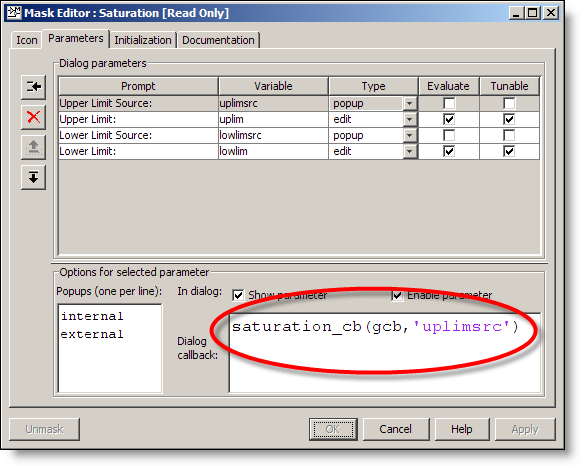
The lowlimsrc dialog callback is similar. Execution flows through
the primary function to the subfunciton uplimsrc_cb.
% uplimsrc_cb Dialog Callback
function uplimsrc_cb(blk)
This subfunction is where the real work happens. The
primary function just dispatches to the appropriate subfunction. In the case
of the mask initialization code, we have access to all the mask variables in
the workspace. For this reason, I pass these in as additional inputs.
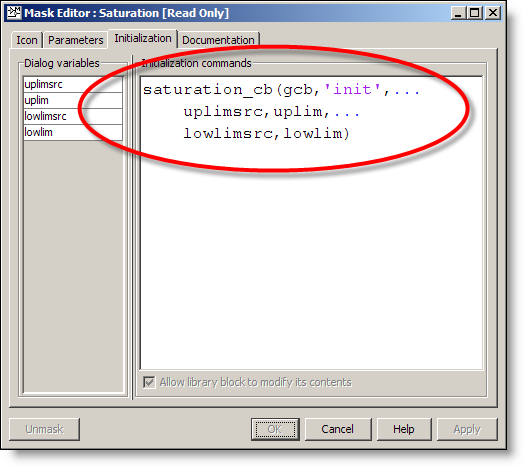
This call passes through the switchyard to call the init_cb
subfunction.
% init_cb Mask Initialization
function init_cb(blk,uplimsrc,uplim,lowlimsrc,lowlim)
I like working in the MATLAB editor
My friends on the Desktop team have spoiled me. I
prefer the debugging tools that I get from working in the MATLAB editor. The
switchyard callback M-file makes it easier to edit and debug as I develop the
block. I find that the space in the mask editor is only comfortable to work in
when the callback is a few lines at most.
Now it’s your turn
This is how I keep mask code organized. I use this basic
system every time I develop a new block. How do you keep your code organized?
Do you prefer another style of switchyard function? Leave me a comment here.
23:00 UTC |
Posted in Masking |
Permalink |
You can follow any responses to this entry through the RSS 2.0 feed.
You can skip to the end and leave a response. Pinging is currently not allowed.
Leave a Reply
|
Seth:
Thanks for a great series. As I am in the process of building a set of Simulink blocks, these were both timely and helpful.
I took your advice, and the advice of a commenter to create an “enumeration” of parameter indices. Now my callback switchyard calls get_param(blk, ‘MaskNames’) and passes that result to the individual handlers. Using the global enumerated indices, I don’t change any code if I rename parameters. I just have to keep the enumerations up to date.
One question. If my parameter is set to a variable, get_param() in my callbacks returns that variable string. I’ve found that I have to try evaluating the get_param() results in first the model workspace, and then the caller (i.e. MATLAB’s) workspace if I need the actual numeric value. Is this indeed the case? Is their an easier way?
Thanks again.
reilly.
@ John Reily - The string entered into your mask will be evaluated in the parent workspace, (it could come from a system above the current one), or it may trace all the way back to the base workspace.
The Dialog Callback is tricky because you can’t always guarantee that the value is known. For example, when I set a gain value of A, I often later add that to the model workspace, or base workspace. The tricky problem you face is trying to anticipate where the variable is coming from, and as you note, it could be in the model workspace, the MATLAB base workspace, or some parent system workspace that passed down through hierarchical resolution.
An alternative design is to use Mask Initialization to check the value. At that point, the value is known and available to your code without calling get_param.
Can you give more details about what you are trying to do in yor mask callback?
Seth: Thanks for your reply. I have constant block values that depend upon parameter values. In order to provide user notification as early as possible, I have my mask callback for parameter A calculate the constant C whenever A changes. That way I can generate an error as soon as possible. From a usability perspective, I feel this is the best experience. But it sounds like I should wait until initialization?
While we’re discussing it, does TMW publish a “best practices” document for developing Simulink blocks? That would be helpful. (Your articles on masking contain content that I’d like to see in such a tome.)
Thanks again.
reilly.
Hi Seth,
For some build-in blocks (for example, the constant block), there are multiple tabs (”Main” and “Signal Attributes”). The dialog window also uses multi-columns. Further, there is “Data Type Assistant” feature which can be shown/hidden with a button, iconed ‘<>’, click.
How could Simulink modelers add these capabilities for their custom blocks without invoking handle graphics?
Hi Seth,
Is it possible to detect the width or dimension of an input signal of a masked block in the “Initialization-Code” of the Mask-Editor?
At first I’ve tried to use the paremeter ‘CompiledPortWidth’ of the input port with these 4 commands:
modelname([],[],[],’compile’);
q=get_param(gcb,’PortHandles’);
dim = get_param(q.Inport(1),’CompiledPortWidth’)
modelname([],[],[],’term’);
It doesn’t work in the ‘Initialization-Code’ but in the MATLAB prompt. Do you know where I can add code that is executed while the model is compiled.
My second idea was the block ‘Probe’. This block detects the width/dimension and generates a signal with that value. But I don’t know how to use the value of an input-signal in the ‘Initialization-Code’ of the Mask-Editor.
Have you any idea?
Thanks for your help and all the tutorials.
Albert
@Albert Kröber - The model function should not be called from the initialization code of a Mask. Mask initialization is called during initialization of the model. This means, at the start of the simulation your block would start to initialize itself, again during the process of init. THEN, the same block would tell the model to terminate. I believe we prevent this from working in the initialization code to prevent a infinite loop.
You can use the get_param commands to gather the CompilePortWidth, but there will be a result of 0 when the model is not compiled. You can check for this 0 in a conditional command and only apply an action when the value is non-zero and your data is valid, otherwise, do nothing.
How are you using this information? The Probe block can return the signal width as a signal line which is used in a downstream calculation. This is often preferred over depending on initialization code to gather this information.
I’ve asked the Mathworks support. And they said that it is not possible to detect the signal width in the inizialization code of a mask. Also the Probe-block can’t solve the problem.
At the moment the user has to write the signal width by himself in the mask of the block.
Anyway, thank you for your help