Guy and Seth on Simulink

March 31st, 2009

Parallel Computing with Simulink: Model Reference Builds

Have you seen the MATLAB Channel on YouTube??  I like the way you can express an idea using video, describe how things work, and then watch it work.  That is why I asked my friend Doug to help me make a video this week. (Thanks Doug! Check out Doug’s MATLAB Video Tutorials.)

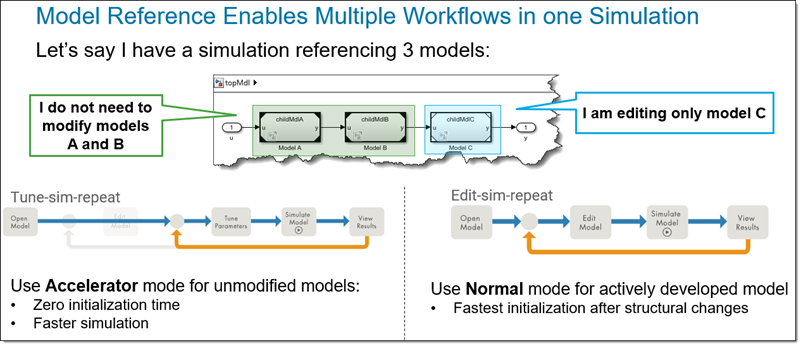
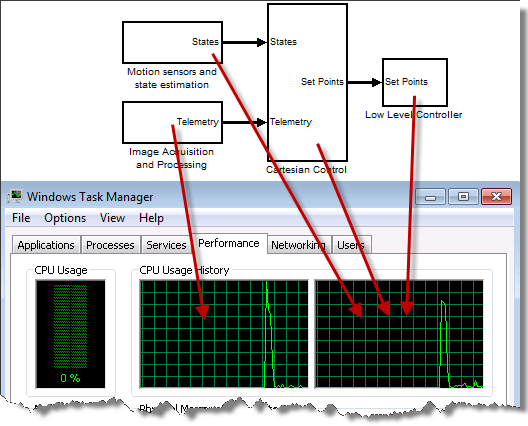
The topic today is the Simulink R2009a feature for Parallel Model Reference builds.   Model reference blocks run in normal (interpreted) mode or accelerated mode.  Simulink has to generate SimTargets for the accelerated reference models during update diagram.  In R2009a you can use the Parallel Computing Toolbox to start a pool of local MATLAB workers and distribute the generation of the SimTargets across the available cores on your system.  Model Reference parallel build also speeds up Real-Time Workshop code generation.  All you need to distribute your build across all the cores on your multi-core machine is to start a local pool of MATLAB workers:

>> matlabpool

Starting matlabpool using the 'local' configuration ... connected to 4 labs.

Watch the video.  Try it out.  Leave a comment below and tell me how it worked.

Updated the video player which was broken on IE.
Files used in this video are available from the File Exchange here

7 Responses to “Parallel Computing with Simulink: Model Reference Builds”

  1. Dan replied on :

    Very nice video. I liked how you brought up the window task manager performance consistently to demonstrate the workings of the PCT toolbox. Hope to see more great videos like this.

  2. Jay replied on :

    Does this toolbox support building Model References across several machines?

    i.e. Using a Team’s Matlab/Simulink installed desktops to perform model reference builds, controlled by a single ‘build’ user?

  3. eric replied on :

    Make sure you turn on “Enable parallel model reference builds” in the Model Referencing Pane of the configuration parameters.

  4. Peter Murphy replied on :

    I tried using this in R2012a with the rtwbuild command, and it didn’t seem to work at all. Task Manager only showed 1 core running (out of 2), and total execution time didn’t change. I have a top level model with 113 reference models that are in normal mode. Here is what I used:

    set_param(cs,’EnableParallelModelReferenceBuilds’,'on’);
    set_param(cs,’ParallelModelReferenceMATLABWorkerInit’,'Copy Base Workspace’);

    tic;
    matlabpool
    rtwbuild([model_root '/ECU']);
    rtwbuild_time = toc;

    The command window indicated that the pool had indeed started by displaying:

    Starting matlabpool using the ‘local’ profile … connected to 2 labs.

    The Help indicates that I also should have seen output to the command window like:

    ### Initializing parallel workers for parallel model reference build.
    ### Parallel worker initialization complete.
    ### Starting parallel model reference SIM build for ‘bot_model001′
    ### Starting parallel model reference SIM build for ‘bot_model002′
    ### Starting parallel model reference SIM build for ‘bot_model003′
    ### Starting parallel model reference SIM build for ‘bot_model004′
    ### Finished parallel model reference SIM build for ‘bot_model001′
    ### Finished parallel model reference SIM build for ‘bot_model002′
    ……….

    but there was no output like this. What am I missing? Does this only work for Sim builds in accelerator mode, and not for RTW builds?

  5. Guy Rouleau replied on :

    For the curious, Peter was using an Embedded Coder custom target.

    When creating your custom target, you need to declare model reference compliance and adapt your template makefile to comply with the build folder used by the parallel workers.

    The procedure is explained here:

    http://www.mathworks.com/help/toolbox/rtw/ug/bse3c9v-1.html#bru4now-1

  6. Andreas replied on :

    The link:
    http://www.mathworks.com/help/toolbox/rtw/ug/bse3c9v-1.html#bru4now-1
    is broken…

  7. Guy Rouleau replied on :

    @Andreas,

    I apologize for that. The link changed when R2012b got released. You cna find the relevant information here:

    http://www.mathworks.com/help/rtw/ug/supporting-optional-features.html#bru4now-1

Leave a Reply

Wrap code fragments inside <pre> tags, like this:

<pre class="code">
a = magic(3);
sum(a)
</pre>

If you have a "<" character in your code, either follow it with a space or replace it with "&lt;" (including the semicolon).


MathWorks
Guy Rouleau and Seth Popinchalk are Application Engineers for MathWorks. They write here about Simulink and other MathWorks tools used in Model-Based Design.

These postings are the author's and don't necessarily represent the opinions of MathWorks.