Seth on Simulink

April 17th, 2009

S-functions, Bus Signals, and Missing Documentation

This almost never happens, but today I get to share with you an undocumented Simulink capability! In R2009a the S-function builder has the ability to accept bus signals at its input and output ports.  We accidentally omitted the updated doc section when R2009a shipped.  You can find the missing documentation here, but I still want to tell you about how to use bus signals with S-function Builder.

What is an S-function?

If you want to build your own custom block in Simulink, we provide a couple ways to do it.  For now, I am going to ignoring masked subsystems and reference models and focus on block authoring in the truest sense, the S-function.  The "S" in S-function stands for System (or maybe Simulink).  S-functions define how a block works during the different parts of the simulation, for example: initialization, update, derivatives, outputs, and termination.  S-function are often used as a gateway to other simulation environments, interfaces to hardware or software.  There are a few ways to implement an S-function, such as using an M-file or a C-MEX file.   There are also tools like the S-function Builder Block and the Legacy Code Tool to make it easier to write S-functions.

The Simulink S-function Builder Block in the library browser

The S-function must define itself as a system.  You have to define the interfaces and algorithm for the system.  The interfaces to the system are the ports and parameters of the block.  For a long time, users have asked for the ability to write an S-function that accepts a bus signal as the input, or provides a bus signal as the output.  This is the capability added in R2009a for the S-function Builder.

S-functions and Bus Signals

In January 2005, Tom Erkkinen posted the Legacy Code Tool (LCT) to the MATLAB Central File Exchange.  The Legacy Code Tool helps you integrate existing C functions into your Simulink model by generating an S-function.  LCT has been shipping with Simulink since R2006b.  One of the major capabilities of LCT is the ability to interface to bus signals.  If your function requires a structure input or returns a structure output, LCT can generate the wrapper S-function that handles a bus signal.

S-function Builder Bus Support

I think the S-function Builder block is the easiest way to bring a short C code algorithm into your Simulink model.  New in R2009a, the S-function Builder block now supports bus signals for the input and output ports.  There is a demo model called sfbuilder_bususage.  Here is how it works:

The S-function builder works like many software wizards, and leads you through the process of writing an S-function.  When you double click on the S-function builder block, you get a GUI that looks like this.

The S-function builder GUI

If you start on the left most tab, add information in each tab, by the time you have reach the last tab, you are done.  To include a bus input in the S-function builder, you need to define a bus object.  In a previous post, I talked about how to do use bus objects as interface specifications.  The Data Properties tab defines all the information for the ports of the S-function.  First, you have to define the inputs and outputs of your system.
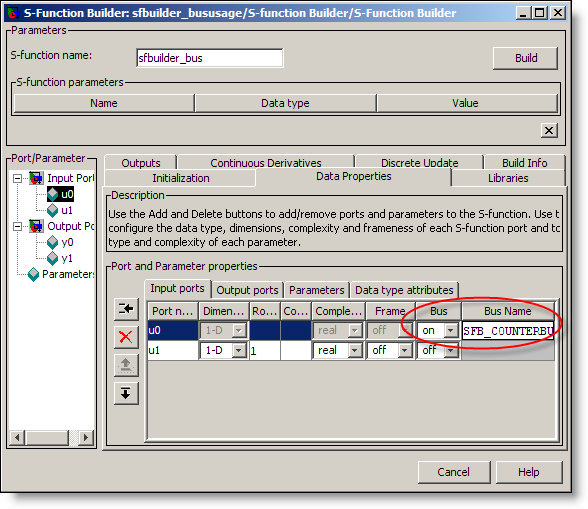
The S-function builder with a bus input

To include a bus, turn the Bus property ON, and se the Bus Name to the bus object in the base workspace.  Next, you have to access elements of the bus using standard C structure indexing.  Here is a snippet from Outputs function that accesses signals from the bus.

C-code from the Outputs Function that accesses bus signal elements

That is all there is to it.  The bus object can optionally include a C header file that defines the C structure definition for the bus. You can specify this in the Bus Editor:
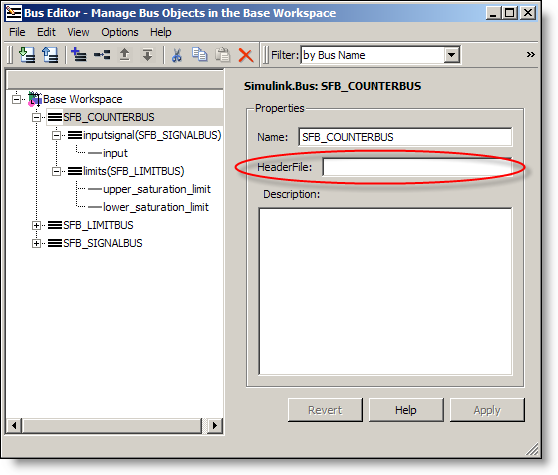
The Bus Editor can be used to specify the headerfile for the bus

If you include the header file in your bus object, the S-function builder will use it.  If you don’t specify the header file, the S-function builder will generate one for you that looks like this:

The S-function Builder generates a header file for your bus if you don't provide one in the bus object

Wait a second, why isn’t this in the doc?

It was just an oversight.  There were many changes made to the doc, and we forgot to include this one.  Luckily, when we realized the doc was not complete, technical support came to the rescue.  We have published a revised section of the S-function builder documentation through a solution titled:

How can I input and output Bus signals to and from an S-function created using the S-function builder in Simulink 7.3 (R2009a)?

Now it’s your turn

Do you write S-functions?  Have you tried this feature?  Leave a comment here and tell me about your experience.

19 Responses to “S-functions, Bus Signals, and Missing Documentation”

  1. wei replied on :

    @Seth, If this uses bus object, could Simulink.BusElement be dynamically sized, maybe undocumented?

  2. Mike replied on :

    Seth, I am relative new to Simulink, and only have a Simulink 5/R13 at hand. I know my version does not support bus signal, but is it possible to have some work turnaround for my application: I have to compute a state-space output online based on one of the system state (LPV problem). I’ve written an M file S-function to do the job. However, this varying state signal seems no way for me to get it into the S-function. One approach I tried was to MUX this signal with the inputs, and wanted to separate it from inside the S-function, but did not work. E.g. combine this state signal with two other S-function inputs as a 3-element vector u, and tried to read u(3) as the varying parameter, but always received a “exceeds matrix dimensions” error. Kinda stuck here, and I am not good at C or other complicated programming skills, could you provide some hints or there is another solution without using S-function? Thanks in advance!

  3. Seth replied on :

    @wei - The Simulink.BusElement can not be dynamically sized. As this is a definition for a type, the size must be known. As far as dynamic values for your bus, you can specify Sample Time as -1, and I recommend this.

  4. Seth replied on :

    @Mike - You may need to increase the width of the input to your S-function. If you are using R13, you don’t have access to Level-2 M-file S-functions, so you can’t just add another input port. If you need to input a 3 element vector then:


    function [sys,x0,str,ts,simStateCompliance]=mdlInitializeSizes
    sizes = simsizes;
    sizes.NumContStates = 0;
    sizes.NumDiscStates = 0;
    sizes.NumOutputs = 0;
    sizes.NumInputs = 3; %< ====
    sizes.DirFeedthrough = 1;
    sizes.NumSampleTimes = 1; % at least one sample time is needed
    sys = simsizes(sizes);

  5. wei replied on :

    @Seth, one can dynamically size inport/outport, but not if signals are grouped as bus. What’s benefit?

  6. Seth replied on :

    @Mike - I would like to suggest another possible solution for your LPV problem: do your computation in blocks! If you look through the Math Operations library you will find things like Product, Gain and Sum blocks. Most people are familiar with working on signals and vectors, but these also work on matrix signals. Try implementing your algorithm using those blocks and avoid building an S-function all together.

  7. Seth replied on :

    @wei - Dynamic sizing only works when the port is virtual and left unspecified (-1). The same is true for Virtual Bus Signals. If a bus signal is left virtual, and you do not specify the bus object, then the behavior is dynamic and calculated during update diagram. When a bus object is present, this provides the definition for the interface. Currently that definition includes information about the number of signals, their size and type. Generally, I suggest leaving bus signals virtual unless you have a reason to specify the interface. The most common example of a non-virtual interface is at Model Reference boundaries. For Model Reference blocks to work, the interface must be fully defined. Do you encounter another situation where you need a non-virtual bus, but you don’t want to specify the size?

  8. wei replied on :

    @Seth, S-function has dynamically sized port. And number of ports is self-modifiable. It should support virtual bus port.

    But now a port has to be non-virtual if it’s a bus. Is the restriction from design that bus object has to be non-virtual? If so, could one define s-function’s bus port by non bus object mean?

  9. Gaurav Thaiba replied on :

    Need Help in modeling PWM or SPWM using s-function, it would be great help if modeling of PWM using simulink models available and can be used in s-fucntion modeling.

    Thank you

  10. Seth replied on :

    @wei - You have asked a difficult question. S-functions with simple signals (one type and one definition of size) can be dynamically sized, but that was part of the original design for blocks. Bus signals came later, and the purpose of bus objects is to define an interface. Dimensions and data types are the required parts that define that interface. At the boundary, the bus is non-virtual and must be fully defined. I’m not sure I understand your last questions about defining “s-functions bus port by non bus object.” Please clarify if you want more information.

    @Gaurav Thaiba - If you are simply looking for a block to output a pulse signal, there are some pulse generators in the Simulink Sources library. You could also model a PWM signal using SimElectronics or SimPowerSystems. Search the documentation for PWM.

  11. Jeff replied on :

    Hey Seth,

    I have a large struct that I need to pass through a simulink model (presumably by bus object). The struct is created in a Level 2 M-file S-Function. Unfortunately it doesn’t look like Level 2 M-file S-Functions support bus ports, do you have any recommendations for making this work? The struct is way too complicated to multiplex into a single matrix.

    Thanks!

  12. Jeff replied on :

    Seth,

    Just FYI, I found a bug in the S-Function Builder. If you try to create an S-Function with a bus output and no inputs, the builder messes up while generating the code (inserts an extra comma where the input argument usually is) that causes build errors, rendering the builder GUI useless.

    Thanks,
    Jeff

  13. Seth replied on :

    @Jeff - Regarding your first question about handling a bus with a Level 2 M-file S-function: you are correct, level 2 M-file S-functions do not support bus signals, but there are some other options.

    • Use Embedded MATLAB - As long as you have an structure of arrays (not an array of structures) you should be able to pass the bus out of an Embedded MATLAB block.
    • Mask the level 2 M-file s-function in a subsystem with a bus creator at the output. If there are 100 signals, you can pass them out separately and wire them into the bus. If the bus is more complicated, you may need to cascade the bus creators. This would have a high one time cost, but it will give you a nice interface to the system.

    I think the Embedded MATLAB option may be best, though, the Embedded MATLAB language is a subset of what you can do in the M-file S-function. Embedded MATLAB blocks don’t have states the way S-functions do, so you may have to rething your code if you rely on them.

    Regarding your second comment about the S-function builder bug, thanks for reporting it. Technical Support is looking into this.

  14. Jeff replied on :

    Hi Seth,

    Thanks for the feedback. I actually decided to go with the second option since it made more sense for me to have an initialization step and subsequent output steps.

    Have you played around with the dynamic port dimensions in the latest prerelease (2009b)? I’m looking at having a bus with elements of varying dimensions, but I haven’t found any documentation on the updates to the bus editor. I take it prereleases don’t come with documentation?

    P.S. Glad y’all spotted the bug!

    Thanks,
    Jeff

  15. isaiah replied on :

    Hi, i tried modifying a level 2 s-funtion. however i keep getting an error.
    please help. im new to simulink so i almost have no idea.
    i am pasting the code here. please advise on what to…

    50
    d=d-2; %reduce dutycycle by 2
    else
    d=d+2; %increment dutycycle by 2
    end
    set_param(block.Dwork(2).Data, ‘PulseWidth’, num2str(d));

    %endfunction

    function Update(block)
    d=50;
    % Store the input value in the Dwork(1)
    block.Dwork(1).Data = d;

    %endfunction

    function Terminate(block)

    %endfunction
    >

  16. isaiah replied on :

    sorry about my previous posting. didnt wrap the code properly. here is the full code well wrapped

    function msfcn_varpulseizzy(block)
    % Level-2 M-file S-function to implement a variable pulse width generator
    %   Copyright 1990-2007 The MathWorks, Inc.
    
    % This S-function takes a desired pulse width (in percentage
    % of the period of a Pulse Generator block) and sets the PulseWidth
    % property in a Pulse Generator block. The result is a variable-width
    % pulse signal. The S-function assumes the model contains only one Pulse
    % Generator block and modifies the PulseWidth of that block.
    
    setup(block);
    
    %endfunction
    
    function setup(block)
    
    % Register number of ports
     block.NumDialogPrms = 1;
    block.NumInputPorts  = 1;
    block.NumOutputPorts = 0;
    
    % Setup port properties to be inherited or dynamic
    block.SetPreCompInpPortInfoToDynamic;
    block.SetPreCompOutPortInfoToDynamic;
    
    % Override input port properties
    block.InputPort(1).DatatypeID  = 0;  % double
    block.InputPort(1).Complexity  = 'Real';
    
    % Register sample times
    block.SampleTimes = [0 0];
    
    % Register methods
    block.RegBlockMethod('PostPropagationSetup', @DoPostPropSetup);
    block.RegBlockMethod('InitializeConditions', @InitializeConditions);
    block.RegBlockMethod('Start', @Start);
    block.RegBlockMethod('Outputs', @Outputs);
    block.RegBlockMethod('Update', @Update);
    block.RegBlockMethod('Terminate', @Terminate);
    
    %endfunction
    
    function DoPostPropSetup(block)
    
    % Initialize the Dwork vector
    block.NumDworks = 2;
    
    % Dwork(1) stores the value of the next pulse width
    block.Dwork(1).Name            = 'x1';
    block.Dwork(1).Dimensions      = 1;
    block.Dwork(1).DatatypeID      = 0;      % double
    block.Dwork(1).Complexity      = 'Real'; % real
    block.Dwork(1).UsedAsDiscState = true;
    
    % Dwork(2) stores the handle of the Pulse Geneator block
    block.Dwork(2).Name            = 'BlockHandle';
    block.Dwork(2).Dimensions      = 1;
    block.Dwork(2).DatatypeID      = 0;      % double
    block.Dwork(2).Complexity      = 'Real'; % real
    block.Dwork(2).UsedAsDiscState = false;
    
    %endfunction
    
    function Start(block)
    
    % Populate the Dwork vector
    block.Dwork(1).Data = 0;
    
    % Obtain the Pulse Generator block handle
    pulseGen = find_system(gcs,'BlockType','DiscretePulseGenerator');
    blockH = get_param(pulseGen{1},'Handle');
    block.Dwork(2).Data = blockH;
    
    %endfunction
    
    function InitializeConditions(block)
    
    % Set the initial pulse width value
    d=50;
    set_param(block.Dwork(2).Data, 'PulseWidth', num2str(d));
    
    %endfunction
    
    function Outputs(block)
    % Update the pulse width value
    if block.InputPort(1).Data>50
        d=d-2;  %reduce dutycycle by 2
    else
        d=d+2; %increment dutycycle by 2
    end
    set_param(block.Dwork(2).Data, 'PulseWidth', num2str(d));
    
    %endfunction
    
    function Update(block)
    d=50;
    % Store the input value in the Dwork(1)
    block.Dwork(1).Data = d;
    
    %endfunction
    
    function Terminate(block)
    
    %endfunction
    
  17. Pat replied on :
  18. wei replied on :

    @Seth(#10), Virtual bus block is very useful for large model. If as object bus can only be non-virtual, then either object, block, or both need be extended to support virtual and non-virtual buses.

  19. ksreddy replied on :

    Hi, I am new to MATLAB, As a part of my assignment work I have been asked to integrate a program of 2k lines with simulink.This program has been written in fortran.The code also consists of many functions,just one input and many output variables.
    I dont know as to how to call the functions within an s-function. I want to stick to level 1 as that is a little beginners level and easy to understand.
    But due to too many outputs I dont know how we can assign it in s-function.
    But there is one main function, can that be called in s-function. and what do I assign x and u in level 1 s-function,as input is directly given in through an include file.
    So please can you help me out., because I am getting a runtime error forrtl sever(29):file not found although there are no compilation errors.
    Hoping for a favourable reply.
    thank you and regards,
    ksreddy

Leave a Reply

Wrap code fragments inside <pre> tags, like this:

<pre class="code">
a = magic(3);
sum(a)
</pre>

If you have a "<" character in your code, either follow it with a space or replace it with "&lt;" (including the semicolon).


Seth Popinchalk is an Application Engineer for The MathWorks. He writes here about Simulink and other MathWorks tools used in Model-Based Design.
  • Mohamamd: Hi Suth, I try to simulate a load tap-changing transformer in simulink but its control part has to be...
  • Han Geerligs: Hello Guy, thanks for the clarificaton and link. However in the documentation I am missing the...
  • Guy: @Han, you probably already know, but I think it is good to share with everyone. To zoom in use the key...
  • Han Geerligs: Hi Seth, Once again I’d like to point out that my biggest accelerator is using mouse and keyboard...
  • XaL: Hi, thanks for the tips. As someone wrote in http://blogs.mathwor ks.com/seth/2009/03/ 13/new-%C2%A0rele...
  • Uba osy: Hi, in the introductory example for fuzzy logic toolbox it was noted that using non fuzzy means, you could...
  • Prashant: How can I have same example but instead AC(1 to 10V 50 or 60Hz) and DC(0.5 to 10 V) then adding AC+DC but...
  • adrian chavarro: Great tool, for educational and sicentific, simulation. I would like to know where can i place a...
  • Ashish Sadanandan: @wei, I was talking about the case where the compiler would perform the ‘model_Xdim...
  • wei: @Ashish, I agree with your observation on compiler optimization but fail to see why Han’s code would be...

These postings are the author's and don't necessarily represent the opinions of The MathWorks.