Guy and Seth on Simulink

December 2nd, 2009

Floating-Point Numbers

Numeric simulation is all about the numbers.  In a previous post, I talked about integer and fixed-point number representations.  These numbers are especially useful for discrete simulation and embedded systems.  For continuous dynamic systems, the values do not represent discrete values but continuously changing functions in time.  For this, floating-point numbers provide the flexibility and range of representation needed to store results.  In this post, I will review the fundamentals related to floating-point numbers.

Sign, Exponent, Fraction

Floating-point numbers extend the idea of a fixed-point number by defining an exponent.  A normalized floating-point number has a sign bit, the exponent, and the fraction.

sign

exponent (e)

fraction (f)

The fraction can represent numbers where 0≤X<1. The exponent provides the ability to scale the range of the numbers represented by the fraction.  The spacing of floating-point numbers is relative to the number of fractional bits and the magnitude of the number represented.  For very large values of the exponent, the spacing between the numbers is large.   For small numbers, the spacing is small.  This space between the numbers you can represent in floating point is called epsilon, or eps.  When calculations result in a number that falls into one of these spaces between floating-point representations, rounding occurs.  This rounding introduces an error to the calculation on the order of eps.

Cleve Moler wrote a great article titled Floating Points.  It gives a great explanation of how floating point works and some of the historical context for the IEEE double precision standard.  In the article, he describes a toy floating-point system consisting of one sign bit, a three-bit exponent, and a three-bit fraction.

sign

exponent (e)

fraction (f)

+/-

+/-

21

20

2-1

2-2

2-3

The exponent can hold integer values between -4 and 3.  The fraction holds values of 0 to ⅞ with a ⅛ spacing.  The value of a normalized floating-point number is:

x = ± (1 + f ) × 2e

The following graphic from Cleve’s article illustrates the spacing between floating point numbers in this toy system.
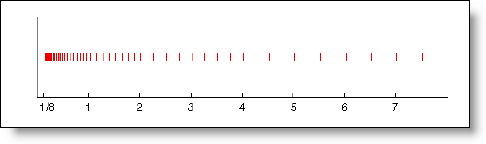
A toy floating point number system showing the spacing between numbers. 

This is my mental image when I think about floating-point numbers and issues of precision in floating point calculations.

Resources

There are many great sources of knowledge about floating-point numbers on the web and everyone seems to have a favorite reference.  My favorite is from Cleve, but here are some more resources to check out for yourself.

Floating Points by Cleve Moler

What Every Computer Scientist Should Know About Floating-Point Arithmetic by David Goldbeg

Where Did All My Decimals Go? by Chuck Allison

Now it’s your turn

Can you think of an example of an embedded system that needs to represent numbers over a full range from 2.2251e-308 to 1.7977e+308?  What resource do you turn to when you have questions about floating-point numbers?  Leave a comment here and share it.

6 Responses to “Floating-Point Numbers”

  1. James Tursa replied on :

    This is a nice article. You mention the reconstruction of the floating point number as (1 + f) * 2^e, where 0 <= f < 1. I would like to point out to the readers that while this is true for the IEEE floating point format, it is not true for all floating point formats in general. For example, the VAX / ALPHA F_FLOAT, D_FLOAT, and G_FLOAT floating point formats have the reconstruction as (0.5 + f) * 2^e, where 0 <= f <= 0.5. So in the IEEE case the hidden leading bit has a value of 1 with total mantissa value 0 <= mantissa < 2, whereas the VAX / ALPHA formats have the hidden leading bit value as 0.5 with total mantissa value as 0 <= mantissa < 1. (And there are other differences for exponent bias and special patterns that are beyond the scope of your article).

    Speaking of the VAX / ALPHA formats, this brings up the following thorny issue. Previous versions of MATLAB used to support file i/o for the VAX / ALPHA formats. E.g., the fopen command used to have ‘vaxd’ and ‘vaxg’ options so that binary files written with these formats could easily be read into MATLAB and automatically converted to IEEE. The latest versions of MATLAB have dropped this support. Why was this capability removed? It seems it would have been less effort to simply leave this capability in. There are still VAX / ALPHA systems in use today (I use one at work everyday), and there are legacy data files written in these formats that one might want to access in MATLAB. The decision to remove this capability from MATLAB was very shortsighted. It forces users to either use an older version of MATLAB to perform the task, or rewrite m-code (that used to work) with custom s/w to do the low level floating point bit format conversions manually. It has even spawned File Exchange submissions to do this. I hope The Mathworks realizes their decision was a mistake and reinstates the ‘vaxd’ and vaxg’ options in future versions.

  2. Scott Hirsch replied on :

    James –

    We don’t have a good reason for why vaxd and vaxg file formats were removed. There was a breakdown in our standard release compatibility process which failed to catch precisely your use case – that while MATLAB hasn’t run on VAX for a very long time, there are still data files which use VAX file formats.

    While we were not able to restore the functionality to MATLAB itself, we have put a patch on the File Exchange which provides the ability to read and write to these file formats:

    http://www.mathworks.com/matlabcentral/fileexchange/22675
    http://www.mathworks.com/matlabcentral/fileexchange/24793

    Sorry for the grief, and I hope that these files help out.

  3. James Tursa replied on :

    Hi. I took a look at these FEX submissions. Thanks for creating them, however, there are a couple of bugs and some undesirable behavior that I hope you can fix. First, and most importantly, they don’t convert 0 properly. e.g., do the following test:

    >> VAXG_to_uint64le(0)
    ans =
    0
    0
    >> uint64le_to_VAXG(ans)
    ans =
    2.7813e-309

    You can see that the all-zero bit pattern was converted into the garbage number 2.7813e-308. A simple fix for this file would be to add this line of code at the end of the file:

    doubleVAXG(sum(uint32le)==0) = 0;

    Similar comments apply to the VAXD_to_uint64le and uint32le_to_VAXF functions. I would request that you fix these bugs.

    Additionally, the VAXF, VAXD, VAXG formats do not have bit patterns for NaN or inf or -0, and they have a smaller range than their IEEE counterparts. When going from IEEE to VAX, it appears that your functions convert the NaN and -0 inputs into 0, so this seems reasonable. However, when the input is out of range (the IEEE number is outside the range of the VAX format) then the functions produce garbage results. e.g.,

    >> VAXG_to_uint64le(realmax)
    ans =
    16
    0
    >> uint64le_to_VAXG(ans)
    ans =
    5.5627e-309

    I would suggest that you pretest the inputs for this condition and then either convert them to the max +/- finite value for the VAX pattern or convert them to 0. e.g., for the VAXG_to_uint64le function you could do this at the beginning:

    VAXGmax = realmax / 2; % VAXG range is exactly 1/2 of IEEE
    doubleVAXG(doubleVAXG > VAXGmax) = VAXGmax;
    doubleVAXG(doubleVAXG < -VAXGmax) = -VAXGmax;

    Similar code could be added to the VAXD_to_uint64le and VAXF_to_uint32le functions.

  4. James Tursa replied on :

    I forgot to mention in my previous post that your code also has bugs at the low end. e.g.,

    >> realmin/2 % A denormalized number
    ans =
    1.1125e-308
    >> VAXG_to_uint64le(ans)
    ans =
    16
    0
    >> uint64le_to_VAXG(ans)
    ans =
    5.5627e-309

    For denormalized numbers, there is no hidden leading bit and the exponent bias is different by 1. Your code should be fixed to account for this.

  5. James Tursa replied on :

    My earlier post should have read:

    doubleVAXG(sum(uint32le,2)==0) = 0;

    (I missed a ‘ that you had in the code)

  6. James Tursa replied on :

    I haven’t heard back from you on this forum so I will move my comments over to the FEX submissions.

Leave a Reply

Wrap code fragments inside <pre> tags, like this:

<pre class="code">
a = magic(3);
sum(a)
</pre>

If you have a "<" character in your code, either follow it with a space or replace it with "&lt;" (including the semicolon).


MathWorks
Guy Rouleau and Seth Popinchalk are Application Engineers for MathWorks. They write here about Simulink and other MathWorks tools used in Model-Based Design.

These postings are the author's and don't necessarily represent the opinions of The MathWorks.