
Detecting Divide by Zero Errors
Wouldn't it be great if you could analyze a Simulink model and certify that it will never encounter design errors like divisions by zero and overflows? Since MATLAB R2011a, this is possible!
This week, my friend Nishaat Vasi introduces this new feature of Simulink Design Verifier
Detecting Design Errors with Simulink Design Verifier
 Imagine driving a new prototype of a car on a test track at 100mph when a division by zero error in the embedded design causes an unwarranted transmission shift to first gear. Even a car enthusiast would not want to be the test-track driver in such a scenario! Such errors in design logic and math operations can be easily detected in your Simulink models without requiring extensive tests or simulation runs.
Consider a small section of a controller model that has an input bus which I defined in the MATLAB workspace:
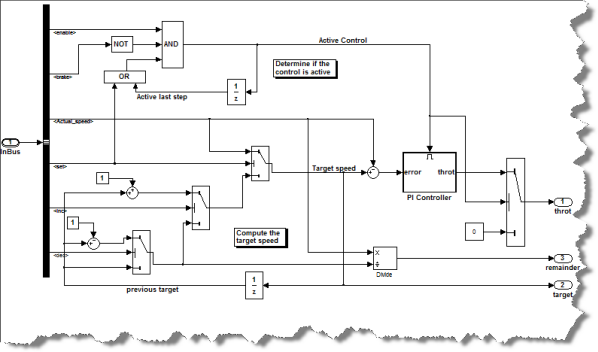
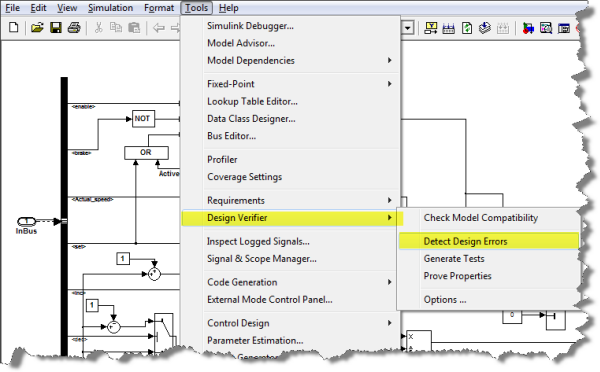
This model simulates fine for my set of inputs in the InBus declaration, but I wanted to be sure that it will not cause any dynamic execution errors. I used the new Detecting Design Errors option of the Simulink Design Verifier as follows:
The tool highlights the analysis results on the model making it much easier to debug potential issues:
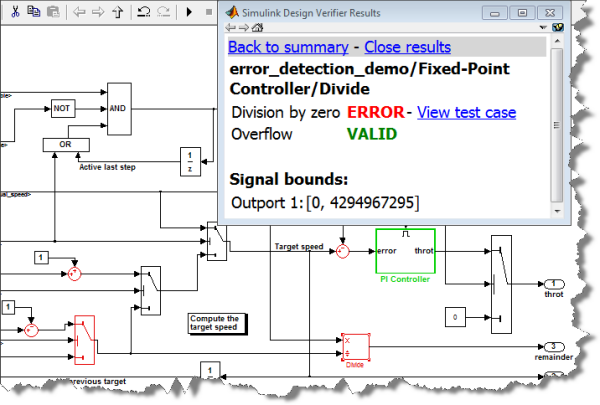
For each block with an error (red), Simulink Design Verifier calculates signal-range boundaries and generates a test vector that reproduces the error in simulation. Using this test case made it easy for me to identify what set of inputs cause an error and engineer a defensive mechanism to avoid this scenario. As you may notice, green highlighting indicates that the block does not produce a design violation. Design errors detected include dead logic, integer overflow, division by zero, and violations of design properties and assertions. This information can then be used to either improve the design and its requirements or guide the simulation for debugging and validation.
Overview Video of Simulink Design Verifier (1:50)
This new R2011a feature could save you huge amounts of time, effort, and money in debugging design errors – even before running a simulation!
Now it's your turn
What do you think of the Design Error Detection feature? Did you encounter such design error in the past? Leave us a comment here.
- Category:
- Guest Blogger,
- Verification & Validation




Comments
To leave a comment, please click here to sign in to your MathWorks Account or create a new one.