
Auto Solver Settings
When looking at the solver configuration of a new model, you probably noticed that many settings are set to Auto.
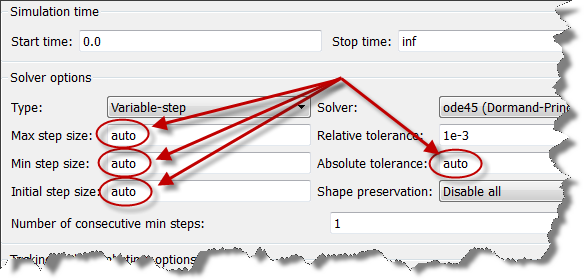
When an Auto option is provided for a setting, it is because we feel that this Auto setting will be appropriate for most users.
Today I want to show an example illustrating that this is not always the case.
The Question
Last week a user asked me the following question:
Why is my model running significantly slower when I set the stop time to infinite, versus a large number like 500,000 seconds?
The Investigation
To begin, here is an image of what the model looks like:
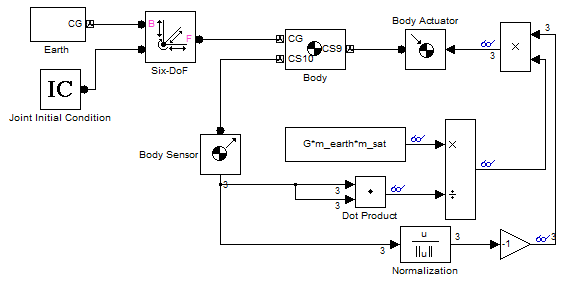
We can see that this is a SimMechanics model simulating the motion of a satellite rotating around the Earth. Obviously, this kind of system has a very slow dynamics and can probably take very large time steps without loosing accuracy significantly.
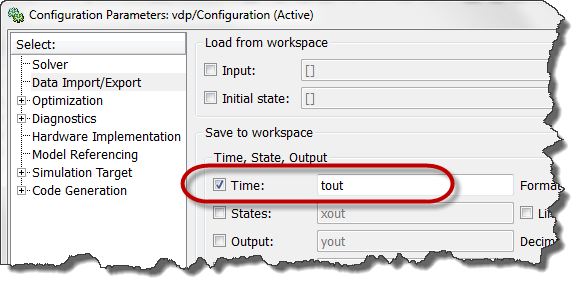
One thing I like to do when a user reports a model being slow is to log the time vector of the simulation
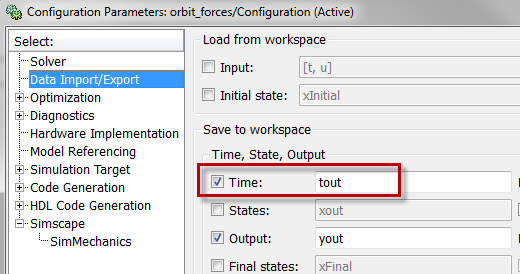
and display it using a line like:
semilogy(tout(1:end-1),diff(tout))
The log axis allows to differentiate large versus small time steps and to identify some common patterns.

In this case, it clearly showed that with a stop time of 500,000 sec, the steps taken could go up to 1000sec, but with the stop time set to infinity, the time steps taken are never higher than 0.2sec.
The explanation
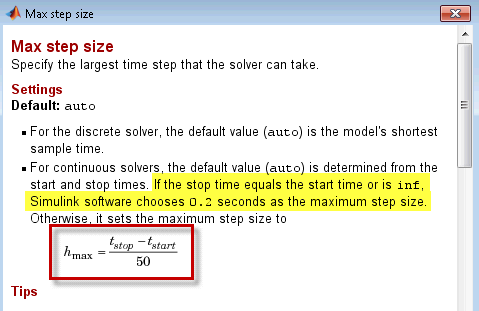
Let's right click on this setting to reach its documentation:

The first thing we see, highlighted by a red rectangle here, is the equation linking stop time and max step size. Many users are familiar with this equation. But when reading the text, we find the description of the behavior when the stop time is infinite.
Now it's your turn
Are the Auto and default settings in Simulink appropriate for you? Please share your experience by leaving a comment here.
- Category:
- Simulation,
- Simulink Tips




Comments
To leave a comment, please click here to sign in to your MathWorks Account or create a new one.