
Sample Time Offset
I noticed that many users are not aware that it is possible to specify sample time offsets in Simulink.
Scalar Sample Time
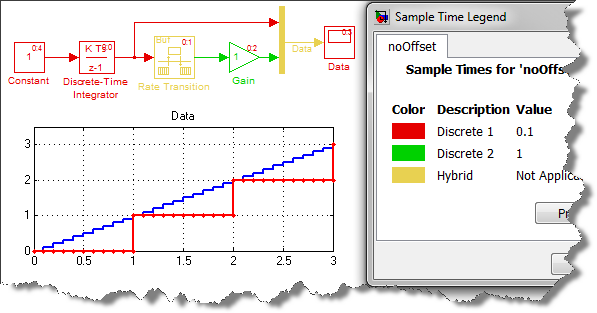
In this simple model, I have specified the sample time of the Constant and the Discrete Integrator to 0.1s and the sample time of the Rate Transition block to 1s. This means that the Gain block will execute at time 0s, 1s, 2s, 3s, ...
Sample Time Vector
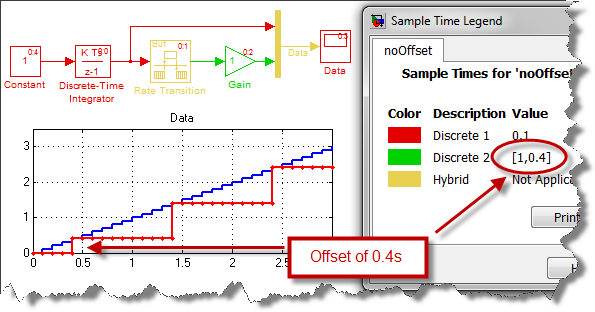
What if I want the Gain block to execute at 0.4s, 1.4s, 2.4s, 3.4s, ... ?
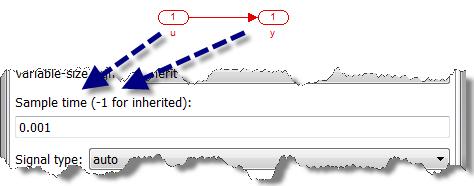
As described in documentation section How to Specify the Sample Time, you can specify a sample time vector in the form [Ts, To] where Ts is the sample time and To is the initial time offset.
To apply an offset, I configure the Rate Transition:
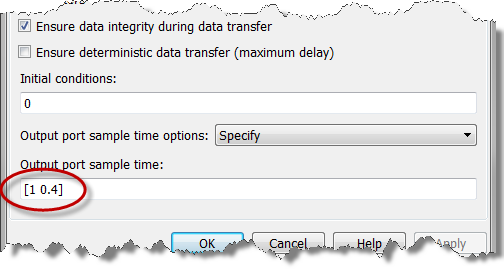
and the model now gives a different result. We now see that the Gain executes at a sample time of 1s, but with an offset of 0.4:
Now it's your turn
Do you use sample time offset in your model? Leave us a comment here.
- Category:
- Modeling,
- Simulation,
- Simulink Tips


Comments
To leave a comment, please click here to sign in to your MathWorks Account or create a new one.