
Accessing Block Data During a Simulation
This week I discovered that event listeners also work with bus signals!
You might be saying: "What is an event listener?"
In this post, I will describe how to register an event listener for a bus signal to display signal values on a figure. Here is the final result:

You can download the files for my event listener example here.
If you want to see a complete example that is really good, I recommend the File Exchange submission Simulink Signal Viewing using Event Listeners and a MATLAB UI by Phil Goddard. It has been selected as pick of the week some time ago.
Let's see how this stuff works.
Event Listener
An Event listener gives you a way to access block data during simulation. A typical use case is to display simulation data in a MATLAB GUI while a model is running. The key function you need to know about is add_exec_event_listener.
Setup a nonvirtual bus
Before setting up the event listener, we need to prepare a model. Let's create a simple test model including a bus with 2 elements:
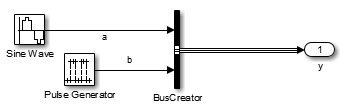
We need to make the bus nonvirtual. For that, you can manually follow the steps outlined in Creating Nonvirtual Buses. Alternatively, here is a script that should do it automatically:
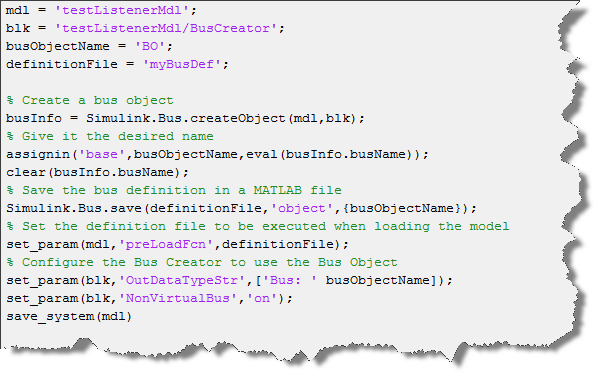
Registering the Event Listener
The event listener must be registered while the model is running using add_exec_event_listener. Because of this requirement, a good place to register the listener is in the model StartFcn callback. Here is what it looks like:
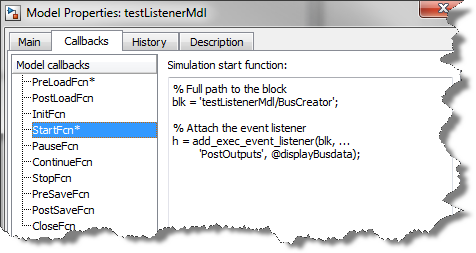
The callback function
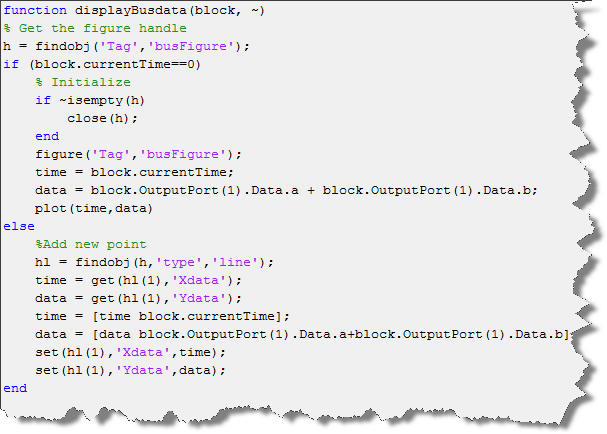
In the image above, you can see that I register a function displayBusdata to execute after the block's Outputs method executes.
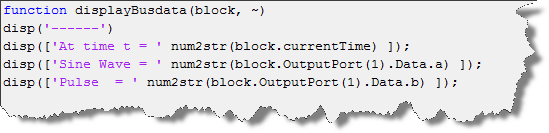
When it calls this function, the Simulink engine passes to it the Simulink.RunTimeBlock object for this block. This object allows you to access everything relevant to this block. For example, if you want to display the value of the bus elements at the MATLAB prompt, the registered function could be as simple as:
If you want to go more complex and display the values in a MATLAB figure. Here is an example where I plot the sum of the two bus elements:
Now it's your turn
I hope this inspires you to create nice MATLAB GUIs to interface with your simulations. Share your event listener stories by leaving a comment here.
- Category:
- MATLAB,
- Parameters,
- Signals,
- Simulation



Comments
To leave a comment, please click here to sign in to your MathWorks Account or create a new one.