
MATLAB Language in Stateflow
Have you noticed a new block in the Stateflow Library since R2012b?
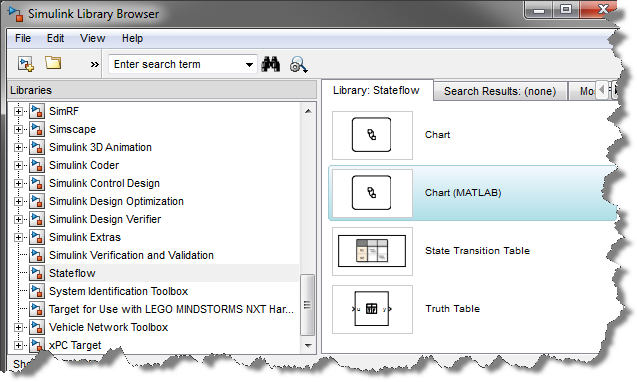
The MATLAB Chart block uses MATLAB as the action language for states and transitions in Stateflow.
This means that you don't have to create a separate MATLAB Function every time you want to do matrix math in a Stateflow chart. Let's look at a few examples of what can be done in a MATLAB Chart.
Matrix Operations
Let's say I define a bus object containing a 3x1 position vector and a 3x3 rotation matrix:
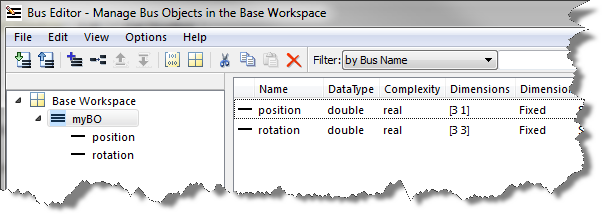
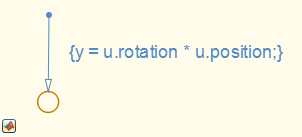
With MATLAB as the action language, I can multiply the bus elements directly in a transition action:
Access to all MATLAB Coder supported functions
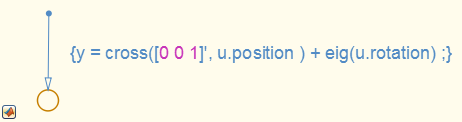
With MATLAB as the action language, you can use any function supported by MATLAB Coder for code generation. For example, I can use the functions like ones and eig in a transition:
Manipulating Arrays of buses
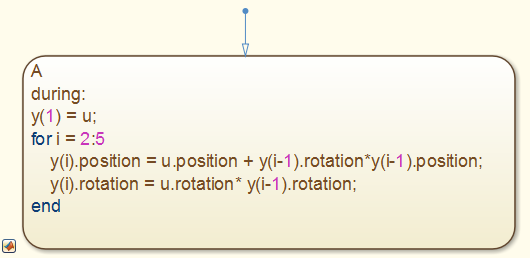
Let's say I want my chart to generate an array of the bus defined previously, I could write something like:
Conclusion
Based on my experience, using MATLAB as the action language in Stateflow charts makes it a lot easier to implement the algorithms I need. Since I first tried it, I have not needed to use C as the action language.
Of course, the MATLAB Chart block is not the best choice for all applications. If your application is interfacing with legacy C functions or more naturally expressed in C language, than there is no need to switch. The C chart block that we are all used to still continues to be developed and supported.
If you need help deciding which block to use, I recommend looking at the Differences Between MATLAB and C as Action Language Syntax in the Stateflow documentation.
Now it's your turn
Have you tried using MATLAB as the action language in your Stateflow charts? Let us know what you think by leaving a comment here.
- Category:
- Stateflow,
- What's new?






Comments
To leave a comment, please click here to sign in to your MathWorks Account or create a new one.