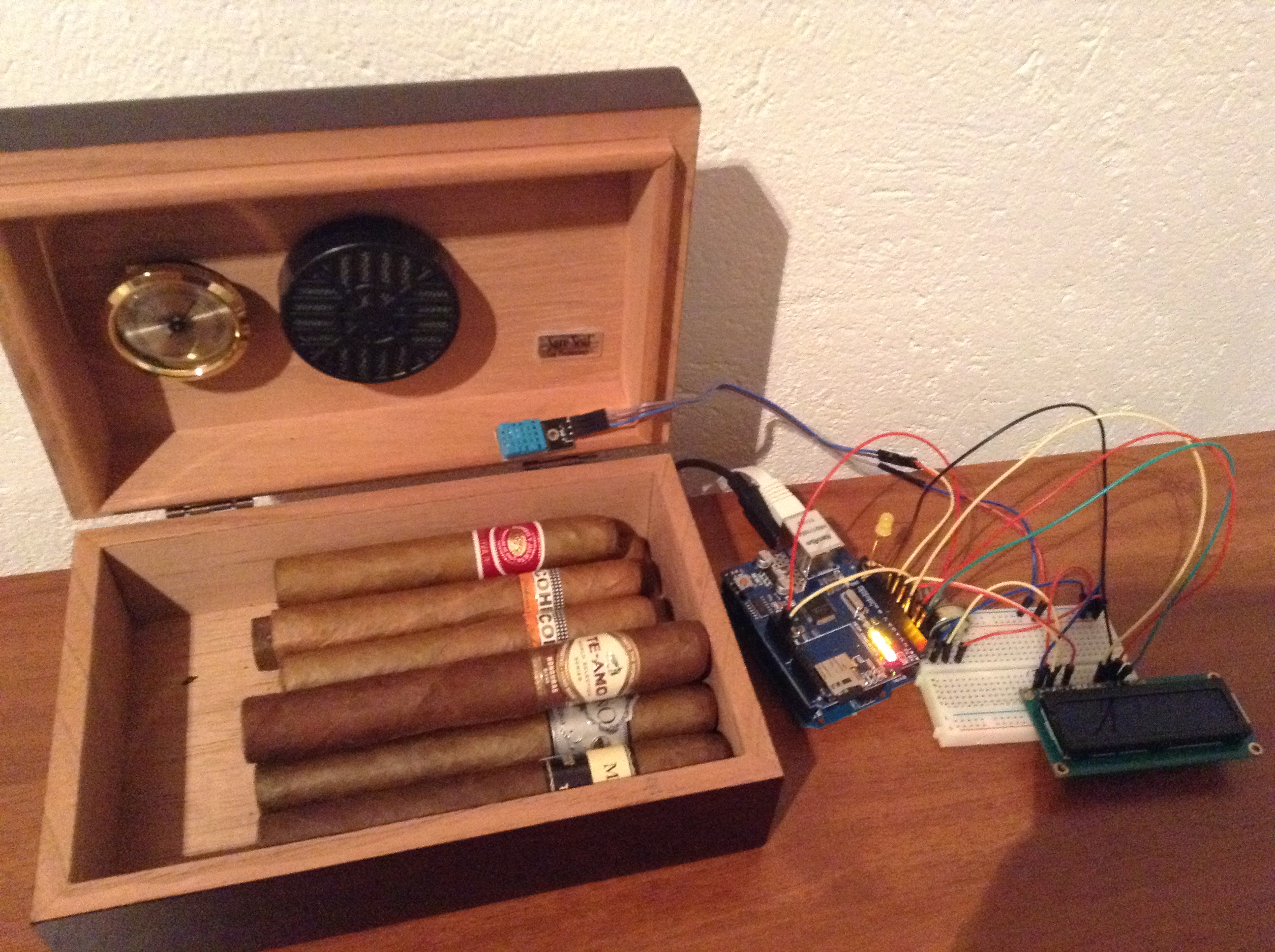
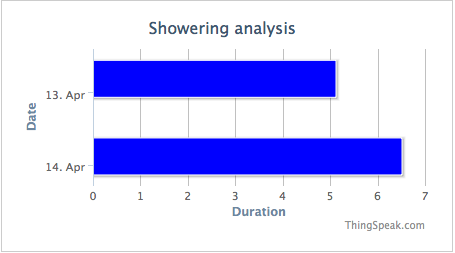
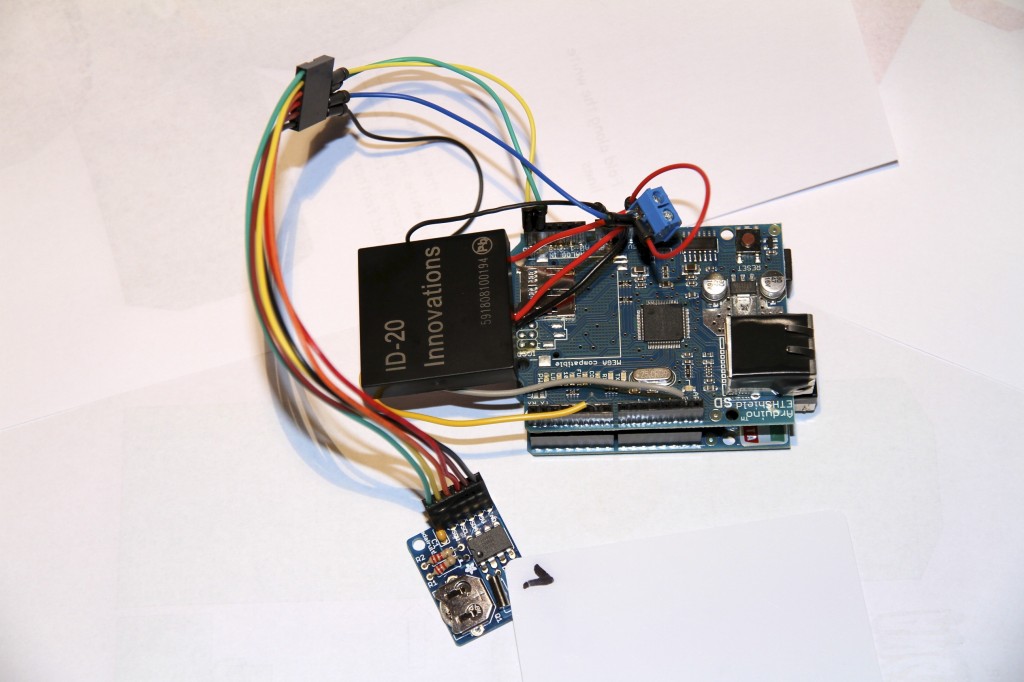
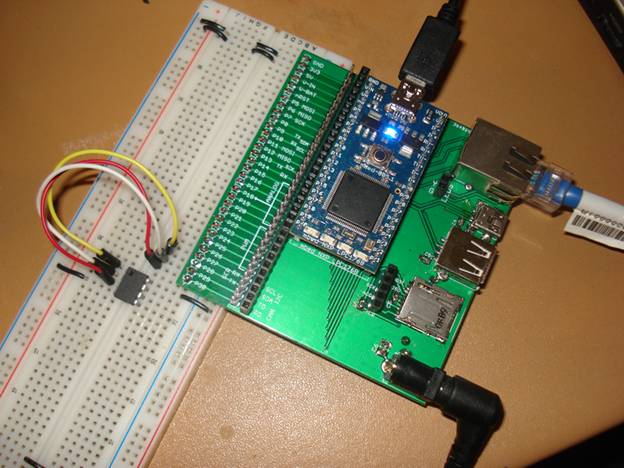
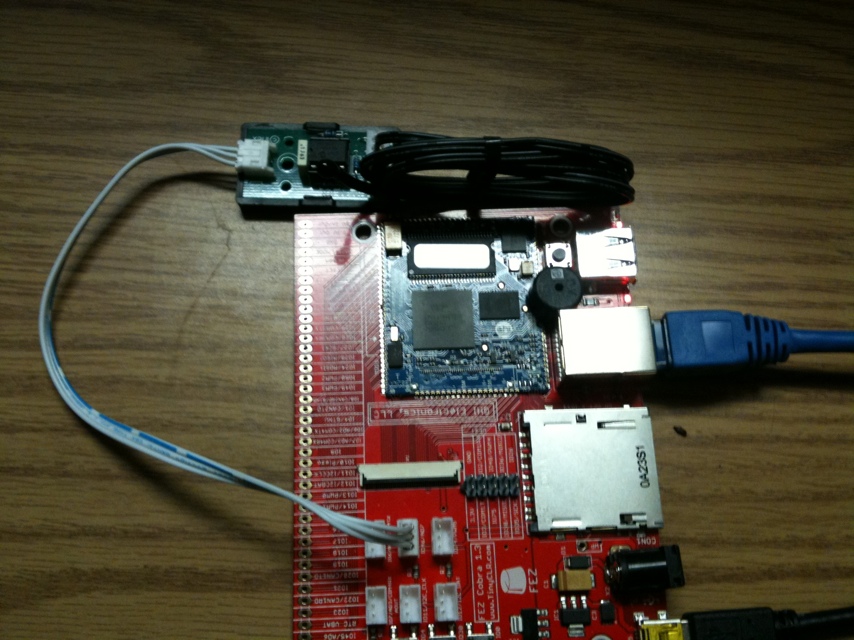
IoT has uses in all types of industries. Personally, I use ThingSpeak in about 8 different projects around my house. ThingSpeak’s ability to help you easily share your data and insights from the... read more >>
]]>“The Gunma Industrial Technology Center Implements 24/7 Anomaly Detection System for Product Processing”
What features are important in your production monitoring systems? If you aren’t monitoring them in real time today, leave a comment if you’d like to try using ThingSpeak!
]]>
The Internet of Things (IoT) can help you get the right data from your hardware when you need it, no matter if you are right there with the hardware or a world away. Two new hardware examples... read more >>
]]>1. IoT-Based Temperature Monitoring Using ThingSpeak and Arduino Hardware – MATLAB & Simulink
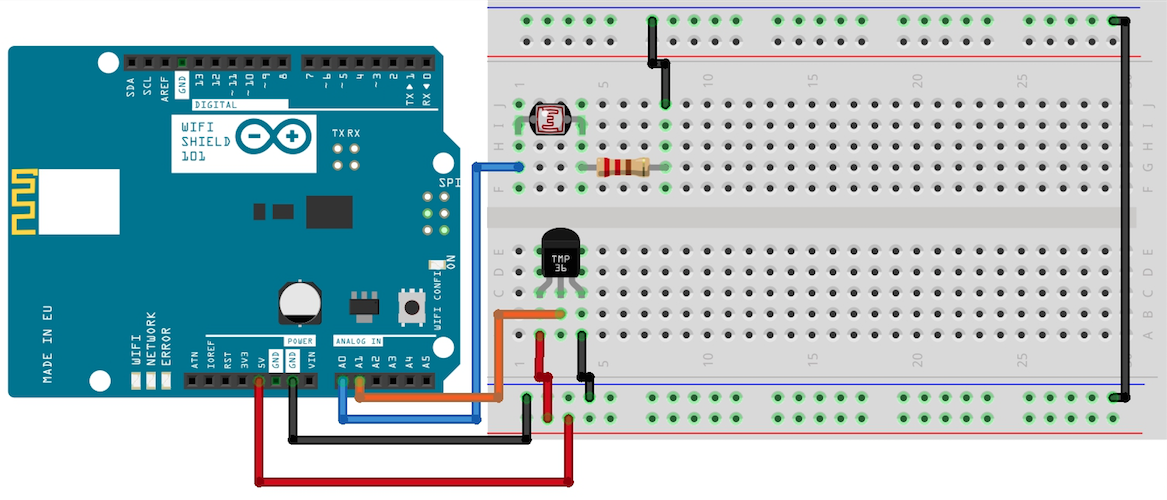
Environmental monitoring is one of the standout applications of IoT technology, and where the ease of getting set up on ThingSpeak also stands out. Once you’ve got your data streaming in, you can use the more advanced features of ThingSpeak and the built in MATLAB to enhance your data collection and interpretation. This example shows several of these features including the useful visualization widgets, integrated MATLAB code, and the use of the email alerts service to keep you aware of anomalous activity in your channel. This setup involves a BMP280 sensor connected to an Arduino® board, which serves as the hardware foundation. This example assumes a dedicated MATLAB connection, which can allow high speed analysis and controls. For a deployed sensor example, have a look at the many other examples in the ThingSpeak documentation, including this temperature read and write example.
2. Introduction to Engineering with Arduino – Curriculum Module
This complete curriculum module is available in the MathWorks File exchange. The module includes MATLAB live scrips demonstrating engineering principles using Arduino Hardware. Instructors can use these live scripts as demonstrations in lectures, class activities, or as interactive assignments outside class. Everyone else can use it to level up their engineering basics. This module covers the concepts of signals, control, and technical writing. It also includes examples of the Internet of Things and physical modeling. This example not only educates on the technical aspects of hardware-software integration but also inspires innovation and experimentation within the realm of IoT.
3. Analyzing Traffic Using a 360-Degree Camera and ThingSpeak Analytics
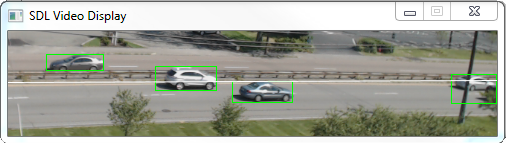
The final example highlights the application of IoT technologies in urban planning and management, specifically in analyzing traffic patterns. The author demonstrates data collection using ThingSpeak from their edge processing system with video sensor. Then the author shows how you can do both live visualizations in the channel field plots and processing of the incoming data to produce live analysis such as a traffic comparison plot.
The intersection of hardware connectivity and software analytics shows the true potential of IoT. Happy ThingSpeaking!
]]>
The MATLAB AI Chat Playground was launched on the MATLAB Central community at the end of November. I recently got the chance the interview the chatbot about ThingSpeak. I was curious how much it knew... read more >>
]]>Here are some excerpts from my first conversation.
Me: Can you read and plot the temperature from field 4 of the weather station at ThingSpeak channel 12397? Show 120 minutes.
AI:
Great, lets see what the code does by inserting it into the code editor and clicking run.
Woah!
I’m pretty impressed. Lets go a little further.
Me: Can you add a 30-point moving average and label the maximum and minimum values of the moving average?
And it can keep going! Even though I’m a seasoned ThingSpeak user, the AI helps me improve my efficiency. Lets say I didn’t know how to visualize some ThingSpeak IoT data. Lets ask it for ideas on types of MATLAB visualizations.
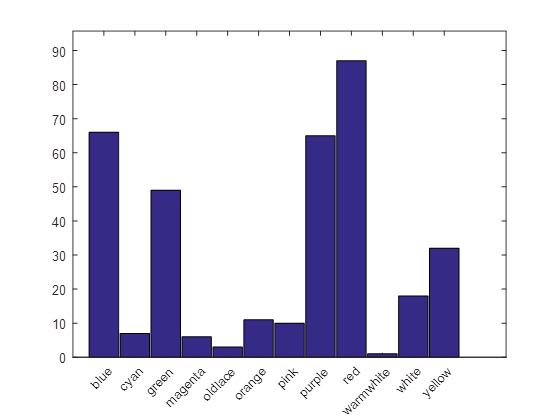
Me: What are some ideas to visualize colors from the cheerlights channel?
That’s great, the AI suggested frequency analysis on the colors. Even if I didn’t know how to effectively visualize this kind of data, the AI chat Playground gave me a direction to go.
And don’t forget to be friendly to the AI just in case…
Try out the playground for your IoT projects, and let us know what your experience was.
]]>
If you want to upgrade your ThingSpeak capabilities, have a look at the ThingSpeak repository of template codes that open in MATLAB Online. ThingSpeak has MATLAB built in to make it easy to analyze... read more >>
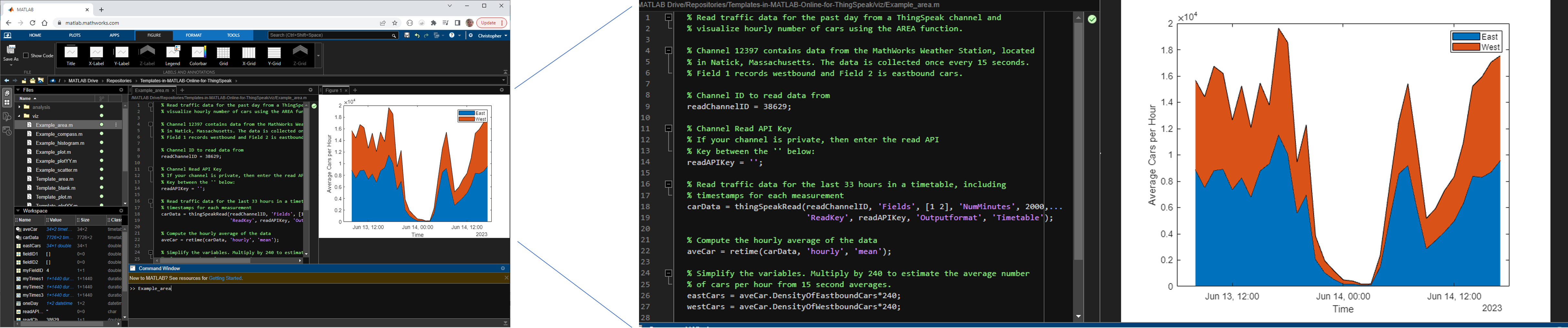
]]>To try it out, follow any of the links in the ThingSpeak GitHub repo. The template links will automatically take you to MATLAB Online and open the file for you to edit. You can also create your own GitHub repositories that have links to open in MATLAB online. You can read the instructions on how to create these links; the page even includes a form to build the link for you using a few inputs.
If you find yourself wanting some advanced analysis on your IoT data (as I often do), or perhaps you want to set up automated analysis and reporting of the status of your data, use ThingSpeak’s integration with MATLAB. Try these:
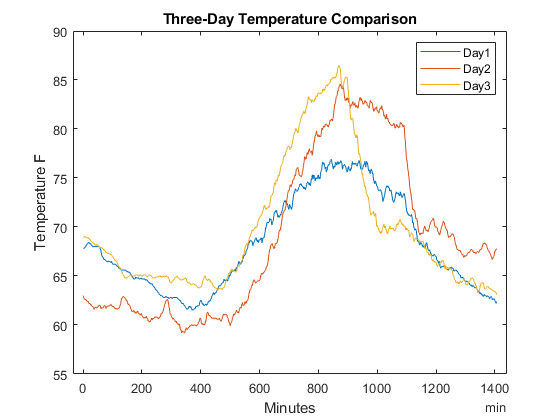
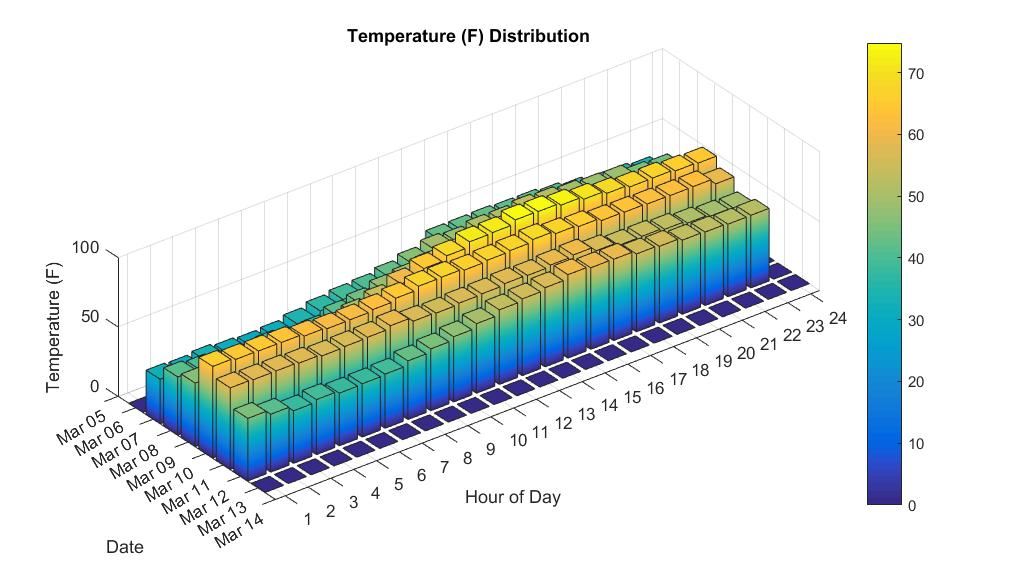
Let’s say you wanted to make this cool three-day temperature comparison with ThingSpeak data using MATLAB.
Using MATLAB Online with GitHub is just one example of how you can leverage the power of MATLAB to improve your ThingSpeak IoT projects. With its advanced features and user-friendly interface, MATLAB Online is a valuable tool for anyone working with IoT data and analytics.
]]>
“MATLAB and ThingSpeak extended tools necessary for remote learning and technologies covered by our course. Project-based learning benefited from MathWorks’ high-level programming, simulation,... read more >>
]]>The Slovak University of Technology is the largest technical university in the Slovak Republic and they belong to MathWorks’s Campus Wide License model – along with more than 2000 universities worldwide. The university has almost 11, 000 students and offers education in technical fields and involves students in research in natural sciences, computer sciences, construction, architecture, materials technologies, chemistry, and food technologies.
The Institute of Robotics and Cybernetics at the Slovak University of Technology recently extended its curriculum with a course in Industrial IoT. In this course, the students can learn current communication standards that include OPC UA, CAN BUS, EtherCAT, PROFINET, and technologies that include internet-of-things solutions for primarily industrial applications. Learning in the course is project based, and students must do five projects during the semester. Each project builds on the skills and technologies learned in the previous projects, and the difficulty and complexity of the projects rise with time.
“Students at the Institute of Robotics and Cybernetics use MathWorks products in several courses from Systems Theory to several Control courses. As a standard simulation and development tool, MATLAB enables students to focus more on the topics. MATLAB products offer solutions for technologies used in many industries,” says Dr. Ernek
Challenge
Teaching industrial communication standards and technologies is best done with project-based learning. However, project-based learning requires cooperation between software and hardware. Dr. Ernek explains that, “Due to the pandemic, we were forced to convert the Industrial IoT course into a remote learning experience.” The first challenge was replacing laboratory hardware with models that represent real-world processes like heating systems or assembly lines. “Although PLC manufacturers provide simulators for controllers, we still needed to simulate other laboratory hardware.”
The second challenge was to find a reliable IoT platform. Historical process data are usually captured and stored for later analysis. “Storage and visualization of the process data were one of the key topics of the course. We needed a platform that is easily accessible without a complicated setup for the students,” says Dr. Ernek. Setting up a local IoT platform could lead to complications with databases or communication. Cloud IoT platform seemed like a better option, but it had to be easily accessible via other software solutions used in the course.
The last challenge was to show industrial communication between an operator, who monitors the process, and a remote controller. “OPC UA technology is a well known industrial communication standard used by many industries. Therefore, we needed software that could act as an OPC client,” says Dr. Mrafko. In addition, OPC UA technology is only one of many industrial communication standards, and it would be beneficial to work with or simulate other communication technologies.
Solution
The Slovak University of Technology acquired a Campus-Wide License for MATLAB, Simulink, and related products a few years before the pandemic. The Campus-Wide License gave students, professors, and researchers freedom to access software downloads, online training, and other resources. Moreover, students were familiar with MATLAB and Simulink from other fundamental classes. Therefore, the transition to the Industrial IoT course was seamless. “Having well-known software was beneficial to our course because students did not have to spend a few weeks to learn a new tool,” says Dr. Ernek.
MATLAB, Simulink, and related products were crucial to overcoming the first challenge of representing real-world hardware. Simulation models replaced laboratory hardware. Simulation of a simple system and data transfer to the IoT platform is one of the tasks in the first weeks of the course. “MATLAB offers a plethora of ready-to-use and well-documented examples that we were able to reuse for the course needs,” says Dr. Ernek. For example, the Simscape Fluids House Heating System example was chosen as since it is relatable and easy to conceptualize. Another project uses a custom manufacturing system modeled in Simulink and visualized via Simulink 3D Animation.

Figure 1 Simulink house heating system model adapted to store data in ThingSpeak.
The ThingSpeak IoT platform provided the solution to the second challenge. “ThingSpeak offers data aggregation and visualization and data analysis tools as well. It is accessible via a MathWorks account, easily set up, and works with MATLAB. It was what we needed for our students,” says Dr. Ernek. The House Heating System model was paced to run in soft real-time, and data were sent to ThingSpeak every 30 seconds. The obtained data were then visualized in ThingSpeak, and the student immediately saw if the data had been sent correctly .

Figure 2 ThingSpeak plots output from home heating model. Fluctuation about the set point and the model response for a change in setpoint are seen in the plots.
Projects in the second half of the course require OPC UA communication. Industrial Communication Toolbox provides the capability to read, write, and log OPC UA data from MATLAB and Simulink. In addition, students can write their Apps for reading and writing OPC UA data using the MATLAB App Designer and the simulated OPC UA C++ Demo Server application. The next project focuses on monitoring manufacturing productivity indicators for data obtained from a simulation of packing machines. Students use Node-Red to read data from PLC, process the data, calculate the productivity indicators, and then publish the calculated indicators to ThingSpeak. The last project used the Simulink model, Siemens virtual PLC for control, and an OPC client to read data from a PLC.

Figure 3 ThingSpeak charts for Simulink model outputs from PLC control read via OPC client.
Course evaluations showed that students liked working with new technologies and projects. “The lectures gave us a good introduction to the theory and technologies, which we then applied in the projects. The project was progressively complex and used combinations of real-world technologies,” wrote one of the students. Dr. Ernek and Dr. Mrafko want to continue using MATLAB and ThingSpeak even after returning to the state before the pandemic.
Results
Universal Platform Facilitates Higher Quality Learning Experiences. “All university members and students have full access to MATLAB, Simulink, and various toolboxes with Campus-Wide License,” says Dr. Ernek. “Access to MathWorks tools provided universal software platform for multiple courses across study domains that can build on top of each other.”
Reconfiguration of multidisciplinary projects is simplified. “MATLAB enabled us to quickly convert from laboratory hardware projects to a remote learning experience,” says Dr. Ernek. “Many industry standards are implemented in the MathWorks products family, which allowed students to use them right away and focus on the projects,” notes Dr. Mrafko
Adoption of cloud platform for live data sharing and visualization. “ThingSpeak provided a complete IoT analytics platform in the cloud that is easily accessible to students without additional installations,” says Dr. Ernek. “Ability to visualize and analyze live data was great, but best ThingSpeak feature is seamless cooperation with MATLAB, Simulink, and other products used in our course.”
Products Used
• MATLAB
• Simulink
• Simscape
• Simscape Fluids
• Industrial Communication Toolbox
• Simulink 3D Animation
• ThingSpeak

Professor Chao Wang at Arizona State University recently introduced a course on AI and IoT to first-year engineering students. Deep learning in MATLAB is used to classify images and send the results... read more >>
]]>Read the article here:
l

Many users have asked, and it’s finally here: Your devices can upload images to ThingSpeak! With this new feature, you can create a cloud-based tracking or monitoring system for your important... read more >>
]]>With this new feature, you can create a cloud-based tracking or monitoring system for your important assets by taking photos and uploading them to ThingSpeak image channels. Users with a paid ThingSpeak license can create image channels and then embed the output from the image channel onto a channel view using the image widget.
To help you get started, the ThingSpeak documentation includes two examples for uploading images to ThingSpeak: ESP32-CAM camera module and Raspberry Pi-connected camera.
Many ThingSpeak channels represent a particular IoT project. Previously, to show an image in the channel view you had to go to some lengths – including copying from third-party location using MATLAB visualizations or using an existing photo on the web. The ThingSpeak images feature uses your MATLAB Drive space to store images, so they will be available for your channels whenever you need them.
Here is some MATLAB code that will write to an image channel from your computer. This code will help you get an image into ThingSpeak without needing an IoT device. Save an image to your system and name it “myImage.jpg”.
% Import these libraries to use the HTTP interface.
% They are in base MATLAB, no extra license is required.
import matlab.net.http.*
import matlab.net.http.field.*
import matlab.net.http.io.*
% Edit this section for your files. Timestamps are optional.
channelId = 'X1X1X1X1X1';
channelApiKey = HeaderField('thingspeak-image-channel-api-key', 'ZZZZZZZZZZZZZZZZ');
filename = 'myImage.jpg';
clientTimestamp = '2022-01-29T15:06:35.642Z'; % Optional Timestamp
provider = FileProvider(['./', filename]);
req = RequestMessage(RequestMethod.POST, [channelApiKey], provider);
url = ['https://data.thingspeak.com/channels/', channelId, '/images/', ...
filename, '/', clientTimestamp ];
response = req.send(url)
If everything worked, you should expect a StatusLine of ‘HTTP/1.1 202 Accepted’ in the response. If you want to see this image on a channel view, follow the steps in the documentation.

Be careful when saving a regular stream of images, they can fill up your drive space fast. Here is MATLAB code to delete a date range of images.
import matlab.net.http.*
import matlab.net.http.field.*
import matlab.net.http.io.*
% Edit this section with your information.
channelId = 'x1x1x1x1x1';
channelApiKey = HeaderField('thingspeak-image-channel-api-key' ...
, 'xxxxxxxxxxxxxxxx');
endDate = datetime('now');
startDate = endDate - days(3);
fmt = 'yyyy-mm-ddThh:MM:ssZ';
startDate = datestr(startDate,fmt);
endDate = datestr(endDate,fmt);
pathRange = sprintf('/images?timestamp=ingest&start=%sZ&end=%s',...
startDate,endDate);
req = RequestMessage(RequestMethod.DELETE, [channelApiKey]);
url = ['https://data.thingspeak.com/channels/', channelId, ...
pathRange];
response = req.send(url)
In both cases, you will get a status code that you can check using the status endpoint.
]]>
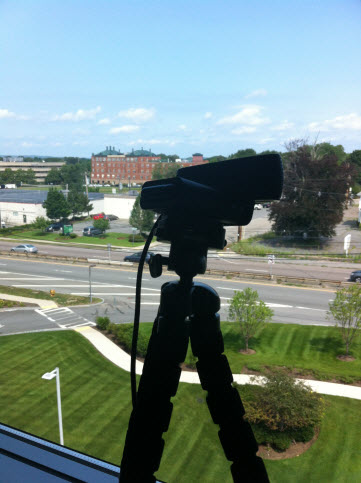
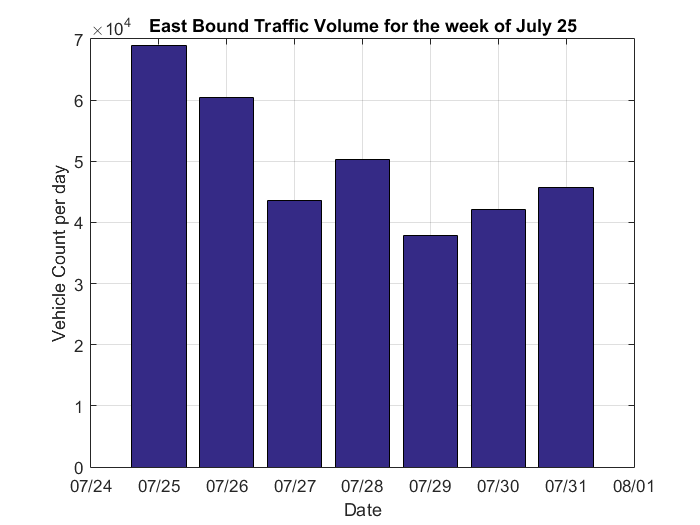
We’ve set up a new way to monitor the traffic and made some unexpected discoveries using MATLAB along the way. You may be familiar with the ThingSpeak traffic monitor channel that uses a image... read more >>
]]>The “Shake” already makes the data available in the cloud. But with ThingSpeak, I can to set up an automated process that filters the raw data and plots it with the traffic data. Now I can see the comparison data whenever I need to and verify predictions with live data. For example, I can see there is a correlation of an increase in the traffic intensity during rush hour. Recently, during a big snowfall, I was able to verify seismic data (from the snowplows) correlated to lower traffic numbers (from travelers staying off the road.)
Here’s the process for getting this going, with a few code hints (not the full script though).
urlQuery =... 'https://data.raspberryshake.org/fdsnws/dataselect/1/query?starttime=2022-02-28T00:30:00&endtime=2022-02-28T01:00:00&network=AM&station=RF23B' data = webread(urlQuery);
…
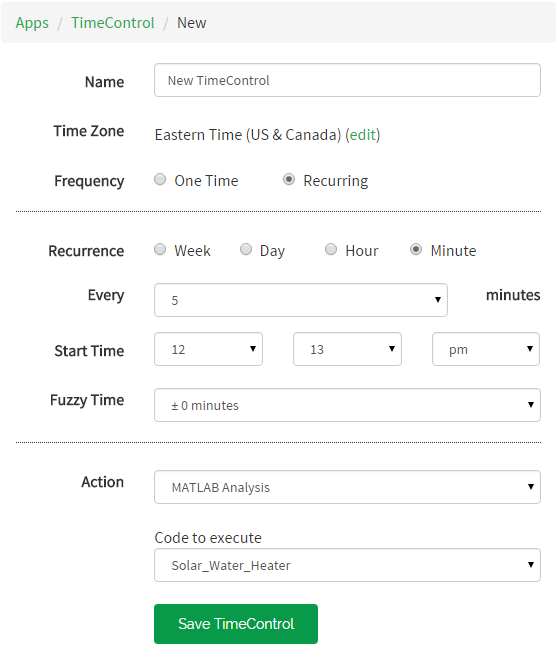
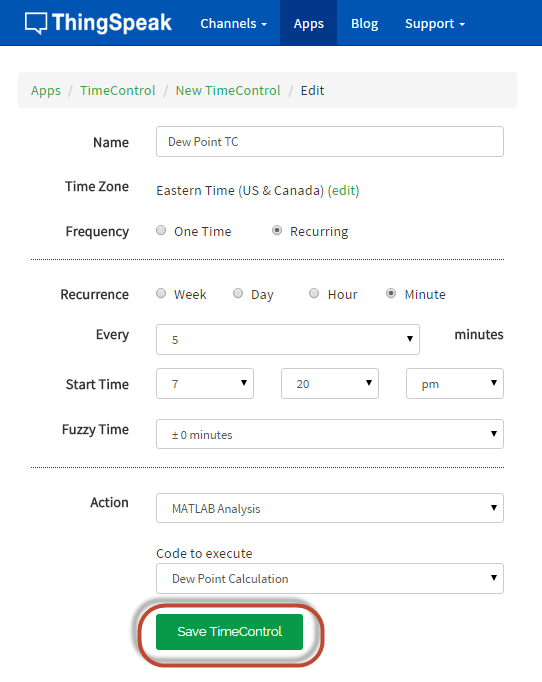
2. If you used MATLAB Analysis in ThingSpeak, then you can set up a TimeControl to get the data at regular intervals; I chose 5 minutes, so the data is nearly live.
3. Use MATLAB visualizations to read the traffic monitor data and the filtered shake data, and plot over the same time range.
myData = thingSpeakRead(channelID,'dateRange',[startTime,endTime],'outputformat','timetable');
The seismic data does generally mimic the traffic data but there is not 100% correlation. One reason may be that trucks driving by at night may make large seismic events but show up as only one count in the webcam data. Another issue is that the distance from the road to the seismic detector is at least 100 m, over which many of the ground vibrations may dampen or scatter. Last the building vibrations are still present somewhat in the comparison data.
The building makes a lot of noise so choosing the right frequencies for a band pass filter is important to get good comparison data. Since the processing is done in MATLAB, it’s easy to generate an FFT spectrum and compare nighttime data (when there are fewer cars) to daytime data, perhaps in rush hour, when the traffic is highest. Here is a comparison of frequency spectra for the start of rush hour and the middle of the night.
The difference line (in yellow) does not have a specific value since the two FFT’s are not normalized, but it provides a hint of where to look for differences. Choosing the right frequencies removes features in the seismic data that do not match the traffic data, as expected. Note the missing building noise features in the plots below.
The real benefit to live IoT data is that you can view the plots whenever and wherever you need them. For example, when the road gets closed, or the local quarry is blasting rocks, you can see how the live data responds when you ae looking for particular features or insights.
]]>
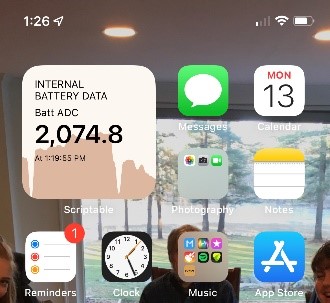
Starting with iOS 14, Apple introduced widgets for the iPhone and iPad. Widgets elevate information to the top of your device and offer information at a glance. They help you customize your device in... read more >>
]]>
Scriptable allows you to write your own widgets using JavaScript and run the scripts on your iOS device. Anil Patro shared a starter template to create a ThingSpeak Graph widget using JavaScript on GitHub. You can use Anil’s code and modify it for your ThingSpeak channel and style.
Here are some steps to help you put a ThingSpeak widget on your iOS device:

iOS widgets refresh rate is controlled by the device. The widgets will update themselves on some schedule and eventually synchronize with recent ThingSpeak channel data.
Enjoy making custom widgets for iPhone and iPad thanks to Scriptable and Anil’s work. Anil also posted some widget code for CheerLights.
]]>
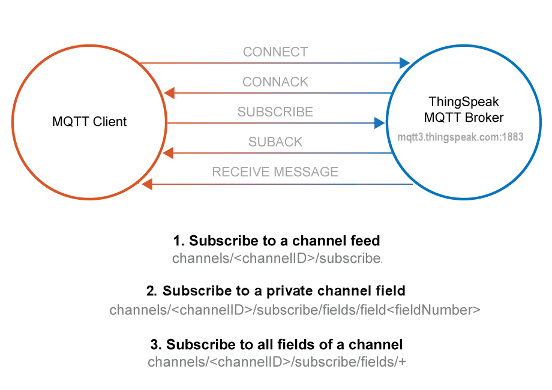
ThingSpeak has released an update to the MQTT service that improves access control and device management for IoT projects. This new interface is available to all ThingSpeak users. Learn more in the... read more >>
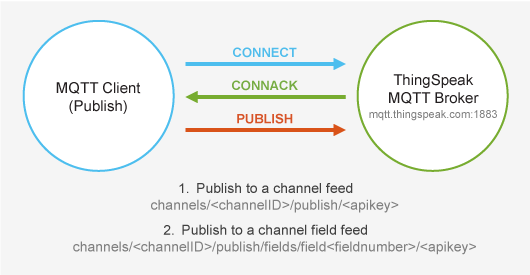
]]>If you have used ThingSpeak MQTT in the past, I wanted to mention one big change to how you access the service. The new MQTT service is available at the hostname: mqtt3.thingspeak.com.
If you decide that MQTT is right for your IoT project, you can start by adding a new device to your ThingSpeak account. This will set up the MQTT credentials needed for the device to connect to ThingSpeak. MQTT works well for low-power devices and low-latency applications.
ThingSpeak’s new MQTT support includes:
We’ve updated our documentation to include several new MQTT examples with code for the new interface. We have added a new example to secure the transmission of data between devices and ThingSpeak.
]]>
We were searching around for ThingSpeak IoT resources and noticed that Google was sharing the top questions related to ThingSpeak. Christopher Stapels and I thought that it would be fun to answer... read more >>
]]>Some people use ThingSpeak for monitoring machine processes. This allows them to share the data with potential customers and ensure the process is within control. There are over a million ThingSpeak channels representing a vast assortment of projects. Some projects measure the temperature and humidity in one room, some projects include a global network of air quality monitors. You can send data to ThingSpeak from your devices, create instant visualization of live data, and send alerts.
ThingSpeak accepts strings, integers, decimal degrees, and any encoded data. ThingSpeak stores data as strings of up to 255 characters per field. ThingSpeak organizes data by channels, where a channel represents data from a given device or process. Each channel contains eight data fields, three fields for location: latitude, longitude, and elevation, and one extra field for a status report. If you write a number into a field (integer or float), ThingSpeak will display the numbers in field charts on your channel view.
Yes, for non-commercial use. ThingSpeak has different license types for different intended uses. The free license has some restrictions. Purchasing a paid license allows a faster update rate and the creation of additional channels. For more info, see How to Buy and the ThingSpeak FAQ.
Once your data is stored in ThingSpeak, you can retrieve your data from ThingSpeak from MATLAB, a REST API, or MQTT API.
Many devices can take advantage of the ThingSpeak library for Arduino and Particle devices. You can use the address bar in your web browser to test updating a channel via the REST API.
Use this format to update your field.
https://api.thingspeak.com/update?api_key=<YOUR_API KEY>&field1=<YOUR_VALUE>
If you have any questions for Christopher, myself, or the rest of the community, ask them at the ThingSpeak Community site.
]]>
First, I would like to introduce the new ThingSpeak Community hosted at MathWorks. The community will moderated and curated by Christopher Stapels, product marketing manager for ThingSpeak and IoT... read more >>
]]>
What is ThingSpeak? ThingSpeak is an IoT analytics platform service that allows you to aggregate, visualize, and analyze live data streams in the cloud. You can send data to ThingSpeak from your devices, create instant visualization of live data, and send alerts. It has MATLAB Analytics tailored for IoT included.
ThingSpeak has a vibrant community of makers and engineers and users all over the world. We are building connected toasters, air quality sensors, and smart irrigation systems on The Things Network. Part of the success of ThingSpeak has been the community. Users from all around the world share their data, their projects, and their experiences building IoT projects. We all learn from each other and some of our projects turn into products and solutions.
To join the ThingSpeak Community, visit MATLAB Central hosted MathWorks. The new community site features a discussion forum, Q&A, related files, related blog posts, related videos, and links to resources that support ThingSpeak. If you want to be notified of new things added to the ThingSpeak Community, click “Follow the community”. By being hosted at MathWorks, you also get direct access to all of the MATLAB and Simulink resources to extend your IoT projects.
Let us know what you think. What should we include going forward? What new resource would help you?
]]>
This time of year is about staying connected, maybe more so this year than with previous years. CheerLights is an IoT project to share some of the connections through synchronized lights. All of the... read more >>
]]>If you are just learning about the Internet of Things, you can use CheerLights as a Hello World project to get started. Once you learn how CheerLights works, you can learn how to build on top of it and create new connected projects.
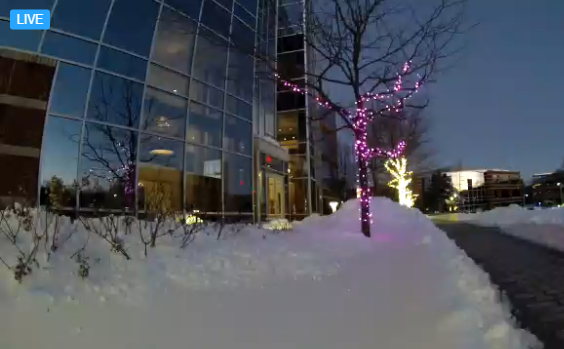
CheerLights are back at MathWorks. While everyone is learning, working, and living from home, we wanted to install CheerLights at the MathWorks campus in Natick, MA. We also installed a camera for anyone to check out the lights no matter where you are. They look awesome at night and even better with a lot of snow.
Our lights at MathWorks include a sparkling effect to display the latest color. You might have noticed that effect on our live webcam. The WS2811 RGB LED strips are connected to ThingSpeak using a Particle Argon Wi-Fi device. The open-source code for this effect is on GitHub. Let us know if you try it out.
You have two options to get the latest color: HTTP and MQTT. It’s easy to get the latest color using HTTP, just send a GET request to this address: https://api.thingspeak.com/channels/1417/fields/1/last.txt, since CheerLights is using channel 1417 and the color name, is in field 1. You will need to keep checking this address to get the latest color. If you use MQTT, you can subscribe to the channel and your device will get updates when the color changes. Check out ThingSpeak Documentation to learn more.
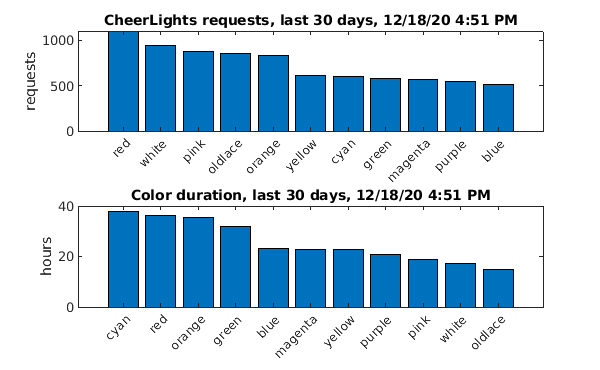
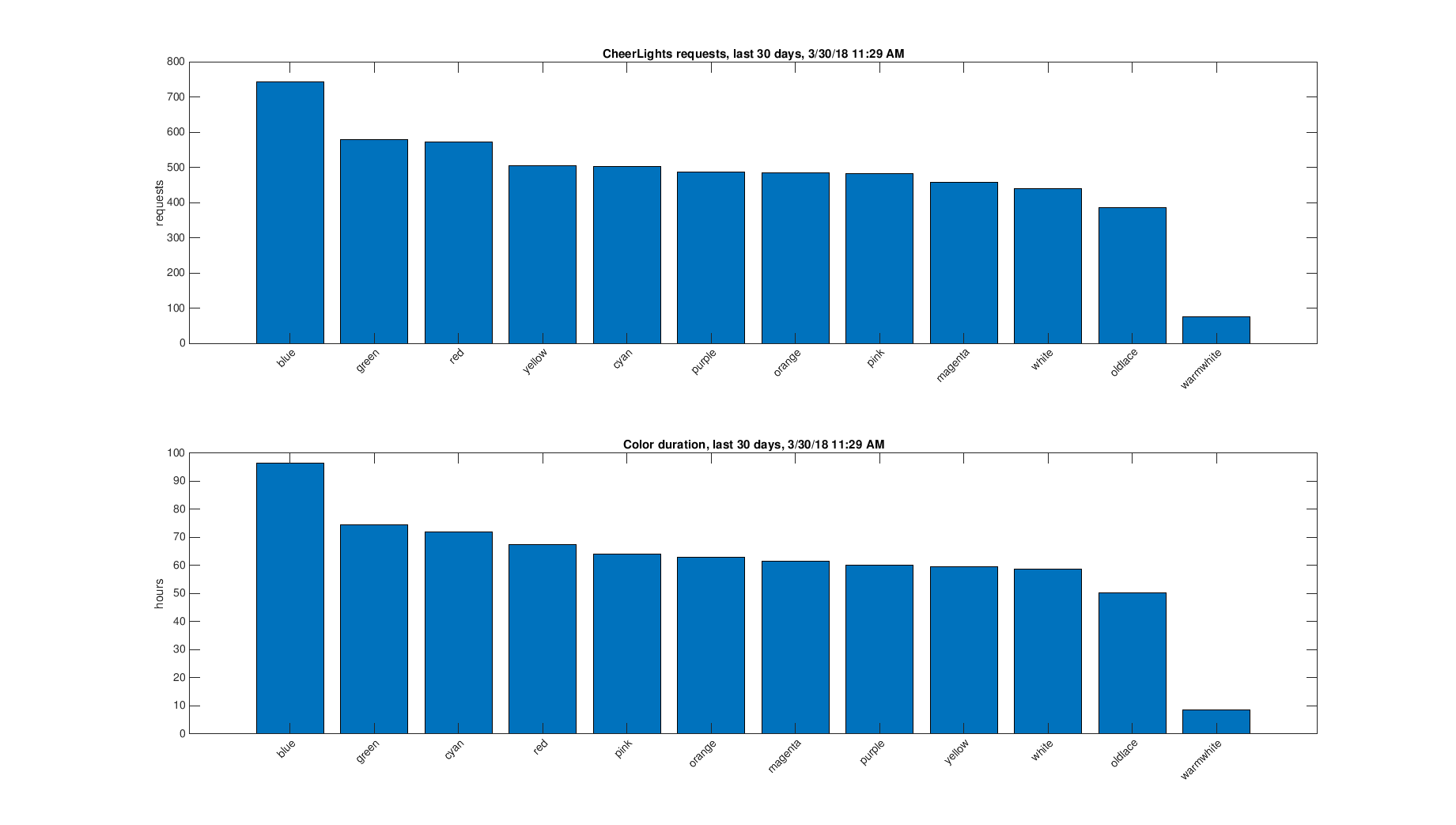
Since each color is being stored in a ThingSpeak channel, we can use MATLAB to do some IoT analytics on the CheerLights channel. As of today, the most popular color requests have been red, white, and pink in the past month. But, the color that tends to stay the longest is cyan! I wouldn’t have guessed that. It is always nice to use a tool like MATLAB to find something out rather unexpected.
To learn how to build your own set of CheerLights and to join the project, check out CheerLights.com. Let us know what you build and how you use this project in the comments.
Stay healthy. Stay connected.
]]>
ThingSpeak automatically gives you access to the latest MATLAB features from the latest MATLAB release. MATLAB R2020b now includes swarmchart to create sarm scatter charts! The charts are a great way... read more >>
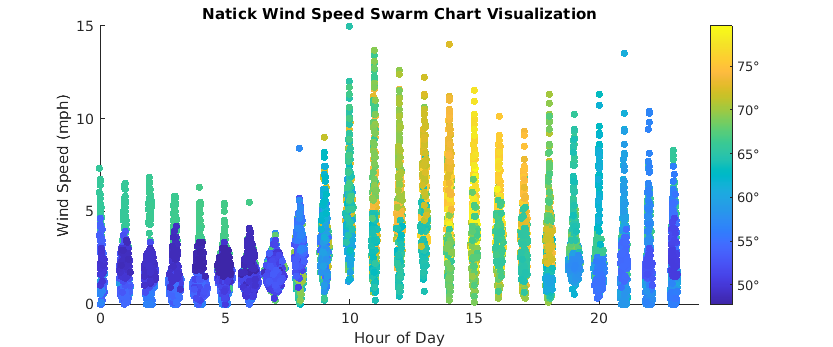
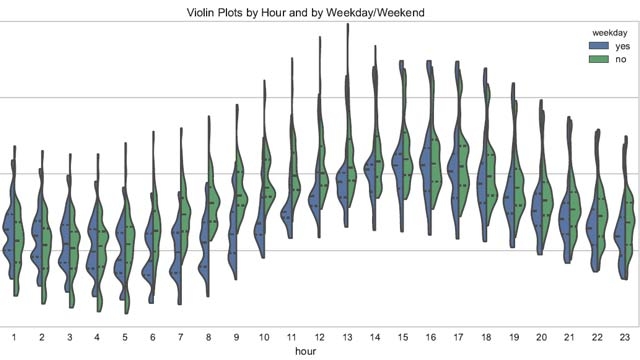
]]>Here is a swarm chart of wind speed versus hour of day. The chart is created with just two lines of MATLAB code (and a few more for formatting the plot). This plot uses data from the weather station on top of the parking garage at the MathWorks Apple Hill location in Natick (Channel 12397).
Since the weather station also includes temperature, I’ve color-coded the points using the temperatures for the day.
To create this chart in ThingSpeak, select the MATLAB Visualizations app, and create a new visualization. You can use this code as a start, change the channel ID to whatever channel you want to read.
% Read the data from ThingSpeak into a timetable and create the plot.
myData = thingSpeakRead(12397,'daterange',...
[datetime('now')-days(14) datetime('now')-days(9)],'outputformat','timetable');
swarmchart(hour(myData.Timestamps),myData.WindSpeedmph,30,...
myData.TemperatureF,'filled')
% Create the swarmplot with appropriate labels and limits
xlim([0, 24]);
xlabel('Hour of Day');
ylabel('Wind Speed (mph)');
title('Natick Wind Speed Swarm Chart Visualization');
c = colorbar();
c.TickLabels = c.TickLabels + "\circ";
% Change the aspect ratio.
set(gcf,'units','points','position',[0,0,600,250]);
]]>
ThingSpeak users frequently ask how to build customized views for their ThingSpeak data. The channel view provides automatically generated field plots that are customizable with the ThingSpeak Charts... read more >>
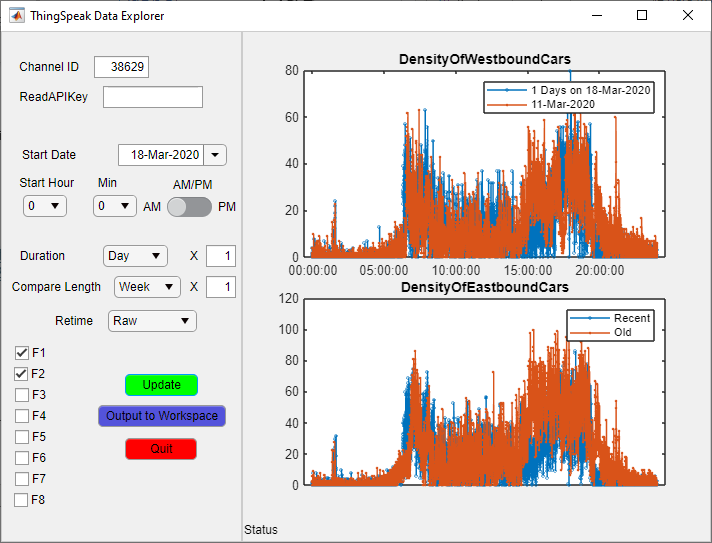
]]>Christopher Stapels, the ThingSpeak Product Manager, built an IoT data explorer app for MATLAB. The app is available for download on File Exchange or GitHub to help you explore your ThingSpeak data.
The ThingSpeak and MATLAB integration makes MATLAB the best environment for building a tool to analyze your ThingSpeak data. The IoT Data Explorer App is straightforward to use, to answer some questions about your data, and to customize for your own purposes. Chrisopher also created a video to help you get started with the IoT Data Explorer App for MATLAB.
If you have some ideas for improvements to the app, leave your comments here. We are already thinking of new features such as using the user API key to prepopulate the channel ID boxes automatically.
Download the IoT Data Explorer App for MATLAB from File Exchange or GitHub.
]]>
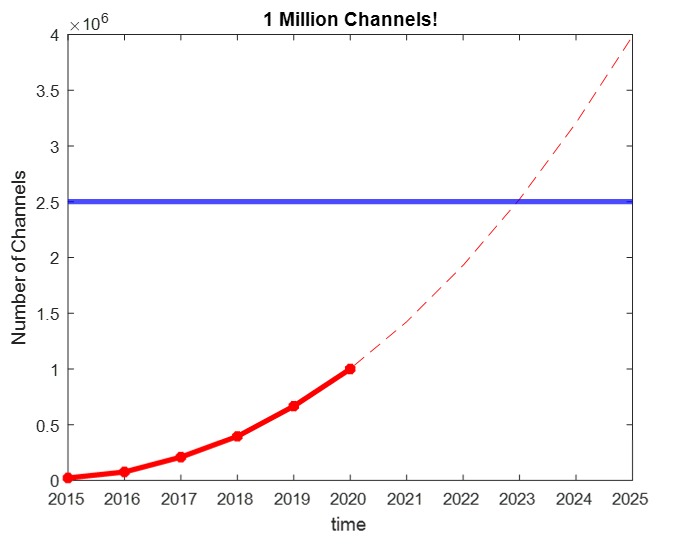
Christopher Stapels, the product marketing manager for ThingSpeak, told me that we crossed ONE MILLION CHANNELS of IoT data on ThingSpeak. We have come along way over the years. The first channel... read more >>
]]>Thanks to all of our users who keep collecting data, adding devices, and analyzing data on ThingSpeak! This is a huge milestone for all of us and you are making an impact on IoT all around the world.
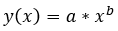
To commemorate one million channels, Christopher saved the number of channels at the beginning of each year to an array and used MATLAB to fit a power function to the data. You can do this using a MATLAB Visualization in ThingSpeak. The fit parameters are a = 1693 and b=2.277 for the model shown here.
![]()
According to a Business insider article, there will be 25 billion IoT devices by 2025. If the present rate continues, at least .1% of those devices can be on ThingSpeak by 2024 when we reach 2.5 million channels!
Here’s some MATLAB code to generate this plot and estimate the number of the ThingSpeak channels in the future.
% Gather data
dates=2015:2020;
absYears=dates-2014;
numChan=[22155,75957,208835,394780,666479,1000000];
% Plot the data
plot(dates,numChan,'r*-','linewidth',3);
xlabel('time');ylabel('Number of Channels');title('1 Million Channels!');
[xData, yData] = prepareCurveData( absYears, numChan );
% Set up fittype and options
ft = fittype( 'power1' );
opts = fitoptions( 'Method', 'NonlinearLeastSquares' );
opts.Display = 'Off';
% Fit model to data
[fitresult, gof] = fit( xData, yData, ft, opts );
hold;
extendRange = 2015:2025;
plot(extendRange,fitresult(extendRange-2014),'r--');
yline(2.5e6,'b','LineWidth',3);
We wanted to thank you again. We look forward to the next million channels and supporting your IoT journey. Let us know in the comments what you are doing or planning to do with ThingSpeak and what functionality that will help you along the way.
]]>
For this post, I would like to introduce Christopher Stapels as our guest blogger. Christopher builds lots of cool IoT projects and is omnipresent on MATLAB Central and ThingSpeak and MATLAB... read more >>
]]>ThingSpeak has added an alerts API to let you to send emails from your ThingSpeak account. Let me say that again… ThingSpeak now offers email alerts!
Use the new alerts API key to trigger emails and check the sent email history using MATLAB code or another HTTP client. With MATLAB code in ThingSpeak, you can read and analyze channel values and then respond with an email. You can even add information in the email about the condition that triggered the email.
Until recently, you needed a third-party service to get email notifications sent about your ThingSpeak channels. New in 2020, you can now get email alerts sent to you directly from ThingSpeak.
Regular visitors to the public channel 276330 will be familiar with my desk plant. I have a soil monitor probe set up to measure the conductivity of the soul, and my plant will send me email if it needs refreshment. I can now have the email set directly from ThingSpeak. The easiest way is to use a MATLAB analysis. Here is the general format for sending an email.
alert_body = 'This is the text that will be emailed';
alert_subject = 'This will be the subject of the email';
alert_api_key = 'YOUR_API_KEY_FROM_STEP_1';
alert_url= "https://api.thingspeak.com/alerts/send";
jsonmessage = sprintf(['{"subject": "%s", "body": "%s"}'], alert_subject,alert_body);
options = weboptions("HeaderFields", {'Thingspeak-Alerts-API-Key', alert_api_key; 'Content-Type','application/json'});
result = webwrite(alert_url, jsonmessage, options);
You can see a more detailed example at Analyze Channel Data to Send Email Notification. There is even a new template for email alerts in the MATLAB analysis app. You can see all the information on how to send an alert or get your alerts history in the documentation.
Let us know what you think!
]]>
Long-range wireless communication technology enables the transfer of sensor data over a long distance while using low-power radios for connectivity. This technology can be leveraged to connect... read more >>
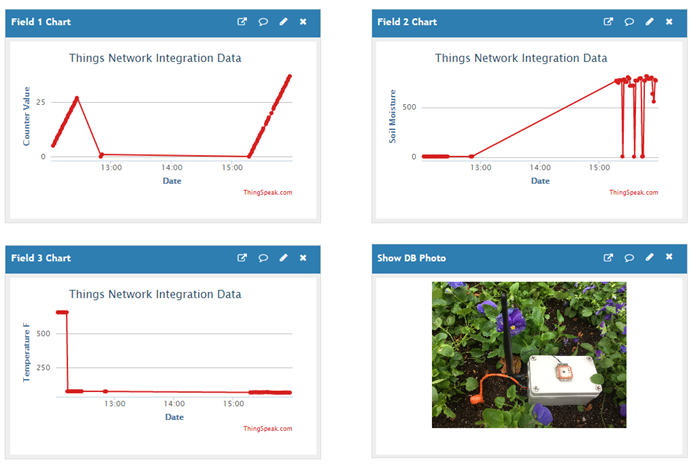
]]>The ThingSpeak team has created a new example that shows you how to leverage The Things Network and build an agricultural data application using ThingSpeak. The sensors send data to The Things Network, which is then forwarded to ThingSpeak for collection, analysis, and visualization. Here’s what the project view on ThingSpeak looks like.
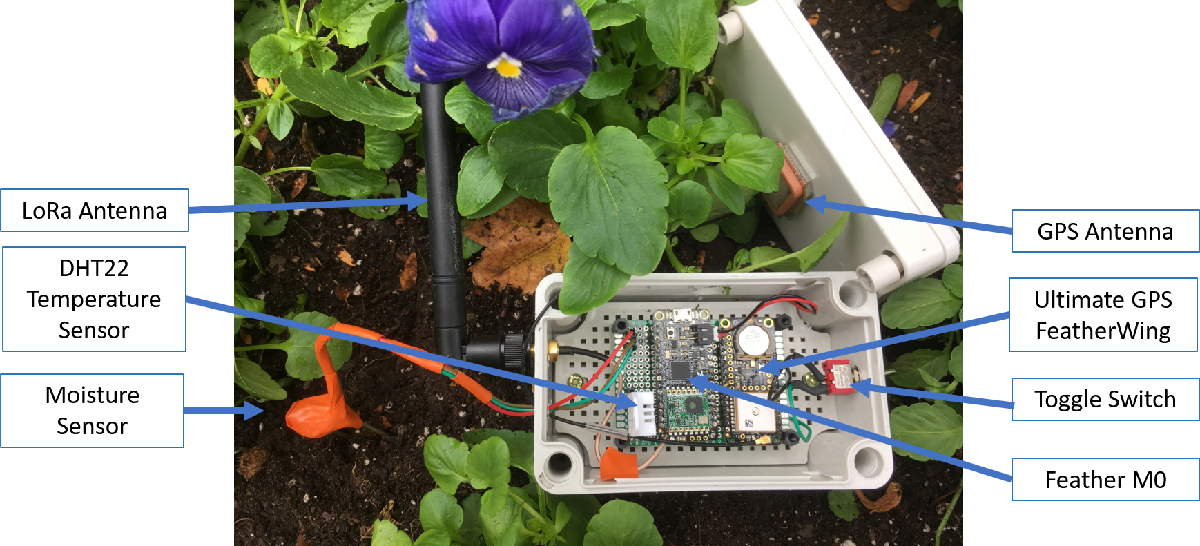
To build a soil moisture sensor device for The Things Network, you need use an Adafruit Feather M0 RFM95 LoRa Radio (900MHz), an Adafruit Ultimate GPS FeatherWing, a SparkFun Soil Moisture Sensor, and a DHT22 temperature and humidity sensor. Once you have the device put together and programmed, you can use this device to measure soil moisture, temperature, humidity, and its location.
Check out the full Collect Agricultural Data over The Things Network example at the MathWorks Documentation site.
]]>
Have you ever wondered if the air around you is healthy? It is possible to understand air quality by using MATLAB to analyze air quality data collected by an air quality sensor on ThingSpeak. What... read more >>
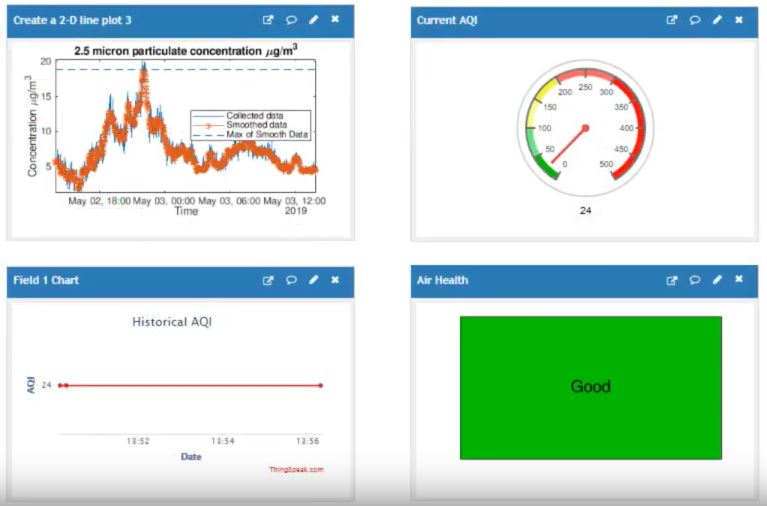
]]>Good or moderate air quality is when the Air Quality Index (AQI) is 100 or less. AQI is a relative measurement of five common air pollutants: ground-level ozone, particle pollution, carbon monoxide, sulfur dioxide, and nitrogen dioxide. A high AQI indicates a higher level of pollution and is considered unhealthy over 100.
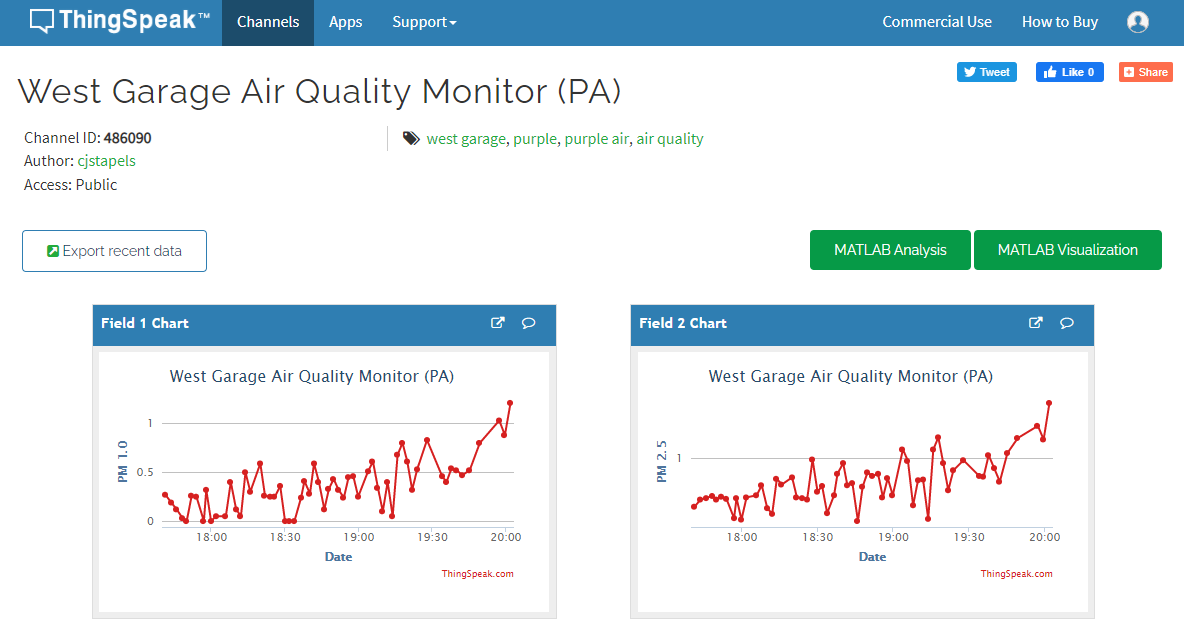
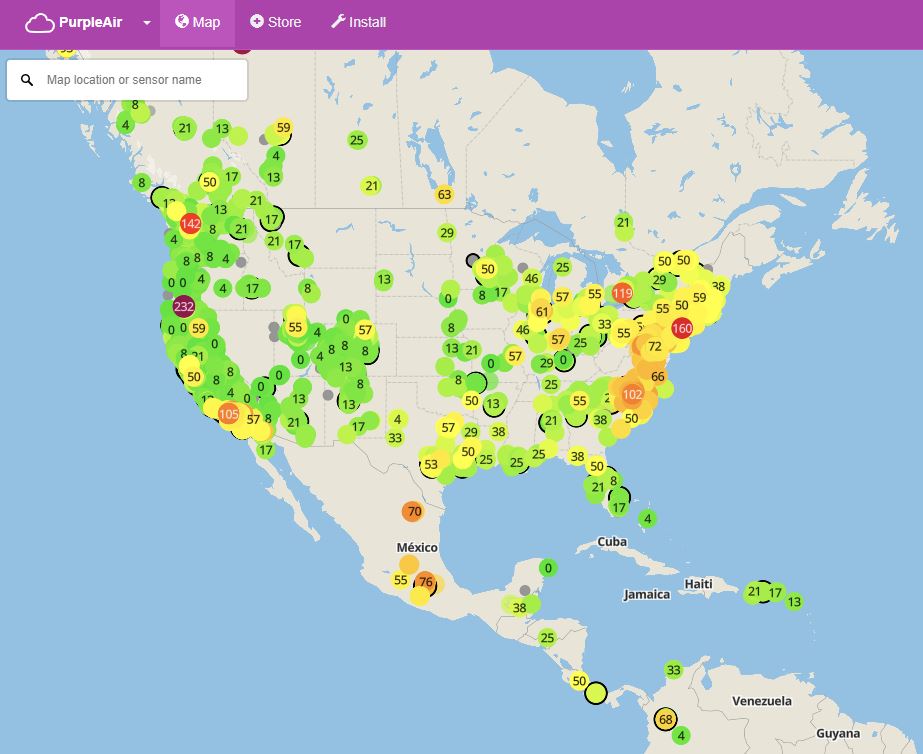
We have installed a PurpleAir sensor at the MathWorks Apple Hill campus in Natick, MA. PurpleAir sensors use laser particle counters that provide an accurate and low-cost way to measure smoke, dust, and other particulate in the air. The data from our air quality sensor is available on a public ThingSpeak channel.
PurpleAir produces an interactive map using the air quality data from their sensors deployed around the world. Among other applications, the data is used by researchers to understand the effects of forest fires on air quality.
On File Exchange, we have posted our MATLAB functions used to analyze the air quality data collected by ThingSpeak. The MATLAB code helps preprocess the sensor data, provides functions to classify the data, and provides functions for visualizing the processed air quality data. The MATLAB visualizations are added to a ThingSpeak channel dashboard so you can see the current air quality near you. The MATLAB analysis code calculates the AQI using the definitions from the United States Environmental Protection Agency (EPA).
You can build a data analysis dashboard on ThingSpeak using publicly available data and MATLAB. This project it makes it easy to explore IoT data analysis using MATLAB to preprocess and visualize data without having IoT hardware.
Download the code from File Exchange and follow along with our video tutorial.
]]>
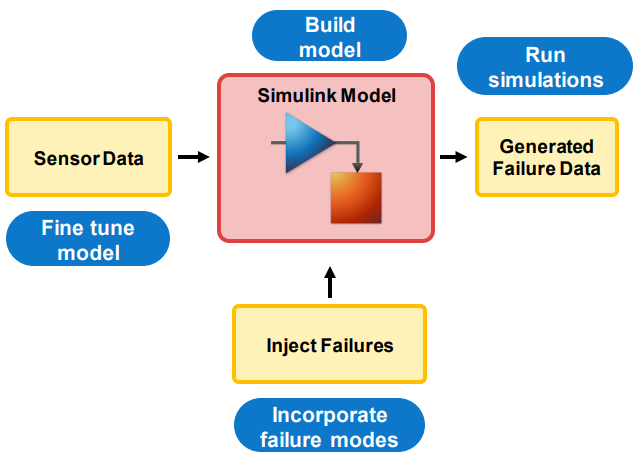
Interest in predictive maintenance is increasing as more and more companies see it as a key application for data analytics that leverages IoT systems. Branko Dijkstra, a technical consultant at... read more >>
]]>You can watch Branko’s full talk and download related resources from MathWorks Videos and Webinars.
]]>

The ThingSpeak team has released an updated version of the ThingSpeak Communication Library for Arduino, ESP8266, and ESP32 devices. The ThingSpeak library is the easiest way to get Arduino devices... read more >>
]]>The Arduino IDE needs to have the ThingSpeak library installed in order for your devices to know how to send data to ThingSpeak. In the Arduino IDE, choose Sketch, Include Library, and Manage Libraries. Search for “thingspeak” and click Install.

The ThingSpeak Communication Library supports many devices. Using the library makes the experience the same for each board type. When you learn one way to work with ThingSpeak, you will be to work with other devices in the same way.
Each supported device includes three ThingSpeak examples.
To get the best compatibility with ThingSpeak IoT services, we recommend using the ThingSpeak library. The library has extra features that help you troubleshoot and get visibility into any issues with requests to ThingSpeak. I find it useful to store the last status code from ThingSpeak. I can use this code to understand if the request succeeded or failed. Here’s an example of how to use the “getLastReadStatus” method.
// Read in field 1 of the private channel which is a counter
long fieldValue = ThingSpeak.readLongField(myChannelNumber, myFieldNumber, myThingSpeakReadAPIKey);
// Check the status of the read operation to see if it was successful
statusCode = ThingSpeak.getLastReadStatus();
if(statusCode == 200) {
Serial.println("Field Value: " + String(fieldValue));
}
else {
Serial.println("Problem reading channel. HTTP error code " + String(statusCode));
}
The code behind the ThingSpeak library is available on GitHub. Discover other MathWorks Open Source and Community Projects on The MathWorks GitHub page.
]]>
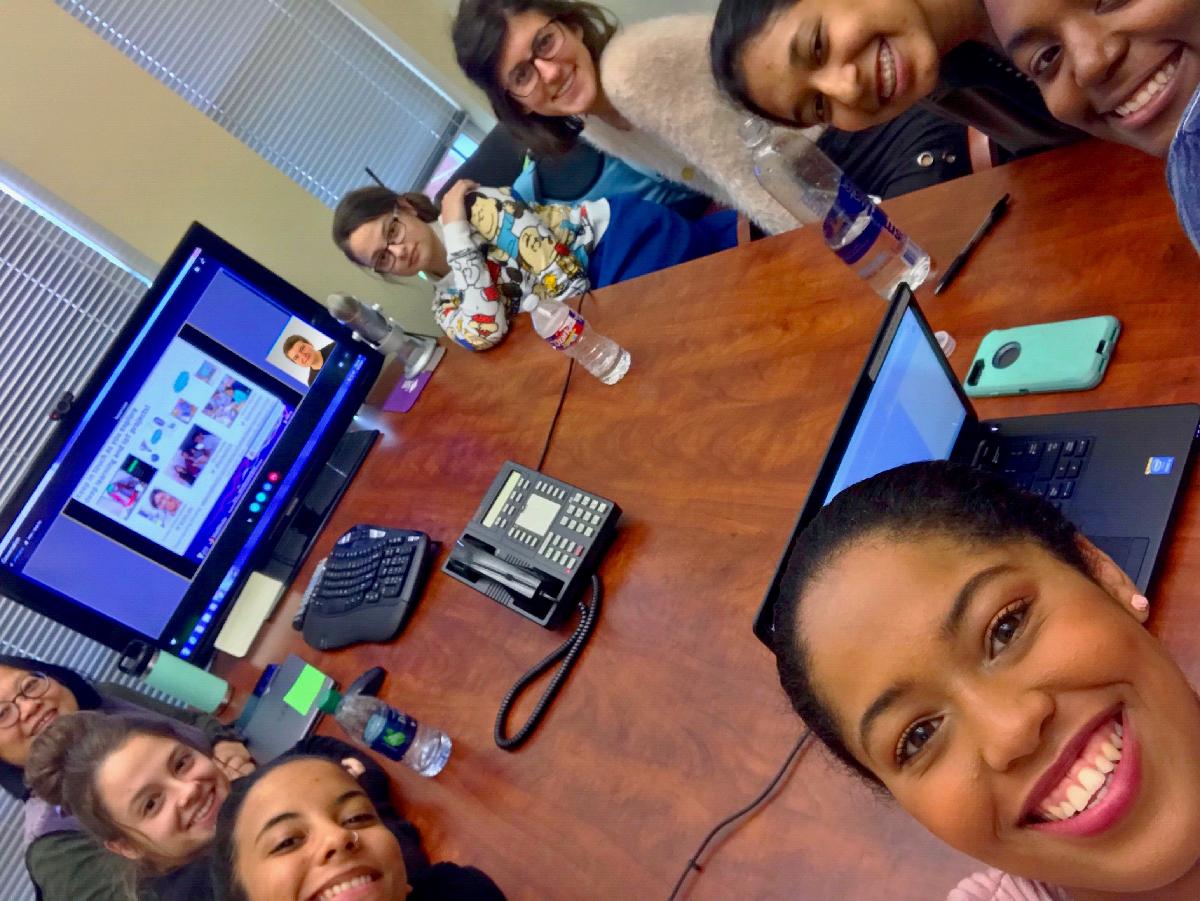
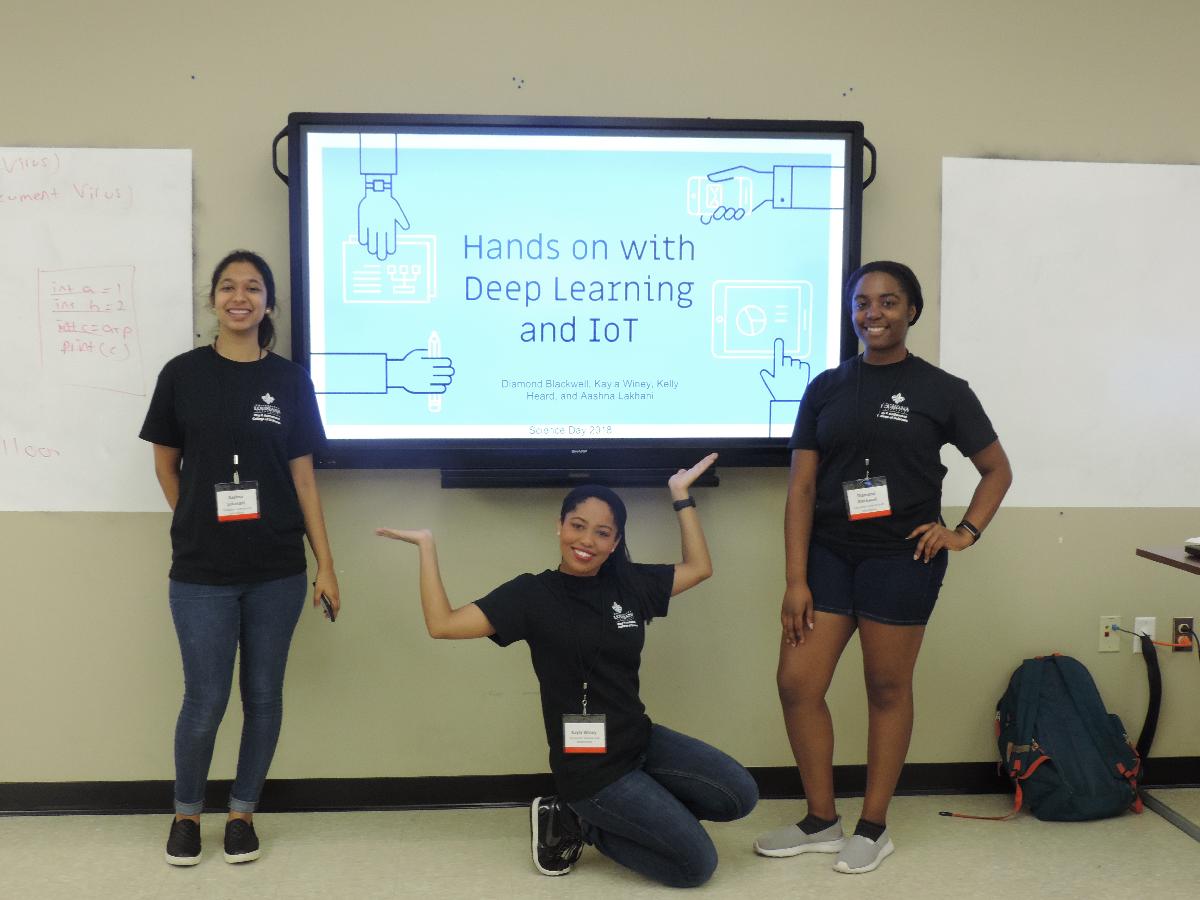
This is a guest post by Diamond Blackwell, ACM-W President at the University of Louisiana at Lafayette. On Friday, October 26, 2018, the University of Louisiana at Lafayette opened its doors to over... read more >>
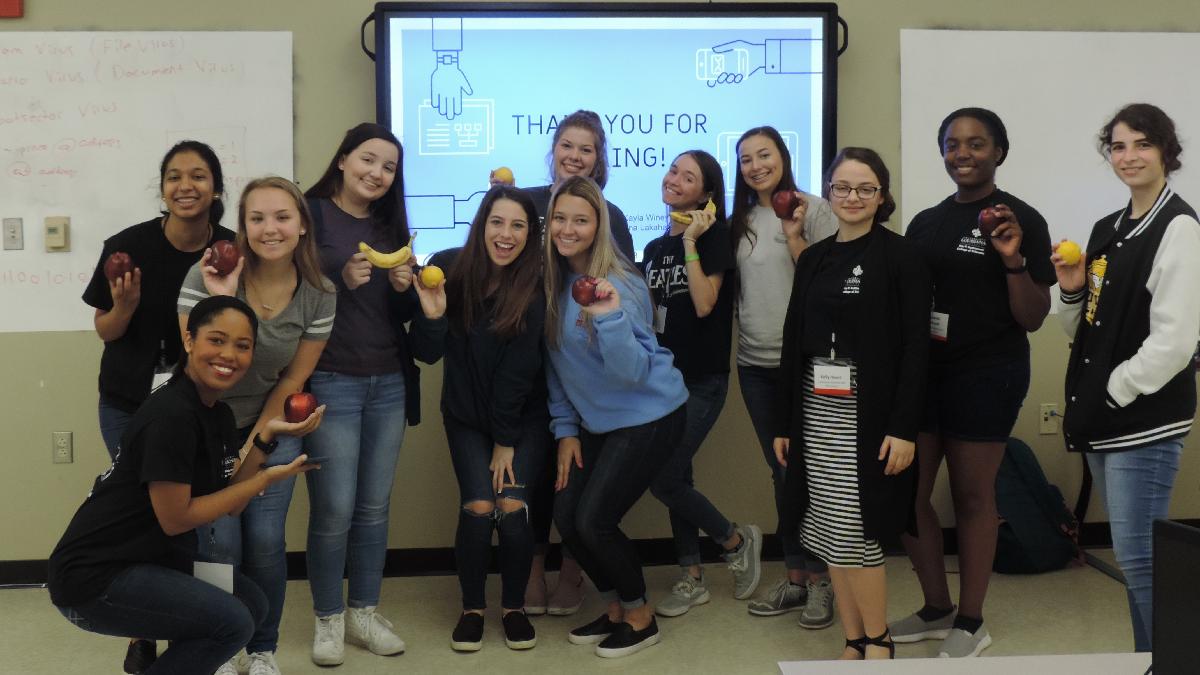
]]>On Friday, October 26, 2018, the University of Louisiana at Lafayette opened its doors to over 900 students participating in Science Day. This is a campus-wide event where high school students throughout Louisiana come to visit university’s various science departments. Our department, the College of Computing and Informatics, put on four demos for students to partake in.

The Association of Computing Machinery – Women (ACM-W) club, an organization dedicated to increasing the number of women in tech, decided we should do something different than the previous year for our demo. Our organization’s advisor, Dr. Sonya Hsu, gave us the idea to try a Deep Learning and IoT, Internet of Things demo presented at Grace Hopper Celebration of Women in Computing this past September by the team from MathWorks. With the help from the MathWorks GHC team and colleagues, we were able to put on this spectacular demo at the Science Day at the University of Louisiana. You can read about the GHC 18 Deep Learning and IoT workshop here on this blog.

We gathered all of the required tips from Anoush Najarian of MathWorks, configured all of our laptops, and put together an informal and interactive presentation. And we had our students very entertained! They really enjoyed taking photos of the fruit (and sometimes themselves) in order to see how and which objects were classified. Students kept taking photos until their fruit was correctly labeled, seeing how holding the object in a certain position or light would affect the MATLAB program’s answer.

We did notice that with smaller groups, it was easier to help everyone and keep control of the room. This made the demonstrations and feedback sessions a lot more educational: in larger groups, most people could not get most of their questions answered in the allotted time. But, the interactive segment of the demo did make up for it.

Meanwhile, the MathWorks team in Boston could keep up with what we’re doing by looking at the data collected on ThingSpeak and analyzing it with MATLAB – that’s IoT in action!

This was an amazing outreach opportunity for our organization that could not have been executed without the help of the MathWorks team! The positive feedback and help really made this an enjoyable experience for my team, and we hope to partner with MathWorks in the future.
You too are welcome to use our GHC 18 Deep Learning and IoT workshop materials, and share your thoughts in the comments! Check out the work of awesome women in engineering and science we have been highlighting with the #shelovesmatlab hashtag!
]]>
Dear friends, we: Louvere Walker-Hannon, an application engineer who assists customers doing deep learning and data analytics, Shruti Karulkar, a quality engineering lead for test and measurement,... read more >>
]]>Our team had an awesome time at GHC 18, Grace Hopper Celebration of Women in Computing. Going to the conference helped our team members get to know each other, and brought out superpowers we didn’t know existed!
This is our first year as a sponsor of the conference.Grace Hopper Celebration is the world’s largest gathering of women technologists. Besides recruiting and attending key technology talks, our team delivered a hands-on MATLAB workshop on Deep Learning and IoT.
We were thrilled to have a hands-on workshop proposal accepted at GHC, an honor and a responsibility. It turned out that we were going to be running two large sessions, full in preregistration.
We asked everyone to bring a laptop with a webcam, or share. Participants used their browser to run deep learning code in MATLAB Online, a cool framework built on top of cloud instances, and aggregated inference data to ThingSpeak, an open IoT (Internet of Things) platform, and analyzed that data.

Everyone captured images of real-world objects using webcams and used a Deep Learning network to classify them. To make things more fun, we used fruit for inference: Granny Smith apples, oranges, lemons and bananas. Our team went on a “fruitcase” expedition: we visited a local grocery store with a suitcase, bought a bunch of fruit for the workshop, and at the end of the day, gave it away to the many amazing GHC workers.

Our workshop had three exercises, and two take-home problems.
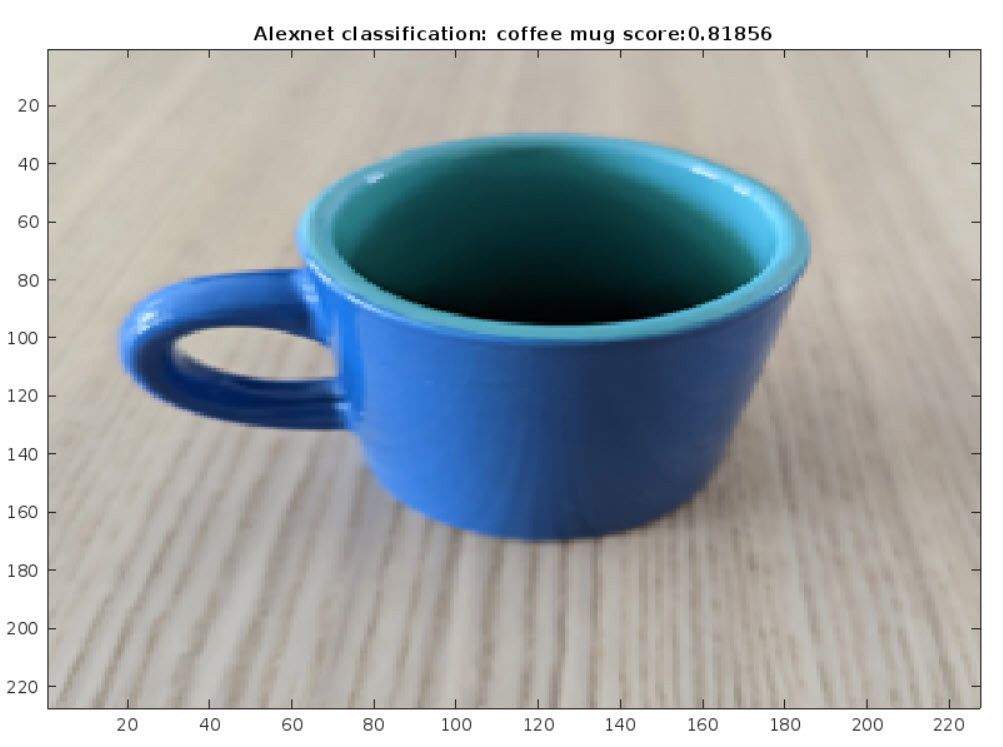
In our first exercise, we used a webcam to capture an image, and passed it along to the AlexNet Deep Learning network for inference, generating a classification label and a confidence score.
% This is code for Exercise 1 as part of the Hands on with Deep Learning % and IoT workshop presented at the Grace Hopper Celebration 2018-09-27 %% Connecting to the camera camera = webcam(1); % Connect to the camera %% Loading the neural net named: Alexnet nnet = alexnet; % Load the neural net %% Capturing and classifying image data picture = snapshot(camera); % Take a picture picture = imresize(picture, [227, 227]); % Resize the picture [label, scores] = classify(nnet, picture); % Classify the picture and % obtain confidence score [sorted_scores, ~]=sort(scores, 'descend'); % Sorting scores in % descending order image(picture); % Show the picture title(['Alexnet classification: ', char(label), ' score:', ... num2str(sorted_scores(1))]); % Show the label clear camera drawnow;
In our second exercise, we repeat what we did in Exercise 1, and post inference data to an IoT channel. Note that we use the same channel to aggregate everyone’s data.
% This is code for Exercise 2 as part of the Hands on with Deep Learning % and IoT workshop presented at the Grace Hopper Celebration 2018-09-27 %% Connecting to the camera camera = webcam(1); % Connect to the camera %% Loading the neural net named: Alexnet nnet = alexnet; % Load the neural net %% Capturing and classifying image data picture = snapshot(camera); % Take a picture picture = imresize(picture, [227, 227]); % Resize the picture [label, scores] = classify(nnet, picture); % Classify the picture and % obtain confidence score [sorted_scores, ~]=sort(scores, 'descend'); % Sorting scores in % descending order image(picture); % Show the picture title(['Alexnet classification: ', char(label), ' score:', ... num2str(sorted_scores(1))]); % Show the label clear camera drawnow; %% Aggregating label data to open IoT platform try thingSpeakWrite(123456789, string(label), 'WriteKey', 'XXXYYYZZZ') catch pause(randi(5)) end
In our third exercise, we grabbed the aggregated inference data from the IoT channel and visualized it. It was fun and a bit surprising to see what everyone’s objects ended up getting classified as.
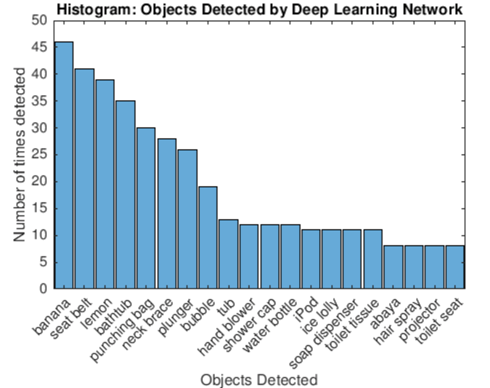
% This is code for Exercise 3 as part of the Hands on with Deep Learning % and IoT workshop presented at the Grace Hopper Celebration 2018-09-27 %% Reading aggregated label data for the last 2 hours from ThingSpeak readChannelID = 570969; LabelFieldID = 1; readAPIKey = ''; dataForLastHours = thingSpeakRead(readChannelID, ... 'Fields', LabelFieldID, 'NumMinutes', 5, ... 'ReadKey', readAPIKey, 'OutputFormat', 'table'); %% Visualizing data using a histogram if (not(isempty(dataForLastHours))) labelsForLastHours = categorical(dataForLastHours.Label); numbins = min(numel(unique(labelsForLastHours)), 20); histogram(labelsForLastHours, 'DisplayOrder', 'descend', ... 'NumDisplayBins', numbins); xlabel('Objects Detected'); ylabel('Number of times detected'); title('Histogram: Objects Detected by Deep Learning Network'); set(gca, 'FontSize', 10) end drawnow
When our participants ran this code, we saw a histogram aggregating everyone’s inference data, with all the objects detected during the workshop. This is the power of IoT! Check out the data from all our workshop sessions aggregated together on the ThingSpeak channel.

As take-home exercises, we challenged participants to use GoogLeNet instead of AlexNet, and to create their own IoT channel and use it to post and analyze data.
It’s an honor to have a speaking proposal accepted at GHC, and delivering large hands-on sessions is a big responsibility.

We loved hearing from our participants on social media:

We heard from professors and AI and Deep Learning enthusiasts who are interested in using our materials on campuses and at maker events: below are the first two, and a few others are in the works! If you’d like to give our Deep Learning and IoT demo a shot, let us know in the comments.
Hope Rubin of our GHC team led STEM Ambassadors who brought this Deep Learning and IoT demo to the Boston Mini-Maker Faire.
Under the leadership of brave Professor Sonya Hsu and her ACM-W partners, a team ran the workshop during the Science Day at the University of Louisiana at Lafayette. Look for posts on these events on this blog!
We couldn’t have done this without our team members’ extensive experience with teaching and tech, the awesome guidance by our senior leaders, and the help from hundreds of MathWorkers and Boston SWE friends.

Boston SWE, Society of Women Engineers, one of the oldest and largest sections in the country, has been our rock! We ran our workshop to a SWE event at MathWorks the week before GHC, getting our code and materials in front of many inquisitive, engaged participants who gave us their time, their words of encouragement, and who asked us tough questions!
You too are welcome to use our GHC 18 Deep Learning and IoT workshop materials!

Want to learn more? Take the free Deep Learning Onramp! Learn about and build IoT projects.
Visit our GHC page to meet our team and learn about working at MathWorks. Take a look at the photos our team took, or was given by session chairs, and our Twitter Moment. While you’re at it, check out the work of awesome women we have been highlighting with #shelovesmatlab hashtag! Share your thoughts in the comments.
]]>
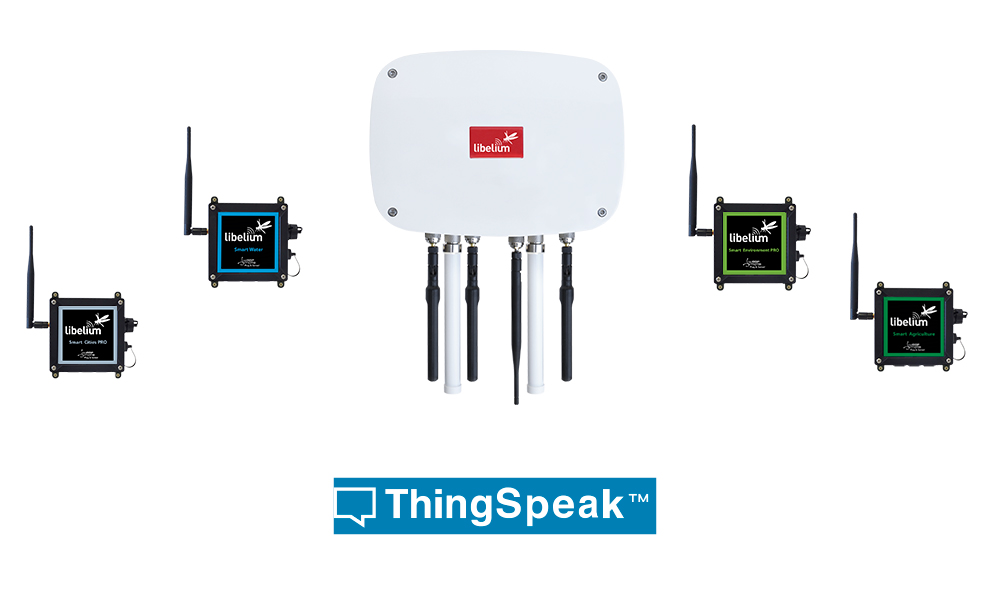
Libelium makes the Meshlium IoT Gateway that supports commercial IoT systems and sensor applications such as waste management, forest fire detection, potable water monitoring, supply chain... read more >>
]]>ThingSpeak is a MATLAB enabled IoT analytics platform from MathWorks, the leading developer of technical computing software for engineers and scientists. With ThingSpeak, users can view instant visualizations of live data from any Internet-connected web browser and schedule MATLAB code to run live analyses and visualizations as new data arrives. To accelerate the development of IoT analytics, MATLAB offers a full set of statistics and machine learning functionality, plus advanced methods such as nonlinear optimization, system identification, and thousands of prebuilt algorithms for signal and image processing.
Libelium sensors are used in a variety of vertical IoT applications like air quality monitoring and smart agriculture that are also common applications for users of the ThingSpeak platform. “The new integration between the Meshlium IoT Gateway and ThingSpeak will allow our customers with mutual interests to quickly analyze their data in the cloud with MATLAB,” said Eric Wetjen, Senior Product Marketing Manager for ThingSpeak.
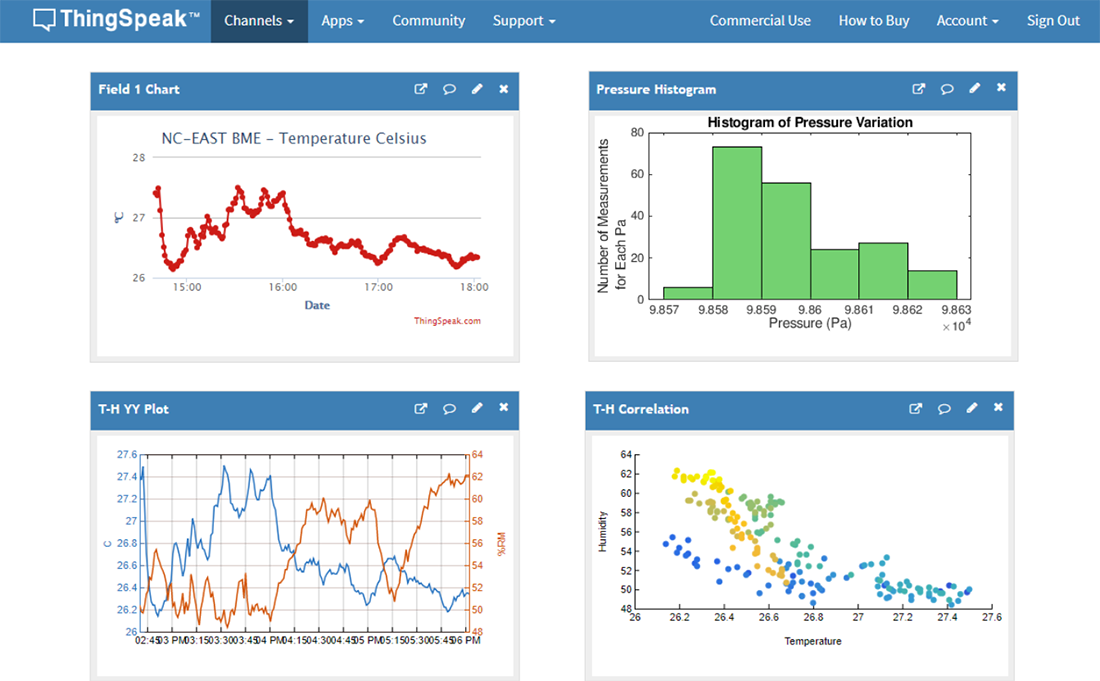
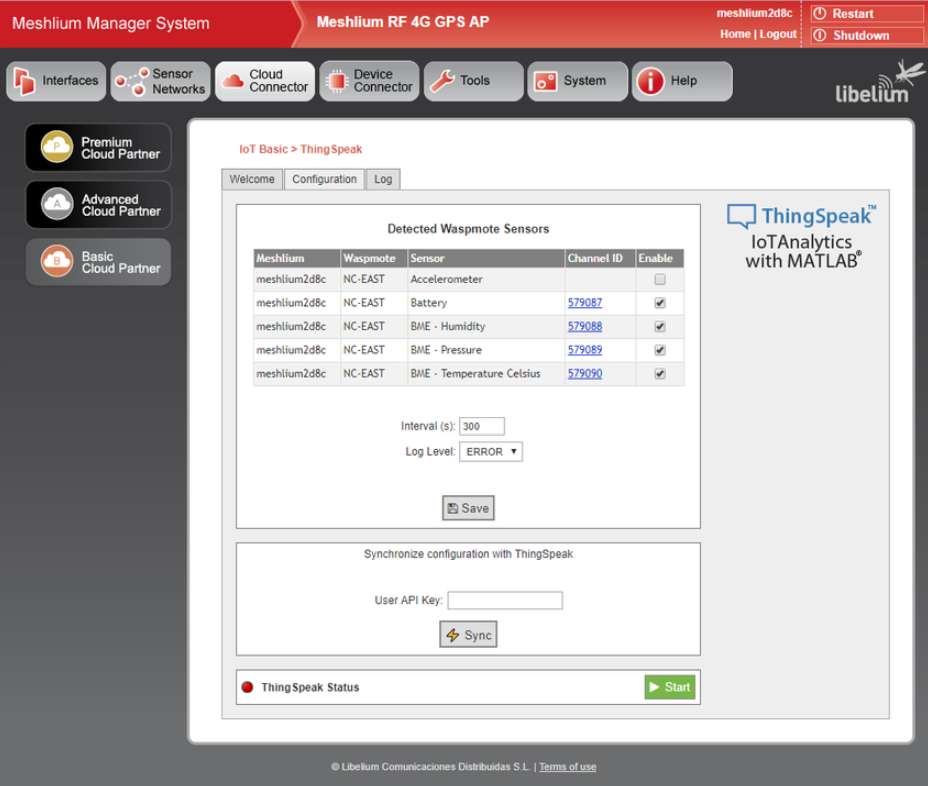
The ThingSpeak integration allows you to easily connect your Libelium devices to the ThingSpeak IoT analytics platform by using the ThingSpeak cloud connector, which is built into the Libelium Meshlium IoT gateway. The ThingSpeak cloud connector inside of the Meshlium Manager System creates the ThingSpeak channels needed for your devices and synchronizes the data automatically without writing any custom code.
Check out the MathWorks Hardware Catalog for more information about the Libelium support for ThingSpeak and MATLAB.
]]>
We have published an example in the ThingSpeak documentation that shows you how to train a feedforward neural network to predict temperature. The feedforward neural network is one of the... read more >>
]]>We are collecting data in a ThingSpeak channel and will use the integrated MATLAB analytics. To predict the temperature, this example makes use of the Neural Network Toolbox in MATLAB along with the data collected in a ThingSpeak channel. We will be using data collected by a weather station located at MathWorks offices in Natick, Massachusetts.
The process for creating, training, and using a feedforward network to predict the temperature is as follows:
ThingSpeak channel 12397 contains data from the MathWorks weather station, located in Natick, Massachusetts. The data is collected once every minute. Fields 2, 3, 4, and 6 contain wind speed (mph), relative humidity, temperature (F), and atmospheric pressure (hg) data respectively. To read the data from the weather station within MATLAB, use the thingSpeakRead function.
data = thingSpeakRead(12397,'Fields',[2 3 4 6],'DateRange',[datetime('Jul 30, 2018'),datetime('Jul 31, 2018')],... 'outputFormat','table');
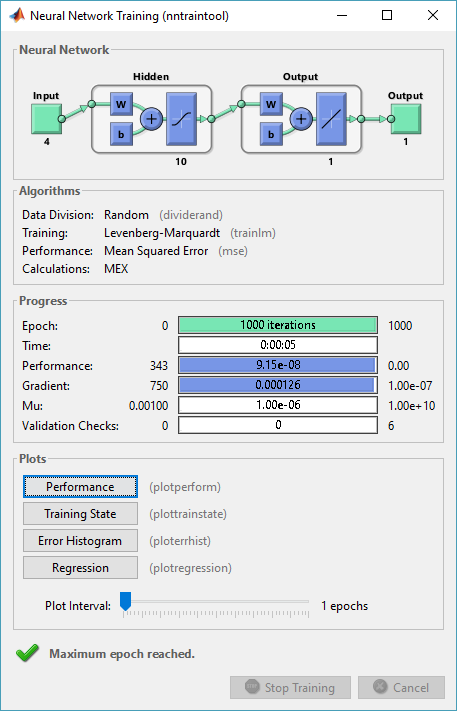
Use the feedforwardnet function to create a two-layer feedforward network. The network has one hidden layer with 10 neurons and an output layer.
net = feedforwardnet(10);
Use the train function to train the feed-forward network.
[net,tr] = train(net,inputs,targets);
After the network is trained and validated, you can use the network object to calculate the network response to any input.
output = net(inputs(:,5))
output = 74.9756
This example can be adapted to other IoT applications. Check out the ThingSpeak documentation for the code and explanation.
]]>
The ThingSpeak IoT has been building a new framework to support widgets on channel views. Widgets can be added to the public or private view of a ThingSpeak channel and even be embedded in 3rd-party... read more >>
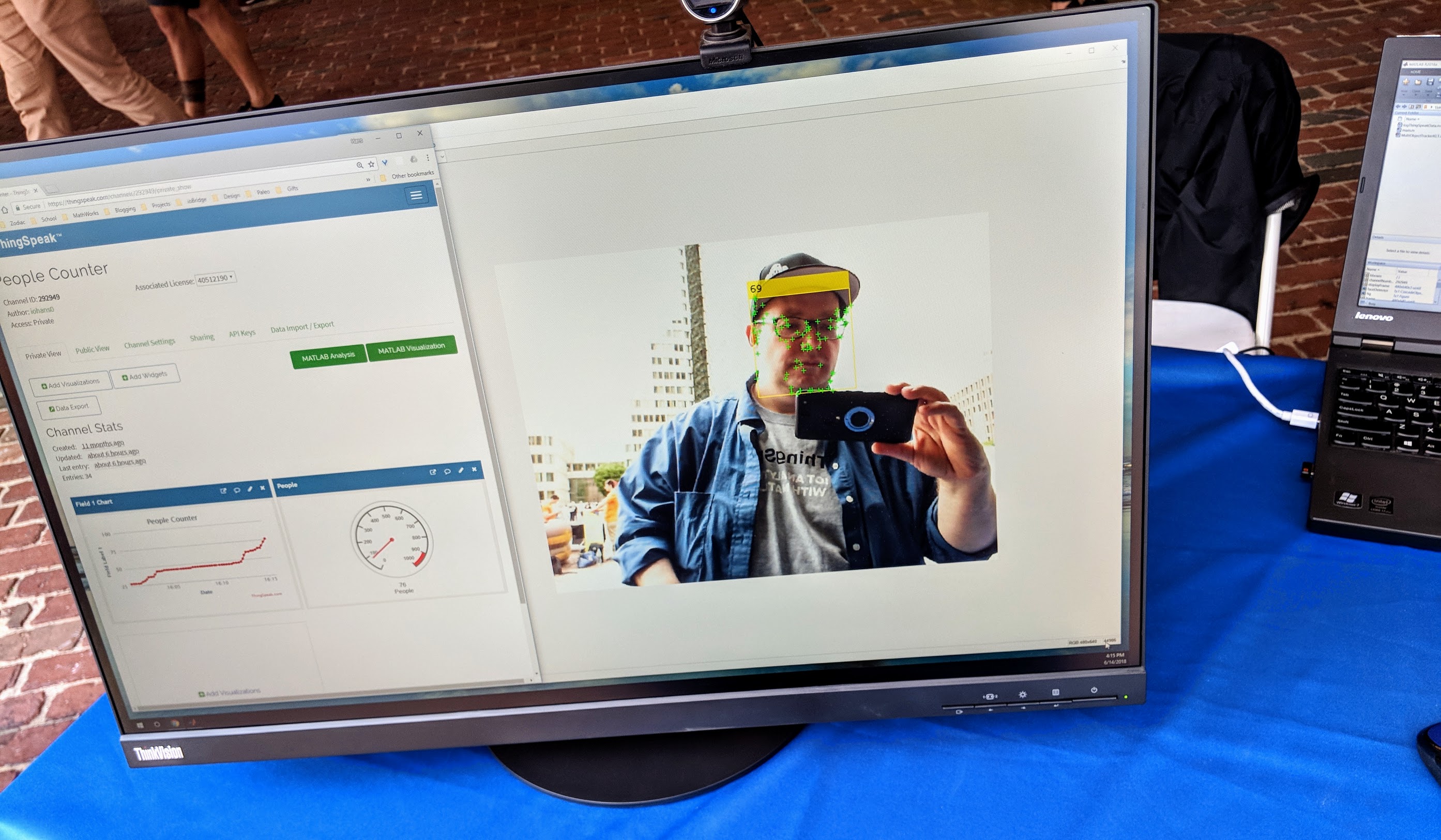
]]>At the recent Boston TechJam, MathWorks had a ThingSpeak People Counter that used face detection to count people that came over to our booth and learned about our demo. The people counter uses MATLAB to identify faces in a live video stream from a webcam, count the number of faces, and send the results to ThingSpeak. The code and instructions for the ThingSpeak People Counter project are on File Exchange.
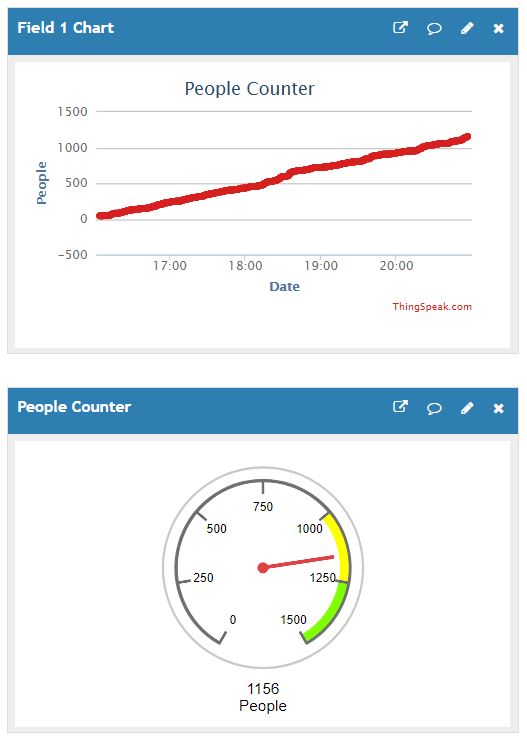
I used the new ThingSpeak gauge widget to show the visitors the lastest people count. The gauges are easy to set up, you don’t have to edit JavaScript code, just point-and-click and configure options. You can add custom colored ranges, units, and display options. If you want to learn more about ThingSpeak channel display widgets and gauges, visit the MathWorks Documentation for ThingSpeak.
Now that we have the infrastructure for widgets on ThingSpeak, we can more widget types. What other widgets would you like to see on ThingSpeak?
]]>

The ThingSpeak team has integrated the Predictive Maintenance Toolbox for MATLAB into the IoT Analytics features of ThingSpeak. The Predictive Maintenance Toolbox provides tools for labeling data,... read more >>
]]>Here is a quick list of features of the Predictive Maintenance Toolbox for MATLAB:
, Windows Azure® Blob Storage, and Hadoop®Distributed File SystemThe Predictive Maintenance Toolbox is available on ThingSpeak to users that have a license to the toolbox. Just sign into ThingSpeak using your MathWorks Account and you will have access to the features of the Predictive Maintenance Toolbox with the MATLAB Analytics app. If you have any questions about the Predictive Maintenance Toolbox, contact Aditya Baru at MathWorks.
]]>
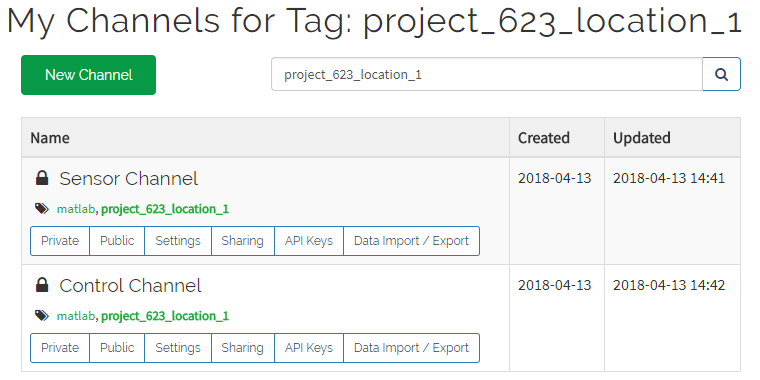
I am excited to announce a number of new features that are available to all ThingSpeak users. We added the ability for ThingSpeak channels to be organized by tags. ThingSpeak channels have a... read more >>
]]>We also added support for tags within the ThingSpeak User API. Just pass the same tag into the API call to ThingSpeak, and you will receive a list of channels that match. This is really useful for integrating ThingSpeak into enterprise systems and for automating channel creation by deployed devices.
All of the tag-related features are available today to all ThingSpeak users!
]]>
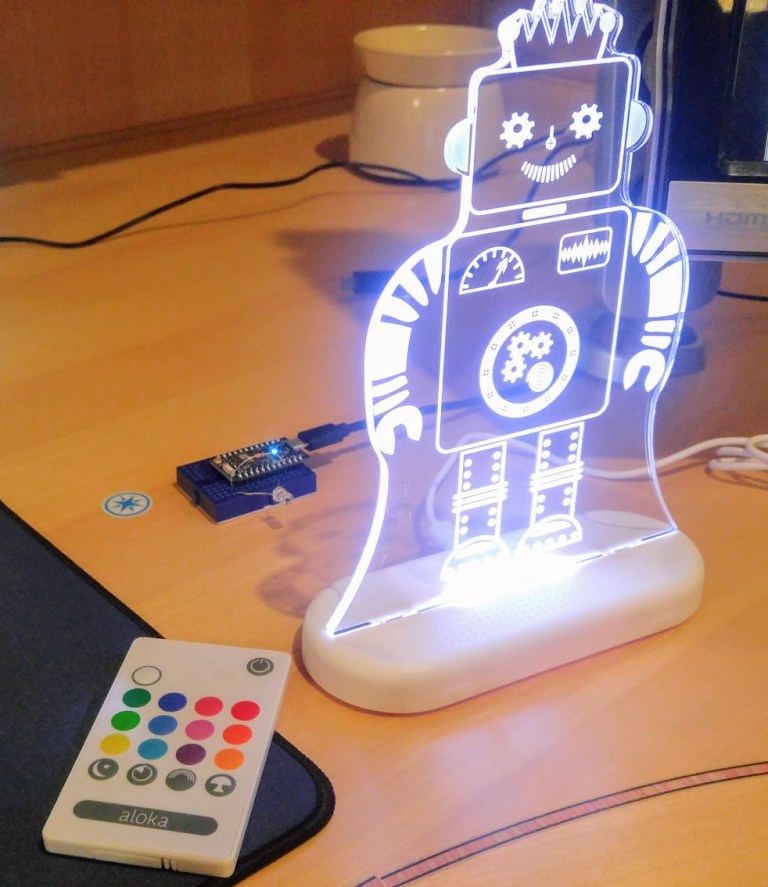
As most of you know I love building IoT projects. Most of these maker projects use an Arduino, Particle, or Raspberry Pi, like my IR color-changing robot that connects to ThingSpeak and the... read more >>
]]>I recently became the moderator of the MATLAB Maker Community that is hosted on MATLAB Central. There are many times where MATLAB and Simulink can help build a hardware-based project or be used to create the code running on a device. I also use MATLAB for analytics. Here are the most popular colors on CheerLights in the last 30 days.
The goal of the MATLAB Maker Community is to connect makers and builders together. I learn by working with others and sharing my work. If you are interested in maker project, I suggest following the Maker Community and jumping in on conversations or starting new discussions. I find this helpful if I am exploring a new idea or looking for feedback.
Right now, there is a discussion thread about how to use MATLAB to interface and interact with an Arduino. Makers can use MATLAB to control an Arduino by first installing the MATLAB® Support Package for Arduino®. Once you have the support package, you can use MATLAB to control the Arduino with familiar MATLAB commands.
% create an Arduino object
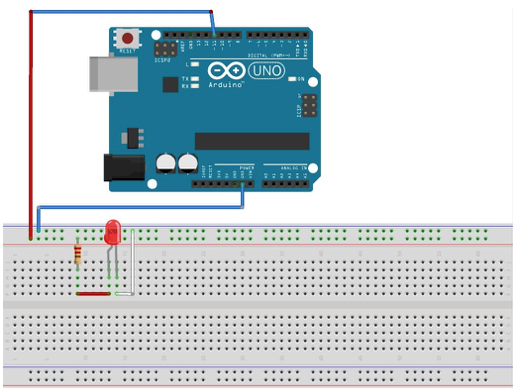
a = arduino('com3', 'uno');
% turn on an LED connected to Pin D11 writeDigitalPin(a, 'D11', 1);
% turn off an LED connected to Pin D11 writeDigitalPin(a, 'D11', 0);

Join the MathWorks and ThingSpeak IoT team at the MIT Connected Things 2018 conference held at the MIT Media Lab on April 5, 2018. MathWorks is proud to be a sponsor for a second year and we are... read more >>
]]>Randy Cronk, a volunteer at the MIT Enterprise Forum of Cambridge, sits down with Eric Wetjen of MathWorks and interviews him about IoT solutions from MathWorks and our ThingSpeak IoT Analytics platform. Check out the interview on the Connected Things blog.
]]>
Douglas Mawrey created a Smart Humidity Sensor using ThingSpeak to collect data, MATLAB to analyze the data, and IFTTT to send push notifications for certain conditions. This project uses the outdoor... read more >>
]]>This project uses the ESP-based NodeMCU as an IoT gateway to forward sensor data to ThingSpeak. The NodeMCU is essentially a microcontroller and a Wi-Fi device that costs less than $10 US. The humidity sensor that is used in this project is the DHT11. This a very common sensor used to monitor temperature and humidity. The sensor either comes in a 4 pin or 3 pin package. The NodeMCU is programmed with the Arduino IDE using the code in Douglas’ tutorial or GitHub.
Douglas uses the metadata setting within a ThingSpeak channel to store condition ranges. This allows you to adjust settings in your online analytics code without redeploying new code. Each ThingSpeak channel has a metadata setting. You can store arbitrary text data that can be used in your MATLAB Analysis code. To load your channel’s metadata into MATLAB, use the webread function and add metadata=true to the ThingSpeak API Read Data request.
indoorChannelData = webread(strcat('https://api.thingspeak.com/channels/', ... num2str(indoorChannelID), ... '/feeds.json?metadata=true&api_key=', ... indoorChannelReadKey));
Douglas uses MATLAB on ThingSpeak to determine the proper condition. This is a common requirement in complex IoT systems. This example could be a good starting point for building a condition monitoring system for industrial maintenance applications. You use MATLAB to determine the target humidity using a polynomial fit over the lookup data.
lookupFit = polyfit(humidityLookup(:, 1), humidityLookup(:, 2), length(humidityLookup) - 1); optimalHumidity = polyval(lookupFit, curTempOut); humidityDiff = curHumidity - optimalHumidity;
Often you want to get notifications when a certain condition is met. Douglas shows you how to use IFTTT to send push notification directly to your phone. In this project, MATLAB is determining the condition and then interfaces with the IFTTT API to send the push notification. To send push notifications via IFTTT, use the webwrite function in MATLAB.
webwrite(strcat('https://maker.ifttt.com/trigger/', makerEvent, ... '/with/key/', makerKey), ... 'value1', stateMsg, ... 'value2', char(timeSinceChange, 'hh:mm'));
All of the MATLAB code can be deployed on ThingSpeak and scheduled to be executed periodically without having this on your desktop computer. The complete Smart Humidity Sensor project tutorial is available on Hackster.io. Feel free to discuss on the MATLAB Maker Community.
]]>
Social media is blowing up the term bomb cyclone. The term is everywhere from Twitter to 24/7 news coverage of the storm hitting the East Coast of the United States. The technical term for a bomb... read more >>
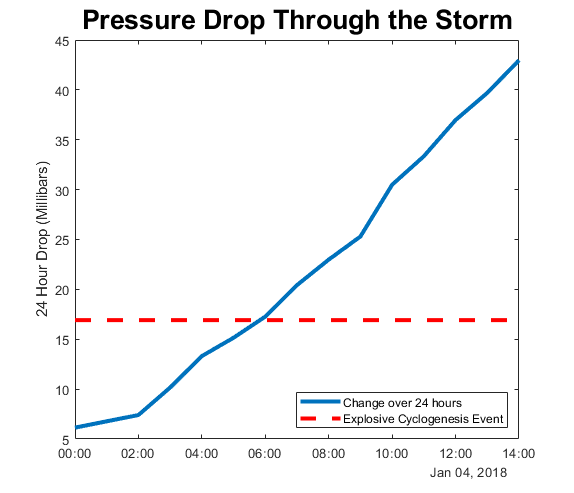
]]>A storm undergoes bombogenesis when its central low pressure drops at least 24 millibars in 24 hours, according to the National Oceanic and Atmospheric Administration (NOAA).
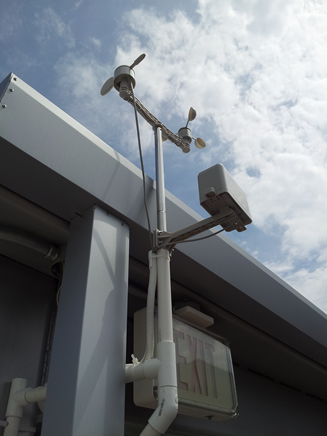
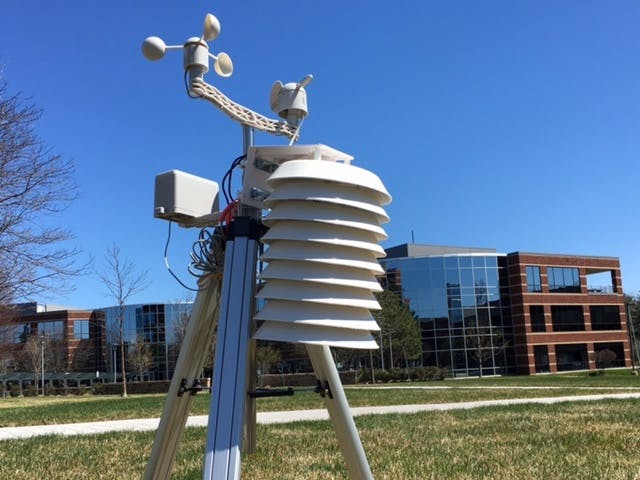
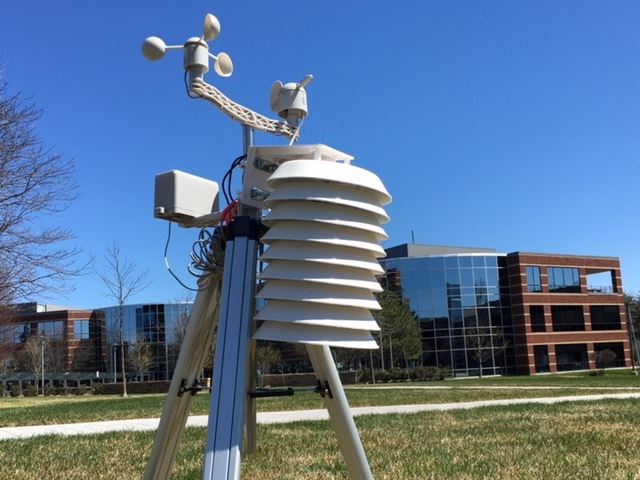
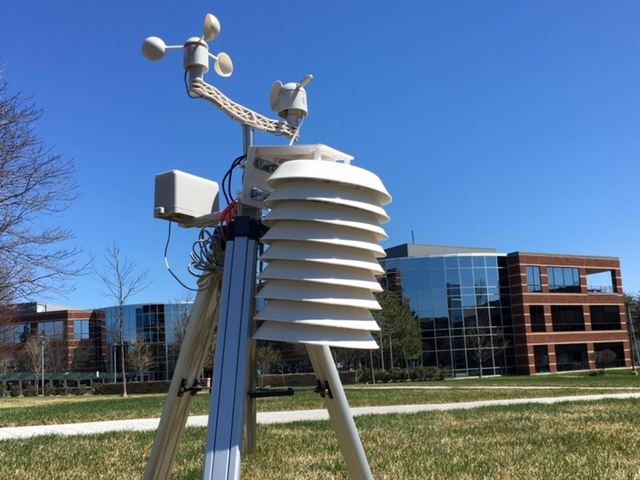
At the MathWorks headquarters in Natick, MA we have a weather station sending data to ThingSpeak for the past several years. Here’s what the weather station looks like on a better day.
Not many interesting events emerge from the data, but with something called a bomb cyclone, Rob Purser decided to take a closer look using MATLAB. Our weather station on ThingSpeak channel 12397 collects temperature, humidity, and pressure data. By taking a look at this MATLAB plot of the pressure analyzed over 24 hours, you will see the pressure drops at least 24 millibars in 24 hours and in fact over 40 millibars. This storm definitely fits its name of explosive cyclogenesis.

Have a look at the raw data from ThingSpeak and see if you can determine the bomb cyclone event. In MATLAB, use thingSpeakRead via the ThingSpeak Support Toolbox. We documented the process of analyzing the weather station data using MATLAB on Hackster.io. Just follow the steps using MATLAB or MATLAB Online, to discover some interesting results.
Stay warm.
]]>
ThingSpeak has APIs for collecting data produced by sensors and APIs for reading that data from applications. Think of an IoT project as two parts. One part of the project is where you need to... read more >>
]]>
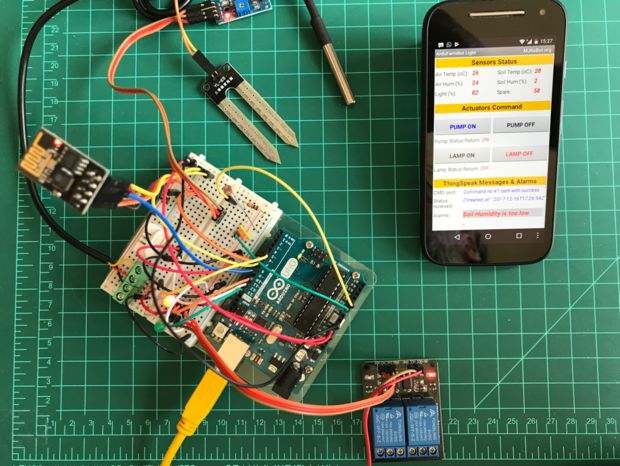
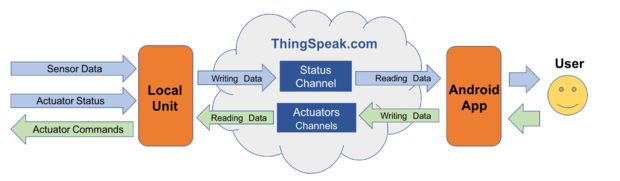
Marcelo has put together a great tutorial that uses ThingSpeak in the middle to collect data from sensors and then display the sensor readings on a custom Android app running on a mobile phone. He uses the MIT App Inventor to create a custom Android app to see the sensor data and status of the system. This project uses easily accessible hardware to build a proof-of-concept IoT system to monitor air temperature, humidity, soil temperature, soil humidity, and luminosity. Other people could modify this project with different sensors or actuators and build something for their own purposes or build a prototype for your next meeting at work.
Check out the full project tutorial on Arduino Project Hub and Instructables. Marcelo provides all of the parts, code, and instructions to make your own prototype IoT system monitored and controlled by a mobile app.
]]>
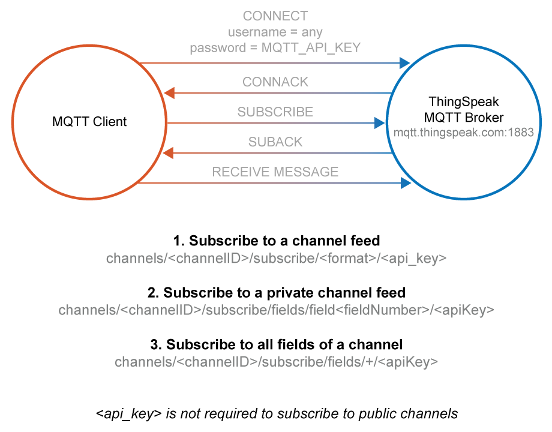
The ThingSpeak IoT service now supports MQTT subscriptions to receive instant updates when a ThingSpeak channel gets updated. MQTT is a powerful standard for IoT systems. ThingSpeak enables clients... read more >>
]]>We also published a new File Exchange submission that allows you to publish and subscribe using MQTT within MATLAB. Download and install MQTT in MATLAB to be able to connect to ThingSpeak’s MQTT server or connect to other standard MQTT brokers such as AWS IoT. Using this Add-On in MATLAB allows you to define custom functions to evaluate on receiving messages streaming over subscribed topics.
View our ThingSpeak MQTT documentation to learn more about MQTT support on ThingSpeak, and find examples for Arduino, Particle, and Raspberry Pi.
]]>
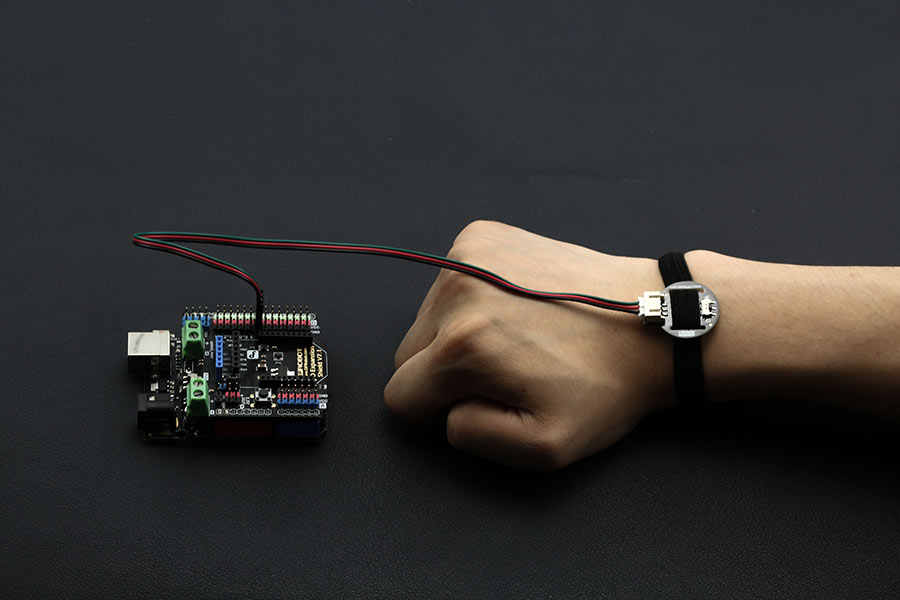
Naman Chauhan from SRM University created a proof-of-concept project that measures your resting heart rate and sends the data for analysis via a $5 Wi-Fi device. The project is fully documented with... read more >>
]]>Naman uses an Arduino for processing the heartbeat data and turns the data into heartbeats per minute. Then, periodically, the device sends the data to ThingSpeak for data storage and data analysis using MATLAB. The heart rate monitor is connected to the internet using DFROBOT’s ESP8266 Wi-Fi Bee. The Wi-Fi Bee turns serial data-to-Wi-Fi.
This heart rate monitor sensor is a pulse sensor which is developed based on PPG techniques. This is a simple and low-cost optical technique that can be used to detect blood volume changing in the microvascular bed of tissues. It is relatively easy to detect the pulsatile component of the cardiac cycle according to this theory.
To build your own, check out Naman’s tutorial on either Hackaday or Hackster.
]]>
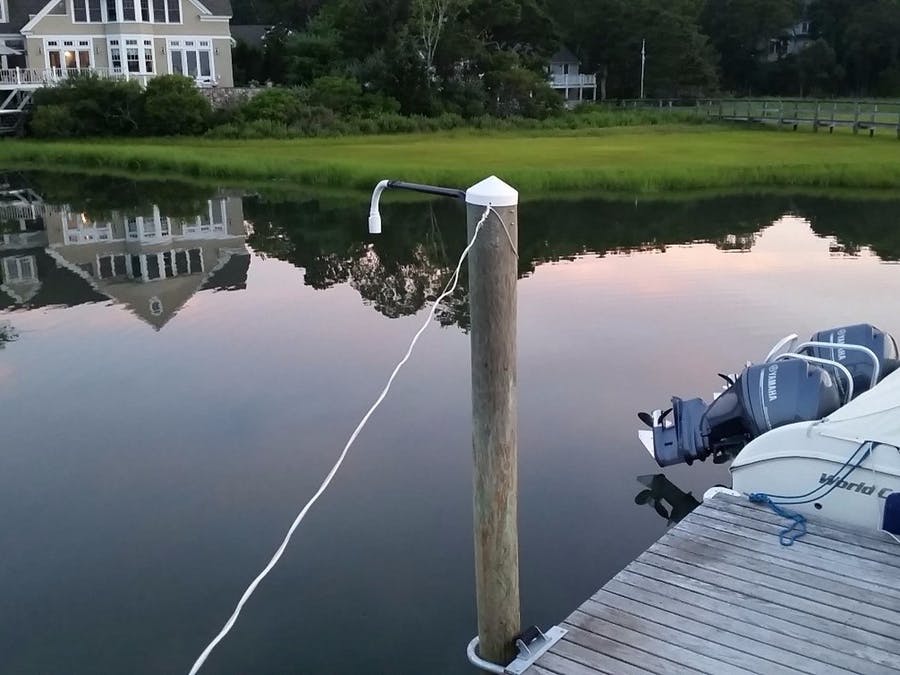
Tides go up and down. But, the question is when and how will the tide levels change in the future. If you are planning a boating trip or trying to understand how the wind affects tide levels during... read more >>
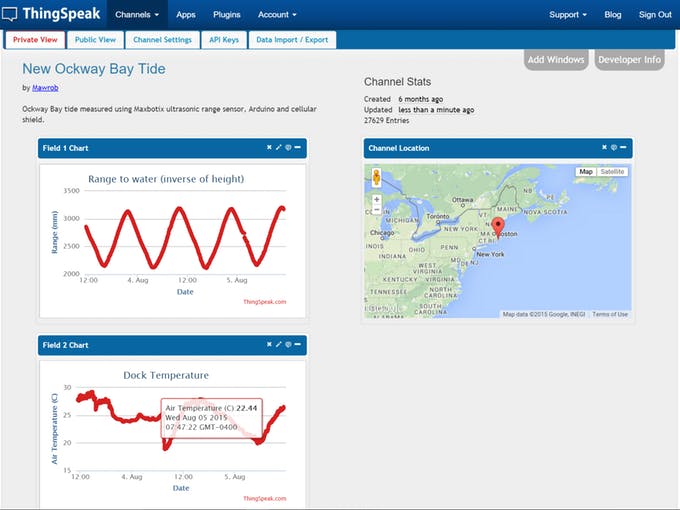
]]>The tide height is calculated using an ultrasonic level sensor. This measurement is taken periodically and then sent to ThingSpeak, an IoT analytics cloud platform by MathWorks, using a cellular modem. The system can easily be adapted to collect data about any environmental system such as greenhouses or oyster farms.
Once you have the data in a ThingSpeak channel, you use MATLAB to preprocess and clean up the data. The raw data some times has extraneous values caused by environmental factors such as lighting, cabling, and electrical interference. Sometimes, you have missing data caused by connectivity issues. It is important to clean up the data before you use the data in your analysis.
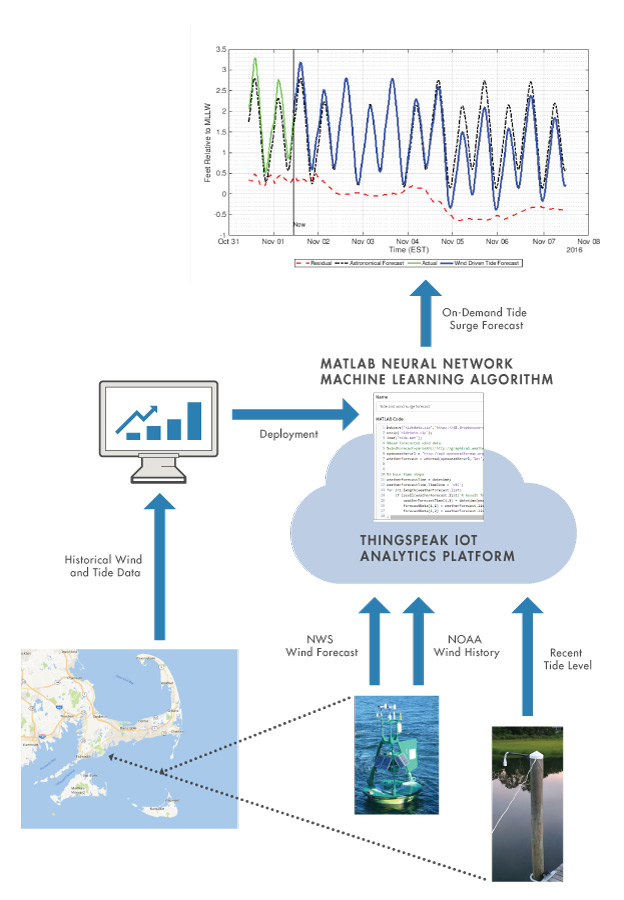
To predict future tide levels and send alerts when the tide is rising or falling, we use the MATLAB Analysis app on ThingSpeak. With MATLAB, we can use historical data to make a prediction about the future tide levels. This predicted tide level can be used to help schedule a boating trip or plan for a water surge after a storm.
Remembering to check the tide level when fishing or lazing on the beach is not particularly convenient. A much more useful approach is to have the system send a message when the time has come to pack up and start heading back to the dock. The timing of the alert depends on how much water depth is needed by a particular boat. Larger boats need higher water levels in order to move without getting stuck in the mud. One way to send alerts is to use ThingSpeak and MATLAB to detect changes in tidal height and send alerts.
Developing a tide monitoring system provided accurate tide level measurement and tide level prediction, with the added ability to send alerts. Robert has been able to avoid being stuck in the bay by providing enough time to get back to his dock using this system. This project also serves as a useful approach to solving many data-driven puzzles by having a reliable way to collect, analyze, and act on data. Using MATLAB, the accuracy of the tide levels improved by understanding the proper tide levels at a specific location and when the tide levels will change. If you used the general tide forecast, you would have to account for several inches of tide height difference.

An emerging topic with IoT is Digital Twin (DT). The digital twin is a federation of data and models that can be analyzed or put into a simulation to create useful information about the past,... read more >>
]]>The digital twin is a federation of data and models that can be analyzed or put into a simulation to create useful information about the past, present, or future of the DT’s physical twin.
Bruce Sinclair of the Iot-Inc. Business Show podcast invite Jim Tung, a MathWorks fellow, to discuss models, simulation, and digital twins. Jim shares information about a few MathWorks customer use cases and our products used for modeling, simulation, and IoT.
Bruce and Jim talk about many interesting and key topics for IoT system development, including:
To listen to the Iot-Inc. Business Show podcast, either subscribe on iTunes or play the episode on Iot-Inc.

Many IoT projects collect data from a sensor and send the data to ThingSpeak at the same time over and over. To continuously collect and send data to the cloud requires the device to be powered and... read more >>
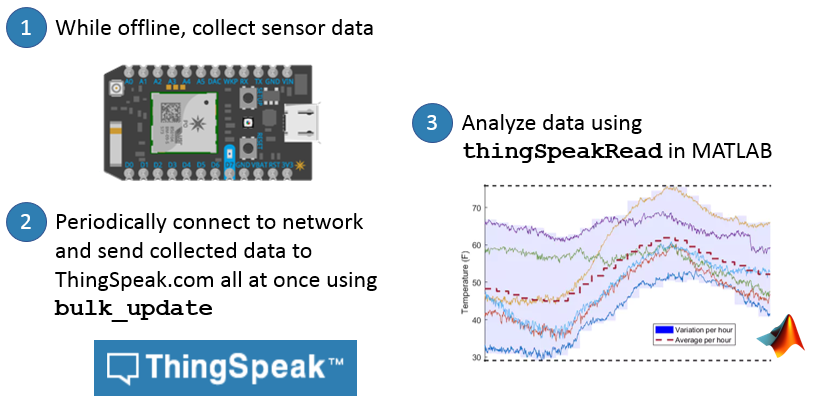
]]>The ThingSpeak team at MathWorks is excited to announce Bulk-Update! This new ThingSpeak feature is targeted at IoT devices trying to optimize battery use by allowing the device to update a lot of data at once. To help you get started with bulk-update, we have written examples for Arduino, ESP8266, Particle Photon, and the Raspberry Pi 3.
Once your data is on ThingSpeak, it is easy to analyze using the MATLAB Analysis and Visualization apps within ThingSpeak, MATLAB Online, or Desktop MATLAB. To read data from ThingSpeak into MATLAB, use the ThingSpeak Support Toolbox and the thingSpeakRead command. We have released documentation and examples to help you get started with bulk-update on ThingSpeak.

We are excited to return to the 124th Annual American Society of Engineering Education Conference & Exposition! ASEE is committed to fostering the exchange of ideas, enhancing teaching methods... read more >>
]]>This year, I will be hosting an IoT workshop with Dr. Gerald W. Recktenwald, Portland State University, Jeff Branson from SparkFun, Dr. Duncan James Bremner P.E. from the University of Glasgow. Our session is called, “Your Head in the Clouds: A Hands-on Workshop on Using IoT Devices as Teaching Aids“. We will explore IoT hardware and software to be used as teaching aids in engineering education. We will use tools from SparkFun, ThingSpeak, and MATLAB to build an IoT project in the workshop. For more information, visit the ASEE session website.
Greater Columbus Convention Center
400 N. High Street
Columbus, OH
Your Head in the Clouds: A Hands-on Workshop on Using IoT Devices as Teaching Aids
Wednesday, June 28, 2017 1:30 PM to 5:30 PM

Smoking ribs or a pork shoulder requires lots of patience and practice. When everything works, you get to enjoy an amazing dinner. When things go wrong, you end up with dry, overcooked meat that only... read more >>
]]>My process of smoking meat, cheese, or even ice cream is to monitor only the meat temperature and the internal temperature of the smoker. When I finish a cook, I go back and try to learn from the data. I do not attempt to control the smoker using the Internet of Things, I use IoT to collect the data with ThingSpeak, analyze the data with MATLAB, and apply the insights to the next cook. The best advice that I have been given is to not change too many variables. Stick with simple rubs, the same charcoal, the same wood, the same cuts of meat, etc. Only change one variable for one cook. It takes years of trial and error before you get great at BBQ.
With the help of ThingSpeak and MATLAB, I can help you understand one of the more frustrating parts of smoking meats… the stall! The stall is a period of time where what you are cooking does not seem to be increasing in internal temperature. I used to panic during the stall and mess with the temperature by adding more charcoal or turning the vents. Overtime, I realized this is normal. No reason to panic.
Cooking is taking something cold and getting its internal temperature up to a safe level. Everything that you cook has a different target internal temperature, but generally the sweet spot is 190-205F. Smoking is about low and slow cooking. This means that you are trying to raise that internal temperature slowly with a low temperature. I use a cook temperature of 230-250F. This means that smoking takes a lot of time to properly cook. In some cases, this is two hours per pound. Things don’t change much minute to minute in a BBQ pit, so you can collect data every few minutes and still have an accurate picture of what’s happening.
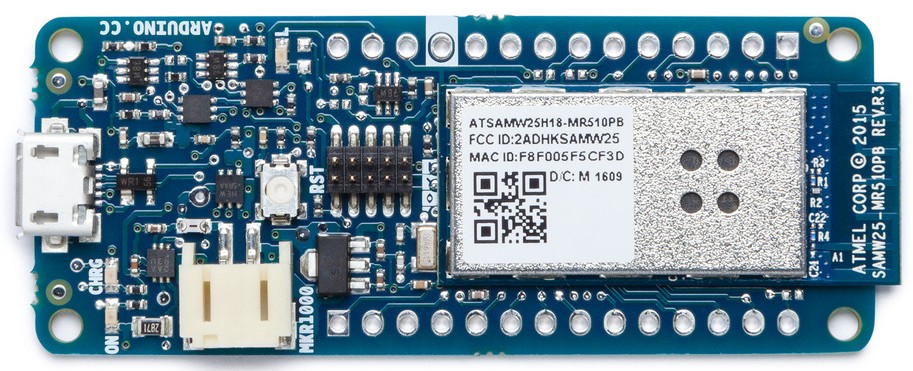
First, I set up a ThingSpeak channel to store my temperature data. One field is for the smoker’s temperature and field two is for the internal temperature of what I am cooking. To get the data, you have many options. I did a quick search around the internet and discovered hundreds of Arduino and ThingSpeak projects to get data from a smoker. In general you need two temperature probes that can take the heat of the smoker, connectors, an Arduino with Wi-Fi like the MKR1000.
The first step is to read in the temperature data using MATLAB that was collected by ThingSpeak. Data on ThingSpeak is stored in a channel and identified by a channelID. If you have a private channel, you will need to supply a Read API Key to get access to the data.
smokerTT = thingSpeakRead(279400,'ReadKey','9AYZQDT1XFDM98FW','OutputFormat','timetable','NumPoints',115);
Sometimes the data from your temperature probe is noisey. This means the value that the temperature probe reports is sometimes higher or lower than the actual temperature. If you take a few samples and take a median, you get a consistent result. In MATLAB, I use smoothdata to take a moving median of my time-series sensor data.
smoothSmoker = smoothdata(smokerTT);
After I clean up the data, I want to visualize it and to see what happened. This is a good time to learn how long things actually take, so on your next cook you budget the right amount of time and don’t rush any phases.
plot(smoothSmoker.Timestamps, smoothSmoker.Variables);
I can use this data to determine how long the total cook will last and even set alerts using ThingSpeak. I tend to watch the smoker and tend the fire.
After a lot of research, I discovered what the stall is doing and why it is important to keep your patience and push forward. This is starting to sound like a metaphor for life. According to Prof. Greg Blonder, “The stall is evaporative cooling”. Prof. Greg is a physicist, entrepreneur, former Chief Technical Advisor at AT&T’s legendary Bell Labs, and regularly contributes to AmazingRibs.com. He likes to bust myths about barbequing and help us understand the thermodynamics of cooking. You are heating the meat slowly, but the moisuture in the meat is evapotaring at the same rate. This effect causes a stall in the temperature rise. The temperature of the meat will go up when the moisture is depleted. The stall is important to the cooking process and leads to something called the bark. This is an outer layer of the meat that is slightly thicker and less tender than the rest of the meat, but traps in lots of flavor and adds to its complexity. So, don’t rush during the stall. Keep the smoker temperature constant – avoid the temptation to turn the heat up to get through faster. And in the end, enjoy some well made BBQ with friends and family over the summer weekends and holidays.
]]>
April 9th is IoT Day! We are celebrating by announcing new IoT Analytic features. All ThingSpeak users now have access to the new features of MATLAB R2017a. In ThingSpeak you can analyze and... read more >>
]]>In the latest update, we have added many new analytics features perfect for IoT data:
At our headquarters in Natick, MA, we have a weather station sending data to ThingSpeak channel 12397. We use ThingSpeak to collect raw temperature, humidity, wind, and rain data. We use MATLAB to analyze and visualize the data so we can use it for forecasting plant harvesting and building weather models. Learn how to build your own weather station at Hackster.io and learn how to analyze the weather data using MATLAB with the source code on File Exchange.
Often you want to process the raw data by removing outliers and smoothing the data. This helps if you are building a predictive model and to better visualize the data. The common IoT analytics workflow is to read in raw data, synchronize the data in time, detect and remove outlier values, smooth the data, and visualize the data. This example works on ThingSpeak, MATLAB Online, and desktop MATLAB.
[weather,channelInfo] = thingSpeakRead(12397,...
'DateRange',[datetime('Feb 04, 2016'),datetime('Feb 10, 2016')],...
'outputFormat','table');
weather = table2timetable(weather);
First, resample the timetable using the retime function so the times and data are uniformly spaced on the minute.
wdata = retime(weather(:,{'Humidity','TemperatureF'}),'minutely','linear');
Smooth the data using a moving median and compare this to the original data. There are a number of moving statistics functions for vectors and matrices like movmean, movmedian, etc and also the smoothdata function which also works on timetables and uses the RowTimes as the sample points. Moving median is the default and other options are available.
smdata = smoothdata(wdata);
figure
plot(wdata.Timestamps,wdata.TemperatureF,...
smdata.Timestamps,smdata.TemperatureF,'m--')
legend('Raw Data','Smooth Data')
ylabel('Temperature (\circF)')
title('Temperature Over Time')

Have a happy IoT Day and we hope that you understand your IoT data a littler more by using MATLAB Analytics on ThingSpeak. I would like to thank Heather Gorr for helping me put together the example MATLAB code. Cheers!
]]>
April 1st is Arduino Day, no joke! For in person events near you, check out the Arduino Day website. If you have been kicking around an idea about a project to build, this is a great time to try to... read more >>
]]>Maybe it’s time to build your version of a MATLAB and Arduino powered dartboard.
We hope you build some awesome projects using Arduino, MATLAB, Simulink, and ThingSpeak on Arduino Day!
]]>
Anders Sollander, a principal technical consultant at MathWorks, and his team put together a project to determine what demo was the most popular at one of our demo showcases. Anders made an... read more >>
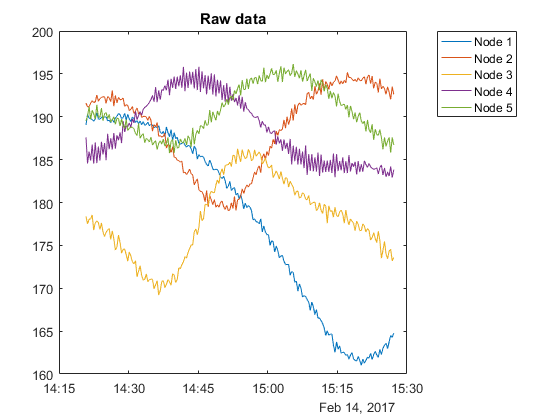
]]>Anders was determined to measure sound from over 20 demo stations at the same time and figure out who the the winner is. This turns out to be a complicated challenge and he used our tools such as MATLAB, Simulink, and ThingSpeak, to produce some interesting results. Here’s what the raw data looks like from just five sound sensor nodes at the demo stations.
The sensor nodes uses the Arduino Nano devices because they’re small, low-cost, and Simulink has an Arduino support package. Arduino Nano’s both low cost and energy efficient which is great, but it doesn’t have Wi-Fi. They connect the sensor nodes to an Internet-connected Raspberry Pi using an RF mesh network with the nRF24l01+ radio. The RF24 solution is both very cheap and energy efficient, which is valuable if you’re running them with battery power. Simulink Coder has a Raspberry Pi Support Package which simplified the workflow.
When you follow the tutorial, you are going to learn many things and experience their analytic workflow as they decide how to develop an algorithm to normalize sound levels, determine which data to send to ThingSpeak, and build visualizations to see the results of the project.
Anders also shared a library on File Exchange that allows users to communicate with RF24 chips on Raspberry Pi and Arduino boards. The library relies on the RF24Mesh library, and has S-functions that interact with the classes there. The File Exchange submission includes an example for the Arduino to read sensor data from a temperature sensor and sends it to the gateway Raspberry Pi and then sends the data to ThingSpeak. In order to download the File Exchange, you need to sign in with your MathWorks account. This would be the same account that you use on ThingSpeak.com.
Visit ThingSpeak Tutorials, to see the complete tutorial for Building a Dynamic and Self-organizing Network of Devices.
]]>
The Internet of Things (IoT) enables power producers, public utilities, and other companies in the energy sector to collect energy power consumption data from hundreds of factories and thousands of... read more >>
]]>Consulting firm Cadmus provides full-spectrum energy-efficiency support services to energy utilities throughout North America. These services include studies of energy use that require extensive data collection and analysis.
To make the most of the opportunities presented by the IoT, Cadmus engineers used MATLAB® and the ThingSpeak
IoT platform to develop a workflow for collecting, storing, analyzing, visualizing, and interpreting data from sensors in homes and businesses distributed across wide geographic areas.
“In just a few months, we implemented a new service that measures and analyzes temperature and humidity changes in dozens—and soon hundreds—of homes,” says Dave Korn, vice president of engineering at Cadmus. “Without MATLAB and ThingSpeak, we would still just be talking about it. Instead, we’re already pitching this service to utilities. That is a huge competitive advantage for our company.”
Cadmus used MATLAB and ThingSpeak to develop and deploy two systems of cloud-connected sensors for the near-real-time measurement and analysis of energy data, while establishing a workflow for rapidly implementing similar systems.
The first system, designed for an energy efficiency study of residential homes, used custom sensors to send temperature, relative humidity, and device battery voltage measurements to ThingSpeak every five minutes. The second, designed to monitor loads of HVAC systems and large appliances, used off-the-shelf home automation hardware to send power usage data, captured at residential circuit breakers and individual outlets, every minute.
Using the ThingSpeak web application, the engineers created new channels to collect data from the sensors and to quickly verify that each new sensor added to the system was reliably sending data.
Working in MATLAB, the team analyzed the collected data, using standard statistical techniques to identify outliers and calculate means and standard deviations. For example, they calculated and plotted power load profiles by the hour and correlated the load data with weather data from an outside source.
They created a variety of data visualizations, including interactive maps, which they shared with clients and prospects.
Cadmus engineers are currently using MATLAB and Statistics and Machine Learning Toolbox
to develop predictive algorithms based on machine learning and advanced classification and regression techniques. These algorithms are designed to predict and model load based on weather conditions and sensor data collected via ThingSpeak.

Takuji Fukumoto, an Application Engineer at MathWorks, shared a project with me that he created that uses capabilities of MATLAB Mobile™, MATLAB Drive™, MATLAB Online™, and ThingSpeak™. His project... read more >>
]]>
, MATLAB Drive
, MATLAB Online
, and ThingSpeak
. His project uses MATLAB Mobile to send its position and sensor data to ThingSpeak. He then uses MATLAB® to process the data and generate maps of his position.
You might have noticed recently on ThingSpeak that you can link your ThingSpeak user account to a MathWorks Account. By doing so, you have access to other MathWorks products and services that you can use with the same user account. MATLAB Mobile is a native Apple or Android app that allows you to evaluate MATLAB commands, create and edit files, view results, acquire data from sensors, and visualize data. MATLAB Mobile also has thingSpeakRead and thingSpeakWrite functions built-in. One exciting aspects of MATLAB Mobile is that you can capture the sensor data of the mobile device and send it to MATLAB Online.
To take the project further, you can use additional toolboxes from MathWorks to preprocess the data and do advanced mapping. Takuji demonstrates using the Signal Processing Toolbox
to filter, down sample, and remove outliers from the incoming data from the MATLAB Mobile sensors. Using the Mapping Toolbox
, he plots the latitude and longitude of his mobile device on a WPS map and displays the map on a ThingSpeak channel.
Takuji has shared all of the source code and steps on File Exchange so you can replicate this project on your own mobile device. Check out his project on File Exchange and see his raw data and visualizations on ThingSpeak.
]]>
MQTT is a common protocol used in IoT systems to connect low-level devices and sensors. MQTT is used to pass short messages to and from a broker. ThingSpeak has recently added an MQTT broker so... read more >>
]]>The ThingSpeak MQTT broker is available now to all ThingSpeak users!
To help users get started using MQTT to send data to ThingSpeak, we have created some examples for common devices and applications that support MQTT.
If your device or application is not able to use MQTT directly, we have also enabled WebSockets. Using MQTT over WebSockets allows devices to use the MQTT protocol to send messages behind a firewall. We also support secure sockets to encrypt the messages that are being sent to ThingSpeak.
To learn how to use MQTT with ThingSpeak, please review our documentation. Let us know what you build with this new capability.
]]>
ThingSpeak has experienced tremendous growth over the past 6 years and we continue to add new users from all over the world who are building amazing IoT projects that use ThingSpeak and MATLAB. As... read more >>
]]>As the ThingSpeak user community grows, we have been hearing requests for sending many millions of messages to ThingSpeak, connecting more devices, and building scalable commercial solutions. To address these requests, we are releasing new paid options for ThingSpeak. For more information, see the How to Buy page and the ThingSpeak licensing FAQ.
ThingSpeak users can continue to send up to 3 million messages per year for free (about 8200 messages per day). That satisfies the needs of 99.5% of the user community. To determine how many messages you are using, you can login and look at your account usage.
]]>
Over the weekend, I noticed a tweet about a people counter using MATLAB and ThingSpeak being demonstrated at Big Data Spain. They were able to detect over 1,500 visitors at their demo station. The... read more >>
]]>The project uses MATLAB to create a cloud-based people counter by detecting faces with the Computer Vision System Toolbox
. The raw people count is then sent to the ThingSpeak IoT platform for data collection in the cloud and further data analysis.
Check out File Exchange to learn how to build your own people counter using MATLAB and ThingSpeak.
]]>
ThingSpeak offers an easy way to collect data from things, analyze and visualize the data with MATLAB, and act on your data. With MATLAB from MathWorks, you have access to powerful data processing... read more >>
]]>
and Signal Processing Toolbox
. These toolboxes need a license from MathWorks. If you have access to these toolboxes linked to a MathWorks Account, you have access to many of the toolboxes on ThingSpeak. All you have to do is to log in to ThingSpeak using your MathWorks Account credentials. With very little code, it is possible to forecast tidal depths using tide data collected by a ThingSpeak channel and the System Identification Toolbox.
When you are logged into ThingSpeak using your MathWorks Account, you can use functions from the following toolboxes if you are licensed to use them:


We have created many examples showing you how to use MATLAB Toolboxes using ThingSpeak channel data. We have an example using the Signal Processing Toolbox to Visualize and Remove Outliers in Your Data which a common task when you are working with IoT data from sensors. If you want to forecast environmental data by using a feedforward neural network, we have an example using the Neural Network Toolbox operating on weather station data collected by ThingSpeak. In all of our examples, you are able to use the code right on ThingSpeak and allow it to run on a schedule using TimeControl or be triggered to run using React. Many of your licensed toolboxes are now available with your MathWorks Account on ThingSpeak.

We released a new version of MATLAB and it’s available now for every ThingSpeak user. MATLAB R2016b includes many new features that make it easy to work with time-stamped tabular data,... read more >>
]]>With multiple sensors around my house or office, I want to be able to send data to multiple ThingSpeak channels. But, when I want to perform data analysis, I have a hard time working with data from multiple channels. The channels do not have the same time stamps and are out-of-sync with each other.
With R2016b of MATLAB®, I am able to use the new timetable data container. Once the data is a stored as a timetable, I can perform powerful operations such as retime, synchronize, and rmmissing.
In this example, I have two sensors outside of my office here in Natick, MA. One sensor is a temperature sensor that is sending data to ThingSpeak channel 163540. My other sensor is writing humidity data to channel 163545. Both channels are public. My goal is to plot temperature versus humidity over one time series. To accomplish this, I will use timetable and synchronize inside of a new MATLAB Visualization on ThingSpeak.
% Read from the temperature channel
temperatureTT = thingSpeakRead(163540,'Fields',1,'NumPoints',100,'outputFormat','timetable');
% Read from the humidity channel
humidityTT = thingSpeakRead(163545,'Fields',1,'NumPoints',100,'outputFormat','timetable');
% Synchronize two timestables and fill in missing data using linear interpolation
TT = synchronize(temperatureTT,humidityTT,'union','linear')
% Plot Temperature and Humidity over time
plotyy(TT.Timestamps,TT.Temperature,...
TT.Timestamps,TT.Humidity);
title('Temperature and Humidity Synchronized From Two Channels')
xlabel('Temperature and Humidity in Natick, MA')
legend('Temperature','Humidity')
The first part of the script reads in ThingSpeak data from two different channels and stores the data in two timetables. Once the data is stored in a timetable, I am able to take advantage of synchronize. With synchronize, I can combine both timetables with one time series and fill in missing data using linear interpolation. This results in a plot that shows my data over time without any missing data. To create the plot, I signed into ThingSpeak, selected Apps, and created a new MATLAB Visualization with my MATLAB code.
All ThingSpeak users are able to try this example or explore the other new MATLAB features directly on ThingSpeak. I will leave my temperature (163540) and humidity (163545) channels public, so you can try out timetable example without having to connect devices to ThingSpeak.
]]>
Allie Fauer, a designer from New York, has released another awesome Instructable tutorial on how to build a “To Do List Reminder Light”. This project is very creative and easy to build on... read more >>
]]>Allie uses the MATLAB Analysis app on ThingSpeak to check her to do list and see if anything is overdue. If a task is overdue, the MATLAB code writes the task overdue into a ThingSpeak channel. The MATLAB code is very straightforward and does a bit of analysis on her task list to see what is overdue. To get the MATLAB Analysis code to keep checking her task last, she schedules the MATLAB code using the TimeControl app on ThingSpeak.
Allie also has other ideas on how to make use of her status light:
To build your own Remembrall light, follow the step-by-step tutorial on Instructables.
]]>
We launched MATLAB Analysis and Visualizations on ThingSpeak last year and have noticed a sharp increase in IoT analytics being used in your projects. We are seeing everything from analyzing... read more >>
]]>MATLAB Central is “a place where you can get answers.” We have over 100,000 community members and MathWorks employees all sharing projects and files, experience, and answering questions. And, ThingSpeak is showing up on MATLAB Answers and File Exchange. This is great news for the ThingSpeak Community. If you already have a MathWorks user account and use it on ThingSpeak, you already have access to MATLAB Central. All you have to do is sign in. If you are new to MathWorks, you can sign up for a free user account to gain access to MATLAB Central and other features of ThingSpeak.
Check out Ned Gulley’s post, “Going Way Back with MATLAB Central” to learn about how the MATLAB community has formed over the years.
Cheers to MATLAB Central hitting the 15th year mark! We are happy to be a part of the story.
]]>
2016 has been a huge year for IoT and the growth of ThingSpeak. We are looking at where our users and visitors are coming from and we are seeing some surprising trends. India alone represents 10% of... read more >>
]]>*According to ThingSpeak Usage Stats
]]>
Lord Kelvin said, “If you can not measure it, you can not improve it.” In Carsten’s project, he built a squirrel feeder complete with sensors and a camera. The “Squirrel... read more >>
]]>The Squirrel Cafe is connected to the ThingSpeak IoT Analytics platform using the Raspberry Pi. The Raspberry Pi collects data from a tilt sensor, temperature sensor, and a camera to determine how many nuts the squirrels are taking. Whenever the lid opens, the current temperature gets measured by the DS18B20 sensor and sent to ThingSpeak for storage and analysis using MATLAB.
Carsten is also testing a theory. He noticed through observation that there might be a correlation between the number of nuts that get taken from the feeder and how long the coming winter season will be. This winter forecast and “nuts per minute” calculations are being performed by ThingSpeak’s MATLAB Analysis app. We are excited to see what the results prove in the next few years.
For full project details and source code, visit Carsten’s website for this project at www.TheSquirrelCafe.com.
]]>

Rob Purser, our Senior Development Manager for IoT, will be holding a hands-on workshop at this year’s IoT Evolution in Las Vegas. Rob will teach the attendees how to prototype IoT analytics... read more >>
]]>The Internet of Things typically involves a discussion of smart devices and the cloud, with much less attention paid to the data collection, pre-processing of acquired data, and development of real-time analytics algorithms. A successful data analytics strategy involves embedded sensor analytics, historical data analysis, and online analytics. In this hands-on session, each participant will work with devices and try out the various types of analytics in action.
Caesars Palace, Las Vegas
900 Convention Center Blvd
New Orleans, LA
IOTD-02: Prototyping IoT Analytics: Hands on with ThingSpeak and MATLAB
Tuesday, July 12, 2016 at 2PM
Forum 15

I will be joining a panel at the ASEE’s 123rd Annual Conference in New Orleans. The goal of our panel is to discuss what students need to learn to be successful in IoT. Our session is Tuesday,... read more >>
]]>The IoT panel at ASEE will be moderated by Dr. Gerald W. Recktenwald and features Dr. Jacob Segil from the University of Colorado, Boulder, Dr. Duncan James Bremner P.E. from the University of Glasgow, and Hans Scharler from MathWorks.
New Orleans Convention Center
900 Convention Center Blvd
New Orleans, LA
T426·IoT: What Do Students Need to Learn to Be Successful in this Field?
Tuesday, June 28, 2016 1:15 PM to 2:45 PM
]]>

[Haodong Liang] has released a weather station project with full MATLAB data analysis, device source code, and procedures on Hackster.io. He used the Particle Electron to connect the SparkFun weather... read more >>
]]>The project also shows you how to use MATLAB to get very detailed visualizations and data analysis of the data collected by the weather station. Some of the examples include histograms of temperature, humidity, and pressure, curve fitting, daily comparisons, and 3D plots of temperature.
Visit Hackster.io for the complete tutorial to build your own weather station, connect it to the internet with the Particle Photon, collect your data with ThingSpeak, and do data analysis with MATLAB.
[via Hackster.io]
]]>
If you are looking to start with the Internet of Things, then try out the Arduino MKR1000 and connect it to the ThingSpeak IoT Platform. We have put together a complete tutorial that uses the MKR1000... read more >>
]]>The Arduino MKR1000 is a great starting point when learning about the “things” in IoT. The MKR1000 has a microcontroller, Wi-Fi module, encryption module, and a battery-charging circuit. It’s easy to get started and once you get it connected to ThingSpeak, you have a lot of “cloud power”. ThingSpeak has a suite of apps to allow the Arduino to post messages to Twitter, do data analysis, show charts and visualizations, and be controlled by schedules and external events. With these building blocks you can prototype any IoT system.
Once you have your data on ThingSpeak, you can analyze and visualize the data with built-in MATLAB apps.
[via ThingSpeak Tutorials]
]]>
Cinetica has released to Google Play, a new app to see ThingSpeak charts on Android smartphones and tablets. The app is called ThingView and has already reached 5,000 installs on Android... read more >>
]]>Even if you do not have devices and sensors sending data to ThingSpeak, you can still use ThingView to see public channels. For example, if you want to see the charts created by sensors in my house, just add Channel ID 9 to ThingView. You see charts of light levels and temperature generated by my house.
Check out ThingView on Google Play!
]]>
Hackster.io announced that ThingSpeak is now a platform on their project sharing website! The ThingSpeak platform joins the likes of Amazon Echo, ESP8266 Wi-Fi, and Particle.io platform. ThingSpeak... read more >>
]]>The ThingSpeak platform joins the likes of Amazon Echo, ESP8266 Wi-Fi, and Particle.io platform. ThingSpeak users can easily document, share, and reproduce hardware and Internet of Things projects using Hackster.io. We are already off to a great start with 13 documented projects and tutorials and 31 community members. Check out our platform on Hackster.io to discover great projects and build your own IoT projects.
]]>
Loren Shure, a blogger at MATLAB Central, has written a new blog post about Eric Wetjen’s Counting Cars and Analyzing Traffic project. Eric uses a Raspberry Pi and webcam to capture traffic... read more >>
]]>Loren explores the data using MATLAB Analysis and MATLAB Visualizations app built into ThingSpeak.
If you have desktop MATLAB, you can gain even more insights into our traffic data or any of your ThingSpeak Channels. You need to first import the data from ThingSpeak into desktop MATLAB. To simplify the retrieval of the data from ThingSpeak, we use the functions from the ThingSpeak Support Toolbox, available on MATLAB Central File Exchange.
readChannelID = 38629;
readAPIKey = '8NPXB8G515OAD94Q';
%% Read Data %%
[data, time] = thingSpeakRead(readChannelID,'DateRange',[datetime('Mar 13, 2016'),datetime('Mar 14, 2016')],'ReadKey', readAPIKey);
]]>
My power meter at my house reports its power every few minutes. I capture that data and send it to ThingSpeak. The value reported is the total kilowatt-hour (kWh). I would love to see the maximum... read more >>
]]>My data over an hour looks like this: 803, 919, 724, 1349, 1500, 602, 549, 899, 1678, 1577
Using movmax, I can have a sliding window ran over my data to pull out a maximum value from the window and use it for visualization or further analysis.
The MATLAB code to process my power data is really straightforward.
readChannelID = 97871; fieldID1 = 1; readAPIKey = '7MOXB8G515OAD94Q'; %% Read Data %% [data, time] = thingSpeakRead(readChannelID, 'Field', fieldID1, 'NumPoints', 10, 'ReadKey', readAPIKey); %% Process Data %% data_max = movmax(data, 4) %% Visualize Data %% plot(time, data_max);
Now, using the MATLAB Visualizations app on ThingSpeak, I can visualize the data. Here’s the before and after.

You can use movmax in the MATLAB Analysis or MATLAB Visualizations apps on ThingSpeak. Sign up or sign into ThingSpeak, select Apps, and click “MATLAB Visualizations”. Create a new one with the blank template and use my MATLAB code. I will leave my channel of data up for you to try out. You can use channel number 97871 and my read API key 7MOXB8G515OAD94Q. The power data is stored in field1.
]]>
Julien Vanier over at Hackster.io created a new tutorial showing you how to get started with the Internet of Things using the new Particle Electron and ThingSpeak. The Electron is a new 3G connected... read more >>
]]>The Electron is a new 3G connected IoT device using cellular data and works anywhere you can get 3G in the United States. It is really awesome to plug-in a device and get it connected without the issues of Wi-Fi. This development kit also makes it possible to build battery-powered, mobile sensors. Good thing that ThingSpeak supports GPS data and offers sensor data analytics.
Check out Julien’s tutorial to go “From 0 to IoT in 15 Minutes” and other ThingSpeak projects on Hackster.io.
]]>
Have you ever wondered how long it will take to get an Uber at your location? This project uses ThingSpeak to log the ETA for an Uber service based on your latitude and longitude. We will use... read more >>
]]>The Uber API allows you to pass a latitude and longitude to determine the estimated time of arrival for an Uber car. The API also allows you to schedule a car. I have made a button that requests an Uber car and also schedules an Uber at the right time.
MATLAB Analysis Code
% Read the ThingHTTP for 'Uber Ride Estimate'
data = webread('https://api.thingspeak.com/apps/thinghttp/send_request?api_key=XXX')
% Convert the response to a number
eta = str2num(data);
% Write the data to the 'Uber Ride Estimate Data' ThingSpeak Channel
thingSpeakWrite(Channel_ID,eta,'WriteKey','XXX');
Each time the MATLAB Analysis code is executed, it will write the estimated time of arrival (ETA) for Uber to your ThingSpeak channel. To track the ETA over time, schedule the MATLAB code with TimeControl. I am running the code every 5 minutes to get an idea of when the peak times are for Uber to pick me up at my office in Natick, MA. Check out the ThingSpeak channel number 840700 to see the estimated times.
Step-by-step project details are available at Hackster.io.
]]>
Chris Hayhurst uses a solar water heater at his house to lower energy costs and use hot water in his house heated up by the sun. Chris is a consulting manager for The MathWorks and partnered with the... read more >>
]]>
Chris’ home solar water heating system is an example of an IoT application that uses multiple sensors to collect data about a physical system. Chris’s water heater measures ambient temperature, stored water temperature, collector temperature, and pump speed. All of this data gets collect by ThingSpeak and stored in Channel 29633.
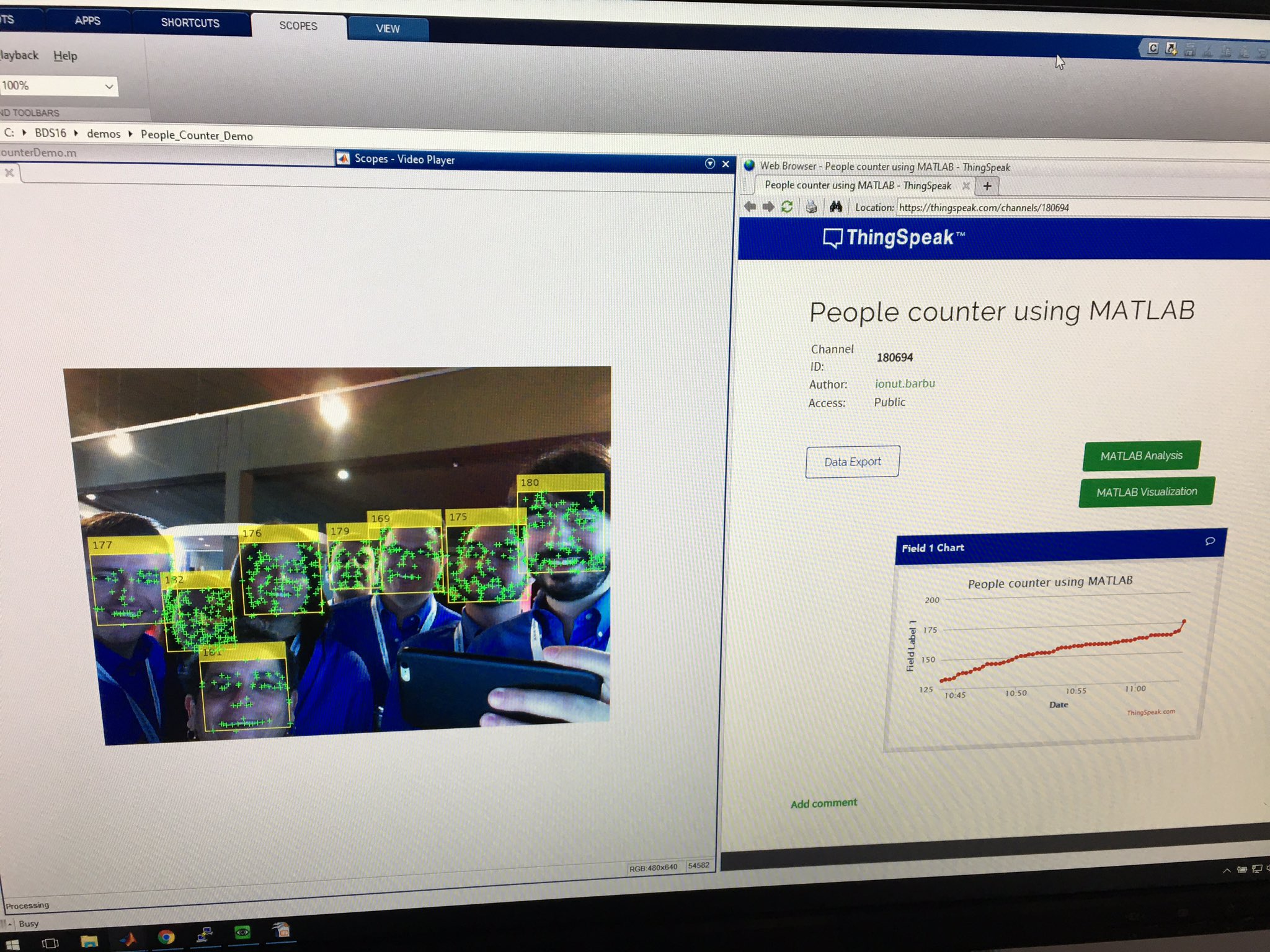
On days when the stored water temperature exceeds 50°C (122°F), there’s no need to use other methods to heat the store of water to a useful working temperature. The pump should turn on only when the collector temperature is greater than the temperature of the stored water tank. If the pump turns itself on when the collector is cooler than the stored water temperature, valuable heat is lost from the stored water tank. Chris wants to be alerted of this condition, so that he can adjust the controller settings and increase the efficiency of the system.
IoT systems like Chris’ solar water heating system, typically gather large amounts of data but often the real interest is in events that occur infrequently. The ability to take action when these infrequent events occur is important and requires a mechanism to detect such an event and launch an action. We are going to use the data collected by the solar water heating system stored in the ThingSpeak Channel 29633 and use the MATLAB Analysis app to detect a condition and alert him using Twitter.
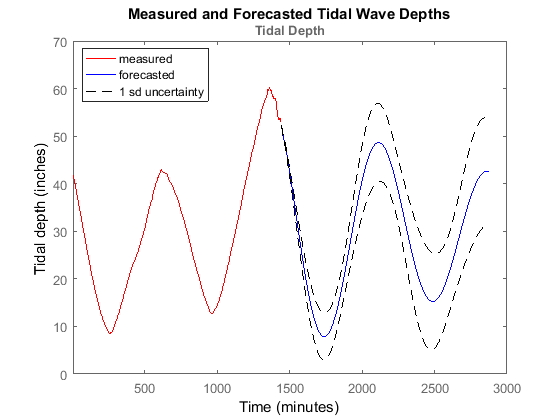
To detect an erroneous pump behavior event, create a new MATLAB Analysis on ThingSpeak with the following code:
% Read data from fields 1, 2, and 3 from channel 26633. % Field 1 represents the stored water temperature % Field 2 represents the collector temperature % Field 3 represents the state of the pump - on or off [data, time] = thingSpeakRead(29633, 'Fields', [1, 2, 3]); % Assign measurements to individual variables storeTemp = data(1); collectorTemp = data(2); pumpState = data(3); % Check if collectorTemp is less than storeTemp isCollectorCooler = collectorTemp < storeTemp; % Identify if pump is on while the collector is cooler. % We apply a logical AND operation to detect an event only when collector % is cooler than store temperature and the pump is on. eventDetected = isCollectorCooler & pumpState
Press the ‘Run & Save’ button to save the MATLAB Analysis App. The code above sets eventDetected to 1 every time the collector temperature is cooler than stored temperature and if the pump is on. Now that we can detect the event, we need to set the MATLAB App to be run on a schedule. To do this, we will setup a TimeControl to run our MATLAB code every 5 minutes.

So far, we’ve created a MATLAB Analysis to detect events in the data being collected in the solar water heater data channel. We associated our MATLAB Analysis code with a TimeControl to have it run every 5 mins to check for our event of interest. To receive a notification via Twitter when the pump is on incorrectly, we can use MATLAB Analysis to send a Tweet.
First, you need to link your Twitter account to your ThingSpeak account. Then, add the following lines of code at the end of your MATLAB Analysis code to send a Tweet when an event is detected:
If eventDetected
webwrite('http://api.thingspeak.com/apps/thingtweet/1/statuses/update',
'api_key', '<ThingTweet_APIKey>', 'status', 'Alert! Solar pump error!')
end
Be sure to replace <ThingTweet_APIKey> with your ThingTweet API Key.
If the solar water heater pump turns on at the wrong times, you will get a Tweet to let you know!
This example shows you the power of some of the ThingSpeak apps that we make available to you to experiment with. The MATLAB Analysis app is really powerful and can be used to detect events in your data and send alerts. MATLAB Analysis can be used for all sorts of calculations and orchestrations of different web services. We could have also used MATLAB to control the pump.
Feel free to try this example and take it further…
What will you MATLAB?
]]>
Slack is a team collaboration tool to make your work life simpler. It is an extremely popular way to receive messages from team members all in one place and integrate with external web services. One... read more >>
]]>By following our tutorial, you will be able to use ThingSpeak to send messages to your team’s Slack channel. This will also allow devices like an Arduino to use Slack since ThingSpeak will take care of authentication and HTTPS.
]]>
Arduino has published a tutorial for their WiFi 101 Shield that sends data to ThingSpeak. The Arduino WiFi Shield 101 is a powerful Internet of Things shield with crypto-authentication that connects... read more >>
]]>You only need a few things to build a light and temperature sensor that writes data to ThingSpeak:

Once you have the circuit built, you create a ThingSpeak channel, connect the Arduino WiFi 1010 to your Wi-Fi network, and install the source code from the tutorial on the Arduino.
Data is now being sent to your ThingSpeak Channel. Go to your channel to see two charts of the light and temperature data. To take the project a step further, go to ThingSpeak Apps and use MATLAB to analyze and visualize and trigger actions from the data.
[via Arduino.cc]
]]>
element14 is hosting a free webinar, “How To Use MATLAB and Simulink With ThingSpeak“, a free webinar hosted by Eric Wetjen of MathWorks. Join the webinar live on November 12, 2015 at... read more >>
]]>This webinar will show how you can use MATLAB and Simulink with ThingSpeak, an Internet of Things data collection platform. ThingSpeak can be used to collect, analyze and act on data sent from devices such as Raspberry Pis and Arduinos. To illustrate this, a car counter is implemented overlooking a busy highway using a Raspberry Pi 2 and a webcam. In this demonstration, Simulink is used to deploy the car-counting algorithm on the Raspberry Pi which is connected to ThingSpeak. The traffic can be analyzed offline with MATLAB or online using ThingSpeak and its built-in MATLAB Analysis and MATLAB Visualizations apps.

Eric Wetjen has been working in Product Marketing at MathWorks for the last 7 years. He focuses on bringing MATLAB analysis capabilities to low cost hardware, Test and Measurement equipment and Internet of Things devices. Prior to MathWorks, Eric held various positions in Product Management and Application Engineering primarily in the telecom industry. Eric holds a Ph.D. in Engineering from Brown University.
Sign up at element14.
]]>
Here at our headquarters we have a weather station collecting lots of weather data and sending it to ThingSpeak. We have made that data public for use in your own projects. We write the temperature... read more >>
]]>We write the temperature and humidity values from the weather station to a ThingSpeak channel. At some point in the project, we started to wonder about dew point calculations. We wrote some MATLAB code that combined the temperature and humidity to calculate dew point. I did this using the ThingSpeak app, “MATLAB Analysis”. You can try this out with ThingSpeak now by signing in, selecting Apps, MATLAB Analysis, New, selecting “Calculate Dew point”, and clicking “Create”. This happens to be one of our built-in examples using our weather station’s public data.
It is great that it was easy to calculate dew point with MATLAB, but I want to see this analyzed data over time just like any other sensor data. The solution is a powerful combination of MATLAB Analysis and TimeControl. We use MATLAB Analysis to do the analysis and write the data to a ThingSpeak channel. Then, we use the TimeControl app to repeat the analysis every 5 minutes.
To setup MATLAB Analysis on a schedule, sign into ThingSpeak, select Apps, TimeControl, and New TimeControl.
My MATLAB code now runs every 5 minutes doing analysis and writing data to my ThingSpeak channel. The TimeControl settings can be tailored to your needs such as executing MATLAB code once a day or only on weekends. This combination of MATLAB Analysis + TimeControl allows you to create continuous analysis of your project data.
To try this out for yourself, we have a public channel of weather station data that we have collected in Natick, MA at our headquarters. You can use that data and do your own MATLAB Analysis and writing the results back to your own channel. Also, Check out the ThingSpeak Documentation where we have a complete tutorial for you to help get started with ThingSpeak and MATLAB.
]]>In the Arduino IDE, choose Sketch/Include Library/Manage Libraries. Click the ThingSpeak Library from the list, and click the Install button.
In the Particle/ Spark Web IDE, click the libraries tab, find ThingSpeak, and choose “Include in App”.
The library includes several examples to help you get started.
Complete open source code and examples for the ThingSpeak Library are available on GitHub. Discover other MathWorks Open Source and Community Projects on GitHub.
]]>
Our very own Robert Mawrey produced a video introducing ThingSpeak and the Internet of Things. ThingSpeak is an open data platform for the Internet of Things. Your device or application can... read more >>
]]>ThingSpeak is an open data platform for the Internet of Things. Your device or application can communicate with ThingSpeak using a RESTful API, and you can either keep your data private, or make it public. In addition, use ThingSpeak to analyze and act on your data. ThingSpeak provides an online text editor to perform data analysis and visualization using MATLAB®. You can also perform actions such as running regularly scheduled MATLAB code or sending a tweet when your data passes a defined threshold. ThingSpeak is used for diverse applications ranging from weather data collection and analysis, to synchronizing the color of lights across the world.
At the heart of ThingSpeak is a time-series database. ThingSpeak provides users with free time-series data storage in channels. Each channel can include up to eight data fields. This tutorial provides an introduction to some of the applications of ThingSpeak, a conceptual overview of how ThingSpeak stores time-series data, and how MATLAB analysis is incorporated in ThingSpeak.
[via MathWorks]
]]>
The power of any tool becomes magnified when you start combing it with other tools. In this File Exchange project by Eric Wetjen, he demonstrates a powerful project by using a webcam to gather live... read more >>
]]>The project uses a Raspberry Pi 2 and USB webcam acting as a sensor. The webcam picks up traffic flowing in both directions. Once the algorithm for detecting cars is modeled in Simulink, the algorithm gets deployed on the Raspberry Pi. The Raspberry Pi sends the raw data to ThingSpeak on regular basis where it is analyzed using the MATLAB Analysis app on ThingSpeak.
After sending to ThingSpeak, Eric created a MATLAB Analysis app to calculate the daily traffic-volume on ThingSpeak Channel 51671. Now that the data is public, others could use this processed data within apps such as Waze to optimize directions using analyzed traffic flows.
Check out the article for the complete project details and all of the code to get your Raspberry Pi + ThingSpeak analysis project started.
]]>On ThingSpeak, so far, the datetime function returned time set to UTC time zone by default. Starting at 10 am (EDT) on September 10th 2015, the datetime function will return date and time set to your account time zone (at https://thingspeak.com/account). This will allow you to read data from your channel with timestamps zoned to your local time zone instead of UTC.
For example, my account time zone is set to Eastern Time (US & Canada), and when I ran the following MATLAB code at 12:23 pm, I received:
dt = datetime('now')
dt =
10-Sep-2015 12:23:35
Prior to this change, I would have received:
dt =
10-Sep-2015 16:23:35
As you can see, the timestamp is 4 hours ahead of my time zone, which was due to MATLAB returning time in UTC.
This change makes it easier for you to perform time related activities in your time zone. Note that this new feature is available for both thingSpeakRead and thingSpeakWrite functions as well. As an example, consider the following request to read data from the MathWorks Weather Channel:
MATLAB Code:
[data, timestamp] = thingSpeakRead(12397); display(timestamp.TimeZone, 'TimeZone');
Output:
data =
225.0000 3.8000 43.9000 95.8000
0 29.9800 4.3000 0.0300
timestamp =
10-Sep-2015 16:13:54
TimeZone =
America/New_York
With this enhancement, you would no longer have to explicitly specify the time zone of your dates and time to read and write data in your time zone.
Here are a few other examples:
startDateTime = datetime('September 10, 2015 00:00:00')
endDateTime = datetime('September 10, 2015 23:59:59')
readChannelID = 12397;
[data, timeStamps] = thingSpeakRead(readChannelID, 'DateRange', [startDateTime, endDateTime])
startDateTime = datetime('September 10, 2015 07:00:00')
endDateTime = datetime('September 10, 2015 21:00:00')
readChannelID = 12397;
[data, timeStamps] = thingSpeakRead(readChannelID, 'DateRange', [startDateTime, endDateTime])
[data, timeStamps] = thingSpeakRead(12397, 'Fields', 3, 'NumPoints', 10); plot(timeStamps, data)
Note that, if at present, you are explicitly setting the time zone to your local time zone, you might see unexpected behavior in your code. Here are a few examples, based on support requests we have received:
% Set the time now to variable dt
dt = datetime('now')
% Assign time zone to UTC since the dt is unzoned by default
dt.TimeZone = 'UTC';
% Convert the timestamp to ‘America/New_York’
dt.TimeZone = 'America/New_York'
To fix this, remove the “TimeZone” assignments since time is now returned in your time zone by default, and use the code below:
% Set the time now to variable dt
dt = datetime('now')
% Read data from a channel [data, timeStamps] = thingSpeakRead(12397); % Set the timezone to match your zone timeStamps.TimeZone = 'America/New_York';
To fix this, remove the line with the “TimeZone” assignment, and use the code below:
% Read data from a channel [data, timeStamps] = thingSpeakRead(12397);
For more information about the datetime function refer to the MATLAB documentation. If you need support, use the MATLAB section of the ThingSpeak Forum.
]]>
CheerLights is an Internet of Things project created by Hans Scharler that allows people’s lights all across the world to synchronize to one color set by Twitter. This is a way to connect... read more >>
]]>CheerLights uses ThingSpeak to collect the latest color. We get the color value by following “CheerLights” on Twitter using the TweetControl app. When someone Tweets using “CheerLights” and a color name, the TweetControl app writes the color to the CheerLights Channel on ThingSpeak. Other developers wanting to join the CheerLights project read in the latest color value using the ThingSpeak Channel API and then set their light color to the same one.
With some MATLAB Analysis and Visualizations, I know that currently red is the most popular color on CheerLights! I have recently taken advantage of the MATLAB integration with ThingSpeak. Under Apps -> MATLAB Analysis, we have an example that will show you how to analyze the public CheerLights Channel on ThingSpeak to determine the most requested color. The MATLAB Analysis example is called, “Analyze text for the most common color”.
Example MATLAB Visualization Code
lights = thingSpeakRead(1417,'OutputFormat','table','NumDays',30); hist(categorical(lights.LastCheerLightsCommand)) set(gca,'XTickLabelRotation',45)
People all over the world have joined CheerLights by making all kinds of light displays, apps, and browser plugins. I recently created a CheerLights display for my parents using a LIFX Wi-Fi Light Bulb. If you want to control all of the lights, just send a Tweet using Twitter that mentions @CheerLights and a color.
“@CheerLights Let’s go Blue!”
Check out CheerLights.com for more detail and for ideas on how to join the project. We are all connected!
]]>
For the last several years, I have been collecting data with ThingSpeak from devices all around my house. I have been tracking temperature, humidity, light levels, outside weather data, my deep... read more >>
]]>We have been working with the MATLAB team at MathWorks to provide two new ThingSpeak Apps: MATLAB Analysis and MATLAB Visualizations. With these new built-in Apps, the ThingSpeak web service can automatically run MATLAB code. That makes it easier to gain insight into your data.
With the MATLAB Analysis app, I am now able to turn my home’s temperature and humidity data into dew point. Dew point is important to find out if the environment is comfortable independent of just knowing the temperature alone. If the dew point is too high or too low, your guests may notice their glasses sweating or that they are uncomfortable.
I am also able to clean up my sensor data and filter out bad data and write it back to a new ThingSpeak channel. From time to time, I see one of my sensors report a really high value, and I’d like to have a way to fix it.
We have provided many MATLAB code examples to get started quickly.
Some of our analysis examples include:
With MATLAB Visualizations, we made it way easier to chart data from multiple data fields. By selecting the “Wind Velocity” example MATLAB Visualization, I can see a plot of the wind velocity data collected by my weather station.
Other visualization examples include:
Are you looking for an easy way to connect your Arduino or Raspberry Pi devices to ThingSpeak? We have also been working with the MATLAB team at MathWorks on some Hardware Support Packages to help with that. I’ll talk about that in a future blog!
This is really big news for the ThingSpeak Community. I am really excited to see what you do with these new apps. I will share projects on the blog as they come in. Let’s find out together what all of this data means. Get started at ThingSpeak.com!
]]>

Kickstarter projects pop up all of the time. Developers are looking to raise money for their projects so they can order a larger production run and gauge market reaction. A lot of recent projects are... read more >>
]]>The nodeIT is centered around the ESP8266 Wi-Fi microcontroller and allows you stack other boards to extend its base functionality. Once the nodeIT is connected to your Wi-Fi network, you can easily publish data to ThingSpeak and visualize the results, such as data collected by a barometric sensor.
For more information about nodeIT, follow their Kickstarter campaign and check out their ThingSpeak Room Monitor project.
[via Kickstarter]
]]>
Using the ESP8266 Wi-Fi module, [shadowandy] built a dust sensor to measure dust levels in his house. The project incorporates the Shinyei PPD42NS dust sensor to do the measurements and posts the... read more >>
]]>The sensor records the PM10 and PM2.5 dust levels to get an accurate indication of the dust in the air. This project is a great example of how a little sensor could turn into something important for protecting machine shops, construction sites, and garages.
[via shadowandy / GitHub]
]]>
[Vegard Paulsen] created a solder iron that reports its usage and temperature to ThingSpeak and alerts him when it was left on. He uses an NodeMCU / ESP8266 Wi-Fi module to collect the data and post... read more >>
]]>Hackaday.com wrote an article about Vegard’s soldering iron connected to the Internet of Things. Here’s what they had to say:
The data pushes out to the ThingSpeak server which handles pushing data out to the bigger network, and data representation (like the cool Google gauge…). The best part: [Vegard] gets a phone notification when he accidentally leaves his soldering iron on. How perfect is that?
That looks a lot like our desks… wires, microcontrollers, pliers, cutters, Wi-Fi modules, and soldering irons. And now, the soldering iron is on the Internet of Things.
[via Vegard Paulsen / Hackaday.com]
]]>
ThingSpeak user, Spencer, adapted a humidifier that sits in his basement. He is solving a common issue about humid basements. If your dehumidifier fails, you get wet things you have stored and then... read more >>
]]>[via Twitter]
]]>
We are growing so quickly and adding a ton of new functionality that we don’t want to lose the User Experience (UX). We want you to be able to build Internet of Things projects in 5 minutes and... read more >>
]]>To help us understand what you are thinking, we created a card sort activity. If you click the link, you can sort out our current functionality into categories. We will use the results over many ThingSpeak users to help us organize and improve our website and UX.
Thanks for your feedback!
]]>
What does an adorable hamster need? Internet of Things, but of course. Using ThingSpeak, ESP8266 Wi-Fi, and Arduino, Ángel from San Sebastián built a monitoring system for his hamster which is dubbed... read more >>
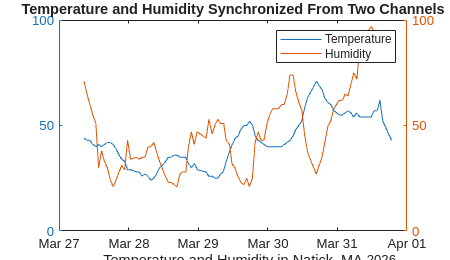
]]>RunnerHam Tweets his distance and time when he takes a run on his wheel, “I’m done! 57.62m at 0.61m/s”. You can also check out his ThingSpeak Channel where he records lots of data about his day.
Ángel also released an Instructables explaining his “pet project” so you can make your own and make your own enhancements. Just imagine what you can do with some sensors, connectivity, and ThingSpeak Web Services!
[via Instructables]
]]>[via GitHub]
]]>
Head over to Instructables to learn how to make your plants Tweet using Spark Wi-Fi and ThingSpeak. Gregory Fenton created a project that monitors his plant’s soil moisture and then notifies... read more >>
]]>Greg built the project out of necessity to help his plants suffering from “localized drought”. Let’s hope his plants get proper watering and that other ThingSpeak users can quickly and easily build this project. Thanks for sharing!
[via Instructables]
]]>
A really awesome Kickstarter campaign called Blynk has came to our attention as users from their community and ours were asking if our systems could work together. Blynk is an Android / iOS app that... read more >>
]]>Blynk is an Android / iOS app that allows for a 5 minute, out-of-the-box experience for Internet of Things projects. Blynk already supports Arduino, Raspberry Pi, and in the future Electric Imp, Spark, The Airboard, Wildfire by Wicked Device, Tiny Duino, and ESP8266 Wi-Fi.
ThingSpeak offers the Internet of Things stable data storage, fast retrieval, data processing, data visualizations, and hooks to every web service possible. We are thrilled that Blynk is planning to support the open APIs of ThingSpeak to extend any IoT project with ThingSpeak web services.
The Blynk Kickstarter campaign ends at 12pm EST on February 14th. You have less than 48 hours to support Blynk! $20+ pledges will also get free 1 year premium account at Codebender.
[via Kickstarter]
]]>>> ThingSpeak ESP8266 Forum <<
]]>
With over 20,000 active streams of “Internet of Things” data, the servers that make up ThingSpeak.com are humming. We recently made extensive upgrades to the database system that stores... read more >>
]]>“We switched to SSD drives for all of our database servers,” said Lee Lawlor, Lead Engineer of ThingSpeak. “All of the upgrades are live and available to the entire ThingSpeak Community!”
The improvements decreased response time dramatically and improved large data set retrieval by ten times.


Chris Forsberg created an example Internet of Things project to track luggage using ThingSpeak, an Adafruit GSM Module, and an Arduino. He built a simple system to send data to ThingSpeak, such as... read more >>
]]>
The idea is that it is frustrating waiting for luggage at the airport and wondering where it is and why it is not on the baggage carousel. With this project, you can track luggage from start to finish. The advantages are not only for the traveler, the airlines could track luggage as well and get quality statistics for each airport. And, the base system has many applications outside of travel such as the Automotive Industry.
Chris explains the project really well on his blog and with a YouTube video.
]]>
We just created a FastLED and Arduino tutorial and Arduino Sketch to read in the latest CheerLights color and display it on FastLED compatible lights. CheerLights is a global network of colored... read more >>
]]>For more information check out the FastLED and Arduino tutorial and the Arduino Sketch on GitHub.
]]>Check out ThingSpeak Docs for more information about Plugin Widgets.
]]>As more and more users create TweetControls, the service started slowing down. We have enhanced how the service works and now you get instant TweetControls!
In an Instragram video sending a Tweet and changing the CheerLights color, you will see that there is little delay between sending the Tweet and executing the control command to change the colors on his Christmas tree.
Learn more about TweetControl on ThingSpeak Docs.
]]>The first step is to link a Twitter account to ThingSpeak.
Next, we’ll create a new TimeControl with the following values:
Save this TimeControl and you’re finished. Every weekday within 10 minutes of 9:40 am in your timezone, TimeControl will send a Tweet with the current datetime and the current CheerLights color.
The CheerLights Channel ID is 1417, and colors are saved in field 1, so %%channel_1417_field_1%% will be replaced with the current CheerLights color. You can change these values to access the most recent data from your own Channels.
Here’s an example Tweet from this tutorial.
]]>
[noel portugal] is at it again! This time Noel created a simple Wi-Fi based sensor data logger using ThingSpeak, the ESP8266 Wi-Fi module, and a digital temperature sensor. At the heart of the... read more >>
]]>Everything you need to know in order to build your own sensor logging project is on Noel’s Instructables.
[via Instructables]
]]>
A ThingSpeak App is a service offered by ThingSpeak that runs in the cloud to help you build connected projects and release connected products for the Internet of Things. We are happy to announce... read more >>
]]>TimeControl is a web service hosted by ThingSpeak that executes any type of HTTP service call or sends Tweets at predetermined times or schedules. We now offer one-time commands and weekly recurring schedules for commands. TimeControl executes a ThingHTTP or ThingTweet command, and ThingHTTP can interface with any external Web Service API by doing SSL, Basic Auth, custom HTTP headers, GETs, POSTs, PUTs, and DELETEs. ThingHTTP simplifies connecting low-power, low-resource microcontrollers to complex web service APIs such as Twilio, Xively, and Amazon. When you combine TimeControl + ThingHTTP, you get scheduled triggers to any web service you can imagine and scheduled control of an embedded IoT device.

It’s Throwback Thursday! We have come a long way since building cloud platforms for connected devices – now known as “The Internet of Things”. Here’s what our first... read more >>
]]>We have come a long way since building cloud platforms for connected devices – now known as “The Internet of Things”. Here’s what our first website for the ThingSpeak project looked like 5 years ago…
Get started with IoT now:
Visit ThingSpeak.com or fork the project on GitHub!
POST https://api.thingspeak.com/update api_key=XXXXXXXXXXXXXXXX field1=73 metadata={"officeTemp":73}
The full ThingSpeak Channels API is available on ThingSpeak Docs.
[via ThingSpeak Forums]
]]>
ThingSpeak can be used to easily monitor CPU usage %, memory usage %, and disk usage % on any Linux machine connected to the internet. First, create a new Channel, and fill out the field names as... read more >>
]]>First, create a new Channel, and fill out the field names as follows: Field 1 = “CPU Usage (%)”, Field2 = “Memory Usage (%)”, Field 3 = “Disk Usage (%)”.

Next, add the open-source server statistics script to your server, which can be found at: https://raw.githubusercontent.com/iobridge/thingspeak/master/lib/server_stats.sh
Inside the script there’s an API Key variable, which should be replaced with your specific Channel’s API Key (leave the single quotes, and only replace the X’s): api_key='XXXXXXXXXXXXXXXX'
For the script to work properly, install the “bc” package via: sudo apt-get install bc
Then make the script executable: chmod +x server_stats.sh
Finally, edit your crontab file: crontab -e
Make the script execute every minute by adding this line to your crontab (make sure you use the proper path to the script): * * * * * /path/to/server_stats.sh
The script will then automatically POST server stats to the Channel specified by the API Key every minute.
You can see some of the ThingSpeak server statistics here:
]]>

The servers behind ThingSpeak have been slammed with data from all kinds of IoT devices and applications. We recently upgraded the entire backend of ThingSpeak and increased capacity to support our... read more >>
]]>Phusion Passenger is a web server and application server for Ruby, Python, Node.js and Meteor web apps. It makes web app deployments a lot simpler and less complex, by managing your apps’ processes and resources for you.
What makes it so fast and reliable is its C++ core, its zero-copy architecture, its watchdog system and its hybrid evented, multi-threaded and multi-process design.
]]>Here’s what the new Spline Chart looks like:
Here’s a regular line chart:
And just as a reminder, here are all of the supported ThingSpeak Chart types:
For complete ThingSpeak Charts documentation, check out ThingSpeak Docs.
]]>
Things want to speak… We keep hearing about how many Billions and Billions of things there will be connected. Just think about how much data that they will create! Yep, it’s Big Data, or... read more >>
]]>We keep hearing about how many Billions and Billions of things there will be connected. Just think about how much data that they will create! Yep, it’s Big Data, or even, Bigger Data. ThingSpeak is the only open data platform specifically designed for the Internet of Things available ‘in the cloud’ or on your own network to capture and distribute data from things.
When we look out into the Cosmos, we see Billions and Billions of stars and keep a fond memory of Carl Sagan in our hearts. As we connect this planet, we can’t but think of the scale and the magnitude that IoT will bring. Using this inspiration, we launched the new ThingSpeak.com!
Carl Sagan said, “We have lingered long enough on the shores of the cosmic ocean, we are ready at last to set sail for the stars.” We believe the same about the Internet of Things! Let’s get going!
]]>
Build Open Data Applications with Electric Imp and ThingSpeak! Electric Imp is a connectivity platform for connecting Wi-Fi devices to cloud services, much like RealTime.io and Iota Wi-Fi modules... read more >>
]]>Electric Imp is a connectivity platform for connecting Wi-Fi devices to cloud services, much like RealTime.io and Iota Wi-Fi modules and Spark.io. Some Electric Imp module’s come in an SD card form factor and adds Wi-Fi connectivity to what’s connected to the Electric Imp module. Access to the Electric Module happens via the Electric Imp cloud. While connectivity is simplified with the Electric Imp system, you will need a data service like ThingSpeak to complete the Internet of Things experience. Once data from Electric Imp devices are in ThingSpeak, you can easily build applications and interactivity with other devices and platforms.
We put together a quick start tutorial for the Electric Imp and ThingSpeak, so you can quickly and easily get the Electric Imp talking to ThingSpeak. The tutorial uses parts from SparkFun – the Electric Imp Wi-Fi SD module, breakout board, and USB cable / power supply.
Get started now… Check out the official Electric Imp and ThingSpeak Tutorial and source code on GitHub.
]]>
[Marcus Olsson] of slickstreamer made a battery-powered temperature logger using ThingSpeak to store and visualize the data collected. He chose the Electric Imp Wi-Fi module for connectivity. The... read more >>
]]>All of the source code to connect Electric Imp to ThingSpeak and the 3D printer design files are available on Marcus’ blog ‘slickstreamer‘.
]]>
CAVA created a cigar humidor with a social life. A humidor stores cigars in a humidity controlled environment to maintain freshness, but this special humidor sends the humidity sensor value to... read more >>
]]>
Mi Humidor de Cigarros conectado a Internet por medio de un Arduino
The Top 10 Internet of Things Countries*
*According to ThingSpeak Usage Stats
]]>
Introducing… TalkBack! We have developed a new ThingSpeak App and it is available now to all ThingSpeak Users. The new TalkBack App allows devices to check ThingSpeak for commands to execute.... read more >>
]]>We have developed a new ThingSpeak App and it is available now to all ThingSpeak Users.
The new TalkBack App allows devices to check ThingSpeak for commands to execute. TalkBack is perfect for battery-powered devices that need to sleep most of the time and wake up to see if there is anything to do and then go back to sleep, like a door lock for example. The lock is mostly going to be asleep to save battery power, but it can wake up periodically and check TalkBack or be woken up by a button press to see if it should be opened or not.
Devices powered by ThingSpeak and now with TalkBack will be able to both push sensor data to the ThingSpeak Cloud and check TalkBack if any commands are available all in one request. To get started, we have the complete TalkBack API Documentation and an Arduino Yún Tutorial available now.
With the release of TalkBack, we created a tutorial for the Arduino Yún. The “Yún” is a special combination of easy-to-program Arduino with an additional processor, an Atheros AR9331, running Linux and the OpenWrt wireless stack. Programming the Arduino via USB is identical to the Arduino Leonardo. Once the Arduino Yún is connected to Wi-Fi, the Arduino has full access to ThingSpeak Cloud Services and the TalkBack App and API. Check out the Controlling the Arduino Yún with TalkBack tutorial for a step-by-step way of controlling the Arduino Yún via TalkBack and the ThingSpeak Cloud.
TalkBack is available now to all ThingSpeak Users and to new users by Sign Up for Free at ThingSpeak.com! Please feel free to share with us and the ThingSpeak Community with the awesome ways you use TalkBack with your ThingSpeak Projects!
]]>
[Andrew Bythell] created a ThingSpeak Java Client for the complete ThingSpeak API. This Java Client makes it really easy for Java (or Processing) developers to add cloud connectivity to applications... read more >>
]]>So, by using Java, a simple “Hello World” app becomes this easy…
Channel channel = new Channel(channelNumber, apiWriteKey);
Entry entry = new Entry(); entry.setField(1, "Hello World"); channel.update(entry);
All of the source code and documentation are available on GitHub. Get started right away with building your Internet of Things with the Java Programming Language and the ThingSpeak Cloud.
Excellent work Andrew – thanks for contributing to the Open Source ThingSpeak Community!
[via Angry Electron / GitHub]
]]>In order to help developers find open data inside of ThingSpeak Channels, we created a new API for searching the public ThingSpeak Channels.
Here are the Public ThingSpeak Channels. We order the channels by activity and completeness. Channels may be tagged and this helps find data that you might find interesting for your application. We also have API commands that you can pass to the ThingSpeak Channel API to return the public ThingSpeak Channels in either JSON or XML format.
Here are some easy examples:
For support and questions, please use the ThingSpeak Forum.
]]>It has been a real treat watching this project evolve as more and more people add lights… and other things. Things like Android and iPhone apps that check the latest color of CheerLights, Christmas trees, and robots.
To control the lights around the world, send a Tweet mentioning @CheerLights and a color. The command is processed by the ThingSpeak IoT analytics platform and distributed to all of the lights listening to the CheerLights API.
@CheerLights I am dreaming of a White Christmas
Another powerful aspect of the CheerLights project is that is shows off what is possible with the emerging Internet of Things. With a single message sent via a social network like Twitter, 1000′s of objects around the world are in sync with each other. Lights are connected by many types of controllers, such as Arduino, ioBridge, Philips, and the Raspberry Pi. This project is only possible through the Internet and the coordination of developers around the world.
In the article, “How the Internet of Things Will Change Our Lives“, CheerLights is included to indicate how we are connected and how objects may bring people closer.
Learn how to join the project at CheerLights.com.
We are all connected…
]]>
Dexter Industries launched a very successful Kickstarter campaign this past summer to build and release the BrickPi. The BrickPi turns the Raspberry Pi computer into a robotics and sensing platform... read more >>
]]>Check out the tutorial, “ThingSpeak Temperature with Raspberry Pi“, to learn how to send sensor data using the BrickPi, a Raspberry Pi computer, and a temperature sensor for the LEGO® MINDSTORMS® NXT. The project uses ThingSpeak to store, share, and visualize sensor data collected by BrickPi-enabled projects. The Python code for the Raspberry Pi is available on GitHub and the entire project is open source!
[via Dexter Industries]
]]>
[Marcus Olsson] from Slickstreamer created a solar-powered temperature logger using the Electric Imp Wi-Fi module to push data up to ThingSpeak to store and visualize the data collected by his... read more >>
]]>Looking over the code for the Electric Imp, it looks pretty easy to cross-clouds from the Imp to ThingSpeak. Check out the source code on GitHub and full details on Slickstreamer.
[via Slickstreamer]
]]>
The Open Hardware Summit is September 6th, 2013 at MIT’s Kresge Auditorium in Cambridge, MA. For the third year, ThingSpeak is sponsoring the event! The OHS is an amazing experience. You get... read more >>
]]>The OHS is an amazing experience. You get to meet all the Open Source Hardware heroes that are pushing this movement forward. This year there are many talks and panels covering all aspects of the open source hardware movement. Our part in all this is to push open platforms to connect all that open hardware. ThingSpeak is growing very quickly supporting the open hardware and software for advancement of the Open Source Internet of Things.
Sponsorship opportunities are still available!
]]>For more information and Python source code, visit MY NERD JOURNAL.
[via MY NERD JOURNAL]
]]>
When we first launched “The Easiest Contest Ever”, we had 300 users and a dream. This time around the ThingSpeak Community has grown to over 10,000 users and channels! The first... read more >>
]]>Drum roll… We are announcing, “The Easiest Contest Ever… Part 2”.
All you have to do is build a project using a ThingSpeak web service, post a demo / how-you-done-it video on YouTube or Vimeo, and tell us about it. We are giving away 20 gift certificates to SparkFun valued at $50 each. And… selecting our favorite projects for bonus prizes. Leave a comment with questions. This contest is open to anyone, so Sign Up for ThingSpeak and get going!
Disclaimer: All entries will be published on the ThingSpeak Community Blog and selection is based on meeting the described criteria. All rulings are at the final discretion of the ThingSpeak team members. Let’s see how crazy this will get!
Check out the public ThingSpeak Channels for what others have done already. Others have made Social Gumball Machines and Real-time Gas Sensors. Incorporate one of the many new features into your project such as REACT and TweetControl. Use a USB data logger with ThingSpeak Importer, track a car using ThingSpeak geolocation services, create a mashup using ThingSpeak Plugins…wait…we have said too much. We want to be surprised by what you come up with, so feel free to get creative.
It may have been some time since you have checked out ThingSpeak, so we wanted to share some of the new things other the past year.
Every ThingSpeak Channel now has a Private and Public view. A private view of your ThingSpeak Channel is only viewable by you. If you choose to make your ThingSpeak Channel public, you also have a public view of your channel info. Separating the views increases privacy and provides flexible usage of a ThingSpeak Channel. Each view is customizable so you can have a more detailed private view for and a customized view for public users.
Chart Builder is now part of the channel views. You can customize your charts directly on your channel. An embed code for the chart gets generated automatically so you can integrate a chart on your own website quickly.
Every thing about a ThingSpeak Channel is customizable. You can control which fields get displayed, add a map, add a YouTube video, add status messages, or add ThingSpeak Plugins. The elements on a ThingSpeak Channel can be moved around using a drag-and-drop user interface.
When we first launched ThingSpeak Plugins we made the plugins only privately accessible. Now, you can make a ThingSpeak Plugin public and add it to your channel views. Plugins are great for making new features for ThingSpeak, such as multiple trend-lines on a chart.
We often get requests to share a list of the public channels offered on ThingSpeak. We have developed a system to display active ThingSpeak channels and score each channel. A channel gets a higher score by being actively updated, adding tags, adding a description, and adding a demo video. Check out the public channels on ThingSpeak.
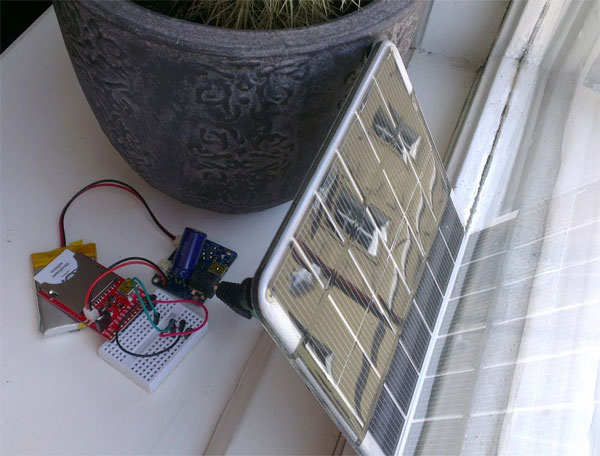
React is our biggest undertaking yet and we spent a year developing a robust and scalable system for monitoring channel data in real-time. With the React app you can set triggers on your channels to cause other events to fire. For example, if your temperature gets too high, you can send a ThingHTTP request to a control system to cause an alert. Since ThingSpeak has location data baked in, you can also create geolocation reacts. If you get within 100 meters of a lat/long, you can trigger an action. This is perfect for building location-based thermostats.

We are working on many features that we will release over the summer. We are also going to update the Open Source version of ThingSpeak on GitHub too. Please stay tuned for some exciting news.
]]>
[donmatito] created an Indoor Environmental Quality Station based on the Arduino platform and uses Bluetooth for connectivity to ThingSpeak cloud services. The great news is that... read more >>
]]>Indoor Environmental Quality (IEQ) is the measure of comfort and includes factors such as temperature, humidity, pressure, noise level, and indoor air quality. don’s original goal was to monitor the IEQ of his baby’s room, but he soon realized that his project has more applications around the house and for others.
Don published the full details of the project and submitted it to the Green Design Contest at Instructables. Great work!
[via Instructables]
]]>
[Risto] from Supermechanical wrote a tutorial on how to use the Twine with ThingSpeak web services such as Data Logging and Charting. The tutorial explains how you can use the Twine’s... read more >>
]]>The Supermechanical team put this combination of Twine and ThingSpeak to use right away. They created a “Productivity Quantification” system to capture events around the office and try to determine how productive they are. They were able to track how much coffee they were drinking, snacks they were eating, toilets they were flushing, and things they were finishing. The results are a quantified picture of office productivity and a beautiful display of the data via the ThingSpeak API.
Creating a Twine Action to push data to ThingSpeak is really easy to do. Here’s what it looks like…
To do more with ThingSpeak and Twine make sure to check out the tutorial on the Supermechnical blog.
[via Twine / SUPERMECHANICAL.BLOG]
]]>Merci beaucoup.
[via YouTube]
]]>
Thanks to the very active ThingSpeak community, we have been able to make some updates to the open source ThingSpeak API and web app. We also have a major new release coming. The latest updates allow... read more >>
]]>We want to send a special thanks to powermik, oiotoshi, sekjal, and akinsgre for contributing new code and reporting bugs.
All of the latest code is available on GitHub, so start building your own Internet of Things today!
]]>Duke says,
“A demo of how to use ThingSpeak (an IOT web site) with a Gadgeteer Gas Sensor Device. Data from the sensors are displayed in real time on ThingSpeak and using some of ThingSpeak’s cool features the Gas Sensor device can send out Tweets for Alert and Alarm conditions.”
Another awesome part of this project is that it uses .NET Micro Framework library, μPLibrary 1.8, created by [paolopat]. This library makes it really easy to tap into ThingSpeak web services by embedded devices. It’s great to see different parts of the project coming together from multiple ThingSpeak users. We appreciate the creative combinations and the efforts that you are putting into your projects. Thanks!
For more information, check out the live sensor readings on the project’s ThingSpeak Channel and download the complete source code at Codeshare.
[via >TinyCLR Forums]
]]>One that has piqued our interest is the EVE Alpha for the Raspberry Pi created by Ciseco from Nottingham, United Kingdom. Wireless is a key part of the Internet of Things as with wireless we can connect more things in a more seamless way, then bridge them to the Internet. EVE Alpha aims at giving you a lot of wireless options in a tiny form factor all connected to an integrated computer called the Raspberry Pi.
Members of the ThingSpeak team are backers of this project and many others. We love finding new ways to get data to and from web services. This is exactly what we are here to do! We are looking forward to connecting the EVE to a host of web services (and ones we haven’t even released yet). Another key feature is the suite of wireless technologies that we want to prototype with all on one board. At the timing of this writing the EVE Alpha Kickstarter campaign is close to being funded, so there are high chances that Ciseco will deliver the Swiss Army knife of wireless development platforms!
[via Kickstarter]
]]>.NET Micro Framework Developer [paolopat] created a client for the ThingSpeak platform. This allows any device that supports the .NET Micro Framework to access ThingSpeak web services by using the μPLibrary 1.8. The library is available on NuGet Gallery and abstracts the ThingSpeak API. The library works with the popular Netduino Plus and other devices running .NET Micro Framework.
Paolo says,
“With more and more embedded devices “smart” in the world, begins to take on an increasingly important concept of the Internet of Things (IoT), a neologism by which you want to express the capacity that these devices (brutally “things”) in order to connect to the world wide web and exchange information. In this come into play a number of online platforms that provide the service to upload and logging information in real-time making it available to other devices that request them. The architecture is oriented such that the platform is obviously RESTful where the data grouped into channels and feeds are accessible through the concept of URL.
One of the main platforms is certainly ThingSpeak, for which I have implemented a client for. NET Micro Framework and I have included in my library uPLibrary (now at version 1.8.0.0) present on CodePlex, namespace uPLibrary.IoT.ThingSpeak.”
Thank you, Paolo!
[via Embedded101]
]]>The OHS was a blast last year. We got to meet all the Open Source Hardware heroes that are pushing this movement forward. Our part in all this is to push open platforms to connect all that open hardware. ThingSpeak is growing very quickly as you see projects pop-up every day. We will be releasing our two-year numbers and the latest stats just before the Open Hardware Summit. Just a hint about what you will hear… we doubled in size over the last 6 months!
Sponsorship opportunities are still available!
]]>[via Facebook]
]]>Over at the Netduino forums, we found the source code for the Netduino and HTML for the ThingSpeak gauges for embedding the solar panel data on a website. Awesome!
]]>For more information, check out our tutorial and visit GitHub for the full source code. Thanks Daniel!
[via RubyGems.org]
]]>The technology behind Tweet-a-Tweat is Arduino + ThingSpeak — this is another powerful combination. The Gumball Machine is from Beaver Vending and has an Arduino inside listening to the TweetControl App from ThingSpeak. TweetControl listens to the Twitter stream for keywords that trigger HTTP requests in real-time. The heavy lifting happens in the cloud so that the embedded Arduino only has to focus on moving servos and being ready for web requests.
For more information, visit Tweet-a-Tweat and check out the live video feed of Philter’s Twitter powered gumball machine being operated live.
[via Tweet-a-Tweat]
]]>Here’s what the temperature looks like now in Australia:
Check out the family’s blog for the source code and to learn how to create your own solar water heater monitoring system.
[via Klink Family Adventures]
]]>This video that we discovered on YouTube is the team’s presentation. You will get to see ThingSpeak in action, live in front of an audience about halfway thru…
We hope you got an “A” on the project (do they still give letter grades?)!
]]>We are starting a video tutorial series, so you can see how to get started with ThingSpeak right away. The first two videos are available now along with our 20 other tutorials for ThingSpeak. Check out the Tutorials section of the ThingSpeak Community website.
]]>All ThingSpeak Channels are continuous logs of data. Using API commands, you can access recent data and historical data. The default API parameters allow for easy access to recent data. To get access to older data, all you need to do is pass in a “start” and “end” parameter into a channel request.
Here is my feed from New Year’s Eve:
http://api.thingspeak.com/channels/9/feed.json?start=2011-12-31%2000:00:00&end=2012-01-01%2000:00:00
And remember, you can also do this with charts too:
Let us know if you need any more clarification on the many API parameters possible. Have fun!
PS. Some big features coming soon!
]]>
Download the free Application Note, “Interfacing Flyport to ThingSpeak”, and the Source Code to get your Flyport connected to web services via ThingSpeak.
]]>https://blogs.mathworks.com/iot/documentation/apps/tweetcontrol/
TweetControl allows you to monitor Twitter for trigger words to send ThingHTTP requests. The CheerLights project by ioBridge Labs uses TweetControl to update its ThingSpeak Channel so other lights around the world stay in sync with each other.
Why use TweetControl? Our app connects to the Twitter Streaming API. What this means to you is that you don’t have to keep polling Twitter for status updates. You can sit back and let TweetControl listen and then process the request when a trigger word gets fired. This happens in real-time and it’s quite remarkable to see in action.
TweetControl is a part of our collection of apps for social things.
]]>Since the project release, there has been much activity. A part from CheerLights being discussed on blogs like MAKE and Lifehacker, the community has created some interesting bits of tech that extend the project further than lights. So if you don’t have a way to connect your lights together with CheerLights, you can connect your mobile phone, browser, and web sites together by subscribing to the CheerLights feed. Right now you can check the latest CheerLights color with an Android App created by @ChrisLeitner. Another really neat thing is a browser plugin for Chrome designed by Josh Crumley. So, in the top corner of your web browser you can see the latest color in an unassuming way. It’s a little reminder that we are connected.
To join CheerLights, all you have to do is build something that subscribed to the CheerLights ThingSpeak Channel or access the data using JSON and XML. You can also use the apps, browser plugins, or web widgets to see the colors. Visit the CheerLights website hosted on Tumblr for details on making a controller with Arduino, ioBridge, or Digi’s ConnectPort.
To control CheerLights, just send a Tweet to @CheerLights and mention a color.
Just think when you send this Tweet that you are updating 1000’s of lights, apps, browsers, and widgets all at the same time.
Spread some cheer…
[via MAKE / Lifehacker / CBC / ioBridge Projects]
]]>ThingSpeak is an open source web application and API to manage devices, to create device interactions, and to store data. Users can use the hosted version of ThingSpeak or setup instances on their own servers by getting the source code from GitHub. The technology behind ThingSpeak is Ruby 1.9.2, Rails 3.0, EventMachine, Phusion Passenger, Nginx, and Memcached to form a highly scalable infrastructure for the emerging Internet of Things and its data model requirements.
You use ThingSpeak to Send and Receive “data” via simple HTTP requests, much like going to a web page and filling out a form. Data can be from
anything — Blood Sugar Levels measured by a glucose meter, Server Usage and Uptime reported by servers, or Location Info from a mobile phone. Once the data is in ThingSpeak, you can build applications that retrieve the data, use the data for process decision-making, and reporting.

The Teracom box allows for 1-wire connections to sensors. David connected a temperature sensor to the 1-wire bus, an Ethernet connection, and customized the controller to push data to ThingSpeak for data logging of environmental sensor data. The tutorial also includes great photos clearly showing the setup for others to repeat.
]]>Sign up for “Hacking REST web services with jQuery” at Eventbrite.
About FUBAR Labs:
Fair Use Building and Research (FUBAR) Labs is a Nonprofit Corporation that provides a location where people with common interests, usually in computers, technology, science, and crafts can meet and collaborate. We are an open community offering classes, workshops, study groups, and long term projects.
]]>We have created a new ThingSpeak Sketch for Arduino 1.0 that you can use for the Arduino and Ethernet Shield or the Arduino Ethernet all-in-one. All you have to do is add your ThingSpeak Write API Key to the sketch, upload to the Arduino, and connect to your network. The sketch includes automatic network configuration with DHCP, domain name resolution using DNS, a watchdog / reset function to keep the Arduino online, and a function to update ThingSpeak Channels. The new sketch has been running without hiccup in our lab for few weeks. We hope that you get the same reliability. Go ahead and copy, transform, and combine…
]]>
Here’s what ThingSpeak is in Brazilian Portuguese: ThingSpeak é um projeto de Internet Aberta das Coisas feito pela ioBridge!
Thank you much, Paulo or should we say, “Muito obrigado, Paulo?”
]]>[via I am ShadowLord]
]]>Behind the scenes, Lars uses the Arduino microcontroller to collect data from the sensors and uses Processing to publish data to his ThingSpeak Channel.
From Lars’ project site:
The goal of this project is to log some weather data and be able to access it from anywhere. There is some sensor data (temperature, relative humidity, pressure, and ambient light) and some computed data (dew point). You can see the weather condition in my apartment in Ithaca, NY at my ThingSpeak Channel 346. You can also look at the Google Chart of my own MySQL solution, which I no longer maintain.
Check out a detailed breakdown of the Weather Station project and more awesome projects on Lars’ project site, called “make.larsi.org“.
]]>Visit the ThingSpeak Plugin page for more information on how to use this plugin with your HomeVision home automation system.
]]>Over the past few months of getting ThingSpeak to full speed, we have been inspired by the outpouring of projects and interaction with the open hardware community. So far, we announced integration with openPICUS which allows developers to create a completely open source wireless solution for the Internet of Things. There are many more announcements coming soon…
Come join us at the Open Hardware Summit!
Sponsorship opportunities are still available. Check out OpenHardwareSummit.org for more information.
[via Twitter]
]]>ioBridge Demo Night
Friday, August 19 @ 7pm
HackPittsburgh Workshop [Google Map]
1936 5th Ave.
Pittsburgh, PA 15219
Just imagine what we can learn from all of our things? Maybe we can save resources as an article by Brian McCann suggests. He also mentions connecting things to ThingSpeak as the Web of Things is being built from the ground up! Our community of developers and users are growing by leaps and bounds and we will continue to contribute to the advancement of the Internet of Things!
Brian says,
The Internet of Things refers to uniquely identifiable objects having an Internet presence. We’re not just talking about your computer, laptop, cellphone or even your TV here – we’re talking about everything. This includes your light switches, your fridge, even your toilet. With an Internet presence, all of your devices can start talking to each other and reacting to each other.

[via The Daily Gleaner]
]]>[via MyBlog4Fun.com]
]]>From the openPICUS announcement:
A wide range of sensors can interfaced to FlyPort, it has more than 20 remappable I/O pins and with a few rows of code your sensors goes online to the ThingSpeak servers. In this way you avoid the server side work, database management and graphics and you have real time data visualization as well as trends and so on.
Here’s a video from openPICUS that explains how to get started with FlyPort + ThingSpeak.
[via openPICUS Blog]
]]>All you to do is add either the min or max parameter (or both) to an API call. This will filter out all other values except for the ones that meet the min or max condition. This applies to getting channel feeds and presenting charts.
For more information, check out the ThingSpeak API Documentation.
]]>willnue added the ability to tweet to his GE Wireless Control Center Alarm system. He added an Arduino with Ethernet Shield and uses the ThingTweet app to connect the alarm to Twitter. Check out his detailed Instructables to learn more, build your own social thing, and enter the contest.
wilnue says,
This project will add tweeting capabilities to the GE 45142 Choice-Alert Wireless Control Center Alarm system. The alarm system allows you to connect up to 16 different sensors across 4 zones and with the addition of the Arduino powered AlarmingTweet you can enable it to keep you informed of its status anytime anywhere.
Good luck with the contest!
]]>The mashup community ProgrammableWeb indexed the ThingSpeak API and the ThingSpeak Chart API. We entered the category of “Other”. Just imagine what web developers will create now that they have the Internet of Things at their fingertips.
[via ProgrammableWeb]
]]>To get the imaginations primed, the workshop is holding a Web of Things Hackathon on Saturday, June 12, 2011 at the Gray Area Foundation for the Arts. The ideas behind the hackathon are to get a bunch of people together from varied fields, focus their creative energy, and build something. The ioBridge/ThingSpeak team will be providing a complete toolkit to enable any ideas that emerge. We will have sensors, servos, Internet gateways, XBee radios, LEDs (of course), relays, microcontrollers, and early access to our next gen platform. All you have to bring is an idea… and a laptop.
If you are interested in participating, visit the Web of Things Hackathon site for more details and registration info. We look forward to working with you.
Web of Thing Hackathon [info]
Saturday, June 11, 2011 – 9am – 5 pm
Gray Area Foundation for the Arts [map]
998 Market St.
San Francisco, CA 94102
Web of Things Workshop [info]
Sunday, June 12, 2011 – 9am – 5pm
Hotel Nikko San Francisco [map]
222 Mason Street
San Francisco, CA 94102
[Elad Salomons] of OptiWater noticed that his house water pressure was 9 bars and this set him on a collision course with the Internet of Things. In his research he discovered ioBridge and ThingSpeak. He was able to connect sensors to the web, visualize the data, and come up with a few ah-ha’s in the process.
Elad is enjoying the process so much that he wanted to share the learning experience with you. He has created a contest based on some sensor data he has collected. You can look at the data and download historical data over at his Water Simulation blog to see if you can explain the correlations. You have until June 30, 2011 to figure it out. Visit Elad’s blog for more information or look him up on Twitter. $100 to learn something? That’s awesome!
[via Water Simulation / ioBridge]
]]>[via NueWire / Arduino Forum]
]]>Imagine an “Easy Button” for Twitter. All you have to is Tweet a hashtag from your Twitter account to control anything that has a web service API.
The applications for TweetControl are endless, and we are excited to see what you come up with. Check out the documentation for TweetControl to help you get started.
]]>We love the combination of storing data in a channel and using the API to update a webpage dynamically based on the current “mood” of an area. We also love the idea of using a webcam as a passive sensor since almost everybody has one.
]]>Outlet has created a detailed Instructables to guide you on how he created the project. This project is at prototype level, but we could see how this could be packaged into an efficient setup and used for many applications that require wireless sensors and remote monitoring and reporting. This is on the same lines as the ioBridge Tide Alerts product used by many marinas to measure and alert tide levels in real-time.
]]>[via JAQ’s Blog]
]]>
Paul says,
I wanted to know how much time I was spending under the shower each day, especially in these environmentally conscious times. The benefits of that are that I can perhaps save some money on the water bills and also study the effect of temperature on my showering time.

[via Paul Asselin]
]]>Brett says,
ThingSpeak is a cool application that allows you to send it any kind of data you want graphed. Your imagination is the limitation. Some ideas of what can be graphed:
These are great ideas and applications!
[via The Cobwebs of My Mind]
]]>Frank says,
This project uses a mbed microcontroller (LPC1768 ARM Cortex-M3) to monitor temperature using a DS1620 (digital temperature sensor IC), retrieve the time via NTP (network time protocol), and then log the current temperature to ThingSpeak along with a time-stamp.
]]>The latest Python code to interface to ThingSpeak is available on GitHub.
[via Australian Robotics]
]]>This week we will be dispatching the SparkFun gift certificates and also blogging about the projects. There were some really cool ones and tons of code for the community to start using right away. There’s even commercial interest in using the platform for an upcoming product. Yeah!
The contest was definitely a success. We needed to get some creative developers to check out all of the features. We also received a bunch of feedback for new features. One feature stood out from the rest, “We want an index of the public channels!!! Now!”. Okay…
]]>Let’s say you have an Arduino and you want to get the last value in a channel. You could get your feed and then write some parsing code to extract the data that you are looking for. It’s a waste of code space and also fills your finite buffers on your microcontroller. Let the cloud do the work and give you just the value you are looking for.
Here’s how you would get our light levels: Live Demo
[cce]http://api.thingspeak.com/channels/9/field/1/last.txt[/cce]
You can even add data to the response. Maybe you have Twilio reading back your temperature. It would not be much fun if Twillio says to you, “80”. Sensor data without context is noise!
Here are two optional parameters when returning the last data on a ThingSpeak Channel:
[cce]http://api.thingspeak.com/channels/9/field/1/last.txt?prepend=Your%20light%20level%20is%20&append=.%20Is%20someone%20in%20your%20room?[/cce]
Check out the ThingSpeak Documentation for more information.
]]>All you have to do is build a project using a ThingSpeak web service, take a photo (if it applies), and writeup a description / how-to on your blog, Instructables, or email us the details. We are giving away 20 gift certificates to SparkFun valued at $50 each.
Some ideas: Use a USB data logger with ThingSpeak Importer, track a car using ThingSpeak geolocation services, create a mashup using ThingSpeak Plugins…wait…we have said too much. We want to be surprised by what you come up with, so feel free to get creative.
Disclaimer: All entries will be published on the ThingSpeak Community Blog and selection is based on meeting the described criteria. All rulings are at the final discretion of the ThingSpeak team members. Let’s see how crazy this will get!
Coming soon: We have some exciting things in store for you. Users have been asking for an index of public channels, so we are going to add a searchable project index soon. This week we will be announcing the beta release of a new application built on the ThingSpeak platform.
]]>All you have to do now is upload your data file to ThingSpeak and you can instantly see charts, run any of the data processing commands that we have like Rounding, Averaging, Summing, Median, and Timescaling, and have the data accessible from our APIs.
To get started, select a ThingSpeak Channel and click Import Data. The file needs to be in a CSV format and include a date stamp with your data. Otherwise, we will do the rest. For more questions, checkout the documentation or ask for help in the forum.
We also added CSV import to the Open Source ThingSpeak on GitHub.
]]>I have been playing around with the ThingSpeak API a little this week. I decided to get my FEZ Cobra reporting temperature data from my office at work. Why a temperature sensor you ask?… Because I had one laying around.. That was good enough for me, guess I’m simple like that.
[via codefox blog]
]]>Have you ever noticed that you keep a schedule on Google Calendar, but every night you set your alarm clock? What if the alarm clock was connected to Google Calendar, would that thing be more useful? You always seem to be replace the toner in the copy machine, right in the middle of when you trying to copy your presentation. Thanks for the warning thing! Is someone in your room when I am not there? Maybe your lights could tell you.
We built ThingSpeak from the ground up to give things a voice. If we listen maybe they will tell a meaningful story. ThingSpeak can connect things, log data, track things, and make things social.
Applications are being built by developers from around the world and interesting and unexpected things are about to happen.
]]>Support for ThingSpeak is available on the ThingSpeak Community site which features a Blog, Forum, Documentation, and Tutorials. The documentation is the same for the open source release of the ThingSpeak API as the hosted web service on ThingSpeak.com.
What is ThingSpeak?
ThingSpeak is an open source “Internet of Things” application and API to store and retrieve data from “things” using HTTP over the Internet or via a Local Area Network. With ThingSpeak, you can create sensor logging applications, location tracking applications, and a social network of things with status updates.
In addition to storing and retrieving numeric and alphanumeric data, the ThingSpeak API allows for numeric data processing such as timescaling, averaging, median, summing, and rounding. Each ThingSpeak Channel supports data entries of up to 8 data fields, latitude, longitude, elevation, and status. The channel feeds support JSON, XML, and CSV formats for integration into applications.
The ThingSpeak application on GitHub also features time zone management, read/write API key management and JavaScript-based charts from Highslide Software / Torstein Hønsi.
]]>Thanks for the feature request, “nr”. Take this as an open invitation to everyone else…If you have questions, comments, or feature requests, feel free to send them in!
]]>In the future, we will add more features to the Devices application. If there is interest, we are thinking of setting up a dynamic DNS service. This is so you can use a consistent URL to access your device from the Internet.
For more information, check the Documentation or click the Devices tab when you are signed into ThingSpeak.
]]>Here are the latest updates:
Here’s what we are working on now:
We welcome any new feedback. Feel free to complain, comment, or help make this a better service!
]]>With this project, I wanted to take it a few steps further and build something from the ground up that’s focused on collecting enormous amounts of data from everyday objects, allowing devices to interact with each other, and building applications to present some meaning.
[via I am ShadowLord Blog]
]]>ThingSpeak is an open web of things platform to allow devices to interact with web services, apps, and things. ThingSpeak is open to any type of data from devices and applications. ThingSpeak is a cloud service…things-as-a-service (TaaS)? ThingSpeak is open now.
Features:
Get started by signing up and creating your own channel for your anything you can imagine. We are excited by what you will come up with and the direction that you will take this project.
]]>I’ve been following the concept of an “Internet of Things” for a few years now and it’s definitely something else that’s heating up! Whether as citizens as sensors or being able to ‘Google your keys‘ bridging the technology most of us take for granted now, the Internet, into the physical realm holds tremendous promise.
However, we know there’s more to it then running an Ethernet cable to your car, or plugging in your teddy bear. The networks we take for granted now, despite their vast capabilities, weren’t designed for this new wave of connectivity. This is especially apparent with the coming exhaustion of IPv4 (an estimated 5 days remaining at the time of this writing)!
Considering all the new protocols, tools, and interfaces that need to be created, I find it fascinating to watch how people are integrating technology into their every-day lives, and it’s surprising how many cool ways these are put to use. As we increasingly rely on connected devices, or come up with new ways to integrate existing systems, will we truly have control or do we risk being locked into the betamax of our generation?
Guys like Bruce Sterling are famous for tracking the future and guys like Linux Torvalds are famous for creating it, or at least the tools people use to build it. What do you see on the horizon, and what will you invent to make it so?
We’re excited to have you here at ThingSpeak to help us make this reality our own.
]]>To help us cover the the emerging Internet of Things, SkyNet, and singularity, we have invited jay@thecapacity, to contribute to our blog. We look forward to his guest posts and his perspective as things move so fast.
Contact us if you are interested in testing the new service.
]]>