Seth on Simulink
May 22nd, 2009
Robotic Arm Models and Repairing Hubble
As you may know, Space Shuttle Atlantis is about to
return this weekend from man’s last visit to the Hubble Telescope. Those
astronauts took some major risks to repair our favorite and most famous scientific
instrument. One of the tools they used during space walks is the robotic
manipulator from the Canadian Space Agency (the robotic arm).

Image Credit: NASA
I have never had a chance to operate a CSA robotic arm,
but my colleague Guy Rouleau has! Guy told me about a Simulink S-function he
created to help in controlling a robotic arm in Simulink.
Changing the color of blocks during simulation
By Guy Rouleau

I have many good memories from my internship at the
Canadian Space Agency when I was studying for my bachelor degree. During this
internship, I was developing control logic for a robotic arm. Simulink was used
to develop the controllers and as a user interface to command the robot.

When driving a robotic arm simulation using a joystick,
it is not always easy to visualize if you are close to a joint limit or a
singularity. It is possible to display the state values in the model, but hard
to know if you are about to lock out control of the arm. To help the person
driving the robot, we though it might be cool to make blocks in the Simulink
diagram turn red when close to a limit. This is what it looks like in action with
the SimMechanics mech_robot_vr.mdl model.

Here is a quick explanation of how to changing the color
of a block with a simple Level 2 M-file S-Function.
As a template, I suggest starting with the demo M-file msfcn_times_two.m.
In your MATLAB installation, you can open this file using the following
command:
>> edit msfcn_times_two.m
Only a few modifications are required to make the file change
the color of a block based on the value of the signal connected to the
s-function.
To begin, save the file as ChangeColor.m for
this example. At the minimum, you need to modify the code of the Output
section. To start, I created a model named “Test” where we will change the
color of the block named “Display”
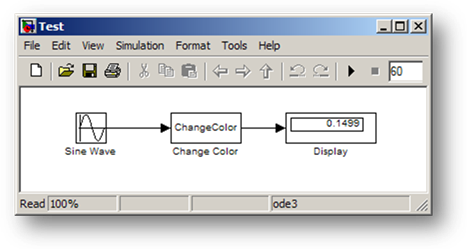
The simplest implementation can look at the input value, and
then use set_param to modify the block BackgroundColor:

In the above code, the color of the block “Test/Display”
is set to green or red depending if the input is larger or smaller than zero.
In order to make the code reusable, I may want to determine
automatically which block is connected to the S-Function. We can also add a
parameter to the block to set the value at which the color switches. In that
case, we add these lines to the setup function:
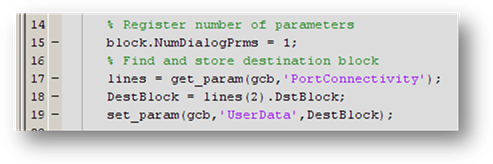
Notice that the handle to the destination block is stored
in the “UserData” of the S-function. UserData is often useful for storing any
data you need to persist with the S-function, but doesn’t fit the definition of
a continuous or discrete state. The output function now looks like:
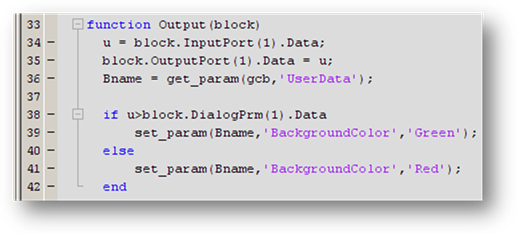
Finally, if you want the block to return to white at the
end of the simulation, you can add these lines to the terminate function:

You can find this example in my File Exchange Submission:
Changing
the color of a block while the simulation runs.
Now it is your turn
Do you work on a robotic arm or on the Hubble? Have you
used an S-function to customize what Simulink looks like? Share your
experience and leave a comment
here.
23:30 UTC |
Posted in Guest Blogger, S-functions, Simulation |
Permalink |
You can follow any responses to this entry through the RSS 2.0 feed.
You can skip to the end and leave a response. Pinging is currently not allowed.
Leave a Reply
|
Good Evening,
I’m glad to see you webpage,it gives me many ideas to work and study of robotics.
Thanking You.
hi.!im currently into the studying a robotic arm and possibly simulating one by controlling it by a joy stick..could you possibly send me some infos on your program the casing of your arm etc..tnx
@Syed Murtuza Hussain - Happy to provide some inspiration.
@Rienzi Mosqueda - The example models I would share with you are part of the demos in SimMechanics. They all depend on the SimMechanics product, so they would not work unless you have a license. Some of the product demos are indexed on mathworks.com here:
http://www.mathworks.com/products/simmechanics/demos.html
clc;
clear all;
% To Open a new model file the Existing Model
% new_system(’Chaining_Diagram’,'Model’)
% To Open the Existing Model
open_system(’Chaining_Diagram’)
Pos = [115, 88, 155, 122];
for i = 1:3
% To add a block to the model
h = add_block(’simulink/Ports & Subsystems/Subsystem’, ‘Chaining_Diagram/Subsystem’, ‘MakeNameUnique’, ‘on’);
if i == 1
add_block(’simulink/Sources/In1′,’Chaining_Diagram/Subsystem/In1′, ‘MakeNameUnique’, ‘on’);
add_block(’simulink/Sinks/Out1′, ‘Chaining_Diagram/Subsystem/In1′, ‘MakeNameUnique’, ‘on’);
else
path = strcat(’Chaining_Diagram/Subsystem’,num2str(i-1),’/In1′);
add_block(’simulink/Sources/In1′, path, ‘MakeNameUnique’, ‘on’);
add_block(’simulink/Sinks/Out1′, path, ‘MakeNameUnique’, ‘on’);
end
% To set the Dimension of the block
set_param(h, ‘Position’, Pos)
set_param(h, ‘ShowPortLabels’,'off’)
BlkName = strcat(’disp(’,num2str(i),’)');
set_param(h, ‘MaskDisplay’,BlkName)
set_param(h, ‘ShowName’,'off’)
set_param(h, ‘Mask’,'on’)
Pos = Pos + [0, 100, 0, 100];
end
add_line(’Chaining_Diagram’,'Subsystem/1′,’Subsystem2/2′,’autorouting’,'on’)
add_line(’Chaining_Diagram’,'Subsystem/2′,’Subsystem1/1′,’autorouting’,'on’)
add_line(’Chaining_Diagram’,'Subsystem1/1′,’Subsystem2/1′,’autorouting’,'on’)
add_line(’Chaining_Diagram’,'Subsystem1/2′,’Subsystem/2′,’autorouting’,'on’)
add_line(’Chaining_Diagram’,'Subsystem2/1′,’Subsystem/1′,’autorouting’,'on’)
add_line(’Chaining_Diagram’,'Subsystem2/2′,’Subsystem1/2′,’autorouting’,'on’)
% To save the open System
save_system(’Chaining_Diagram’)
%*************************************************
please help me to avoid overlapping of lines when this piece of code Executes.
THanks in advance
I am an Mphil Student at the University of the West Indies, St. Augustine, Trinidad & Tobago - Faculty of Mathematics and Computer Science. Presently my studies are in emotional recognition in artificial systems using Matlab Simulink as a simulation tool and PSO Models and how it can be applied to Emotion-Oriented eCommerce Systems.
I have been researching extensively on existing Simulink Control models which are able to simulate the emotions of a user. Such a Model should possess a stated emotional model. However, at this juncture my research is proving futile.
I would like to know if there are actually any Simulink Control Models created in Matlab that can simulate the emotion of a customer or user and how can they be accessed. I do not want to reinvent the wheel if such a project has already been done. The aim is to use an existing simulation to support my findings. This system will be well referenced in the final production of my thesis.
Do you therfore have an emotional model simulated in Simulink and PSO? If this is available for review, can you make the Model available for further analysis?
Your help and suggestions would be greatly appreciated.
@Simone Leon - while I have talked to people about modeling financial systems and biological systems, I have not seen any “emotional models.” I suggest you reach out to a larger community (like comp.soft-sys.matlab) to find an answer. If you have a clear idea of what states your are modeling, and the conditions that lead to transitions between those states, it will be easily expressed in a Stateflow chart.
Are there then any matlab/simulink programs used for recognizing and simulating happy,sad,joy,nervousness,disgust etc….
To be a little more detailed, are there then any matlab/simulink stateflow diagrams or programs used for recognizing and simulating happy,sad,joy,nervousness,disgust etc…. I now there are emotion and face recognition programs in matlab. However, I have not seen any stateflows diagrams that would represent such a simulation. Are there any?