
??? Invalid Simulink object name
Did you ever get an error like this?
>> get_param('model_f14/Controller','TreatAsAtomicUnit')
??? Invalid Simulink object name: model_f14/Controller.
Of course. Anytime you have a typo in a call to get_param or set_param, you will get this message. This is very frustrating, especially when you look at the model, and see the block with the very same name!
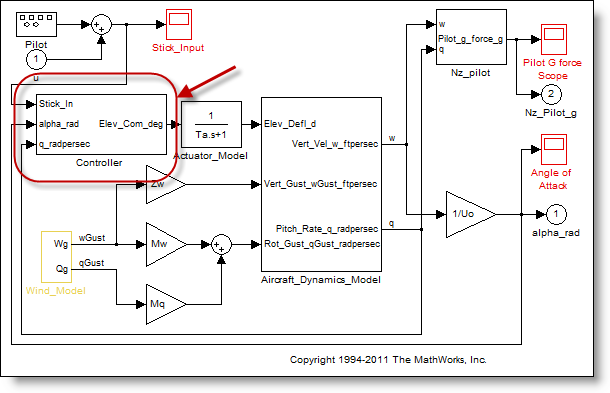
Invisible Characters!
To understand why this was happening, I had to compare the string I was using to the name of the block from using gcb (get current block).
>> s1 = 'model_f14/Controller'
s1 =
model_f14/Controller
>> s2 = gcb
s2 =
model_f14/Controller
>> strcmp(s1,s2)
ans =
     0
The string from gcb looks the same, but then I noticed the size of the signals in the workspace.
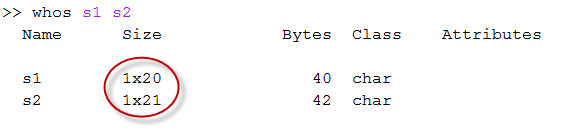
The block has a trailing white-space character! Where did this space come from? The space was probably an accidental keystroke while naming the subsystem. This can happen to anyone, so how could you detect it in your model?
Model Guidelines and Model Advisor
Most teams doing Model-Based Design for production work eventually implement modeling guidelines/standards. Modeling standards make it possible for teams to make components that work well together and look like they were made by the same team. Often, modeling standards include rules about what blocks to use, what settings to use, how to architect the model, how to layout the diagram and naming conventions.
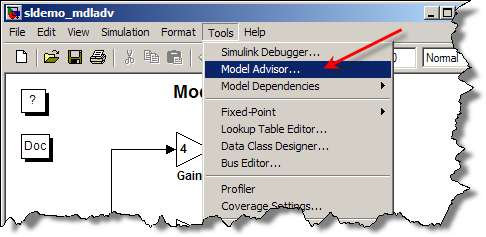
The MathWorks Automotive Advisory Board assembled modeling guidelines for control algorithm modeling and many were implemented as Model Advisor checks (as part of Simulink Verification and Validation). The group of checks I need are the Naming Convention checks under the Modeling Standards for MAAB task.
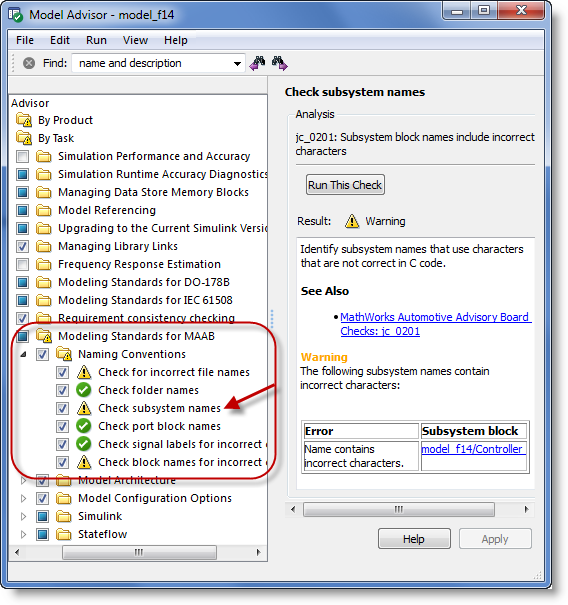
When I selected the Check subsystem names and clicked Run This Check, I got the report you see above. Notice it flagged the model_f14/Controller block as containing an incorrect character. Incorrect characters are those not in the list of allowed characters:
a b c d e f g h i j k l m n o p q r s t u v w x y z
A B C D E F G H I J K L M N O P Q R S T U V W X Y Z
0 1 2 3 4 5 6 7 8 9 _
There are a few standards related to Naming Conventions:
- ar_0001: Filenames
- ar_0002: Directory names
- jc_0201: Usable characters for Subsystem names
- jc_0211: Usable characters for Inport blocks and Outport blocks
- jc_0221: Usable characters for signal line names
- jc_0231: Usable characters for block names
- na_0014: Use of local language in Simulink and Stateflow
For a moderate to large model, you can imagine the time this type of model check would save you.
What are your modeling standards? Do you run the Model Advisor to check that models conform to the standard? Leave a comment here with your thoughts.
- Category:
- Simulink Tips,
- Standards and Guidelines


Comments
To leave a comment, please click here to sign in to your MathWorks Account or create a new one.