
Advanced S-function Techniques: Scheduling Future Events
Today I will describe how to use a variable sample time s-function to schedule events in the future. This topic is fairly advanced, so hold on tight... or as we say where I come from: Attachez vos tuques avec d'la broche
The question
The question I received is:
I have a model with a variable sample time solver. In this model, I have a signal with a continuous sample time, but discontinuous amplitude. Every time the signal changes amplitude, I need to trigger a subsystem. But I do not want to trigger the subsystem immediately. I need to trigger after fixed delay.
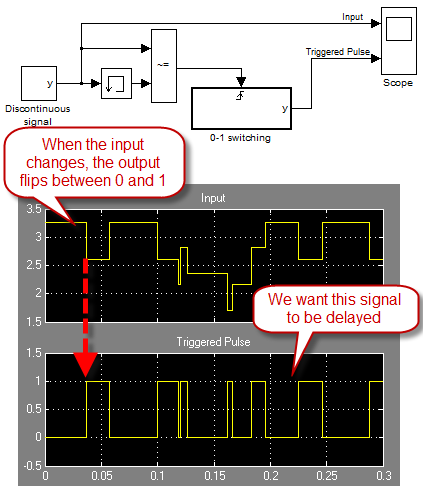
First attempt
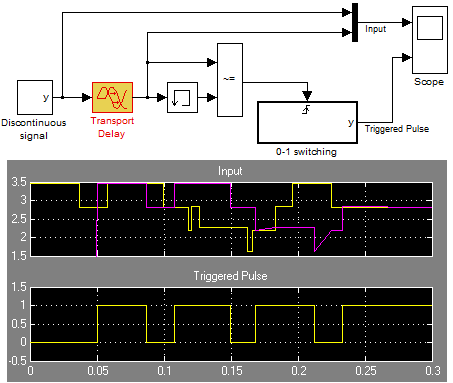
The first thing the user tried is delaying the signal using the Transport Delay block and detecting the changes in the delayed signals.
As I explained in a previous post, the Transport Delay expects a smoothly changing continuous signal. When fed a signal with discontinuities, the output of the Transport Delay is not exactly the input offset by a delay. This is the situation we encounter as shown in this image below.
Variable Sample Time
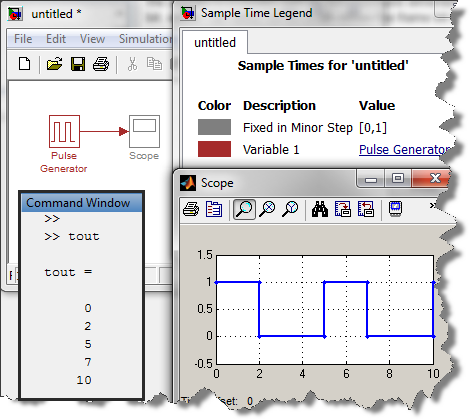
One way for a block to tell the Simulink solver to take steps at a specific moment in the future is to specify variable sample time. For example, the Pulse Generator block uses this technique to run only when needed.
If I make a model with the Pulse Generator block configured to have a period of 5s and a pulse width of 40%, the block will tell the variable step solver to take steps at times 0s, 2s, 5s, 7s, 10s,...
Variable Sample Time S-function
With an s-function, you can do the same!
For a basic example, look at the demo model sfcndemo_vsfunc.mdl. This model shows how to use mdlGetTimeOfNextVarHit to specify the next time your block should run.
The solution
Based on that, we want to write an s-function that will look at its input every major step of the simulation. When a change will be detected, we will store the time value in a buffer. Every time an event will be generated, we will look into this buffer and schedule the next event.
In S-function specific terms, this means:
- In mdlInitializeSizes, we specify the size of the buffer using ssSetNumRWork . We also define an integer work vector using ssSetNumIWork to keep the index of events coming in and out of the buffer.
- In mdlInitializeSampleTimes, we declare 2 sample times: Fixed in Minor and Variable. The fixed in minor sample time will allow us to monitor each sample of the input signal for detected changes and the variable sample time will be used to generate the events.
- In mdlUpdate, we monitor the input. If a change is detected, we store the time in the work vector.
- Every time a variable sample time is hit, the solver calls mdlGetTimeOfNextVarHit to obtain the time of the next variable sample time hit. When this happens, we look into the work vector to get the time of the next event and use ssSetTNext to register it.
- In mdlOutputs, we use ssIsSampleHit to know if the current step is a hit of the variable sample time. If this is the case, we generate a function call using ssCallSystemWithTid.
When this is all implemented, I have a block that can schedule events in the future
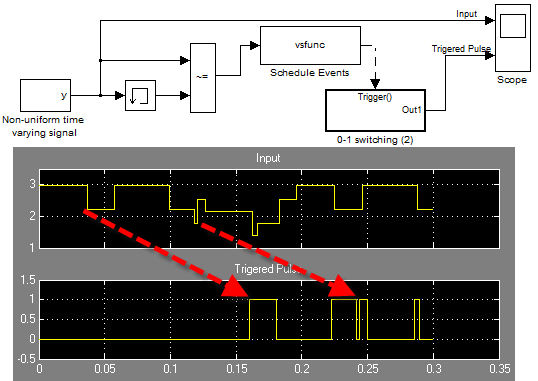
For those interested to see the final results, here are links to the model and the s-function source code.
Now it's your turn
Do you use variable sample times in your model? Leave us a comment here.
- Category:
- Fun,
- S-functions


Comments
To leave a comment, please click here to sign in to your MathWorks Account or create a new one.