Guy and Seth on Simulink
May 1st, 2012
Signal Hierarchy Viewer
If you are like me and often need to understand and edit new Simulink models, you probably already looked at a bus signal and wished you could easily know the hierarchy of signals inside it. What did you do? Before R2012a, my trick was to branch out the signal and connect it to a Bus Selector, just to inspect what is in the bus.
In R2012a, we made your life easier by introducing the Signal Hierarchy Viewer.
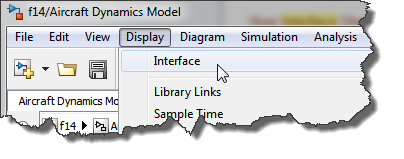
When right-clicking on a signal in R2012a, you will notice a new Signal Hierarchy option.

This opens a nice small window listing the hierarchy of signals inside the bus.
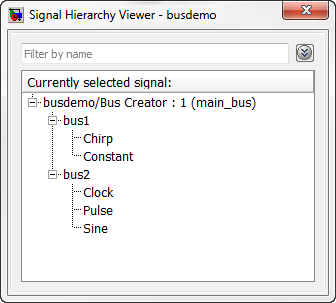
As you can see in the image above, the Signal Hierarchy Viewer allows you to filter the signals in the bus to quickly find what you are looking for.
Now it's your turn
What do you think of the Signal Hierarchy Viewer? Let us know by leaving a comment here.
By
Guy Rouleau
13:30 UTC |
Posted in Debugging, Signals, What's new? |
Permalink |
3 Comments »
You can follow any responses to this entry through the RSS 2.0 feed.
You can skip to the end and leave a response. Pinging is currently not allowed.
Leave a Reply
|
Guy,
Could you please do a post on avoiding precision loss errors in 32-bit floating point parameters when the ‘detect prevision loss’ diagnostic is set to warning or error? Do you have a simple method of finding the nearest representable value of a parameter to use that explicately avoids this error without changing data type?
Secondly, inside a sub-system I note than an input and output port cannot share the same name. But what if they are pass though signals? Is it possible to remove this limitation in future?
Lastly, another post idea could be on blocks that share similar functionality, such as unit delay and memory. I often spend time deciding on the pros and cons of using blocks that on the surface at least appear to have very similar functionality.
Cheers,
Paul
Thanks for this tip, Guy. It is especially useful, since there is a noticeable delay (on the order of 5-8 sec), when one tries to open a decent size (100 – 400 elements) bus selector/creator. I have noticed it in R2011b and R2012a, are you guys aware of it? It is painful.
@Igor
I noticed a small slowdown in these releases. We are actively working to improve this for future releases.
In addition to that, we have two bug reports with workarounds about situations where the bus selector can be very low to open:
http://www.mathworks.com/support/bugreports/728676
http://www.mathworks.com/support/bugreports/808560
I hope this helps.