
What’s in your model?
This morning I was telling my colleague Rob about the blog post I was writing on sample time colors. We talked about models that demonstrated the concept, and he dove into his computer to find an example he had made a couple years ago. I liked the model, so I asked him if he would send it to me, but here was a problem. The model was in a directory with about 50 other M-files, MAT-files and MDL files. How would Rob know which files to send me? Without much thought, Rob was able to identify the two files I would need to run that model. How did he do it?
Model Dependencies
A Simulink model is rarely just a single file. Simulink models often depend on the entire MATLAB environment to run. Most models rely on many more files run correctly. You may need MAT-files, M-files, reference models, S-functions, and C code to recreate the working environment. I have suffered through this repeatedly when working with models sent in to technical support. Many times, the models are missing just a couple files. We discover which file is missing and request it, only to find out there are additional dependencies. Most engineers have experienced this on some kind of development project and then resolve to keep their work more organized.
Model Manifest Tools
My colleague quickly identified his model dependencies using the model manifest tools in Simulink. In R2007a the model manifest tools were added. They provide a short cut method for analyzing your model to identify its dependencies, and then make it simple to package those files into a ZIP file. Take for example, this Lunar_Mission model (download) from the 2007 Simulink World Tour.
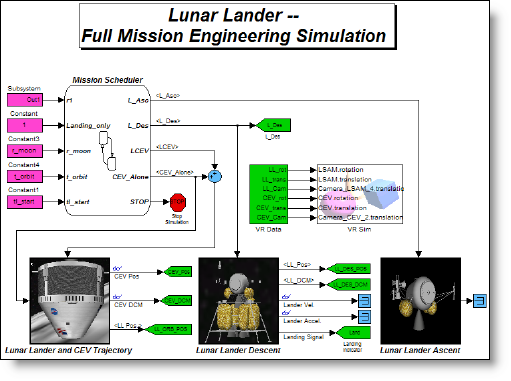
(Click here for Simulink WebView)
If I wanted to upload this to the File Exchange and share this with the Simulink Community, how would I do that? The documentation on model dependencies goes over this process step-by-step. Access the Tools->Model Dependencies->Generate Manifest… menu to generate the XML manifest file. The dialog presents you with some options to control the scope of your search for dependencies. I started by unchecking the items I did not want to include in the initial Simulink Manifest File (.smf).
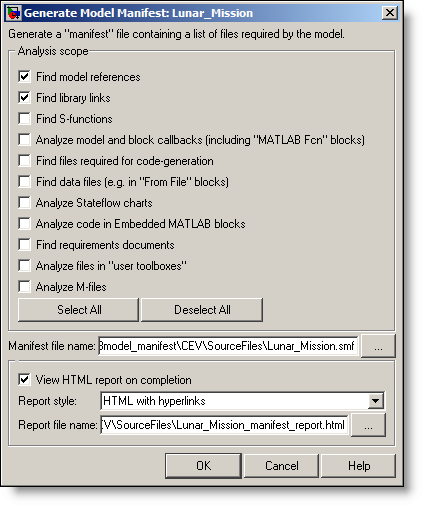
When you click Okay, it begins analyzing your model and produces an HTML report. Here is a snapshot of the output from the Lunar_Mission model.
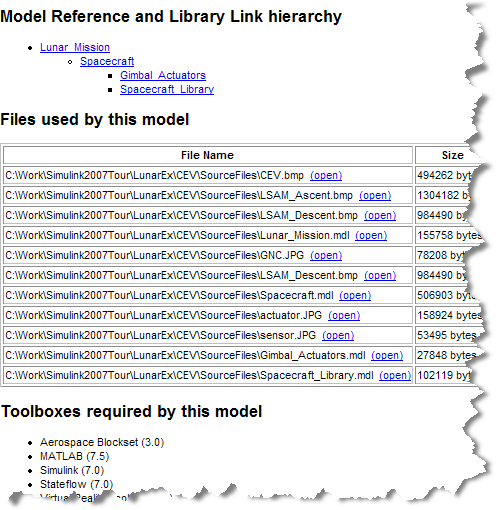
(Click
here for the full dependency report, links in the report won’t work)
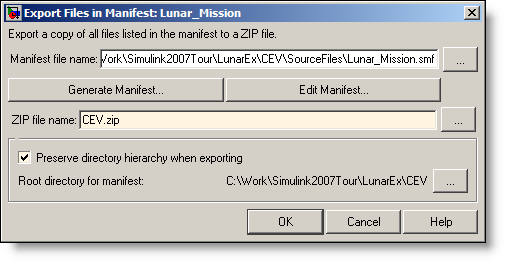
The final step to allow me to share this is to export the files in the manifest. I can package these files up in a ZIP file with just a couple clicks. This is another menu found at Tools->Model Dependencies->Export Files in Manifest…
Maintaining a manifest for your Simulink project is extremely helpful. This enhances collaboration between people working on the same project. A manifest can also be included in a configuration management system as a way to record all the files needed to run.
Now it’s your turn
Do you collaborate in Simulink? How do you keep your models organized? Are there any naming conventions that help you? Post a comment here and tell me about it.
- Category:
- Simulink Tips





Comments
To leave a comment, please click here to sign in to your MathWorks Account or create a new one.