Skip to Main Content Skip to Search
File Exchange
MATLAB Newsgroup
Link Exchange
  Blogs  
 Contest 
MathWorks.com

Seth on Simulink

July 18th, 2008

Libraries in Simulink

Have you ever noticed the same block constructs occurring repeatedly in your model?  Simulink libraries provide you with a way to capture the template for an algorithm, and then reuse that template all over your model.  For this post, I will to introduce the basic concepts of libraries, library blocks, and library links.

Creating a library

To create a Simulink library, you have to create a new Simulink library from the File> New > Library menu, or using the new_system function.
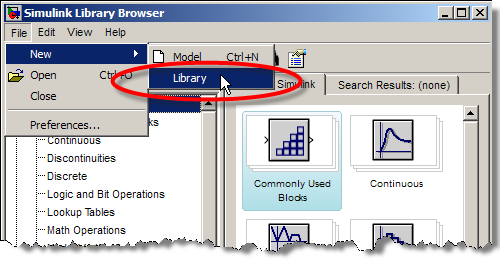
The New Library Menu

Libraries are special MDL-files.  When you look at a library, you will notice that it does not have the simulation controls a normal model has.  The library is not a functional model; it is a palette of components.  Here is an example library that contains a block for doing variable saturation of a signal.
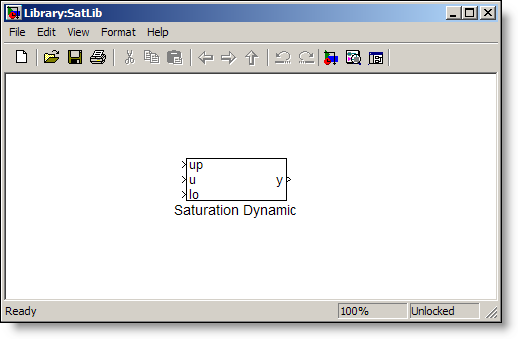
The saturation library diagram.

The library can be constructed in the same way a model is constructed, by dragging blocks into the library canvas and connecting signals.  The Saturation Dynamic block is just a subsystem that contains the algorithm for dynamic saturation of the signal u:
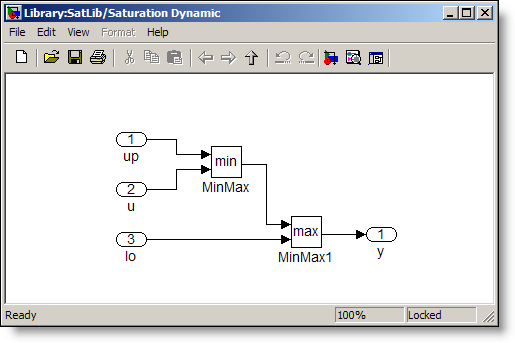
The Saturation Dynamic algorithm

Locking the library

When a library is first created, it is unlocked.
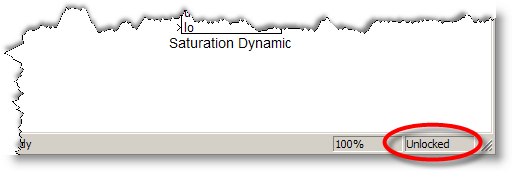
Unlocked library

This allows you to edit and build the components.  Once you save the library and close it, the library is locked.
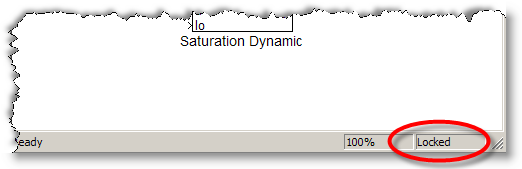
Locked library

No changes are allowed without unlocking the library.  This can be done from Edit > Unlock Library.  Most people just drag a block a few pixels to trigger Simulink to prompt you to unlock the library.
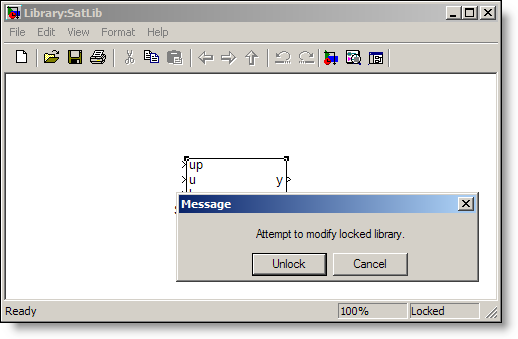
Modify locked library message

Reference blocks and algorithm reuse

Just like the blocks from the Simulink libraries, you can add the library blocks to any model you are working on.  There is some terminology that goes along with library blocks.  When you add the library block to your model, you are creating a reference block.
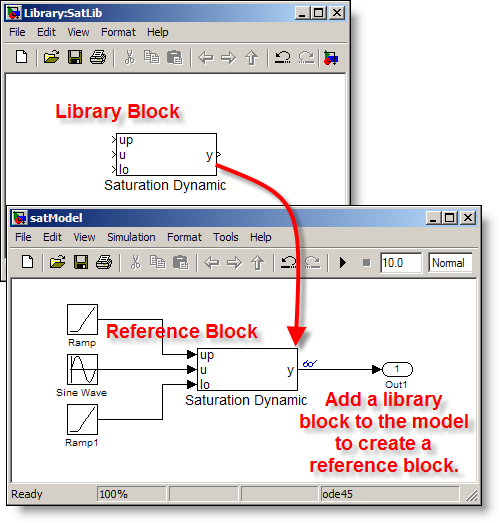
Create a reference block by dragging the library block into the model.

The reference block is an instance of the library block, but the contents are not stored in the model.  A model using the reference block stores only a library link, which holds the path to the library block.

>> get_param('satModel/Saturation Dynamic','ReferenceBlock')
ans =
SatLib/Saturation Dynamic

Set the Format > Library Link Display to User to see which blocks in your model are actually library links.  This setting adds a library link icon to the corner of your block.
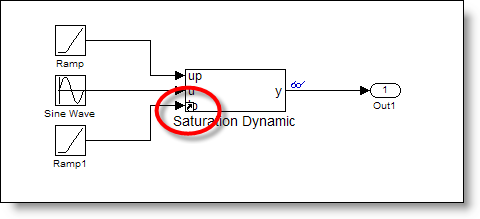
Format -> Library Link Display -> User

Adding your library to the browser

At this point, you might be asking how to add the library to the library browser.  The short answer is: >> doc slblocks.  I provided an example of this in the historical tour of the library browser.

What do you do with libraries?

Do you maintain your own libraries?  How many components does a typical library contain?  Do you share your work with other modelers?  Post your library to the file exchange, or leave a comment here.

6 Responses to “Libraries in Simulink”

  1. Kieran Parsons replied on :

    I do use libraries regularly and share that code with others in my team. One issue (Thread: 1-6A8141) that I have come across is with the use of Embedded Matlab blocks in libraries. If the block has a non-tunable structure parameter then you cannot put it in a library if the structure ever changes (which it will). I can however place multiple copies of the same EML block in my models and it will compile OK. I would be interested if you can think of any workaround which would allow me to put the EML block in the library.

  2. Kieran Parsons replied on :

    I think that a very useful future block post would be how to build and maintain large models with a number of people working on parts of the model. Simulink is used by many large companies presumably with large models maintained by a number of people. It would be good to know the tricks used by them to make maintenance easier.

    Some issues I hit up against include:
    - How to tell what changes have been introduced by other people. There is no “diff” — and using diff on the .mdl file is not very enlightening.
    - When to use libraries vs model referencing.
    - How to pass a large number of parameters into the model. I tend to use structures (now often objects) to pass info into the model workspace, but their support seems haphazard (eg cannot pass a structure into a referenced model). Do people just use the base workspace?

    Thanks.

  3. Georg Wiedermann replied on :

    Dear Seth,

    as Kieran I often wondered how people bring large numbers of parameters into model. I use hierachical structures reflecting the model’s subsystem hierarchy where every subsystem is masked.

    However, the support of parameter structures for tunable parameters is indeed limited - there are no structures allowed for referenced models and autocoding with RTW is not possible with structure parameters. This is indeed the reason which keeps me and my collegues from using model referencing.

    Do you plan to enhance the support of structures as parameters?

    I would also be very interested in the topic how to build and maintain large models with several people contributing. We use an external revision control system to track the changes (SVN / CVS), but the missing diff / merge tool for Simulink is really a nuisance.

    Best Regards

    Georg

  4. Paul J. replied on :

    Seth,

    “doc slblocks” is not very enlightening (at least in 2007b). It basically says to grab a copy from one of the TMW-supplied directories and modify it, but it doesn’t really explain what’s going on. Also, the slblocks.m files in different TMW-libraries sometimes define different structures. On a related note, I tried to add my libraries to the library browser. I put four of my libraries into to top library and added it to the browser via slblocks (as best I could figure out). One of those libraries contains 10 subsystem blocks. I can drag any one of those 10 into a model from the browser. But the browser thinks that three of those are themselves libraries, and clicking on them in the browser reveals all of the blocks in that subsystem. Any idea why the browser thinks that those three subsystems are libraries? I haven’t been able to figure it out yet.

    Thanks,
    Paul J.

  5. Gernot Grabmair replied on :

    large number of parameters: I’m looking for this discussion since some weeks and couldn’t imagine that nobody else has a similar problem.

    The Simulink.Parameter object seems to handle only one parameter value and not to aim at structered types.
    Mathworks hints in (RTW:Creating Data Objects Based on an External Data Dictionary) the use of some external data dictionary. But only EXCEL is mentioned. Does anbody know a good tool for that.

    I think an answer could be some kind of data dictionary with interfaces to most important software-independent/standardized data formats. Additionaly, the handling of parameter data in the generated source code should be handled there. Unfortunately I have only found some 3rd party products so far. (e.g. http://www.dspace.de/ww/de/gmb/home/products/sw/pcgs/data_dictionary.cfm).

    I’m looking forward that MathWorks will deal with that problem, too.

    Regard’s
    Gernot

  6. Georg Wiedermann replied on :

    Dear Seth and Gernot,

    handling a large number of parameters is a very good topic. I suggest to extend this topic to signals ans states also.

    We use Simulink and Embedded Matlab to develop attitude control algorithms for spacecrafts. Simulink is used for the “architecture” of the code while the actual code is implemented in Embedded Matlab. This embedded Matlab code is directly given to the software people as specification for the coding of the on board software. In my Similink model all signals, parameters and states (about 500 data items) are well defined with type, size etc. - but how do I get this information out of the model into an Excel list or a database - in other words, how do I maintain and export a data dictionary? I think this point is not well covered in simulink today.

    Best Regards
    Georg

Leave a Reply


Seth Popinchalk is an Application Engineer for The MathWorks. He writes here about Simulink and other MathWorks tools used in Model-Based Design.
  • Quan: Hi Seth, Great graphics you got here. I especially like the first one, cool animated picture! I”m not a...
  • ChinKeat Low: Hi. I’m a new user of Matlab & Simulink. I would like to know more on building and simulating...
  • Alex: Is it possible to dynamically change the MaskStyle, i.e. change the text entries of a popup parameter? For...
  • Maarten: Seth, As far as I can gather, it is not possible to stream data created using signal logging of a virtual...
  • Bilal Majeed: Dear Sir, Thanks for your release.That was realy helpfull. Sir i have a little problem in connecting my...
  • Shajila: how to implement the following sample rule base in fuzzy If z1(k)=M1 and z2(k)=M2 then est(x(k/k-1))=P(e...
  • Seth: @Kai - The initial value will be the last one you entered into the library block mask. When you work in the...
  • Kai: I wonder how it is possible to define initial values for the parameters in the mask. for example your values...
  • Elbha: I have a question on “scope” block in simulink.How to get the name of X,Y variable in the graph.
  • Waqas Mahmood: Thanks for the respsonse. My other question is, Tracking with zoom-in/out requires to change the...

These postings are the author's and don't necessarily represent the opinions of The MathWorks.

Related Topics