Seth on Simulink

December 25th, 2008

Initializing Parameters

Simulink models often use parameters from the MATLAB base workspace.  However, Simulink does not save the MATLAB base workspace with the model.  This leads me to the following question: How do you initialize the workspace for your simulation?

Simulink Demos

Most Simulink Demos initialize the base workspace before they are loaded.  Let’s take a look at f14.mdl:
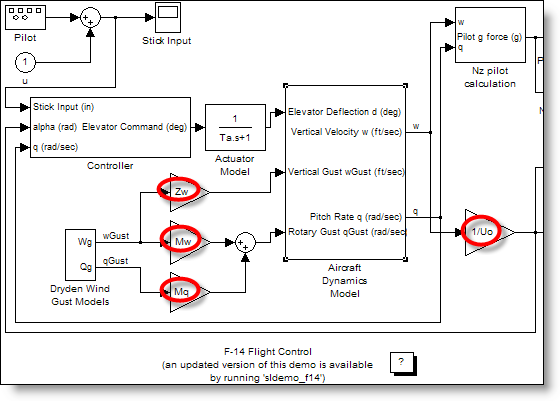
Simulink F14 model uses MATLAB expressions in Gain blocks.

In the F14 model, you see gain blocks with parameters like Zw, Mw, Mq and 1/Uo.  Simulink evaluates those MATLAB expressions in the base workspace during initialization of the simulation.
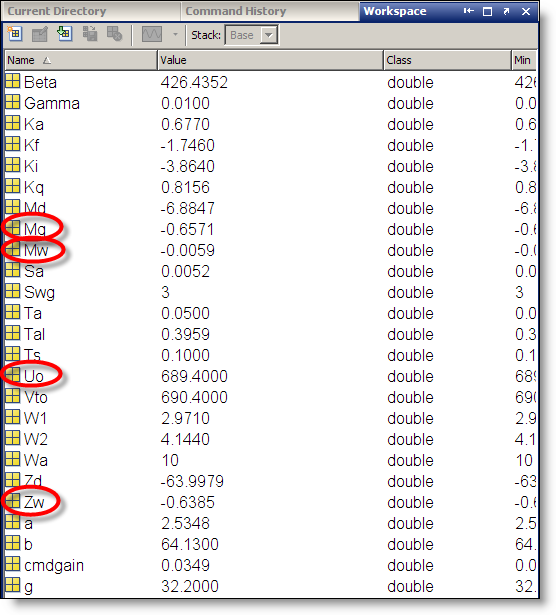
MATLAB Workspace with variables from the F14 demo model.

You can register model callbacks that run when you perform different actions on the model.  In this example, f14.mdl has a PreLoadFcn that runs a script to initializes the workspace.  You can see the model callbacks by opening the Model Properties from the File menu.
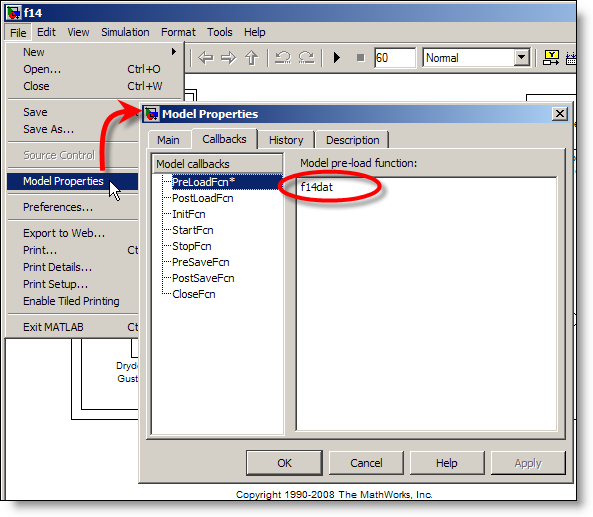
Model Properties dialog box for F14 demo model.

The model pre-load function executes before the model is actually loaded.  If you only need to initialize a few variables for your model, you can enter the MATLAB expressions directly in the pre-load function callback.  The F14 model calls the M-file script f14dat.m.
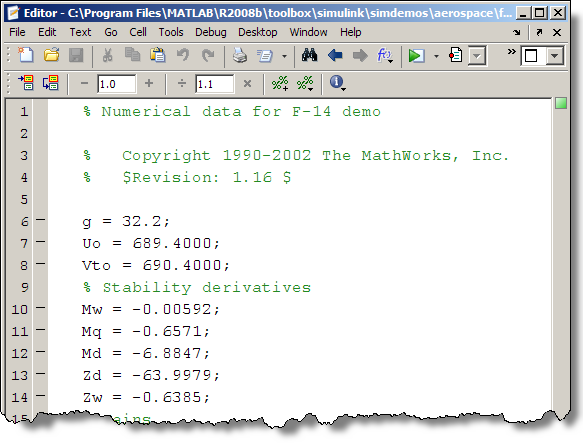
The F14 demo model initializes the workspace with the f14dat.m script.

If I am tweaking variables in my model, I like to change them directly in the workspace browser, or at the command line.  The pre-load function is a good place for initializing variables because it only runs the first time the model is loaded.  This allows you to change the variables for the current session without modifying the initialization code.

Other techniques for initialization?

How do you go from the blinking MATLAB cursor to a fully initialized environment?  Leave a comment here and share your model initialization tips.

11 Responses to “Initializing Parameters”

  1. Farid Arvani replied on :

    Instead of creating an script and loading it with the model using PreLoadFcn, one can easily use the Model Explorer. Press Ctrl+H. It will open the Model Explorer. In the model hierarchy pane on the left, you see Base Workspace which is the main Matlab Workspace that is normally used like the method above.
    You can also see Model Workspace under each open simulink model hierarchy. This is the workspace that is used only by that model. By using this workspace, you will keep Matlab workspace clean and furthermore you do not have to carry the model file (.mdl) and an initialization file (.m or .mat) around. To benefit from this feature, change data source combo on the very right pane to M-code. Input your initializations there and save your model. That’s it. From now on whenever you open the model file, it will load the defined variables into its private workspace and you will not see any mess in Matlab workspace.
    I have to add that this method is good for one-time initializations since you will not be able to change the variables from workspace; again Model explorer should be used for any variable modifications.

    Cheers
    Farid

  2. Rachid replied on :

    hello

    I have a model with many blocs, the last have also the blocs and parameters, so i want to get all these parameters, make them in struct and respect the path of any blocs and parameters
    so there are the function who do this?

  3. Hossein replied on :

    Thanks. This was helpful! :-)

  4. alberto cardeñoso replied on :

    Hello,
    what about initialisation with Simulinks models where a Simulation Settings block is present? One example is the IEEE® 802.11a WLAN Physical Layer Simulink Demo. How does it works?

    Thanks.
    Alberto.

  5. Seth replied on :

    @alberto cardeñoso - Thanks for your question. These kinds of blocks are usually just masked subsystems. Try right clicking on the blocks and selecting, “Edit Mask”. If you look at the MaskInitialization code you can find that it just runs a script. To see the content of that script,

    >> edit commwlan80211a_settings;
    

    The code in the script performs a few get_param commands then assigns a variable into the base workspace. This model is carefully constructed so that all those variables are accessed from the blocks in the model. Double click on the blocks to see how.

  6. alberto cardeñoso replied on :

    Hello,
    thank you Seth for your answer. I have written one script like this,

    function initialisation1

    % Parameter settings for the simulation
    %

    % Fist of all fetch parameters from the Adjust Settings block
    %
    % Construct the whole name of the block
    settings_block_name=’Adjust Settings’;
    settings_block = [bdroot ‘/’ settings_block_name];

    [data_rate, …
    modulation, …
    channel_type,…
    SNR,…
    rolloff] = …
    get_settings(settings_block,…
    ‘data_rate’,…
    ‘modulation’,…
    ‘channel_type’,…
    ‘SNR’,…
    ‘rolloff’);

    % Data Source, Sample Time and Frame Time
    p.data_rate = data_rate; % Data rate.

    % Modulations Squeme
    p.modulation = modulation; % Selected modulation squeme: BPSK, QPSK, 8-PSK …

    % Transmit and receive filters
    p.rolloff = rolloff; % Roll-off factor of the transmit and receive filters.

    % Channel parameters
    p.channel_type = channel_type; % Channel Type: AWGN, Rayleigh, Rice …
    p.SNR = SNR; % SNR of the channel.

    assignin(’base’,'parameters’,p);

    %————————————————————————-

    function varargout=get_settings(settings_block,varargin)

    h=get_param(settings_block,’handle’); % Get the handle of the block.
    for n=1:length(varargin)
    varargout{n}=evalin(’base’, get(h,varargin{n}));
    end

    I don´t know why, but the get_settings function is not working. There is a problem with the
    evalin function. The initialisation1 function is called from the mask initialisation of the “Settings Block”,
    as well as from the PostLoadFcn from the Model.

    Any idea?

    THanks
    Alberto

  7. Seth replied on :

    @Alberto - I think you should set a break point in the function, and when you hit that point, you can step through the code to see what is the problem. Note, your initialization code doesn’t have to be this complicated. In fact, you may want to build a MATLAB GUI using GUIDE and replace the OpenFcn for a subsystem. Good luck.

    I think you will get a faster answer from Technical Support or on CSSM.

  8. Muhammad Arsalan replied on :

    Hi Seth,

    I am facing a very interesting problem about the parameter dependencies.
    The problem is that i have to use some parameters which are dependent on other parameters. e.g.
    x = 6 and y = [0, x, 10, 15, x/2]
    Now when these parameters are loaded to the base workspace of MATLAB the dependency of y on x is lost. In base workspace the value of y is taken as [0, 6, 10, 15, 3]. By this depencency lose it is not possible to change the values in y when it is used in model, just by changing the x. Is there any way by which this lose of dependency is avoided.

    Thank you very much indeed.
    Arsalan

  9. Seth replied on :

    @Muhammad Arsalan - you have brought up an interesting problem. It would be possible to tune parameters while the simulation is running (or paused) and keep them consistent. I would use a cell in my script that initialized X and Y, then execute just that cell to update the values in the MATLAB workspace. You can then update the diagram (Ctrl-D) to get the new values into the simulation.

    The relationship between these variables will not be automatically recognized in generated code. For that you will need to consider custom storage classes where you can layout the X memory as part of Y. This will ensure consistency.

    Anyone else have a suggestion?

  10. wei replied on :

    @Seth,
    I’m interested to see how the dependence of y on x is managed through memory layout. To me this should be part of model done diagrammatically.

  11. Seth replied on :

    @wei - I overlooked the X/2 expression. That cannot be managed through memory layout. It might be possible to create a Data Store that holds X, and diagramatically create Y (Stored in a Data Store) based on X. Then when X and Y are used, the relationship would be correct (as long as execution of the blocks is grouped as an atomic unit).

Leave a Reply

Wrap code fragments inside <pre> tags, like this:

<pre class="code">
a = magic(3);
sum(a)
</pre>

If you have a "<" character in your code, either follow it with a space or replace it with "&lt;" (including the semicolon).


Seth Popinchalk is an Application Engineer for The MathWorks. He writes here about Simulink and other MathWorks tools used in Model-Based Design.
  • Mohamamd: Hi Suth, I try to simulate a load tap-changing transformer in simulink but its control part has to be...
  • Han Geerligs: Hello Guy, thanks for the clarificaton and link. However in the documentation I am missing the...
  • Guy: @Han, you probably already know, but I think it is good to share with everyone. To zoom in use the key...
  • Han Geerligs: Hi Seth, Once again I’d like to point out that my biggest accelerator is using mouse and keyboard...
  • XaL: Hi, thanks for the tips. As someone wrote in http://blogs.mathwor ks.com/seth/2009/03/ 13/new-%C2%A0rele...
  • Uba osy: Hi, in the introductory example for fuzzy logic toolbox it was noted that using non fuzzy means, you could...
  • Prashant: How can I have same example but instead AC(1 to 10V 50 or 60Hz) and DC(0.5 to 10 V) then adding AC+DC but...
  • adrian chavarro: Great tool, for educational and sicentific, simulation. I would like to know where can i place a...
  • Ashish Sadanandan: @wei, I was talking about the case where the compiler would perform the ‘model_Xdim...
  • wei: @Ashish, I agree with your observation on compiler optimization but fail to see why Han’s code would be...

These postings are the author's and don't necessarily represent the opinions of The MathWorks.