
A Better If-Else Construct
In a previous post, I answered a question about how to model an If-Else behavior. Here I will restate the algorithm I want to create:
if(sel==0)
out = 2*in1;
elseif (sel==1)
out = 3*in2;
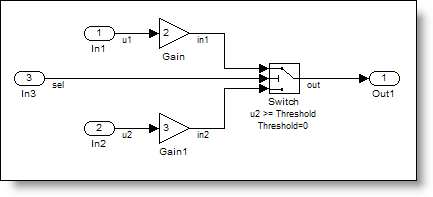
The first answer I gave relied upon a Switch block and the Conditional Input Branch Execution optimization to get an efficient If-Else construct in the model. While this works, I don’t like reliance on an optimization to provide good behavior. Sometimes, small changes to the model prevent Simulink from applying an optimization. I think it is best to implement requirements explicitly. In this post, I want to show you a way to model explicitly an If-Else conditional execution behavior.
Conditionally Executed Subsystems and Merge
The If-Else construct requires decision logic to control the execution of algorithm contained within the expression. One way to do this is using the If block (from the Ports & Subsystems library), combined with the If Action Subsystem. The If Action Subsystem executes based on the conditional expression in the If block. If you have used Function Call subsystems, this is very similar.

The If block provides control over If and ElseIf conditions, and there is even an option to provide an Else signal.

This model will give you the conditional execution of the two subsystem, however, the subsystems write their outputs to separate signals. How do you get two subsystem to write to the same signal?
Merge the Signals
The Merge block provides a way for both subsystems to write to the same signal.
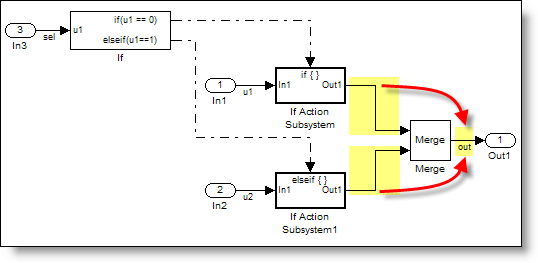
In many ways, the Merge block doesn’t behave like a block with the traditional input/output relationship. I think of it more like a jumper across multiple wires. The merge block specifies that all signals connected to it have the same value and actually share the same memory. This is the programming practice of specifying multiple writers to the same variable.
Generated Code with Merge
The code generated from the above model looks a lot like our original algorithm.
   34     /* If: '<Root>/If' incorporates:
   35      *  ActionPort: '<S1>/Action Port'
   36      *  ActionPort: '<S2>/Action Port'
   37      *  Inport: '<Root>/In3'
   38      *  SubSystem: '<Root>/If Action Subsystem'
   39      *  SubSystem: '<Root>/If Action Subsystem1'
   40      */
   41     if (sel == 0.0) {
   42       /* Gain: '<S1>/Gain' incorporates:
   43        *  Inport: '<Root>/In1'
   44        */
   45       out = 2.0 * u1;
   46     } else {
   47       if (sel == 1.0) {
   48         /* Gain: '<S2>/Gain' incorporates:
   49          *  Inport: '<Root>/In2'
   50          */
   51         out = 3.0 * u2;
   52       }
   53     }
Correct use of Merge
Because Merge blocks are a memory specification rather than an algorithmic construct, there are some guidelines for using merge blocks. The documentation shows some correct and incorrect usage patterns. If you use merge block in your model, I suggest you run the Model Advisor Check for proper Merge block usage.
Now it’s your turn
Do you use the Merge block in your models? Leave a comment here and share your experience.




Comments
To leave a comment, please click here to sign in to your MathWorks Account or create a new one.