Kind of happy, yes. However I think, this feature should have been included at the same moment scopes have been – for what is a graph without a legend good for? In the beginning I really couldn’t believe there was no possibility to display one.
By the way, why do I have to rerun the simulation in order to display a legend although the data is already present? I think that is kind of counter-intuitive…
This is a performance optimization. Signal names used in legend strings are determined only if legends are enabled before starting the simulation. They are also not saved for later use.
@Roshin: I expected the reason to be something like that, but I still think that changing that behavior should at least be considered in favor of usability.
In the mean time I have come across another situation where the scope legend naming does not work as I expected it to:
I have a setup containing 4 named signals connected to a mux block. The output of this mux block is connected to a gain block which is in turn connected to the scope.
The scope does not recognize any names of my signals. Once I remove the gain block, all names are displayed properly. It seems that the gain block prevents signal names from being propagated.
Is there any way to have the 4 signals’ names still be properly displayed in the scope in spite of the gain block?
Eike,
In future, this behavior will be user-friendly.
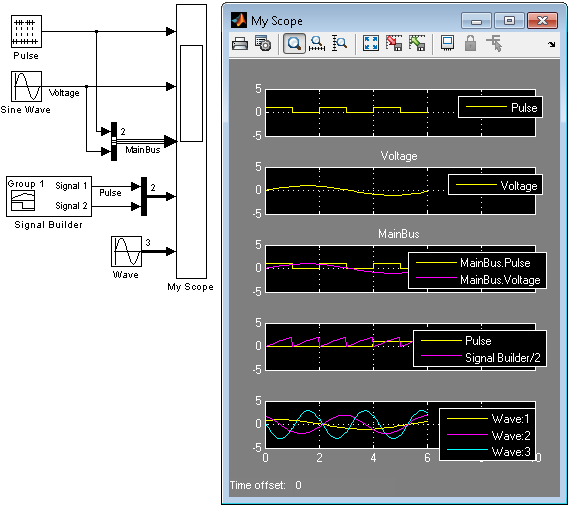
Currently, there isn’t any easy way to display the signal names of the four signals on the mux in the presence of a gain block. They will show up as Gain:1, Gain:2, etc. If you name the output line of the Gain block to xyz, the names will appear as xyz:1, xyz:2, etc. This is a known limitation and we will consider improving it.
Legend good, but please, please put integrated dual cursors with delta t and delta y on the scopes and provide access to the graphics tools of normal figures.
In the process industry where we have long time runs with lots of data these are really needed.
HOW do you get the legend text to be the signal name or other options? The output of my integrator is a temperature. I have the scope block labeled temperature, i have the integrator output labled temperature, heck I’ve labeled everything I could find as “temperature” and the darn legend still says “integrator”. This SHOULD be very simple and obvious -what am I missing? Student version 2012a
@Ray: I am not sure what is happening. Typically, when the signal is named, the Scope will use that first. If the signal is not named, then it will use the block name.
If you cannot figure it out, I recommend contacting technical support.
Guy Rouleau and Seth Popinchalk are Application Engineers for MathWorks. They write here about Simulink and other MathWorks tools used in Model-Based Design.
Kind of happy, yes. However I think, this feature should have been included at the same moment scopes have been – for what is a graph without a legend good for? In the beginning I really couldn’t believe there was no possibility to display one.
Anyway, fine to finally have this. :)
By the way, why do I have to rerun the simulation in order to display a legend although the data is already present? I think that is kind of counter-intuitive…
Kind regards,
Eike
This is a performance optimization. Signal names used in legend strings are determined only if legends are enabled before starting the simulation. They are also not saved for later use.
Dear Sir
I need H,inf matlab code and comments included,applied on non linearity system for both siso and MiMo.
you can send to me a typical non linearity transfer function.
use saturation or and quantizer to include non linearity.
thank you
@Roshin: I expected the reason to be something like that, but I still think that changing that behavior should at least be considered in favor of usability.
In the mean time I have come across another situation where the scope legend naming does not work as I expected it to:
I have a setup containing 4 named signals connected to a mux block. The output of this mux block is connected to a gain block which is in turn connected to the scope.
The scope does not recognize any names of my signals. Once I remove the gain block, all names are displayed properly. It seems that the gain block prevents signal names from being propagated.
Is there any way to have the 4 signals’ names still be properly displayed in the scope in spite of the gain block?
Kind regards,
Eike
Eike,
In future, this behavior will be user-friendly.
Currently, there isn’t any easy way to display the signal names of the four signals on the mux in the presence of a gain block. They will show up as Gain:1, Gain:2, etc. If you name the output line of the Gain block to xyz, the names will appear as xyz:1, xyz:2, etc. This is a known limitation and we will consider improving it.
Thanks,
Roshin
Legend good, but please, please put integrated dual cursors with delta t and delta y on the scopes and provide access to the graphics tools of normal figures.
In the process industry where we have long time runs with lots of data these are really needed.
HOW do you get the legend text to be the signal name or other options? The output of my integrator is a temperature. I have the scope block labeled temperature, i have the integrator output labled temperature, heck I’ve labeled everything I could find as “temperature” and the darn legend still says “integrator”. This SHOULD be very simple and obvious -what am I missing? Student version 2012a
@Ray: I am not sure what is happening. Typically, when the signal is named, the Scope will use that first. If the signal is not named, then it will use the block name.
If you cannot figure it out, I recommend contacting technical support.
Hello,
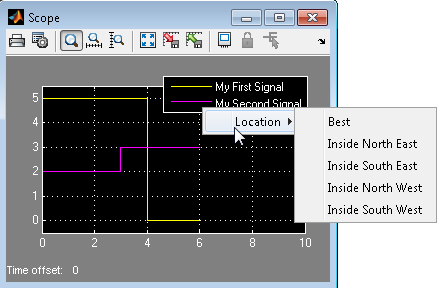
I was wondering whether there is a way to programatically (i.e. via code) modify the location of the Scope legends.
maybe something like this?
simscope(‘Legend’, ‘Location’, ‘NorthEast’, scopeHandle)