
Logging Simscape variables like Simulink Signals

Did you know that starting in R2024a, it is possible to log Simscape variables like if they were Simulink signals?
Let's see how that works.
The Problem
Here is a pattern I often see in Simscape models. To log variables from Simscape blocks, users add sensor blocks and PS-Simulink Converter, and then log the output Simulink signal.
mdl = 'CavitationInTwoPhaseFluid';
open_system(mdl)
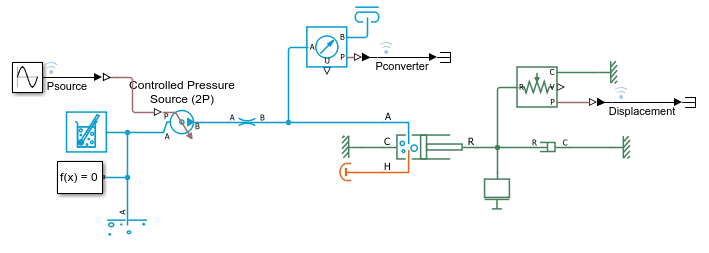
After simulating, you can access all logged signals in the logsout.
out = sim(mdl);
out.logsout
While it is a perfectly valid pattern, adding sensor blocks just to log signals is inefficient. This adds blocks to the model, impacting the performance and clarity of the model.
Simscape Logging - A non-ideal workaround
For as far as I can remember, Simscape offers its own logging that is separate from Simulink logging. While it is useful for debugging purposes using the Simscape Results Explorer, I find it less convenient for writing more robust and scalable post-processing code. For example, to access the data for the Displacement signal from above, I would need this line of code:
out.simlog_CavitationInTwoPhaseFluid.Translational_Mechanical_Converter_2P.interface_displacement.series.values;
This returns an array of double numbers instead of the timeseries or timetable like the signals logged in Simulink.
Let's look at a better way.
Simscape Instrumentation Table
To directly log a Simscape variable like a Simulink signal, start by selecting the block in the canvas. Go to the Simscape Block tab in the Simulink toolstrip and click Instrumentation Table. This will open the Model Editor panel with the Simscape Variables tab selected.
In this panel, you can see all the variables for the selected block, enable logging for the ones you want and specify the name of the logged signals.
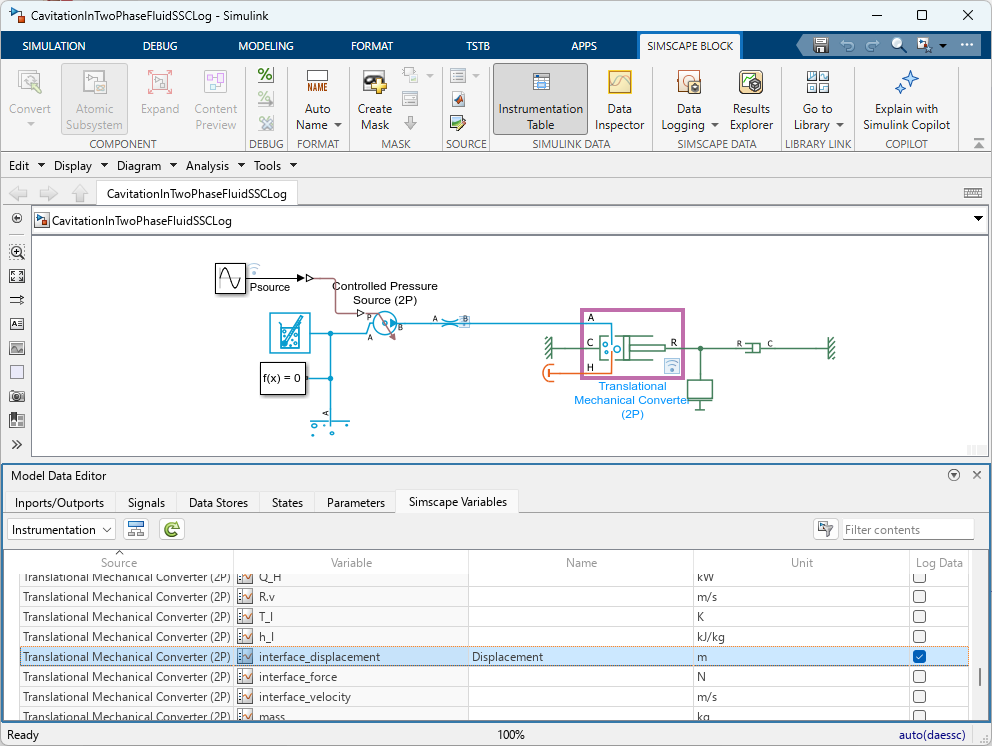
After making those changes, I can simulate the new model and confirm that the results are the same
mdl = 'CavitationInTwoPhaseFluidSSCLog';
open_system(mdl)
outAfter = sim(mdl);
outAfter.logsout
diffResult = Simulink.sdi.compareRuns(runIDs(end-1), runIDs(end),'abstol',1e-3,'reltol',1e-3);
diffResult.Summary.OutOfTolerance
Note that this can all be configured programmatically as described here: Log Selected Variables Programmatically
Using a Coding Agent for Refactoring and Modernization
Do you think I made those changes myself manually? We're not in 2025 anymore!
What I did is connect my favorite coding agent (configured to use the Simulink Agentic Toolkit) to my running MATLAB session and asked:
My Simulink model is logging Simscape variables using sensor blocks and PS-Simulink Converter to then log the Simulink signal. I want you to refactor this model to delete sensor blocks used only for logging and instead use the Simscape Instrumentation Table to log the Simscape variables like Simulink signal. The name of logged signals should remain the same. Begin by capturing a baseline and validate that the logged signals are the same after your changes.
After just a few seconds, I had the model shown in the above picture and a summary of the changes:
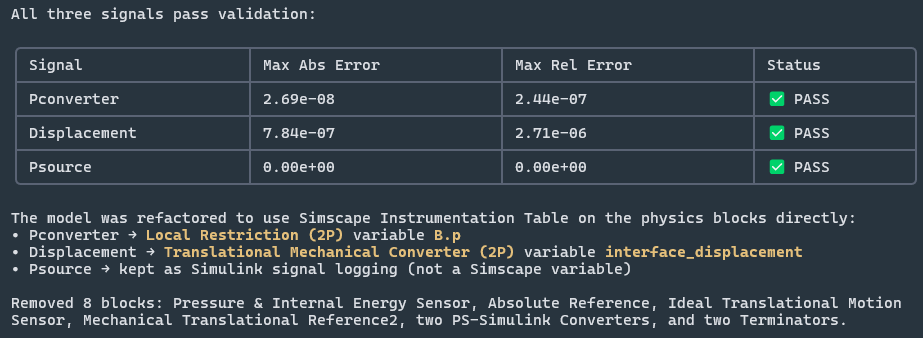
Before you ask, yes, removing sensors in a Simscape model can change the results, but only within the specified solver tolerance, nothing significant. That's one more reason to avoid unnecessary sensors.
Now it's your turn
If you are not familiar with this feature, I recommend these documentation pages:
Do you like this way of logging Simscape variables? Have you tried the Simulink Agentic Toolkit to do this kind of refactoring and modernization work? Let us know in the comments below.



Comments
To leave a comment, please click here to sign in to your MathWorks Account or create a new one.