
Dynamic Mask Dialogs
When configuring a Simulink block, you usually use a
graphical user interface (GUI). In this post I’m going to investigate the
basics of programming a dynamic GUI using the mask editor.
The Saturation block features
In <a
href="https://blogs.mathworks.com/seth/2008/08/05/advanced-masking-concepts/">my
last post, I introduced the example of a Saturation block that can use
fixed limits set in the mask dialog or dynamic limits set via input signals.
Here is an animation of the mask GUI that configures the block for these
different modes.
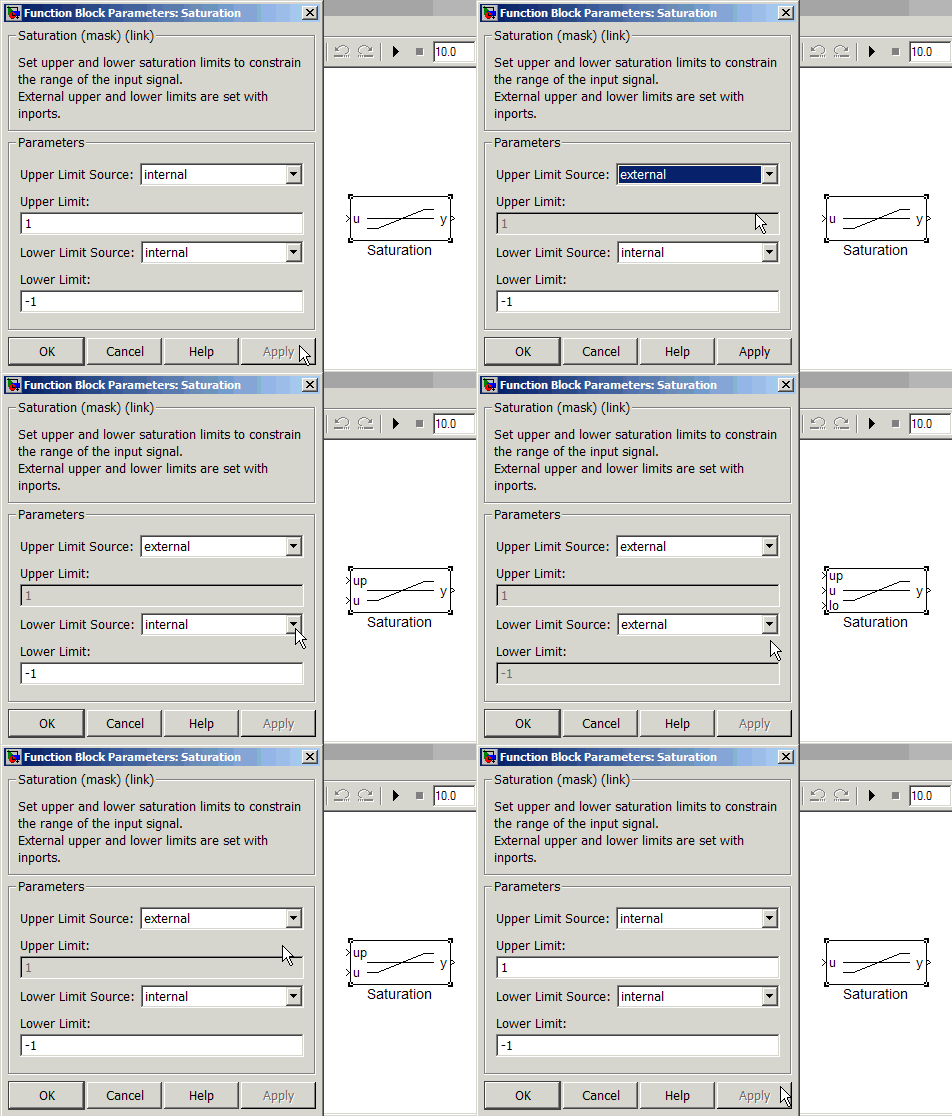 When the Upper and Lower Limit Sources are internal, the
block has a single input port. When the Upper/Lower Limit Source is set to
external, the block grows additional ports to accept signals that provide those
limits.
Mask dialogs can associate actions with its components. Most
Simulink block GUIs have a standard row of buttons along the bottom. These four
buttons provide a consistent interface for Simulink blocks, and when you use
the mask editor, you get them free.
When the Upper and Lower Limit Sources are internal, the
block has a single input port. When the Upper/Lower Limit Source is set to
external, the block grows additional ports to accept signals that provide those
limits.
Mask dialogs can associate actions with its components. Most
Simulink block GUIs have a standard row of buttons along the bottom. These four
buttons provide a consistent interface for Simulink blocks, and when you use
the mask editor, you get them free.
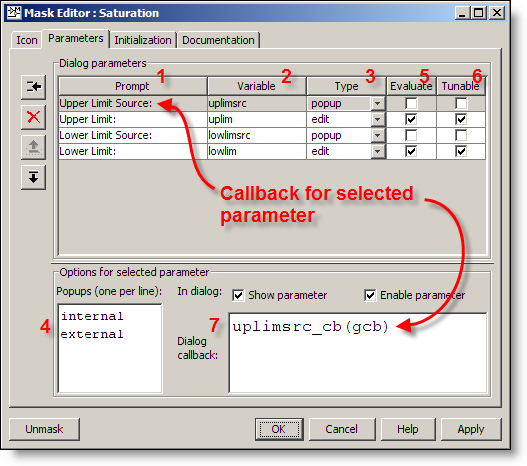 Each parameter of the mask has a row in the Dialog
Parameters table. The Prompt (1) is the text displayed next to the
widget that sets the value. The Variable (2) is the name of the
variable set in the mask workspace when the GUI is applied. The Type (3)
controls the widget used for the parameter. You can choose edit, checkbox or
popup. I picked popup for the parameters Upper Limit Source and Lower Limit
Source parameters. I set the popups (4) to display internal or external.
The Upper Limit and Lower Limit parameters use the edit type.
Each of the parameters also has an Evaluate (5) and Tunable
(6) setting. I want uplim and lowlim to have the values that are entered into
the dialog. If a MATLAB expression (like 'sin(x)+1') is used to set the value
of the Upper Limit, I want that to be evaluated. I don’t want the variable to
hold the string that was typed into the edit field. Tunable means the value of
the parameter can change during the simulation. Upper and Lower Limits will be
tunable through the dialog if internal limits are used. The Limit Source
parameters are not tunable because they change the configuration of the block.
It is not possible to reconfigure the model structurally in mid simulation.
Dialog Callbacks
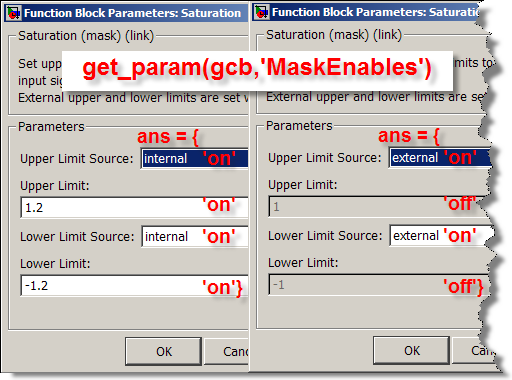
Dialog callbacks (7) are called when the parameter is changed in
the mask. Use dialog callback for error checking and controlling the
visibility and enabled/disabled setting of other parameters in the mask
dialog. In the Saturation mask dialog, the Upper Limit Source and Lower Limit
Source parameters fire a Dialog callback when you click on them. This is the
mechanism for enabling and disabling the Upper Limit and Lower Limit Edit
fields in the GUI.
Key Point: Just like a handle graphics GUI,
the Dialog callbacks run in the MATLAB base workspace. Program the
callback as if you are running it from the MATLAB command line.
Here is the uplimsrc_cb called when the uplimsrc parameter
changes:
Each parameter of the mask has a row in the Dialog
Parameters table. The Prompt (1) is the text displayed next to the
widget that sets the value. The Variable (2) is the name of the
variable set in the mask workspace when the GUI is applied. The Type (3)
controls the widget used for the parameter. You can choose edit, checkbox or
popup. I picked popup for the parameters Upper Limit Source and Lower Limit
Source parameters. I set the popups (4) to display internal or external.
The Upper Limit and Lower Limit parameters use the edit type.
Each of the parameters also has an Evaluate (5) and Tunable
(6) setting. I want uplim and lowlim to have the values that are entered into
the dialog. If a MATLAB expression (like 'sin(x)+1') is used to set the value
of the Upper Limit, I want that to be evaluated. I don’t want the variable to
hold the string that was typed into the edit field. Tunable means the value of
the parameter can change during the simulation. Upper and Lower Limits will be
tunable through the dialog if internal limits are used. The Limit Source
parameters are not tunable because they change the configuration of the block.
It is not possible to reconfigure the model structurally in mid simulation.
Dialog Callbacks
Dialog callbacks (7) are called when the parameter is changed in
the mask. Use dialog callback for error checking and controlling the
visibility and enabled/disabled setting of other parameters in the mask
dialog. In the Saturation mask dialog, the Upper Limit Source and Lower Limit
Source parameters fire a Dialog callback when you click on them. This is the
mechanism for enabling and disabling the Upper Limit and Lower Limit Edit
fields in the GUI.
Key Point: Just like a handle graphics GUI,
the Dialog callbacks run in the MATLAB base workspace. Program the
callback as if you are running it from the MATLAB command line.
Here is the uplimsrc_cb called when the uplimsrc parameter
changes:
 Mask Dialog Callback Confusion
I have found callbacks that modify the block contents are a
major source of problems.
Key Point: The mask dialog callback is for modifying
the mask dialog, not the system.
The documentation on mask callbacks also discusses this subject. If you need to modify the contents
of your system, do that in the Mask Initialization, which runs when you click
the Apply or OK button. That will be the topic of my next post.
Now it’s your turn
Do you have dynamic masks? Leave a comment <a
href="https://blogs.mathworks.com/seth/?p=26&#comment">here.
Mask Dialog Callback Confusion
I have found callbacks that modify the block contents are a
major source of problems.
Key Point: The mask dialog callback is for modifying
the mask dialog, not the system.
The documentation on mask callbacks also discusses this subject. If you need to modify the contents
of your system, do that in the Mask Initialization, which runs when you click
the Apply or OK button. That will be the topic of my next post.
Now it’s your turn
Do you have dynamic masks? Leave a comment <a
href="https://blogs.mathworks.com/seth/?p=26&#comment">here.
When the Upper and Lower Limit Sources are internal, the
block has a single input port. When the Upper/Lower Limit Source is set to
external, the block grows additional ports to accept signals that provide those
limits.
Mask dialogs can associate actions with its components. Most
Simulink block GUIs have a standard row of buttons along the bottom. These four
buttons provide a consistent interface for Simulink blocks, and when you use
the mask editor, you get them free.
- OK – apply changes and dismiss the GUI
- Cancel – abandon changes made in the GUI and do not change the block
- Help – display documentation for the block
- Apply – apply changes made in the GUI
Each parameter of the mask has a row in the Dialog
Parameters table. The Prompt (1) is the text displayed next to the
widget that sets the value. The Variable (2) is the name of the
variable set in the mask workspace when the GUI is applied. The Type (3)
controls the widget used for the parameter. You can choose edit, checkbox or
popup. I picked popup for the parameters Upper Limit Source and Lower Limit
Source parameters. I set the popups (4) to display internal or external.
The Upper Limit and Lower Limit parameters use the edit type.
Each of the parameters also has an Evaluate (5) and Tunable
(6) setting. I want uplim and lowlim to have the values that are entered into
the dialog. If a MATLAB expression (like 'sin(x)+1') is used to set the value
of the Upper Limit, I want that to be evaluated. I don’t want the variable to
hold the string that was typed into the edit field. Tunable means the value of
the parameter can change during the simulation. Upper and Lower Limits will be
tunable through the dialog if internal limits are used. The Limit Source
parameters are not tunable because they change the configuration of the block.
It is not possible to reconfigure the model structurally in mid simulation.
Dialog Callbacks
Dialog callbacks (7) are called when the parameter is changed in
the mask. Use dialog callback for error checking and controlling the
visibility and enabled/disabled setting of other parameters in the mask
dialog. In the Saturation mask dialog, the Upper Limit Source and Lower Limit
Source parameters fire a Dialog callback when you click on them. This is the
mechanism for enabling and disabling the Upper Limit and Lower Limit Edit
fields in the GUI.
Key Point: Just like a handle graphics GUI,
the Dialog callbacks run in the MATLAB base workspace. Program the
callback as if you are running it from the MATLAB command line.
Here is the uplimsrc_cb called when the uplimsrc parameter
changes:
% uplimsrc_cb Dialog Callback
function uplimsrc_cb(blk)
en = get_param(blk,'MaskEnables'<span style='font-size:12.0pt;font-family:"Courier New";color:black'>);
switch get_param(blk,'uplimsrc')
case 'external'
en{2} = 'off';
case 'internal'
en{2} = 'on';
otherwise
disp('Should never get here'<span style='font-size:12.0pt;font-family:"Courier New";color:black'>)
end
set_param(blk,'MaskEnables',en)
When you click on the uplimsrc popup and change it, this callback fires. The callback:- Gets the MaskEnables, which is a cell array of on/off values, one for each parameter
- Assigns the second element (corresponding to uplim) to off if uplimsrc is external, on if uplimsrc is internal
- Sets the MaskEnables to use the updated on/off values
Mask Dialog Callback Confusion
I have found callbacks that modify the block contents are a
major source of problems.
Key Point: The mask dialog callback is for modifying
the mask dialog, not the system.
The documentation on mask callbacks also discusses this subject. If you need to modify the contents
of your system, do that in the Mask Initialization, which runs when you click
the Apply or OK button. That will be the topic of my next post.
Now it’s your turn
Do you have dynamic masks? Leave a comment <a
href="https://blogs.mathworks.com/seth/?p=26&#comment">here. - Category:
- Masking


Comments
To leave a comment, please click here to sign in to your MathWorks Account or create a new one.