Guy and Seth on Simulink

February 26th, 2010

How to Estimate the Frequency Response of a Simulink Model

A core theme in Model-Based Design is reusing your intellectual property for different tasks.  Analysis for the purpose of design is a critical benefit.  Today I introduce Erman Korkut to show how to estimate the frequency response of your Simulink model.

 Erman Korkut, frequency estimator

  • Have you ever estimated frequency response of your Simulink models?
  • Have you ever tried to create “good” input signals for this purpose?
  • Have you ever tried to automate this process by writing scripts to modify your model for simulation using the designed input, and to process the results for estimation?

In R2009b, released this past September, Simulink Control Design added a set of commands that streamline this whole process.  Now you can design input signals, simulate, estimate the response and diagnosing results, without modifying your model in the process!

What is frequency response?

Frequency response is basically the change in amplitude and phase of a system’s output at steady state with respect to a sinusoidal excitation. By analyzing the system’s frequency response, you can gain insight into the system dynamics and robustness to noise. You can also design a controller for your system using the estimated frequency response data as a plant.

One way to estimate frequency response of a Simulink model is to linearize the model. Linearization works for many models, but does not support models with certain blocks. Even if your model is linearizable, you might still want to validate your linearization result by independently computing the frequency response from simulated data.

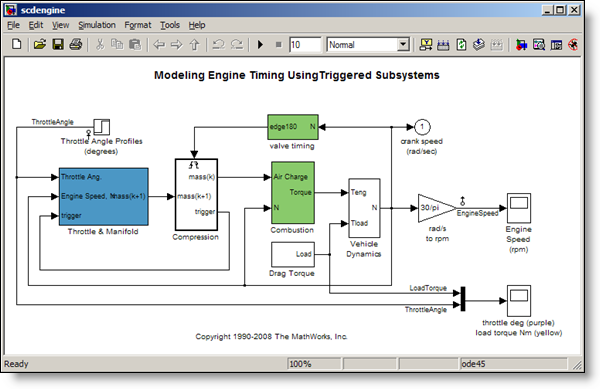
Let’s go through the process of frequency response estimation using a sample engine model, where the input is the throttle angle and the output is the engine speed.

>> scdengine
>> mdl =
'scdengine';


Engine model, throttle angle input, engine speed output.

The first step is to create a “good” input signal for frequency response estimation:

Creating input signals for frequency response estimation

By definition, frequency response estimation requires a sinusoidal input to excite your system. Simulink Control Design provides the frest.Sinestream command to create such a signal.

Let’s create a set of sinusoids with 30 frequencies, varying between 0.1 and 10 rad/s. These are the frequencies that we want to compute the model’s response for:
>> in = frest.Sinestream('Frequency',linspace(0.1,10,30))

    The sinestream input signal:

      Frequency           : [0.1 0.44138 0.78276 1.1241 ...] (rad/s)
      Amplitude           : 1e-005
      SamplesPerPeriod    : 40
      NumPeriods          : 4
      RampPeriods         : 0
      FreqUnits (rad/s,Hz): rad/s
      SettlingPeriods     : 1
      ApplyFilteringInFRESTIMATE (on/off)    : on
      SimulationOrder (Sequential/OneAtATime): Sequential


The resulting sinestream input signal has several adjustable parameters; including the frequencies, amplitude, the number of periods etc.

The SettlingPeriods parameter is especially important. This parameter specifies the period of your response where after the system is assumed to be at steady state. This parameter helps you ensure that the frequency response estimation focuses on the steady state portion of the response. The Sinestream signal is the best input signal for frequency response estimation, because with this signal you can isolate steady state portion of the response. However, you can also design and use other types of input signals. For example, you can create a frequency sweep (chirp) using the frest.Chirp command or create a random signal with the command frest.Random. You can also use a timeseries object to specify a custom input signal.

Estimating the frequency response

After you create an input signal for frequency response estimation, the next step is to run simulation using this input to obtain the output signals and use this data to estimate the frequency response. Simulink Control Design combines these steps in the frestimate command:

>> [sysest,simout] = frestimate(mdl,getlinio(mdl),in);


The syntax of frestimate is very similar to linearize. You must specify the model, the linearization input/output points and the input signal you designed. In our model, the linearization input and output points are already set at the throttle angle and the engine speed signals and you get them using getlinio.  frestimate automatically performs simulation(s) where designed input signal is inserted from the specified input point(s) and the specified output signal(s) are logged. It uses the obtained output signals to estimate the frequency response. It returns the estimated response as a frequency response data object,  sysest,  and the simulation outputs in simout.

The nice thing about the frestimate is that it injects the input signal and runs the simulation logging the outputs without requiring you to change your model. You specify input and output points to be anywhere in your model and frestimate takes care of the rest!

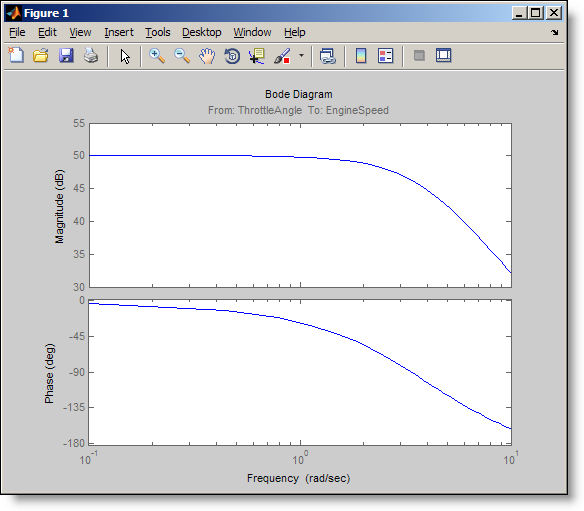
 Let’s look at the Bode plot of the estimated frequency response.

>> bode(sysest)


Bode plot of the estimated frequency response.

Confirming whether your frequency response estimation is good

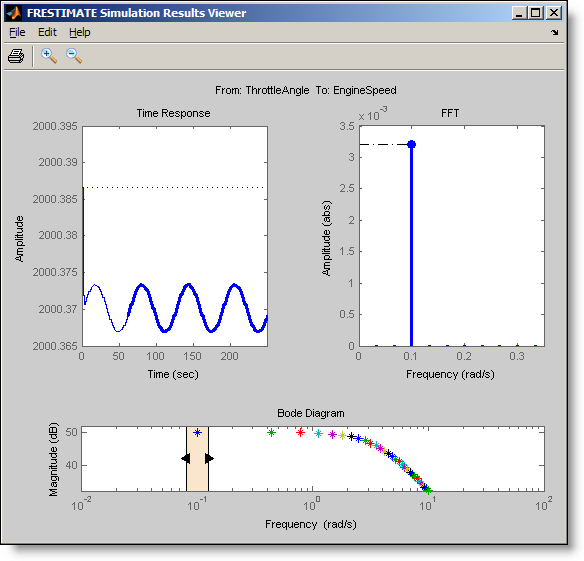
The frest.simView command lets you analyze your frequency response estimation results.
>> frest.simView(simout,in,sysest);


Plot of the computed FFT given a frequency input.

The frequency response is the plot at the bottom where the frequency points are color-coded. You can use the slider on the frequency response plot to interactively explore the time response and the FFT at each frequency of the input. In the time response plot, the steady state portion of the output signal is the thick line. The FFT plot shows the spectrum corresponding to this output signal. At the selected frequency of 0.1 rad/s, the time response includes transients during the first period but reaches steady state afterwards.

Sometimes, it takes a couple of tries to get good estimation results. For example, it is possible that you need an input with different amplitude, or you need to increase number of periods to drive the system to steady state. The time and FFT plots in simulations results viewer help you identify such issues which you can address by changing the parameters of your input signal.

You can learn more about frequency response estimation in our documentation and demos.

Now it is your turn

Do you estimate the frequency response of your Simulink models? Try estimating the frequency response of your Simulink model and share how it goes.

23 Responses to “How to Estimate the Frequency Response of a Simulink Model”

  1. onur akgün replied on :

    Hi;
    l am a student and electrical engineering department.l dont have a matlab student version.Please you are sending matlab student version me.
    Thank you
    Girne American University/CYPRUS
    Name and surname:Onur Akgün
    Id :050302018

  2. Gurudatha Pai replied on :

    Hello Seth,

    It was a short little useful blog. This is my master’s thesis topic and I was happy to see that people do use such simple techniques! This technique is called Empirical Transfer Function Estimate (etfe) in System Identification literature. FYI: I was able to obtain results for statistical moments for the estimate under multiple cycles of multisine (set of sinusoid) signal.

  3. Seth Popinchalk replied on :

    @onur akgün – You may have access to MATLAB through your university. Check with your professor or the adminstrator of the computer lab.

    @Gurudatha Pai – I am glad to know the post was useful.

  4. l. replied on :

    Hi Seth,
    I found this tutorial useful although it is similar to the another one at the main MathWorks website. I have a question if you dont mind answering, can you tell me what is the difference between getting frequency response plots from the “frestimate” command; then bode the result and directly from the “bode” command on the linearized model? The frestimate seems to be unusually slow and requires a lot of trials to get the correct samples. Thanks.

  5. Guy Rouleau replied on :

    @I, The FRESTIMATE function gives you the frequency response of your non-linear model, by exciting it one frequency at a time, not a linearized version.

    Depending on your needs, sometimes a linearized version of your model is appropriate, sometimes you need to real frequency response of your model.

    I recommend looking at the demo titled “Linearization Validation in Frequency Domain Using FRESTIMATE”, where the output of FRESTIMATE is used to validate the results of a linearization.

  6. Josh Wang replied on :

    Hi, Seth,

    I have a problem to use the frestimate to get the frequency response of my nonlinear simulink model. I keep getting the error message :”Error using ==> frestimate at 49
    Not enough input arguments.”

    I can;t figure out what’s wrong, any help will be much appreciated.

    Thanks, Josh

  7. Josh Wang replied on :

    By the way, my simulink model can successfully run through.The model itself is correct.

  8. Erman Korkut replied on :

    @Josh – From the error message it looks like you did not provide frestimate command the required input arguments. These required input arguments are model name, linearization I/Os and an input signal to use for estimation.

    For linearization I/Os, you can right click on Simulink signals and use Linearization Points menu to select them as input or output points (This requires Simulink Control Design product). Then you can get those markings using getlinio command as in the example above and pass it to frestimate command. Note that at least one input point and one output linearization point is required for frestimate.

    For input signal, you can create an input signal such as sinestream or chirp, with the frequency content you are interested in estimating the response for, using the frest.Sinestream or frest.Chirp commands. The example above shows how to create a sinestream signal, which is usually the most suitable one for reliable estimation.

  9. Josh Wang replied on :

    Hi, Seth, thanks for the details. I tried again, and it works. Thanks

    In addition, since you mentioned we can use frestimate to look at the frequency response of the real nonlinear model.
    Then compare with the linearized one. If I understand correct, the bode dirgram generated using “frest.simView(simout,in,sysest)” is the frequency response for the linearized model, and the bode (sysest) is for the real nonlinear model, am I right? Thank you.

  10. Erman Korkut replied on :

    Hi Josh,

    sysest is the simulation based estimation result. Since it is based on the simulation of your actual (nonlinear) Simulink model, it can be considered to be the response of your nonlinear model. Both simview and bode actually shows sysest (response of nonlinear model), the only difference is that simView plots them as color-coded stars so that you can navigate easier between these frequency points to check the corresponding simulation/spectrum data.

    If you are interested in obtaining a linear model from your Simulink model, I would encourage you to look at the command linearize. Its syntax is very similar to frestimate, but its technique is different; it analytically linearizes the model block by block and computes the linear model in between the linearization points you specify. Its result is a state space object and you can use any Control System Toolbox command such as step, impulse etc.

    http://www.mathworks.com/help/toolbox/slcontrol/ug/linearize.html

  11. Josh Wang replied on :

    Erman Korkut, Great. Thank you very much.

  12. Arkadiy Turevskiy replied on :

    If you are interested in learning more about different techniques of doing a linear analysis of Simulink models, take a look at this page:
    Linearization for Model Analysis and Control Design

  13. engin ertopcu replied on :

    Hi Erman,

    Great job!

    Congratulations…. :)

  14. John Walker replied on :

    In the command frestimate above (and included below), there are only three inputs but the syntax in the documentation requires four.

    >>[sysest,simout] = frestimate(mdl,getlinio(mdl),in);

    I received an error when using only three.

  15. Seth Popinchalk replied on :

    @John Walker – It works for me. What error are you getting and what version are you using? The documentation includes options for 3, 4, or 5 inputs.

  16. John Walker replied on :

    I wasn’t able to replicate whatever caused the error; the model ran, as you suggested, with only three parameters for the input.

  17. John Walker replied on :

    I did run a similar model and got:

    ??? Error using ==> frestimate at 85
    In “frestimate(modelname,op,io,in)”, a valid Simulink model modelname,
    linearization I/O array io and an input signal in are required to be specified.

    Error in ==> freq_sweep_of_venable_baseline at 7
    [sysest,simout] = frestimate(mdl,io,input);

    I’m not questioning any fault of Simulink here, I just wanted to post it for comment.

    The version of Matlab that I’m using is 7.10.0.499 (R2010a).

  18. John Walker replied on :

    Could you post the Bode plot for a model of a source with RL impedance?

  19. Erman Korkut replied on :

    @John Walker

    For frestimate command, the model name, linearization points (with at least one input and one output) and the input signal are required input arguments. The operating point is an optional input argument if you like to start the model from a certain operating point you have computed using findop command (such as a steady state operating point).

    I suspect what is happening in your case is some of your models have linearization points marked on them and some do not. For those that do not have linearization points marked on them, getlinio command returns empty. Thus, frestimate complains due to lack of linearization points input argument. To fix this error, you can do either of the two:
    1) Right click on the signals of interests in your model and in the Linearization Points menu, select input or output point as appropriate and save your model.
    2) Create linearization point array outside your model using linio command and pass the array you created to frestimate.

  20. John Walker replied on :

    Thanks, Erman. I appreciate your taking the time to respond to my questions.

  21. Dipan replied on :

    Hi Guys,
    the above discussion for really helpful for me to get started but have some further questions.
    I have a thermal heat transfer simscape model with 4 inputs and 6 outputs. also there is a thermoelectric peltier element which is a custom block that i have created and is non linear. now i wish to find the frequency response of this non linear model:
    1. Can i set my solver to start from steady state so that I am sure that the resulting outputs for the frequency response will be steady state output ?
    2. When i try to linearize the model, my custom block does not give any response results and I am unable to compare results of non linear and linear systems. Any ideas on how to solve this issue ?
    3. This question is a little out of context but any suggestions are helpful. How should I approach the problem of controlling this system ? Which control methods can be directly used in simulink and for which cases should I try and obtain a state space formulation before developing the controller ?
    I hope someone can give some vies and information. Thanks for the above posts anyways.

  22. Erman Korkut replied on :

    @Dipan
    I am glad that you found this post helpful for getting started. Please find below my answers to your questions that will hopefully give you a good direction for getting further information:
    1) It is a great idea to do that because FRESTIMATE command makes the most sense when it is performed around a steady state operating point. FINDOP command can help you find such a steady state operating point which you can obtain by either trimming your model or taking a simulation snapshot. You can simply pass the operating point object you obtained by FINDOP to FRESTIMATE command as an extra input argument and your simulations will start from that operating condition. For more information on this topic, check the doc section for Steady State Operating Points , particularly the examples for trimming from specifications and from simulations.
    2) What analytical linearization with LINEARIZE command does to the custom blocks (such as S-functions) is that it numerically perturbs them to find a linear equivalent. This sometimes works well but a better way is to manually control how your block linearizes, through the right-click menu of the block “Linear Analysis->Specify Linearization…”. From the dialog, you can specify what your custom block linearizes to. For more information on this topic, you can check Controlling block linearization.
    3) This question is perfectly in context. One of the cool features of Simulink Control Design is that it allows you to directly tune Simulink blocks that implement your controller inside Simulink, which does the necessary plant linearizations under the hood for you (check Design and Analysis of Control Systems for how to do this) . Particularly, the new PID Controller block has a tune button which automatically tunes your controller with a single click (see Automatic PID Tuning for details). In cases where you already have a linear model (ss, tf or zpk objects) or a frequency response data for your plant, you can always tune your controller using SISOTOOL from Control System Toolbox.

  23. Mac replied on :

    Hi Seth,

    Nice Blog!

    I have a problem….plz tell me how to obtain a frequency response function plot for following equation –

    mx”+cx’+kx^2=0

    Regards,
    Mahesh.

Leave a Reply

Wrap code fragments inside <pre> tags, like this:

<pre class="code">
a = magic(3);
sum(a)
</pre>

If you have a "<" character in your code, either follow it with a space or replace it with "&lt;" (including the semicolon).


MathWorks
Guy Rouleau and Seth Popinchalk are Application Engineers for MathWorks. They write here about Simulink and other MathWorks tools used in Model-Based Design.

These postings are the author's and don't necessarily represent the opinions of The MathWorks.