
How to Verify Code Generated with Model-Based Design
An important benefit of Model-Based Design is doing early verification of your model and using what you learn to verify your final production software. As your design moves to production a critical question is how do you verify the generated code? In this post I want to provide a high level answer to this question. This question is answered in detail with a clearly defined set of processes in the DO Qualification Kit (for DO-178) and the IEC Qualification Kit (for IEC 61508 and ISO 26262).
Start with a model that meets requirements
The entire code verification and validation process depends on your model meeting your requirements and exactly representing your design.
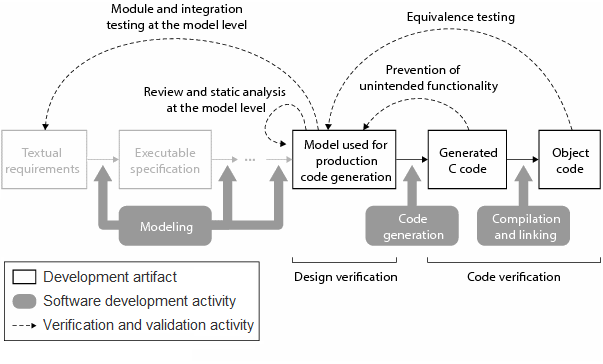
Verify that your design meets requirements during model development by running simulations. Functionality in the model should be traceable back to model requirements. You can use reviews, analysis of the model, and requirements based tests to prove that your original requirements are met by your design and the design does not contain unintended functionality. The test vectors from these simulations will be used for later verification of the generated code.
Test your code in an environment as close to the real thing as possible
Verification of the generated code can be done on the host computer through running the stand-alone application, using software in the loop (SIL) testing or processor in the loop (PIL) testing. Each of these modes of testing provides additional verification using an environment that is increasingly more similar to the final target environment.
Verify the generated code is equivalent to the model
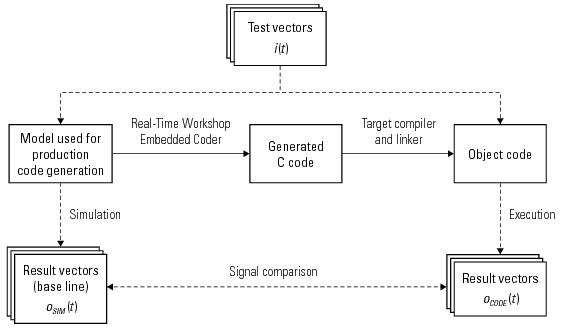
Test vectors used to verify that the model meets requirements provide a baseline for the behavior of the generated code. Once you exercise the generated code with the test vectors compare the generated code results to the baseline result. If you find any differences in testing results they should be investigated and understood. Some differences may be attributed to implementation changes (converting from an interpreted model to an executable implementation), or could be an indication of bugs. All differences should be understood in order to confirm the behavior of the system is bug free.
Verify there is no unintended functionality
After testing for equivalence, you might think you are done, however, if there are code paths you have not exercised, there may be bugs hidden in that portion of the code. To test for unintended functionality you need to perform a traceability review and/or measure code coverage.
Traceability Review
Measuring the traceability of the generated code requires that you confirm that all of the code generated for your final application traces back to a part of the original model that represents your design. Any non-traceable elements in the code need to be reviewed.
Code Coverage
Measuring code coverage can give you an idea of how comprehensive your test cases are. Of course it would be great to have 100% code coverage just from running the baseline equivalence tests, but when you don’t have full coverage you need to add additional test vectors to increase coverage. Review any portions of the code that are not fully tested.
Tools to help with verification and validation
- Simulink Verification and Validation – enables requirements tracing and custom modeling standards checking through model advisor.
- Simulink Design Verifier – automatically generate test vectors to achieve model coverage, implement tests to prove that the model meets requirements.
- Polyspace – use formal methods to prove your code is bug free.
- PIL (processor in the loop) and SIL (software in the loop) mode testing with Real-Time Workshop Embedded Coder
- Use the Code Generation Verification API in Real-Time Workshop Embedded Coder to verify numerical equivalence.
Now it’s your turn
What do you do? Leave a comment here and tell us how you verify your generated code.
Note: The process described here does not ensure the safety of the software or the system under consideration.



Comments
To leave a comment, please click here to sign in to your MathWorks Account or create a new one.